
1. Увод
Хвала вам на куповиниasing the UHAPPY U18 Portable Mini HD LED Projector. This manual provides essential information for the safe and efficient operation of your device. Please read it thoroughly before use and retain it for future reference.
Мере предострожности
- Не гледајте директно у сочиво пројектора када је укљученоamp је укључен.
- Осигурајте одговарајућу вентилацију око пројектора како бисте спречили прегревање.
- Не излажите пројектор киши или влази.
- Користите само адаптер за напајање који се испоручује са пројектором.
- Не покушавајте сами да отворите или поправите пројектор. Сва сервисирања препустите квалификованом особљу.
2. Производ је готовview
Familiarize yourself with the components and ports of your UHAPPY U18 projector.
Садржај пакета
The following items are included in your projector package:

Image: Contents of the UHAPPY U18 projector package, including the projector, power adapter, AV cable, remote control, and user manual.
- UHAPPY U18 Mini LED Projector
- Повер Адаптер
- АВ кабл
- Ремоте Цонтрол
- Кориснички приручник (овај документ)
Projector Components and Ports

Image: Angled top-down view of the UHAPPY U18 projector, highlighting the lens, focus adjustment, and control panel.

Слика: Врх view of the UHAPPY U18 projector, showing the integrated control buttons.

Слика: Фронт view of the UHAPPY U18 projector, focusing on the projection lens.
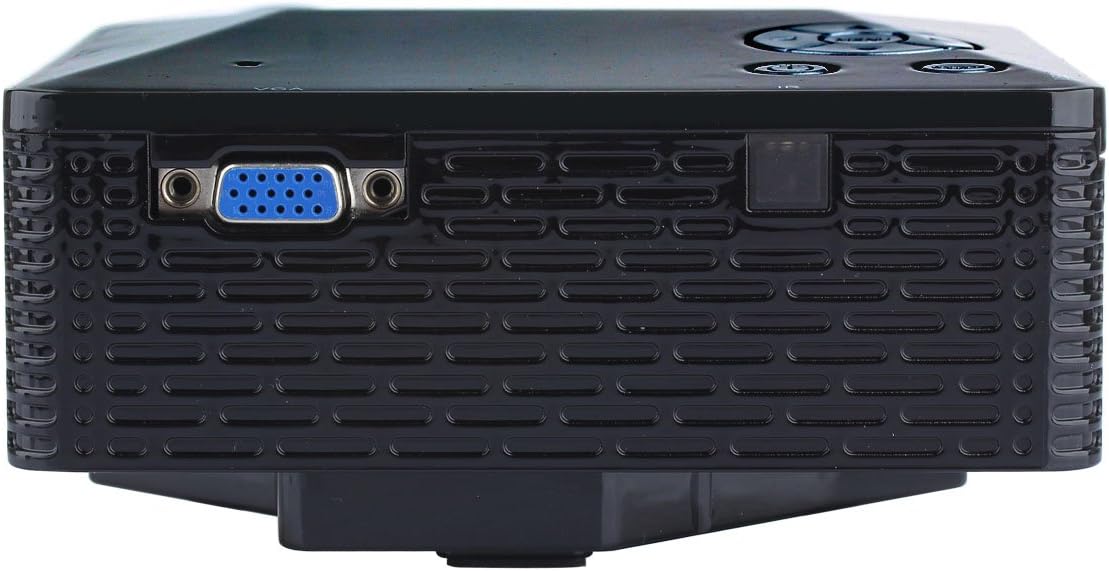
Слика: Са стране view of the UHAPPY U18 projector, illustrating the VGA input port.
The projector features various input ports for connectivity:
- ХДМИ улаз: For connecting devices like laptops, gaming consoles, or media players.
- УСБ порт: For connecting USB storage devices to play media directly.
- Слот за СД картицу: For inserting SD memory cards to play media directly.
- АВ улаз: За повезивање старијих уређаја помоћу приложеног AV кабла.
- ВГА улаз: For connecting computers or laptops with a VGA output.
- ДЦ-ИН: Улазни порт за напајање.
- Излаз за слушалице: За повезивање екстерних аудио уређаја или слушалица.
- Дугме за фокус: Located near the lens for adjusting image clarity.
3. Подешавање
3.1 Постављање
Place the projector on a stable, flat surface. Ensure there is adequate space around the projector for ventilation. The ideal projection distance is between 1 to 4 meters, yielding an image size of 20 to 80 inches.
3.2 Прикључак за напајање
- Connect the power adapter to the DC-IN port on the projector.
- Укључите адаптер за напајање у одговарајућу електричну утичницу.
3.3 Connecting Input Devices
Choose the appropriate cable and port based on your source device:
- ДВИ: Connect an HDMI cable from your device (e.g., laptop, DVD player) to the projector's HDMI port.
- ВГА: Connect a VGA cable from your computer to the projector's VGA port.
- АВ: Use the provided AV cable to connect devices with AV output (e.g., older DVD players, set-top boxes) to the projector's AV port.
- УСБ/СД картица: Уметните USB диск у USB порт или SD картицу у слот за SD картицу.
4. Упутство за употребу
4.1 Укључивање/искључивање
- За укључивање: Press the power button on the projector or the remote control. The LED indicator will light up.
- За искључивање: Press the power button again. It is recommended to allow the projector to cool down for a few minutes before unplugging it.
4.2 Избор извора
After powering on, you may need to select the input source:
- Press the 'Source' button on the projector or the remote control.
- Use the navigation buttons to select the desired input (HDMI, VGA, AV, USB, SD) and press 'OK' or 'Enter'.
4.3 Подешавање фокуса
If the projected image appears blurry:
- Rotate the focus knob located near the projector lens until the image becomes clear and sharp.
4.4 Навигација кроз мени
Use the 'Menu' button on the projector or remote to access settings. Use the navigation arrows to move through options and 'OK' or 'Enter' to confirm selections. The projector supports multiple languages including English, Czech, Slovak, Danish, German, Spanish, French, Croatian, Italian, Hungarian, Dutch, Norwegian, Polish, Portuguese, Romanian, Slovene, Serbian, Finnish, Swedish, Bulgarian, Greek, Russian, and Chinese.
4.5 Подржани формати медија
When playing media directly from USB or SD card, the projector supports the following formats:
- слика: BMP, JPEG, PNG
- видео: MPEG1, MPEG2, MPEG4, RM, RMVB, AVI, FLV, WMV
5. Одржавање
5.1 Чишћење сочива
Use a soft, lint-free cloth specifically designed for optical lenses to gently wipe the projector lens. Avoid using abrasive materials or harsh chemicals.
5.2 Генерално чишћење
Wipe the projector's exterior with a soft, dry cloth. Do not use liquid cleaners directly on the device. Ensure ventilation openings are free from dust and obstructions.
5.3 Складиштење
When not in use, store the projector in a cool, dry place, away from direct sunlight and extreme temperatures. It is advisable to cover the lens to protect it from dust.
КСНУМКС. Решавање проблема
Ако наиђете на проблеме са пројектором, погледајте следеће уобичајене проблеме и решења:
| Проблем | Могући узрок | Решење |
|---|---|---|
| Нема слике на екрану | Изабран је нетачан извор улаза Слаба веза кабла Изворни уређај није укључен | Изаберите одговарајући извор улаза. Проверите све кабловске везе. Уверите се да је изворни уређај укључен и да емитује сигнал. |
| Слика је мутна | Фокус није подешен | Rotate the focus knob until the image is clear. |
| Нема звука | Јачина звука је прениска External audio device not connected Подешавања звука изворног уређаја | Повећајте јачину звука пројектора. Connect external speakers/headphones to the audio output. Проверите подешавања звука на изворном уређају. |
| Пројектор се прегрева и гаси | Блокирана вентилација Дуготрајна употреба у топлом окружењу | Уверите се да су отвори за вентилацију чисти. Allow the projector to cool down. Operate in a well-ventilated area. |
7. Спецификације
Technical specifications for the UHAPPY U18 Portable Mini HD LED Projector:
- Имаге Систем: ЛЦД
- Изворна резолуција: 320к240
- Lamp: ЛЕД
- Живот ЛЕД: 20,000 сата
- Осветљеност: 60 ЛМ
- Контраст: 300:1
- Објектив: Ф=125
- Величина слике: 20-80 инча
- Удаљеност пројекције: 1-4 метара
- Режим пројекције: Предња пројекција
- Режим рада: Ручно/даљинско управљање
- Улазни прикључци: AV, VGA, USB, SD, HDMI
- Излаз: Слушалице
- Снага: 24В
- Боја: 16.77 милиона боја
- говорник: 1.0В*2
- Радна температура: 10-35°Ц
- Димензије: 135 к 132 к 52 мм
- Тежина: 0.44 кг
8. Гаранција и подршка
This product is manufactured by Generic. For warranty information and technical support, please refer to the documentation provided at the time of purchase or contact your retailer. Keep your purchase receipt as proof of purchase.