
1. Важна безбедносна упутства
Please read all instructions carefully before using the UNIC UC28+ projector. Keep this manual for future reference.
- Напајање: Користите само назначени адаптер за напајање. Уверите се да је утичницаtagе одговара захтевима пројектора.
- вентилација: Не блокирајте вентилационе отворе. Обезбедите довољно простора око пројектора за правилан проток ваздуха како бисте спречили прегревање.
- топлота: Пројектор лamp generates heat. Avoid touching the lens or ventilation areas immediately after use.
- Влага: Do not expose the projector to rain, moisture, or immerse it in water. Keep liquids away from the device.
- Чишћење: Искључите пројектор из струје пре чишћења. Користите меку, суву крпу. Не користите течна или аеросолна средства за чишћење.
- Безбедност ока: Не гледајте директно у сочиво пројектора када је укљученоamp је укључено. Јако светло може изазвати оштећење ока.
- Пласман: Place the projector on a stable, flat surface. Avoid placing it in direct sunlight or near heat sources.
- Сервисирање: Не покушавајте сами да сервисирате овај производ. Све сервисирање препустите квалификованом сервисном особљу.
2. Производ је готовview
The UNIC UC28+ is a portable LED projector designed for home cinema and entertainment. It supports a native resolution of 1920x1080 and offers multiple input options for versatile connectivity.
2.1 Компоненте пројектора

Слика 1: Врх view of the UNIC UC28+ projector. This image displays the manual control buttons located on the top panel, including 'ENTER', navigation arrows, 'INPUT' for source selection, and 'ESC' for exiting menus. The focus ring is also visible at the front.

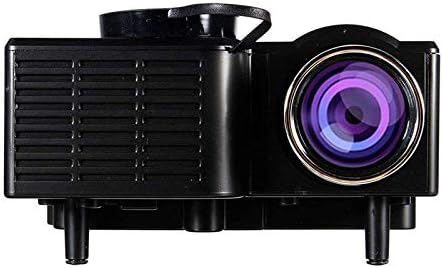
Слика 2: Предња и бочна view of the UNIC UC28+ projector. This image highlights the main projection lens and the ventilation grilles on the side, essential for heat dissipation during operation.
Слика 3: Сиде view of the UNIC UC28+ projector. This image clearly shows the various input ports available: HDMI, USB, AV, SD card slot, and VGA, providing multiple options for connecting external devices.
3. Подешавање
3.1 Садржај пакета
- UNIC UC28+ LED Projector
- Повер Адаптер
- Ремоте Цонтрол
- АВ кабл
- Упутство за употребу
3.2 Постављање пројектора
Position the projector on a stable, flat surface. Ensure the projection surface (screen or wall) is clean and smooth. The optimal projection distance will vary based on desired screen size. Adjust the projector's angle to achieve a rectangular image.
3.3 Прикључак за напајање
- Прикључите адаптер за напајање на улазни порт за напајање пројектора.
- Укључите адаптер за напајање у одговарајућу електричну утичницу.
- Индикаторска лампица напајања на пројектору ће се упалити.
3.4 Connecting Input Devices
The UC28+ supports various input sources:
- ДВИ: Connect a device (e.g., laptop, Blu-ray player, gaming console) using an HDMI cable to the HDMI port.
- УСБ: Уметните УСБ флеш диск у УСБ порт да бисте репродуковали медије fileс директно.
- АВ: Use the provided AV cable to connect older devices (e.g., DVD player, VCR) to the AV port.
- СД картица: Insert an SD card into the SD card slot to play media files.
- ВГА: Connect a computer or laptop using a VGA cable to the VGA port.

Слика 4: Connectivity diagram for the UNIC UC28+ projector. This illustration demonstrates how various external devices such as computers, gaming consoles, smartphones, and media players can be connected to the projector using its multiple input options.
3.5 Подешавање фокуса
After powering on and selecting an input source, rotate the focus ring located around the lens until the projected image appears clear and sharp.
4. Упутство за употребу
4.1 Укључивање/искључивање
- Укључено: Press the power button on the projector or the remote control. The projector will start up, and the lamp ће осветлити.
- Искључивање: Press the power button again. The projector will initiate a shutdown sequence. Allow the projector to cool down completely before unplugging or moving it.
4.2 Избор улазног извора
Press the 'INPUT' button on the projector or remote control to cycle through available input sources (HDMI, USB, AV, SD, VGA). Select the source corresponding to your connected device.
4.3 Навигација кроз мени
Use the navigation arrows on the projector or remote control to move through menu options. Press 'ENTER' to confirm a selection and 'ESC' to go back or exit the menu.
4.4 Основна подешавања
- Режим слике: Подесите осветљеност, контраст, боју и оштрину.
- Размера: Select between 16:9, 4:3, or Auto to match your content.
- звук: Adjust volume or mute the audio output.
5. Одржавање
Редовно одржавање обезбеђује оптималне перформансе и продужава век трајања вашег пројектора.
- Чишћење сочива: Use a soft, lint-free cloth or lens cleaning paper to gently wipe the lens. Avoid abrasive materials or excessive pressure.
- Projector Body Cleaning: Wipe the exterior of the projector with a soft, dry cloth. Do not use harsh chemicals or solvents.
- вентилација: Periodically check and clean the ventilation grilles to prevent dust buildup, which can impede airflow and cause overheating. Use a soft brush or compressed air.
- Складиштење: When not in use for extended periods, store the projector in a cool, dry, dust-free environment. Use the original packaging or a protective case.
КСНУМКС. Решавање проблема
Ако наиђете на проблеме са пројектором, погледајте следеће уобичајене проблеме и решења:
| Проблем | Могући узрок | Решење |
|---|---|---|
| Но Повер | Кабл за напајање је искључен, проблем са утичницом | Check power cable connection. Try a different power outlet. |
| Нема слике | Incorrect input source, cable not connected, device not powered on | Select correct input source. Ensure all cables are securely connected. Power on the source device. |
| Мутна слика | Focus not adjusted, incorrect projection distance | Adjust the focus ring. Reposition the projector for optimal distance. |
| Нема звука | Volume too low, audio cable disconnected, source device muted | Increase projector volume. Check audio cable connections. Unmute source device. |
| Упозорење о прегревању | Blocked ventilation, prolonged use | Ensure ventilation openings are clear. Allow the projector to cool down. |
7. Спецификације
| Феатуре | Детаљ |
|---|---|
| Бранд | УНИЦ |
| Број модела | UC28+ |
| Дисплаи Типе | ЛЕД |
| Нативе Ресолутион | 1920 к 1080 пиксела |
| Максимална резолуција екрана | 1920 к 1080 пиксела |
| Осветљеност | 400 лумена |
| Технологија повезивања | HDMI, USB, AV, SD, VGA |
| Форм Фацтор | Портабле |
| Тип монтаже | Таблетоп Моунт |
| Потрошња енергије | 70 Ваттс |
8. Гаранција и подршка
For warranty information or technical support, please refer to the warranty card included with your product or contact the retailer where the product was purchased. Keep your proof of purchase for warranty claims.