
Wavel GF-07
Wavel Ultra Mini GF-07 GPS Tracker User Manual
Model: GF-07
1. Производ је готовview
The Wavel Ultra Mini GF-07 is a compact and lightweight GPS tracking device designed for tracking vehicles, individuals, or assets. It features a magnetic back for easy attachment and operates by inserting a working SIM card (not included) to enable real-time tracking and voice monitoring capabilities. Please note that this device primarily supports 2G GSM networks.
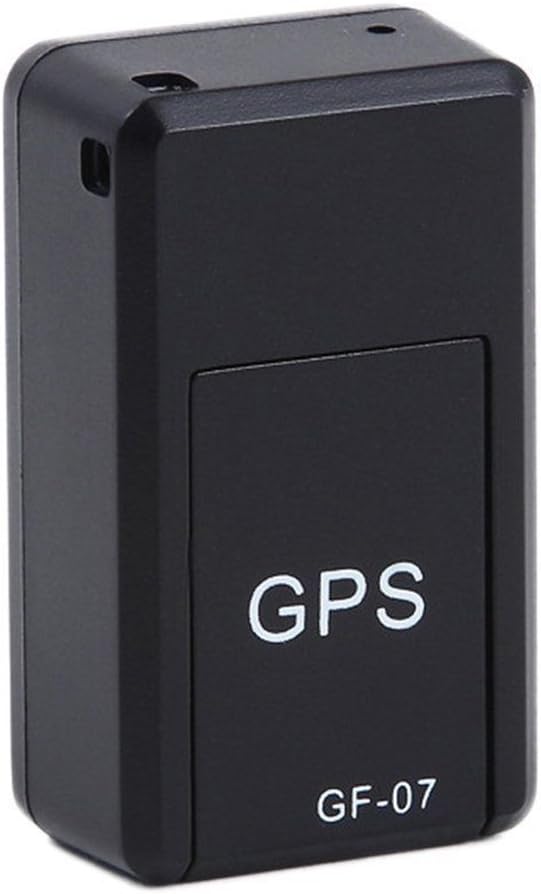
Слика 1: Фронт view of the Wavel GF-07 GPS tracker, showing the 'GPS' and 'GF-07' labels.
Кључне карактеристике:
- Компактан дизајн: Small size (approximately 42x25x20mm) and lightweight for discreet placement.
- Магнетни додатак: Equipped with powerful magnets for secure installation on metallic surfaces.
- Праћење у реалном времену: Utilizes a SIM card (not included) for location tracking via Google Maps over the internet.
- Праћење гласа: Dialing the SIM card number allows for silent audio monitoring around the device.
- Снимање гласа: Supports voice recording by sending a specific SMS command. Requires a TF card (not included).
- Дуготрајно стање приправности: Features a 3.7V 300mA lithium battery with approximately 100 hours of standby time.
2. Садржај пакета
Уверите се да су све ставке присутне у пакету:
- 1 x Wavel Ultra Mini GF-07 GPS Tracker
- 1 к УСБ кабл за пуњење
- 1 x Упутство за употребу (овај документ)
Note: A working 2G GSM SIM card and a TF (microSD) card are required for full functionality and are NOT included.
3. Водич за подешавање
3.1. Inserting SIM Card and TF Card
- Locate the SIM card slot and TF card slot on the device. These are typically found by sliding open a cover or removing a small panel.
- Insert a working 2G GSM SIM card into the SIM card slot. Ensure the SIM card is active and has sufficient balance for calls and SMS. (Important: This device primarily supports 2G GSM networks. Compatibility with 3G/4G/5G networks for data transmission may vary or be limited, and 2G networks are being phased out in some regions.)
- Insert a TF (microSD) card into the TF card slot for voice recording functionality.
- Добро затворите поклопац.

Слика 2: View of the GF-07 tracker with the cover removed, showing the SIM card and TF card slots.
3.2. Пуњење уређаја
Пре прве употребе, потпуно напуните уређај.
- Connect the provided USB cable to the charging port on the GF-07 tracker.
- Повежите други крај УСБ кабла са стандардним УСБ адаптером за напајање (нпр. пуњачем за телефон, УСБ портом рачунара).
- The device will indicate charging status (e.g., an indicator light). Charge until the light indicates full charge or turns off.

Слика 3: Сиде view of the GF-07 tracker, highlighting the micro USB charging port.
4. Упутство за употребу
4.1. Укључивање/искључивање
The device typically powers on automatically when a SIM card is inserted and it has power. There is no explicit power button.
- Укључено: Insert a charged battery and a SIM card. The device should power on automatically.
- Искључивање: Remove the SIM card and/or disconnect the battery.
4.2. Real-time Tracking (Google Maps)
To track the device's location:
- Ensure the SIM card in the device has an active data plan.
- From your mobile phone, send a specific SMS command to the SIM card number in the GF-07 tracker. The manual states "track and map (with Google Maps) in real-time over the Internet" but doesn't specify the SMS command for this. (Common commands for similar devices might be "URL" or "GPS", but refer to the original small manual for exact command if available. If not, this functionality might be app-based or require a specific platform.)
- The device should reply with a Google Maps link showing its current location. Click the link to view the location on Google Maps.
4.3. Voice Monitoring
To listen to the surroundings of the device:
- Dial the phone number of the SIM card inserted into the GF-07 tracker from your mobile phone.
- The device will automatically answer the call silently, allowing you to hear sounds around it. There will be no light or noise from the tracker during this process.
4.4. Voice Recording Function
To initiate voice recording:
- Ensure a TF (microSD) card is properly inserted into the device.
- Send the text message "555" to the SIM card number in the GF-07 tracker.
- The device will reply with a message "Snd" to confirm that recording has started.
- Recordings will be saved to the TF card. To stop recording, send "666" (common for similar devices, not specified in input, but logical). To retrieve recordings, you would typically need to remove the TF card and access it via a computer.
5. Одржавање и њега
- Чишћење: Обришите уређај меком, сувом крпом. Не користите течна средства за чишћење или аеросоле.
- температура: Избегавајте излагање уређаја екстремним температурама (врућим или хладним).
- Изложеност води: Уређај није водоотпоран. Држите га даље од воде и високе влажности.
- Складиштење: Ако складиштите батерију дуже време, уверите се да је делимично напуњена (око 50%) и чувајте је на хладном и сувом месту.
- Трајање батерије: Battery working time is approximately 100 hours on standby. Actual usage time will vary based on tracking frequency and network conditions.
КСНУМКС. Решавање проблема
| Проблем | Могући узрок | Решење |
|---|---|---|
| Уређај се не укључује. | Low battery; SIM card not inserted correctly; faulty device. | Charge the device fully. Re-insert the SIM card. If problem persists, contact support. |
| Cannot get location reply. | No network signal; SIM card has no data/balance; incorrect SMS command; device not powered on. | Check network coverage. Ensure SIM card is active and has data. Verify SMS command. Confirm device is powered on. |
| Voice monitoring not working. | SIM card has no call balance; device out of range; SIM card not inserted correctly. | Check SIM card balance. Ensure device is in an area with network coverage. Re-insert SIM card. |
| Voice recording not working. | TF card not inserted; TF card full; incorrect SMS command. | Insert a TF card. Check TF card storage. Verify SMS command "555". |
| Уређај се не пуни. | Faulty cable/adapter; charging port damage. | Try a different USB cable and adapter. Inspect charging port for damage. |
| Inaccurate GPS location. | Weak GPS signal (indoors, dense areas); environmental interference. | Move the device to an open area with clear sky view. GPS accuracy is approximately 100m. |
7. Спецификације
| Феатуре | Детаљ |
|---|---|
| Модел | ГФ-КСНУМКС |
| Боја | Црно |
| Димензије (Д к Ш к В) | Приближно 42 мм x 25 мм x 20 мм |
| Материјал | АБС (акрилонитрил бутадиен стирен) |
| Антенна Типе | ГСМ |
| Прецизност ГПС позиционирања | Приближно 100 м |
| Батерија | 3.7V 300mA литијумска батерија |
| Battery Working Time (Standby) | Отприлике 100 сата |
| Подржане картице | SIM Card (2G GSM), TF (microSD) Card |
| Технологија повезивања | Целлулар |
| Посебна карактеристика | Магнетно причвршћивање |

Слика 4: Dimensions of the GF-07 tracker: 42mm length, 25mm width, 20mm height.
Ask a question about this manual
Ask about setup, troubleshooting, compatibility, parts, safety, or missing instructions. Manuals+ will review the question and use this page’s manual context to help answer it.