
Увод
The Combrite GM205 Wired USB Gaming Mouse is designed to enhance your computing and gaming experience with its advanced features and ergonomic design. This manual provides comprehensive instructions for setting up, operating, customizing, and maintaining your mouse to ensure optimal performance and longevity.
Key features include 7 programmable buttons, adjustable DPI settings up to 4800, vibrant RGB LED lighting, and a comfortable optical sensor for precise tracking. The included Combrite C-Mouse software allows for extensive customization to suit individual user preferences, whether for gaming or general office tasks.
Карактеристике производа
- 7 програмабилних дугмади: Customize each button for specific functions using the Combrite C-Mouse software.
- Подесиви ДПИ: Optical sensor with adjustable DPI from 200 to 4800, ideal for various applications including FPS and MOBA games. Default DPI settings are 800-1200-1600-2400.
- Chroma RGB Backlight: Features rainbow LED lighting with 7 different color modes, offering up to 16.8 million customizable colors for a personalized aesthetic.
- Ергономски дизајн: Comfortable rubberized coating and scroll wheel, designed for extended use without discomfort.
- Високопрецизни оптички сензор: Ensures accurate and responsive tracking for superior performance.
- Plug and Play USB Connectivity: Easy setup with a 1.5-meter braided USB cable.
- Уграђена меморија: Onboard memory to save custom profiles.
- Durable Switches: Switches rated for 20,000,000 clicks lifespan.
- PTFE Mouse Feet: For smooth gliding on various surfaces.
Упутства за подешавање
- Повежите миш: Plug the USB connector of the Combrite GM205 mouse into an available USB port on your computer. The mouse is plug-and-play compatible and should be recognized automatically by your operating system (Windows 7/8.1/10, Mac OS, Linux).
- Инсталирајте софтвер (опционо, али препоручено): For full customization of buttons, DPI, and RGB lighting, download the Combrite C-Mouse software from the official Combrite webсајт. Пратите упутства на екрану да бисте завршили инсталацију.
- Почетни тест: Once connected, move the mouse and click the left and right buttons to ensure basic functionality.

Image: The Combrite GM205 mouse, ready for connection to a computer via its braided USB cable.
Упутство за употребу
Основна операција
- Леви клик: Примарна акција.
- Десни клик: Secondary action, typically opens context menus.
- Точак за померање: Scroll up/down for navigation. Pressing the scroll wheel acts as a middle click.
ДПИ Адјустмент
The mouse features a dedicated DPI button (typically located behind the scroll wheel) to cycle through preset DPI levels. By default, these are 800, 1200, 1600, and 2400 DPI. The LED lighting may change color to indicate the current DPI setting.
РГБ режими осветљења
The mouse features dynamic RGB lighting. The lighting modes can be adjusted through the Combrite C-Mouse software. Options include rainbow breathing style and various single-color options.

Image: Multiple Combrite GM205 mice showcasing different RGB LED color options, including a rainbow breathing effect.
Customization with Combrite C-Mouse Software
The Combrite C-Mouse software unlocks the full potential of your GM205 mouse, allowing you to personalize its functions to your exact needs.
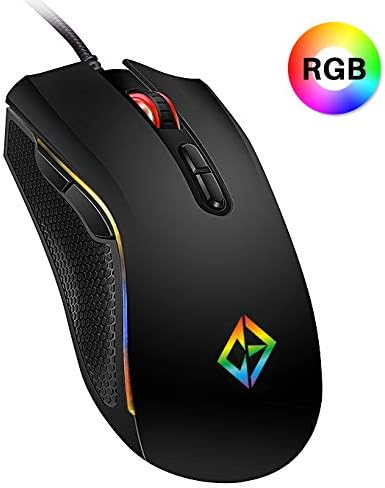
Image: A screenshot of the Combrite C-Mouse Software interface, showing options for programming 7 buttons and adjusting DPI settings.
Програмирање дугмади
- Open the Combrite C-Mouse software.
- Select the button you wish to program from the graphical interface.
- Choose from a variety of functions, including single key presses, macro commands, multimedia controls, or launching applications.
- Save your changes to the mouse's onboard memory.
ДПИ подешавања
- Within the software, you can precisely set custom DPI levels ranging from 200 to 4800.
- Configure multiple DPI stages and assign them to the DPI cycle button for quick switching during use.
Прилагођавање РГБ осветљења
- Access the lighting settings in the software to choose from various effects, colors, and brightness levels.
- Personalize the mouse's appearance to match your setup or mood.
Одржавање
- Чишћење: Користите меку, суву крпу да обришете површину миша. За тврдокорну прљавштину, благо обришитеampИсперите крпу водом. Избегавајте употребу јаких хемикалија или абразивних материјала.
- Чишћење сензора: Occasionally, use a cotton swab lightly dampened with rubbing alcohol to gently clean the optical sensor on the underside of the mouse. Ensure no liquid enters the mouse.
- Нега каблова: Избегавајте оштре савијање или прекомерно повлачење плетеног USB кабла како бисте спречили оштећења.
Решавање проблема
- Миш не реагује:
- Уверите се да је USB кабл безбедно прикључен у исправан USB порт.
- Покушајте да прикључите миш на други УСБ порт или други рачунар да бисте искључили проблеме са портом или системом.
- Поново покрените рачунар.
- Нетачно праћење:
- Очистите оптички сензор на доњој страни миша.
- Уверите се да користите миш на одговарајућој површини (нпр. подлози за миш). Површине са високом рефлектујућом или неравном површином могу утицати на праћење.
- Adjust the DPI settings using the DPI button or the C-Mouse software.
- Buttons Not Working/Programmable Functions Not Activating:
- Verify that the Combrite C-Mouse software is installed and that your custom profileс су учитани.
- Ensure the software is running in the background if required for specific functions.
- Check for any software updates for the C-Mouse application.
- RGB осветљење не ради/нетачно:
- Check the lighting settings within the Combrite C-Mouse software.
- Ensure the mouse is receiving sufficient power from the USB port.
Спецификације
| Бранд | Цомбрите |
| Број модела | ГМ205 |
| Технологија повезивања | УСБ Виред |
| Технологија детекције покрета | Оптицал |
| DPI опсег | 200 - 4800 DPI (подесиво) |
| Број дугмади | 7 (Програмабилно) |
| Осветљење | Chroma RGB LED (Rainbow, 7 modes, 16.8 million colors) |
| Цабле Ленгтх | 1.5 метара (плетено) |
| Пребаците животни век | 20,000,000 клика |
| Димензије производа | 12.7 к 7.01 к 0.1 цм |
| Тежина | 202 грама |
| Компатибилни оперативни системи | Windows 10, Windows 7, Windows 8.1, Mac OS, Linux |
| Препоручена употреба | Гаминг |
Гаранција и подршка
For information regarding warranty coverage and technical support for your Combrite GM205 Gaming Mouse, please refer to the warranty card included with your product or visit the official Combrite webсите. Тхе website typically provides the most up-to-date information on product support, driver downloads, and contact details for customer service.
Ensure you have your product model number (GM205) and proof of purchase available when contacting support.