
Amazon Echo Show 8 (1st Gen, 2019 release)
Echo Show 8 (1st Gen) User Manual
Your comprehensive guide to setting up, operating, and maintaining your Amazon Echo Show 8.
Увод
The Amazon Echo Show 8 (1st Gen, 2019 release) is a smart display designed to enhance your daily life with Alexa. Featuring an 8-inch HD screen and stereo sound, it allows you to manage your day, connect with loved ones through video calls, enjoy entertainment, control smart home devices, and personalize your experience. This manual provides detailed instructions to help you get the most out of your device.
Шта је у кутији
Upon unboxing your Echo Show 8, ensure all components are present:
- Echo Show 8 device
- Power adapter (30W) with cable (4.9 ft.)
- Водич за брзи почетак
Сетуп
Setting up your Echo Show 8 is a straightforward process, often simplified by Amazon Wi-Fi simple setup technology.
- Укључено: Прикључите адаптер за напајање на ваш Echo Show 8 и укључите га у зидну утичницу. Уређај ће се аутоматски укључити.
- Избор језика: Пратите упутства на екрану да бисте изабрали жељени језик.
- Ви-Фи веза: Select your Wi-Fi network from the list and enter the password. The Echo Show 8 supports dual-band Wi-Fi (802.11a/b/g/n/ac).
- Amazon Account Login: Log in with your Amazon account credentials. If you don't have one, you will be prompted to create one.
- Регистрација уређаја: Your device will register to your Amazon account.
- Time Zone and Location: Confirm your time zone and location settings.
- Водич: The device may offer a brief tutorial on how to navigate and use its features.
The Alexa app is compatible with Fire OS, Android, and iOS devices and is also accessible via your web browser for further management and customization.
Управљање вашим Echo Show 8
The Echo Show 8 can be operated using voice commands with Alexa or through its touch screen interface.
Гласовне команде (Алекса)
Једноставно реците „Alexa“ након ваше команде. Нпр.ampлес укључује:
- „Алекса, какво је време?“
- „Алекса, свирај музику.“
- "Alexa, call [contact name]."
- "Alexa, show me my photos."
- "Alexa, turn off the lights."

Image: Echo Show 8 displaying current weather conditions, demonstrating its ability to provide glanceable information.
Навигација по екрану на додир
Swipe down from the top of the screen to access quick settings and the home menu. Swipe left from the right edge to view cards with suggestions and information. Tap on icons and options to interact with the device.
Карактеристике
The Echo Show 8 offers a wide range of features to simplify and enrich your daily routines:
- Video Calling & Messaging: Connect with friends and family who have the Alexa app or an Echo device with a screen. Make announcements to other devices in your home.

Image: A user making a video call on the Echo Show 8, highlighting its communication capabilities.
- Забава: Ask Alexa to show you movie trailers, TV shows, movies, or the news. Listen to radio stations, podcasts, and audiobooks.
- Контрола паметне куће: Voice control compatible devices or manage them on the easy-to-use display. Ask Alexa to show you security cameras, control lights, and adjust thermostats.

Image: The Echo Show 8 displaying a live feed from a nursery camera, illustrating its smart home monitoring feature.
- Персонализација: Show off your albums from Amazon Photos. Customize your home screen. Create morning routines to start your day.
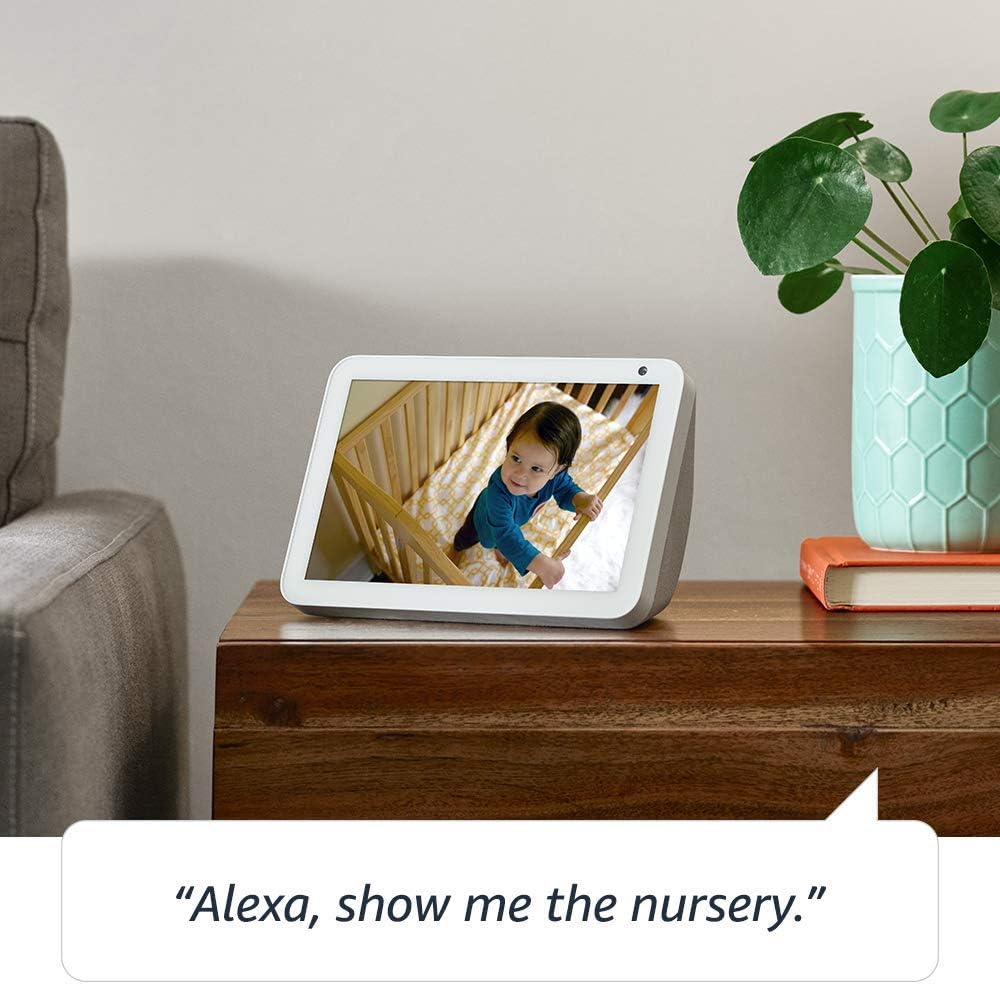
Image: The Echo Show 8 displaying a scenic photo from a user's Amazon Photos album, demonstrating its personalization options.
- Daily Assistance: Cook along to step-by-step recipes. Easily update to-do lists and calendars. Glance at weather and traffic on your way out.
Функције приватности
The Echo Show 8 is designed with privacy in mind, offering several controls:
- Дугме за искључивање микрофона/камере: Electronically disconnect the microphones and camera with one press of a button.
- Уграђени затварач камере: Slide the built-in shutter to physically cover the camera lens.

Image: A finger activating the physical camera shutter on the Echo Show 8, demonstrating a privacy control feature.
- Технологија речи за будност: Alexa devices are designed to detect only your chosen wake word (e.g., "Alexa").
- Индикатори стримовања: Visual indicators show when Alexa is streaming your request to the cloud.
- Управљање снимањем гласа: Способност да view and delete your voice recordings through the Alexa app or Alexa Privacy Hub.
For more information, visit the Alexa Privacy Hub.
Одржавање
Да бисте осигурали дуговечност и оптималне перформансе вашег Echo Show 8, пратите ова упутства за одржавање:
- Чишћење: Use a soft, lint-free cloth to clean the screen and exterior. Avoid abrasive cleaners or sprays directly on the device.
- Пласман: Поставите уређај на стабилну, равну површину, даље од директне сунчеве светлости, извора топлоте и влаге. Обезбедите одговарајућу вентилацију.
- Ажурирања софтвера: The device automatically receives software updates. Ensure it is connected to Wi-Fi to receive these updates, which improve performance and add new features.
Решавање проблема
Ако наиђете на проблеме са вашим Echo Show 8, покушајте следеће кораке:
- Нема напајања:
- Уверите се да је адаптер за напајање безбедно повезан и са уређајем и са исправном утичницом.
- Покушајте са другом утичницом.
- Проблеми са Ви-Фи везом:
- Проверите да ли је лозинка за Wi-Fi исправна.
- Поново покрените свој Wi-Fi рутер и модем.
- Приближите Echo Show 8 свом Wi-Fi рутеру.
- Алекса не одговара:
- Ensure the microphone is not muted (check the microphone/camera off button).
- Говорите јасно и нормалном јачином звука.
- Покушајте да поново покренете уређај тако што ћете га искључити из струје на неколико секунди, а затим га поново укључити.
- Проблеми са екраном:
- Ако екран не реагује, покушајте да поново покренете уређај.
- Ensure the screen is clean and free of smudges.
- Фацтори Ресет: As a last resort, you can perform a factory reset. This will erase all your personal data and settings. To do this, go to Settings > Device Options > Reset to Factory Defaults.
Спецификације
| Феатуре | Детаљ |
|---|---|
| Величина | 7.9”x 5.4”x 3.9” (200mm x 135mm x 99mm) |
| Тежина | 36.6 оз (1037 грама) |
| Дисплаи | 8.0 ”екран осетљив на додир |
| Камера | 1MP camera with built-in shutter |
| Ви-Фи повезивање | Dual-band Wi-Fi supports 802.11a/b/g/n/ac Wi-Fi networks. Does not support connecting to ad-hoc (or peer-to-peer) Wi-Fi networks. |
| Блуетоотх повезивање | Адванцед Аудио Дистрибутион Проfile (A2DP) support for audio streaming from your mobile device to Echo Show 8 or from Echo Show 8 to your Bluetooth speaker. Audio/Video Remote Control Profile (AVRCP) for voice control of connected mobile devices. Hands-free voice control is not supported for Mac OS X devices. Bluetooth speakers requiring PIN codes are not supported. |
| Аудио | 2.0” (52 mm) neodymium speakers with passive bass radiator |
| Системски захтеви | Echo Show 8 comes ready to connect to your WiFi. The Alexa app is compatible with Fire OS, Android, and iOS devices and also accessible via your web browser. Supported operating systems. Certain skills and services may require subscription or other fees. |
| Процесор | МедијаТек МТ 8163 |
| Језик | Алекса говори енглески и шпански |
Функције приступачности
The Echo Show 8 includes various accessibility features to personalize Alexa to your abilities:
- Додирните за Алексу: Access Alexa via touch through on-screen tiles or a keyboard.
- Адаптивно слушање: Пружа више времена за завршетак говора пре него што Алекса одговори.
- Жељена брзина говора: Контролишите колико брзо или споро Алекса говори.
- Alexa Captioning, Call Captioning, Closed Captioning: Provide text captions for supported content.
- Покажи и испричај: Helps customers who are blind or visually impaired identify products by saying “Alexa, what am I holding.”
- ГласView Читач екрана: Enables access for customers who are blind or visually impaired.
- Увећавач екрана: Enables zooming in/out and panning around the screen.
- Обавести када је у близини: Plays notification sounds when you’re detected near your Echo device.
- Киндл Читање наглас: Алекса може да чита ваше Киндл књиге наглас.
- Текст у реалном времену: Enables typing live text in a video call.
- Additional settings include Color Inversion, Color Correction, Request Sound, and more.
To enable these features, go to Settings → Accessibility on your Echo Show 8.
Гаранција и подршка
Your Certified Refurbished Echo Show 8 comes with a 1-year limited warranty and service, similar to a new device. Use of Echo Show 8 is subject to Amazon's terms and conditions.
For further assistance, visit the Amazon Device Support page or contact Amazon Customer Service.
Ask a question about this manual
Ask about setup, troubleshooting, compatibility, parts, safety, or missing instructions. Manuals+ will review the question and use this page’s manual context to help answer it.