
DALI Katch G2
Упутство за употребу преносивог блутут звучника DALI Katch G2
Model: Katch G2
Увод
Thank you for choosing the DALI Katch G2 Portable Bluetooth Speaker. This manual provides essential information for setting up, operating, and maintaining your speaker. Please read it thoroughly before use to ensure optimal performance and longevity of your device.

Слика: Фронт view of the DALI Katch G2 Portable Bluetooth Speaker in Caramel White.
Безбедносне информације
- Не излажите звучник води или прекомерној влази. Овај производ није водоотпоран.
- Avoid placing the speaker near heat sources or in direct sunlight for extended periods.
- Use only the charger supplied with the product.
- Не покушавајте да растављате или модификујете звучник. Сво сервисирање препустите квалификованом особљу.
- Чувати ван домашаја деце.
Садржај пакета
Проверите да ли су сви предмети присутни у паковању:
- DALI Katch G2 преносиви блутут звучник
- Адаптер/пуњач
- Кратки водич (није укључен у овај приручник)
- Travel Pouch (may vary by region)
Производ је завршенview
The DALI Katch G2 features a sleek design with intuitive controls and various connectivity options.
Контроле и индикатори

Image: Top panel of the DALI Katch G2 showing power, Bluetooth, volume, and sound mode buttons.
- Дугме за напајање: Притисните да бисте укључили или искључили звучник.
- Блуетоотх дугме: Притисните да бисте ушли у режим упаривања.
- Дугмад за јачину звука (+/-): Подесите јачину звука репродукције.
- Дугме за режим звука: Cycle through available sound profiles.
- Индикаторска светла батерије: Display current battery level.
Портови и везе

Image: Side panel of the DALI Katch G2 showing the charging port and auxiliary input.
- Порт за пуњење: Connect the power adapter to the charging port on the speaker.
- 3.5 мм помоћни улаз: Connect external audio sources via a stereo mini-jack cable.
Интерне компоненте

Слика: Експлодирана view illustrating the internal components of the DALI Katch G2 speaker, including drivers and circuit board.
Сетуп
1. Пуњење батерије
- Прикључите приложени адаптер за напајање на порт за пуњење на звучнику.
- Укључите адаптер за напајање у зидну утичницу.
- Индикаторска светла батерије ће се упалити да би показала статус пуњења. Потпуно пуњење траје приближно 2 сата.
- A fully charged battery provides up to 30 hours of playback.
2. Укључивање/искључивање
- Да бисте укључили, притисните и држите Дугме за напајање док се индикаторска светла не активирају.
- За искључивање притисните и држите тастер Дугме за напајање again until the indicator lights turn off.
3. Блуетоотх упаривање
- Уверите се да је звучник укључен.
- Притисните тастер Блуетоотх дугме. The Bluetooth indicator light will flash, indicating pairing mode.
- На свом уређају (паметном телефону, таблету итд.) омогућите Блутут и потражите доступне уређаје.
- Select "DALI Katch G2" from the list.
- Once connected, the Bluetooth indicator light will glow solid.
4. Analog Connection
- Connect a 3.5mm stereo mini-jack cable from your audio source to the Auxiliary Input port on the speaker.
- Звучник ће се аутоматски пребацити у режим помоћног улаза.
5. Упаривање са правим бежичним стерео (TWS) системом
Two DALI Katch G2 speakers can be paired together for a stereo sound experience.
- Ensure both DALI Katch G2 speakers are powered on and not connected to any other Bluetooth device.
- На једном звучнику (ово ће бити примарни звучник), притисните и држите Блуетоотх дугме док не уђе у режим упаривања.
- On the second speaker, press the Блуетоотх дугме једном.
- The speakers will automatically connect to each other. The primary speaker's Bluetooth indicator will glow solid, and the secondary speaker's indicator will also confirm connection.
- Now, connect your audio source to the primary speaker via Bluetooth as described in step 3.
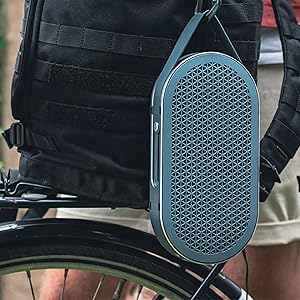
Image: Two DALI Katch G2 speakers set up for True Wireless Stereo pairing in a home environment.
Управљање звучником
1. Аудио репродукција
- Once connected via Bluetooth or auxiliary input, start playback from your audio source.
- Користите Volume Buttons (+/-) on the speaker or your connected device to adjust the volume.
2. Режими звука
The DALI Katch G2 offers different sound profiles to suit your listening preference or environment.
- Притисните тастер Дугме за режим звука to cycle through the available sound modes (e.g., "Clear" and "Warm").
- Each mode provides a distinct audio characteristic.
3. Провера нивоа батерије
- Кратко притисните Дугме за напајање when the speaker is on to illuminate the battery indicator lights, showing the current charge level.
Одржавање
1. Чишћење
- Обришите звучник меком, сувом крпом.
- Не користите абразивна средства за чишћење, воскове или раствараче.
2. Складиштење
- Када се звучник не користи дуже време, чувајте га на хладном и сувом месту.
- Избегавајте екстремне температуре.
3. Брига о батерији
- Да бисте продужили век трајања батерије, избегавајте често потпуно пражњење батерије.
- Charge the speaker regularly, even if not in frequent use.
Решавање проблема
| Проблем | Могући узрок | Решење |
|---|---|---|
| Звучник се не укључује. | Батерија је празна. | Connect the speaker to the power adapter and charge it. |
| Нема звука из звучника. | Јачина звука је прениска или искључена. Изабран је погрешан улазни извор. Device not paired correctly. | Појачајте јачину звука на звучнику и повезаном уређају. Ensure correct input (Bluetooth/Aux) is active. Re-pair the Bluetooth device. |
| Блуетоотх упаривање није успело. | Звучник није у режиму упаривања. Уређај је превише удаљен од звучника. Интерференција. | Press the Bluetooth button to enter pairing mode. Move device closer to the speaker. Удаљите се од других бежичних уређаја. |
| Упаривање са правим бежичним стерео (TWS) системом не успева. | Speakers not in TWS pairing mode. One speaker already connected to a device. | Ensure both speakers are disconnected from other devices and follow TWS pairing steps. |
Спецификације
| Назив модела | DALI Katch G2 |
| Бранд | ДАЛИ |
| Спеакер Типе | Преносиви Блуетоотх звучник |
| Технологија повезивања | Bluetooth 5.0 (apt-X, apt-X HD, AAC) |
| Режим аудио излаза | Стерео |
| Максимална излазна снага звучника | 25 Ваттс |
| Капацитет батерије | 3300 мАх |
| Трајање батерије | До 30 сати |
| Време пуњења | Отприлике 2 сата |
| Пречник вуфера | 3.5 инча |
| Пречник високотонца | 21 милиметара |
| Димензије производа (Д x Ш x В) | 1.8 cm x 10.5 cm x 5.4 cm |
| Тежина артикла | 2.42 фунте (1.1 килограма) |
| Контролни метод | Додирните |
| Водоотпоран | бр |
Информације о гаранцији
The DALI Katch G2 Portable Bluetooth Speaker comes with a Ограничена гаранција. Specific terms and conditions of the warranty may vary by region and retailer. Please retain your proof of purchase for warranty claims. For detailed warranty information, refer to the documentation provided with your purchase or visit the official DALI webсајту.
Корисничка подршка
If you encounter any issues not covered in this manual or require further assistance, please contact DALI customer support.
- Visit the official DALI webсајт за ресурсе подршке, честа питања и контакт информације.
- Refer to your product packaging or purchase documentation for specific regional support contacts.
Ask a question about this manual
Ask about setup, troubleshooting, compatibility, parts, safety, or missing instructions. Manuals+ will review the question and use this page’s manual context to help answer it.