
Macally ACEBTKEY-US
Macally Wireless Bluetooth Keyboard Instruction Manual
Model: ACEBTKEY-US | Brand: Macally
Увод
Thank you for choosing the Macally Wireless Bluetooth Keyboard. This multi-device keyboard is designed to enhance your productivity across various platforms, including Mac, iOS, Windows, and Android devices. Featuring 110 keys, 20 Mac OS shortcuts, and a numeric keypad, it offers a comfortable and efficient typing experience. Its ultra-slim design and rechargeable battery make it an ideal companion for both work and leisure.

Image: The Macally Wireless Bluetooth Keyboard, showcasing its full layout and sleek silver design.
Садржај пакета
- Macally Wireless Bluetooth Keyboard
- Кабл за пуњење
- Упутство за употребу
Сетуп
1. Пуњење тастатуре
Before initial use, fully charge the keyboard using the included charging cable. Connect the cable to the keyboard's charging port and a USB power source. The LED indicator will show charging status.

Image: Illustration showing the keyboard connected to a charging cable, emphasizing its rechargeable nature.
2. Упаривање са уређајима
The Macally Wireless Bluetooth Keyboard supports connecting up to three Bluetooth-enabled devices simultaneously. Follow these steps to pair your devices:
- Укључите тастатуру помоћу прекидача за напајање.
- Press and hold one of the Bluetooth keys (BT1, BT2, or BT3) for a few seconds until the corresponding LED indicator starts blinking rapidly. This indicates pairing mode.
- On your device (computer, tablet, or smartphone), go to Bluetooth settings and search for available devices.
- Select "Macally Keyboard" (or similar name) from the list.
- If prompted, enter the pairing code displayed on your screen using the Macally keyboard and press Enter.
- Once paired, the LED indicator will stop blinking and remain solid for a few seconds before turning off.
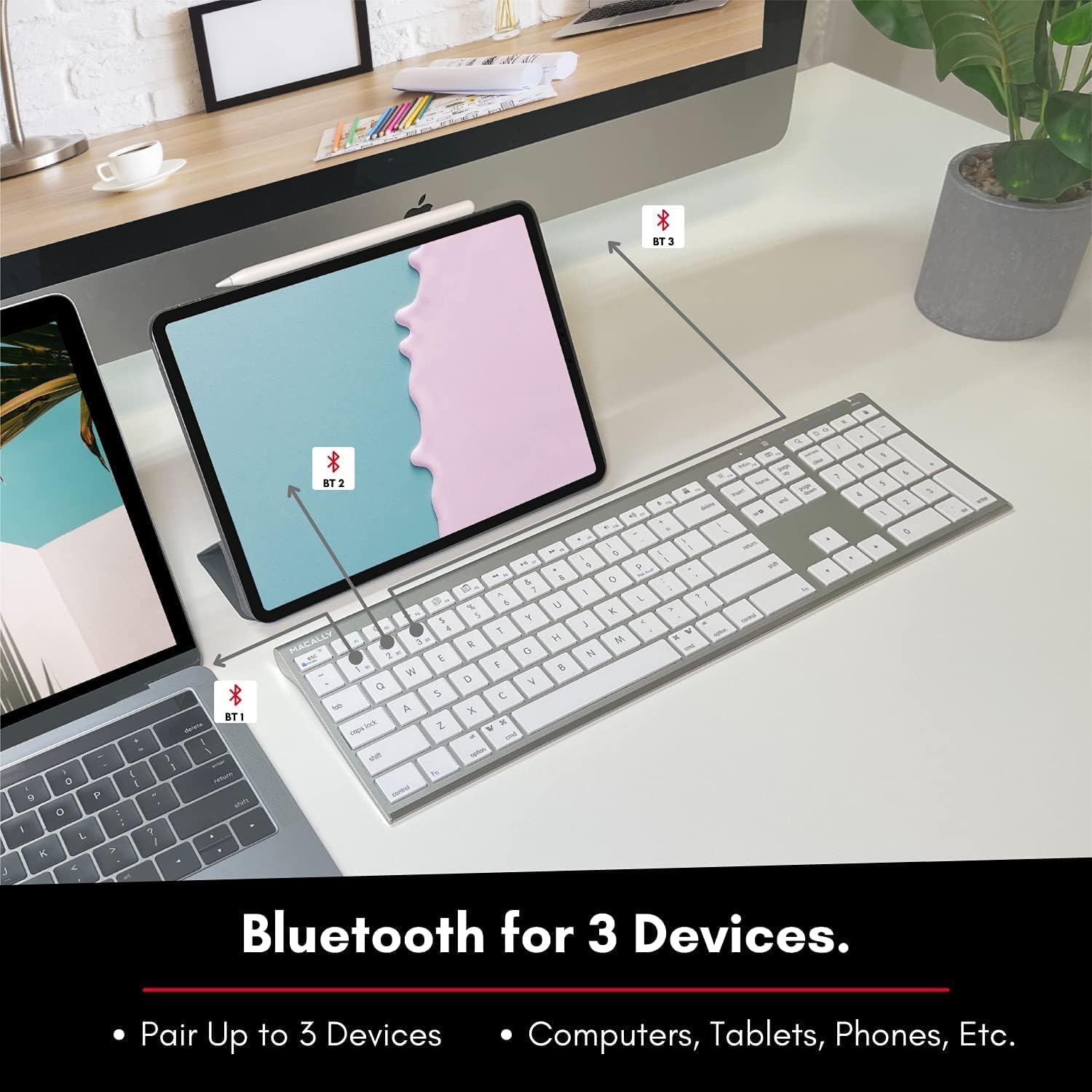
Image: The keyboard connected to a laptop and a tablet, illustrating its multi-device pairing capability.
Упутство за употребу
Пребацивање између уређаја
To switch between paired devices, simply press the corresponding Bluetooth key (BT1, BT2, or BT3) once. The keyboard will automatically connect to the selected device within a few seconds.

Image: Visual representation of the keyboard seamlessly switching between a smartphone, iMac, and laptop, highlighting the multi-sync feature.
Function Keys and Shortcuts
The keyboard features a full set of 110 keys, including a numeric keypad and 20 dedicated Mac OS shortcut keys. These shortcuts provide quick access to various functions such as brightness control, volume adjustment, media playback, and more. Refer to your device's operating system documentation for specific shortcut functionalities.
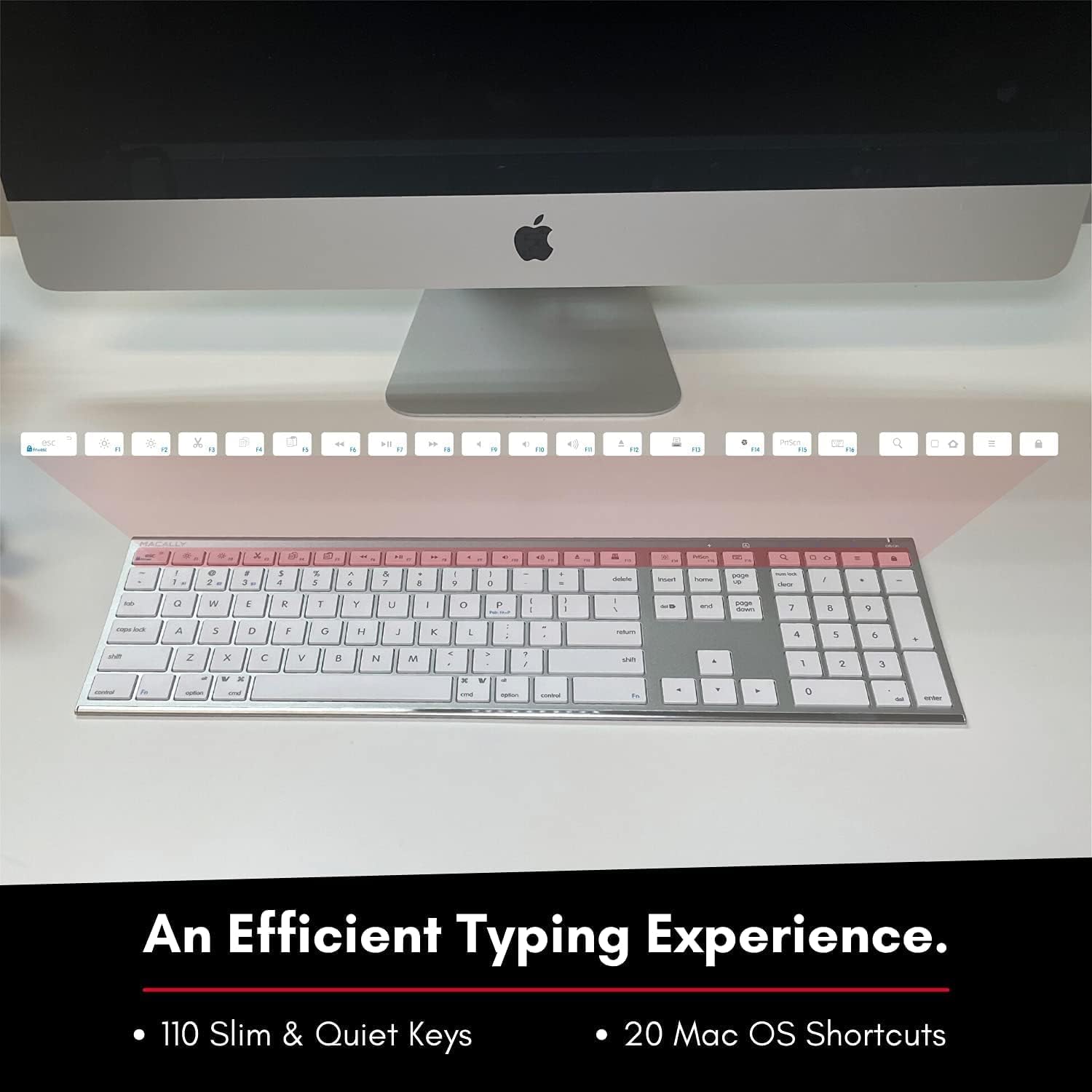
Image: Close-up of the keyboard's top row, highlighting the dedicated function and shortcut keys.
Компатибилност
This keyboard is broadly compatible with a range of operating systems and devices, including:
- мацОС
- Виндовс
- iOS (iPhone, iPad)
- Андроид

Image: The keyboard positioned in front of an iMac, indicating its compatibility with Mac systems.
Одржавање
To ensure the longevity and optimal performance of your Macally Wireless Bluetooth Keyboard, follow these maintenance guidelines:
- Чишћење: Use a soft, lint-free cloth to wipe the surface of the keyboard. For stubborn dirt, slightly dampОбришите крпу водом или благим средством за чишћење. Избегавајте прекомерну влагу.
- Одржавање батерије: The keyboard features a built-in rechargeable battery. To maximize battery life, avoid fully discharging the battery frequently. Charge the keyboard when the low battery indicator appears.
- Складиштење: Када се тастатура не користи дуже време, искључите је да бисте уштедели батерију. Чувајте је на хладном и сувом месту, даље од директне сунчеве светлости и екстремних температура.
- Избегавајте изливање: Држите течности даље од тастатуре како бисте спречили оштећење унутрашњих компоненти.
Решавање проблема
Keyboard Not Responding or Typing Incorrectly
- Уверите се да је тастатура напуњена.
- Verify that the keyboard is powered on and the correct Bluetooth channel (BT1, BT2, or BT3) is selected for your device.
- Покушајте поново да упарите тастатуру са својим уређајем.
- Check if the Fn lock is active. On the top right, there should be a lock symbol with an FN in the lock. If there is a Blue LED light on the panel which is on the top right, then press and hold Fn и притисните ЕСЦ to shut off the Fn lock.

Image: A troubleshooting tip for the Fn lock feature, showing the relevant keys.
Mouse Keys Issue (macOS)
- If your keyboard inputs are behaving like mouse movements, you may have "Mouse Keys" enabled.
- Go to System Preferences (or System Settings on newer macOS versions), then click on Приступачност. After that, scroll to Контрола показивача и онемогућити Enable Mouse Keys.

Image: A troubleshooting tip for disabling Mouse Keys in system settings.
Проблеми са Блуетоотх везом
- Уверите се да је Bluetooth на вашем уређају омогућен и да је видљив.
- Move the keyboard closer to your device to ensure a strong signal.
- Уклоните све потенцијалне изворе сметњи (нпр. друге бежичне уређаје, велике металне предмете).
- Поново покрените и тастатуру и уређај.
Спецификације
| Бранд | Макално |
| Број модела | ACEBTKEY-US |
| Димензије производа | 18.11 к 6.3 к 0.91 инча |
| Тежина артикла | 14.9 унци |
| Технологија повезивања | Блуетоотх |
| Број кључева | 110 |
| Компатибилни уређаји | MacOS, Windows, iOS, Android |
| Батерија | 3 Lithium Polymer batteries (included, rechargeable) |
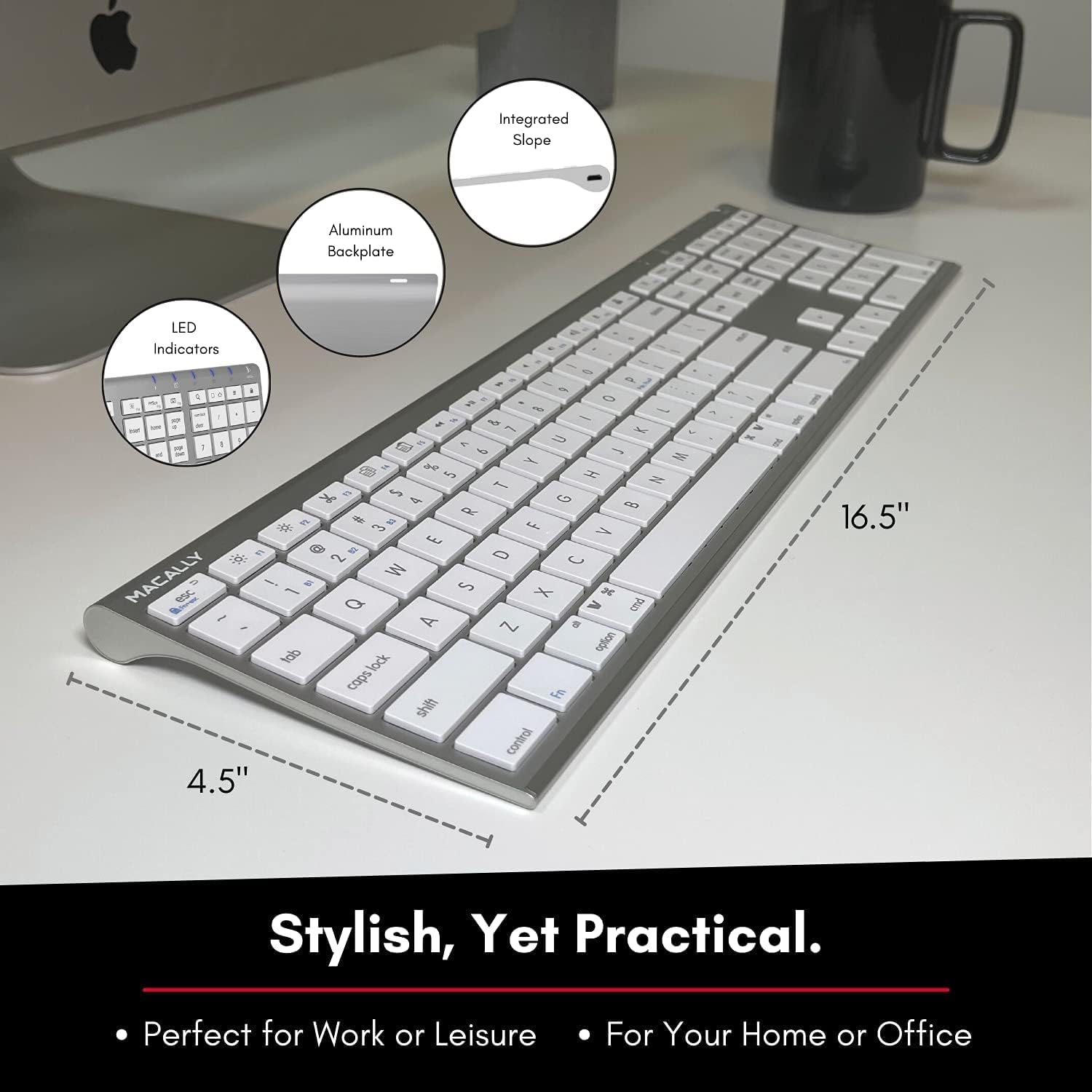
Image: Diagram illustrating the physical dimensions of the Macally Wireless Bluetooth Keyboard.
Гаранција и подршка
Macally is committed to delivering high-quality, user-friendly workflow solutions. For any product inquiries, technical support, or warranty information, please visit the official Macally webсајту или контактирајте њихову корисничку службу. Више информација и ресурса за подршку можете пронаћи на Macally Store on Amazon.
Ask a question about this manual
Ask about setup, troubleshooting, compatibility, parts, safety, or missing instructions. Manuals+ will review the question and use this page’s manual context to help answer it.