
1. Увод
This manual provides detailed instructions for the installation, operation, and maintenance of your Cooler Master Silencio S400 mATX Tower. The Silencio S400 is designed for optimal noise reduction without compromising thermal performance, featuring sound dampening materials, a reversible front panel, and efficient airflow design. Please read this manual thoroughly before beginning installation to ensure proper setup and functionality.
2. Кључне карактеристике
- Звук Дampening Material: Integrated sound dampening material on the front, both side panels, and top for effective noise reduction.
- Removable Sound Dampening Cover: The top panel features a removable cover, allowing for increased ventilation when higher airflow is required.
- Reversible Steel Front Door: The front door can be mounted to open from either the left or right side of the case, offering flexible placement options.
- Silencio FP 120mm PWM Fans: Equipped with two 120mm PWM fans (800-1400 RPM) for quiet operation and rubber padding to minimize vibration noise.
- Integrated I/O Panel: Features an SD card reader and a single 4-pole headset jack for simultaneous audio and microphone capabilities, alongside USB 2.0 and USB 3.0 ports.
3. Цомпонентс Оверview
Familiarize yourself with the main components of the Silencio S400 chassis.


4. Подешавање и инсталација
4.1 Припрема случаја
- Распакивање: Carefully remove the case from its packaging. Inspect for any damage.
- Приступ унутрашњости: Unscrew the captive thumb screws on the rear of the side panels and slide them backward to remove.
- Reversing the Front Door (Optional): If desired, the front door can be reversed. Refer to the detailed instructions in the included accessory manual for this procedure.
4.2 Инсталација компоненти
- матична плоча: Install your mATX motherboard onto the pre-installed standoffs. Secure it with the provided screws.
- Јединица за напајање (ПСУ): Mount the PSU in the bottom rear compartment. Ensure the fan faces downwards for optimal cooling and dust filtration.
- Дискови за складиштење:
- 2.5-inch SSDs: Utilize the tool-less mounting points behind the motherboard tray or on top of the PSU shroud.
- 3.5-inch HDDs: Инсталирајте у кућиште уређаја које се налази испод кућишта напајања.
- 5.25-inch ODD: Slide into the top front bay and secure.
- Картице за проширење: Install graphics cards or other expansion cards into the PCIe slots on your motherboard and secure them with screws.
- Вентилатори/радијатори за хлађење: The case supports various fan and radiator configurations. Refer to the specifications for compatible sizes and locations. Ensure fans are oriented for proper airflow (intake/exhaust).
4.3 Управљање кабловима
Utilize the cable routing cutouts and tie-down points behind the motherboard tray to organize cables. This improves airflow and maintains a clean interior.
5. Операција
5.1 Укључивање/искључивање
Press the power button located on the top I/O panel to turn your system on or off. A subtle LED indicator will confirm power status.
5.2 Using Front I/O Ports
The front I/O panel provides convenient access to USB 3.0 and USB 2.0 ports for peripherals, an SD card reader for media, and a 4-pole headset jack for audio input/output.
5.3 Управљање протоком ваздуха
The Silencio S400 offers flexibility in managing airflow versus noise. For maximum silence, keep the top sound dampening cover installed and the front door closed. For increased thermal performance, remove the top cover to allow for additional exhaust and open the front door to improve intake.
Video 5.1: An official Cooler Master video showcasing the Silencio S400 and S600 cases, highlighting their quiet operation and design features.
6. Одржавање
Редовно одржавање помаже у обезбеђивању дуготрајности и оптималних перформанси кућишта вашег рачунара.
- Чишћење филтера за прашину: The Silencio S400 includes dust filters on the front and bottom (for the PSU). Regularly remove and clean these filters to prevent dust buildup and maintain airflow.
- Спољно чишћење: Користите меку, дamp крпом за брисање спољашњих површина. Избегавајте абразивна средства за чишћење.
- Унутрашње чишћење: Periodically open the case and use compressed air to remove dust from internal components and fans. Ensure the system is powered off and unplugged before cleaning.
КСНУМКС. Решавање проблема
- Прекомерна бука:
- Ensure all fans are securely mounted and free from obstructions.
- Verify side panels and the top cover are properly closed.
- Check for loose components inside the case.
- Слаб проток ваздуха/Високе температуре:
- Очистите све филтере за прашину.
- Consider removing the top sound dampening cover for increased ventilation.
- Ensure fans are correctly oriented for intake and exhaust.
- Проверите да ли каблови ометају проток ваздуха.
- Front I/O Ports Not Functioning:
- Check that all front panel cables are securely connected to the motherboard headers.
- Consult your motherboard manual for correct header pinouts.
8. Спецификације
| Феатуре | Детаљ |
|---|---|
| Назив модела | С400 |
| Број модела ставке | MCS-S400-KN5N-S00 |
| Бранд | Цоолер Мастер |
| Тип случаја | Мини-кула |
| Компатибилност матичне плоче | мАТКС |
| Материјал | легирани челик |
| Боја | Silencio S400 (Black/Grey) |
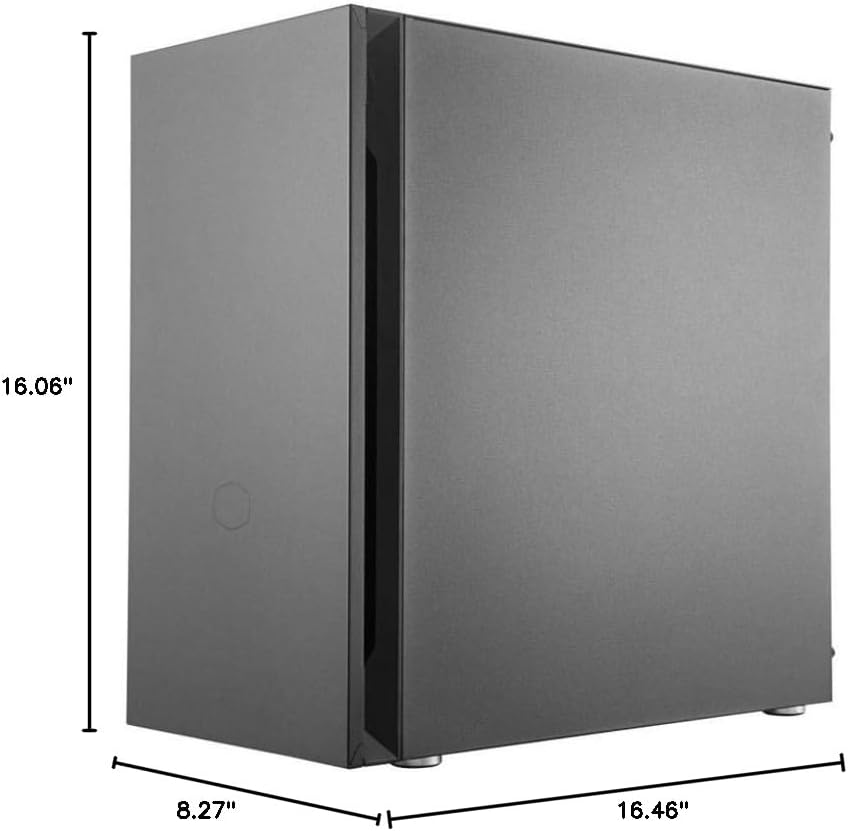
| Димензије (ДкШкВ) | 8.27 к 16.46 к 16.06 инча (210 к 418 к 408 мм) |
| Тежина артикла | 15.4 фунте (7 кг) |
| Метод хлађења | Ваздух |
| Величина вентилатора | 120 Millimeters (Pre-installed) |
| Тип монтаже напајања | Боттом Моунт |
| УСБ 3.0 портови | 2 |
| УСБ 2.0 портови | 2 |
| Читач СД картица | Да |
| Јацк за слушалице | 1 (4-полни) |
9. Гаранција и подршка
For warranty information, technical support, or to download the latest drivers and manuals, please visit the official Cooler Master webсајт. Сачувајте доказ о куповини за потребе гаранције.
Службено Webсајт: ввв.цоолермастер.цом