
Производ је завршенview
The Marantz SR5014 7.2 channel 4K Ultra HD AV receiver is designed to deliver a refined surround sound home theater experience. It supports advanced object-based audio formats and offers high-definition video processing with superior connectivity. Tuned by world-renowned acousticians, the SR5014 produces musical sound from various sources, including vinyl and digital streaming. It provides immersive audio with Dolby Atmos, Dolby Atmos Height Virtualization Technology, DTS:X, and DTS Virtual:X. The receiver also supports voice control via Amazon Alexa, Google Assistant, and Apple Siri, and allows music streaming from popular services through Bluetooth, AirPlay 2, or the HEOS app.
Кључне карактеристике
- 7.2-Channel Discrete Power Ampдизалица: Refine your surround sound home theater experience with advanced object-based audio formats, high definition video processing, and superior connectivity.
- Make the Most of Your 4K Ultra HD TV Investment: Drive exceptional visual clarity with full-rate pass-through, SD/HD video upscaling to UHD, 4:4:4 Pure Color sub-sampling, HDR10, BT.2020, 3D, 21:9 video, Dolby Vision, and HLG.
- Complement Premium Video with the Ultimate Cinematic Audio Experience: 100W per channel high power and latest audio formats including Dolby Atmos, DTS:X, DTS Virtual:X, and Dolby Atmos Height Virtualization Technology for a virtually heightened realism effect.
- Versatile HDMI eARC Connectivity: All 8 HDMI inputs support HDCP 2.3 Digital Content Protection, including 1 front-panel input for quick connections. Includes 2 HDMI outputs with 1 offering full eARC support.
- Effortless Voice Control with Leading Voice Agents: Use your voice to play, pause and stop music, switch inputs, turn the volume up & more with all major voice agents like Alexa, Siri and including, including the top smart home automation systems.
- Stream Unlimited Music or Videos: Using popular services like Spotify, TuneIn, Deezer, Tidal, Netflix, Amazon Prime & others via Bluetooth, AirPlay 2, or HEOS app across one room, or multiple rooms with built-in WIRELESS HEOS MULTI-ROOM AUDIO TECHNOLOGY.
- Easy-to-Understand and User-Friendly Setup Assistant: Comes with an advanced graphical user interface that guides you through the step-by-step process and connects all your audio sources to this stereo receiver.
Садржај пакета
Након отварања пакета, уверите се да су све доле наведене ставке присутне и у добром стању:
- Marantz SR5014 AV Receiver
- Даљински управљач
- 2 AA Batteries (for remote controller)
- Водич за брзи почетак
Водич за подешавање
Овај одељак даје општи прегледview of the setup process. For detailed, step-by-step instructions, please refer to the comprehensive User Manual PDF linked in the "Warranty and Support" section.
- Распакивање: Пажљиво извадите пријемник и сву додатну опрему из паковања.
- Пласман: Place the receiver on a stable, flat surface with adequate ventilation. Ensure there is enough space around the unit for proper airflow.
- Веза звучника: Connect your speakers to the appropriate speaker terminals on the rear of the receiver. Pay attention to polarity (+/-) for each speaker. The SR5014 supports 7.2 channels.
- Веза изворног уређаја: Connect your audio/video source devices (e.g., Blu-ray player, game console, cable/satellite box) to the HDMI input ports. Use high-quality HDMI cables for optimal performance.
- ТВ веза: Connect the HDMI OUT (ARC/eARC) port on the receiver to the corresponding HDMI input on your television.
- Прикључак за напајање: Укључите кабл за напајање у пријемник, а затим у зидну утичницу.
- Помоћник за почетно подешавање: Turn on the receiver and follow the on-screen instructions provided by the Marantz Setup Assistant. This guide will help you configure network settings, speaker calibration (Audyssey MultEQ XT), and input assignments.
Операција
Once the receiver is set up, you can begin enjoying your audio and video content. For detailed operational procedures, refer to the full User Manual PDF.
- Укључивање/искључивање: Use the power button on the front panel or the remote control to turn the unit on or off.
- Избор улаза: Select the desired input source (e.g., Blu-ray, Game, CBL/SAT) using the input selector knob on the front panel or the dedicated buttons on the remote control.
- Контрола јачине звука: Adjust the master volume using the large knob on the front panel or the VOLUME +/- buttons on the remote control.
- Режими звука: Explore various sound modes (e.g., Stereo, Multi-Channel Stereo, Dolby Atmos, DTS:X) to optimize your listening experience for different content types.
- Мрежне карактеристике: Access streaming services, internet radio, and HEOS multi-room audio via the network connection. Control these features using the HEOS app on your smartphone or tablet.
- Контрола гласом: If configured, use compatible voice assistants (Amazon Alexa, Google Assistant, Apple Siri) to control basic functions of the receiver.
Одржавање
Proper maintenance ensures the longevity and optimal performance of your Marantz SR5014 AV Receiver.
- Чишћење: Regularly wipe the exterior of the receiver with a soft, dry cloth. Avoid using abrasive cleaners, waxes, or solvents.
- вентилација: Уверите се да вентилациони отвори на врху и бочним странама пријемника нису блокирани. Правилан проток ваздуха је кључан за спречавање прегревања.
- Накупљање прашине: Periodically use a soft brush or a low-power vacuum cleaner to remove dust from the vents and surfaces.
- Управљање кабловима: Keep cables neatly organized and ensure they are not kinked or pinched, which can affect signal quality or cause damage.
- Ажурирања фирмвера: Check for and install available firmware updates to ensure your receiver has the latest features and performance enhancements. This can typically be done through the receiver's network settings.
Решавање проблема
If you encounter issues with your Marantz SR5014, refer to the following common troubleshooting steps. For more complex problems, consult the detailed troubleshooting section in the full User Manual PDF.
- Нема напајања:
- Проверите да ли је кабл за напајање безбедно прикључен у пријемник и зидну утичницу.
- Уверите се да је утичница функционална.
- Нема звука:
- Проверите да ли је изабран исправан улазни извор.
- Check speaker connections and ensure speaker wires are properly connected to both the receiver and speakers.
- Confirm that the volume is not muted or set too low.
- Check audio output settings on your source device (e.g., TV, Blu-ray player).
- Без слике:
- Уверите се да су HDMI каблови безбедно повезани између извора, пријемника и телевизора.
- Verify that the correct HDMI input on your TV is selected.
- Check the HDMI output settings on the receiver and source device.
- Проблеми са мрежном везом:
- Рестартујте рутер и модем.
- Ensure the Ethernet cable is securely connected if using a wired connection, or check Wi-Fi settings if using wireless.
- Perform a network diagnostic test through the receiver's setup menu.
- Даљински управљач не ради:
- Замените батерије у даљинском управљачу.
- Уверите се да нема препрека између даљинског управљача и ИР сензора пријемника.
- Фацтори Ресет: As a last resort for persistent issues, a factory reset can resolve many problems. Refer to the User Manual for instructions on how to perform a factory reset, as this will erase all custom settings.
Техничке спецификације
| Феатуре | Спецификација |
|---|---|
| Димензије производа | 13.38 к 17.38 к 6.38 инча |
| Тежина артикла | 26.1 фунти |
| Произвођач | Марантз |
| ASIN | B07SW88DXR |
| Број модела ставке | СР5014 |
| Батерије | Потребне су 2 АА батерије (укључене) |
| Датум првог доступног | 10. јул 2019 |
| Бранд | Марантз |
| Технологија повезивања | Блуетоотх, ХДМИ |
| Тип контролера | Амазон Алека, Гоогле помоћник |
| Посебна карактеристика | Амазон Мусиц |
| Компатибилни уређаји | Телевизија, звучник |
| Укупни ХДМИ портови | 7 |
| Тип конектора | ХДМИ |
| Аудио Енцодинг | Стерео |
| Режим аудио излаза | Сурроунд |
| Конфигурација канала сурроунд звука | 7.2 |
Визуелни прикази производа
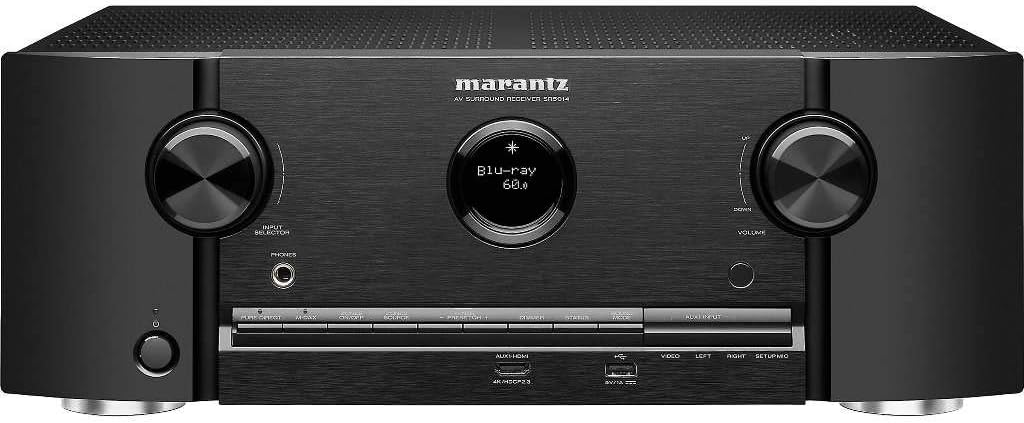
Фронт view of the Marantz SR5014 AV Receiver, showcasing its sleek design with two large control knobs for input selection and volume, a central display, and front-panel inputs.

Rear panel of the Marantz SR5014 AV Receiver, displaying a comprehensive array of input and output ports, including multiple HDMI, analog audio, digital audio, and speaker terminals for a 7.2 channel setup.

Унутрашње view of the Marantz SR5014 AV Receiver, showing the meticulously arranged circuit boards and components, highlighting the quality engineering within the unit.

The included remote control for the Marantz SR5014 AV Receiver, featuring clearly labeled buttons for power, input selection, volume, navigation, and sound modes.
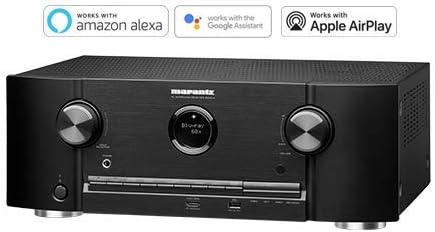
The Marantz SR5014 AV Receiver displayed alongside logos indicating compatibility with Amazon Alexa, Google Assistant, and Apple AirPlay for convenient voice control and streaming.
Гаранција и подршка
Marantz products are designed for reliability and performance. For detailed warranty information, please refer to the warranty card included with your product or contact Marantz customer support.
For comprehensive instructions, detailed setup guides, advanced features, and in-depth troubleshooting, please download the full User Manual PDF:
Преузмите комплетно упутство за употребу (PDF)
For further assistance, please visit the official Marantz support webсајту или контактирајте њихову корисничку службу.