
Hohem iSteady Pro 3-Axis Handheld Gimbal Stabilizer User Manual
Model: iSteady Pro
Увод
The Hohem iSteady Pro is a 3-axis handheld gimbal stabilizer designed to capture smooth, professional-grade footage with your action camera. This device is compatible with various sports cameras, including DJI OSMO Action, GoPro Hero 7/6/5/4/3, YI, and SJCAM models. This manual provides detailed instructions for proper setup, operation, maintenance, and troubleshooting to ensure optimal performance and longevity of your gimbal.
1. Подешавање
1.1 Распакивање и компоненте
Пажљиво распакујте све компоненте из кутије. Уверите се да су присутне следеће ставке:
- Hohem iSteady Pro Gimbal
- Мини троножац
- УСБ кабл за пуњење
- Camera Charging Cables (various types)
- Торбица за ношење
- Кориснички приручник (овај документ)
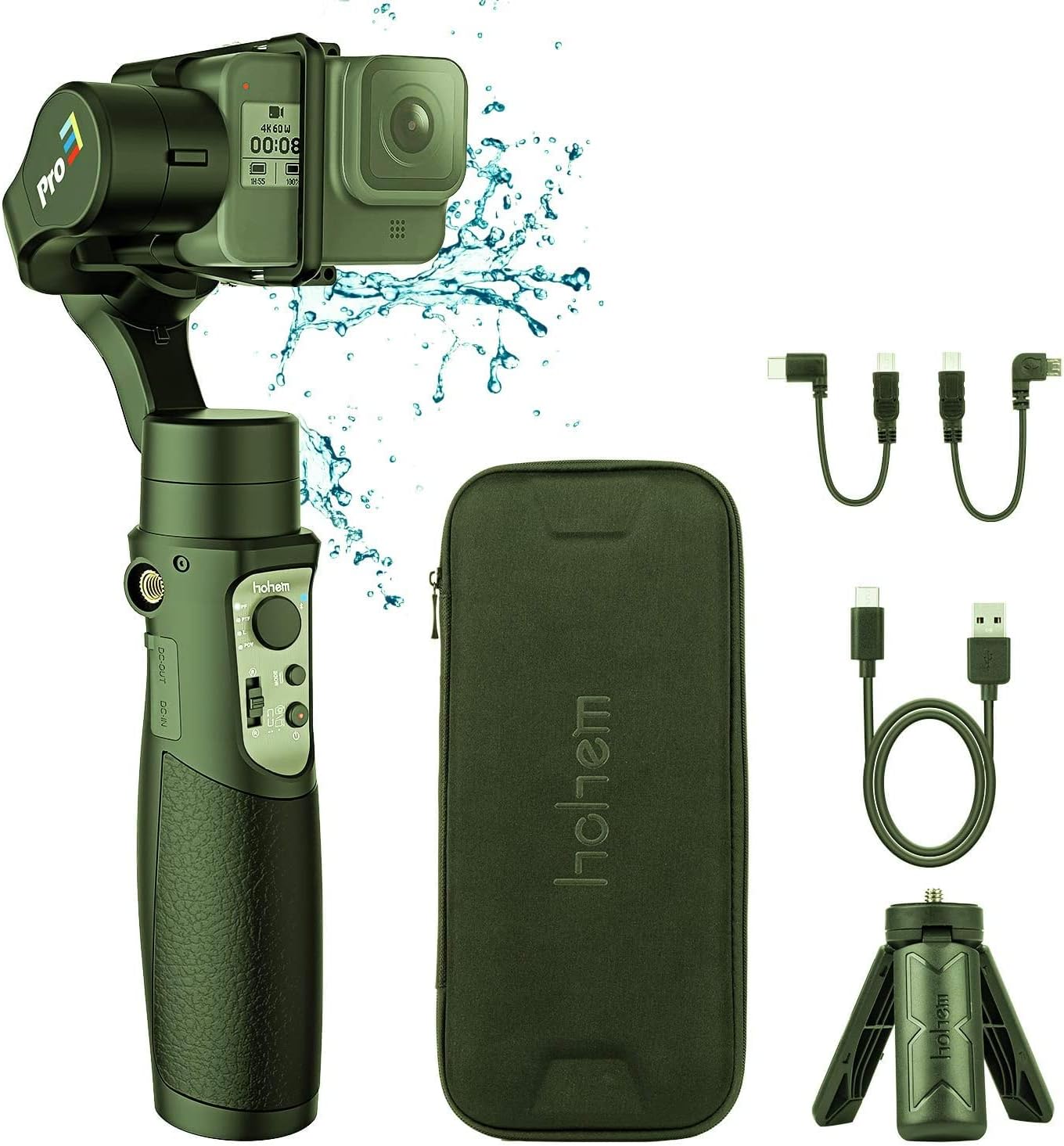
Image: Hohem iSteady Pro Gimbal, carrying case, mini tripod, and various charging cables.
1.2 Пуњење гимбала
Before initial use, fully charge the gimbal. Connect the USB charging cable to the gimbal's DC-IN port and a 5V/2A power adapter (not included). The indicator light will show charging status and turn solid when fully charged.
Напомена:
- The gimbal can also act as a power bank to charge your action camera via the DC-OUT port.
1.3 Mounting Your Action Camera
Mount your action camera securely onto the gimbal. Ensure the camera is balanced to prevent motor strain and ensure optimal stabilization. Adjust the sliding arm until the camera remains level when the gimbal is powered off.
Важно:
- Always balance the camera before powering on the gimbal.
- Some cameras, like the GoPro Hero 7 Black, may have limited access to buttons or ports depending on mounting orientation.
2. Упутство за употребу
2.1 Укључивање/искључивање
Press and hold the power button for 3 seconds to power on or off the gimbal.
2.2 Режими гимбалног стабилизатора
The iSteady Pro features multiple operating modes for various shooting scenarios:
- Pan Following (PF) Mode: The camera pans left/right following your hand movements, while tilt and roll axes are locked.
- Pan & Tilt Following (PTF) Mode: The camera pans left/right and tilts up/down following your hand movements, while the roll axis is locked.
- All Lock (AL) Mode: All three axes (pan, tilt, roll) are locked, keeping the camera pointing in a fixed direction.
- All Following (AF) Mode: All three axes follow your hand movements.
- Спортски режим: Provides faster response and stronger motor torque for dynamic shots.
Switch between modes using the mode button on the handle.
2.3 Kontrola džojstikom
Use the joystick to manually control the pan and tilt direction of the camera.
2.4 Блуетоотх веза
Connect the gimbal to your smartphone via Bluetooth to use the Hohem Gimbal App for advanced controls, parameter adjustments, and firmware updates. Refer to the app's instructions for detailed usage.
2.5 Калибрација
If the gimbal is not level or drifts, perform a calibration. This can usually be done via the Hohem Gimbal App or by following a specific button sequence on the gimbal itself (refer to the quick start guide for specific button combinations).
3. Одржавање
3.1 Чишћење
Wipe the gimbal with a soft, dry cloth. Avoid using harsh chemicals or abrasive materials. Ensure no dust or debris enters the motor joints.
3.2 Складиштење
Store the gimbal in its carrying case in a cool, dry place when not in use. Avoid extreme temperatures and direct sunlight. For long-term storage, ensure the battery is charged to approximately 50%.
3.3 Ажурирања фирмвера
Regularly check for firmware updates via the Hohem Gimbal App to ensure optimal performance and access to new features. Follow the app's instructions carefully during the update process.
КСНУМКС. Решавање проблема
| Проблем | Могући узрок | Решење |
|---|---|---|
| Gimbal not powering on. | Ниска батерија. | Потпуно напуните гимбал. |
| Gimbal vibrates or makes noise. | Camera not balanced correctly. | Re-balance the camera on the gimbal. |
| Gimbal drifts or is not level. | Потребна је калибрација. | Perform a gimbal calibration via the app or button sequence. |
| Проблеми са Bluetooth везом. | App or device issues. | Ensure Bluetooth is enabled on your phone. Restart the gimbal and phone. Reinstall the Hohem Gimbal App. |
5. Спецификације
- Модел: иСтеади Про
- Axes: 3-Axis Stabilization
- Компатибилност: DJI OSMO Action, GoPro Hero 7/6/5/4/3, YI, SJCAM Sports Cams
- Ниво водоотпорности: Водоотпоран
- Произвођач: хохем
Note: Specific battery life and charging times may vary. Refer to product packaging or the official Hohem website for the most up-to-date specifications.
6. Гаранција и подршка
The Hohem iSteady Pro comes with a limited warranty. For detailed warranty terms and conditions, please refer to the warranty card included with your product or visit the official Hohem website. For technical support, troubleshooting assistance, or service inquiries, please contact Hohem customer service through their official channels.
Official Hohem Webсајт: ввв.хохем.цом