
Увод
This manual provides detailed instructions for the assembly, operation, and maintenance of your Cooler Master MasterBox CM694 TG Middle Tower PC Case. Please read this manual thoroughly before beginning installation to ensure proper setup and optimal performance.
Кључне карактеристике
- Curved Mesh Panels: Front and top mesh panels with a diamond pattern for optimal breathability and dust filtration.
- Бочна плоча од каљеног стакла: Пружа јасан view унутрашњих компоненти.
- Modular Drive Cage: Updated design for enhanced storage expandability, supporting 2.5" SSDs and 3.5" HDDs.
- Dual 5.25" Bays: Accommodates optical drives or other 5.25" devices.
- Graphics Card Stabilizer: Arm mechanism to support large graphics cards, preventing motherboard distortion and ensuring safe transport.
- Компатибилност матичне плоче: Supports E-ATX, ATX, microATX, and Mini-ITX motherboards.
- Подршка за течно хлађење: Accommodates up to 360mm water cooling radiators.
- Expansion Card Clearance: Space for expansion cards up to 410 mm (16.1 inches).
- Power Supply Cover: Integrated cover to conceal the power unit for a cleaner build.
- Full I/O Ports: Features 2 x USB 3.0, 1 x USB 3.1 (Gen 2) Type-C, and a 4-pole headset jack with rubber dustproof caps.
Сетуп
1. Распакивање кућишта
Carefully remove the PC case from its packaging. Inspect for any damage during transit. Retain all packaging materials for future transport or warranty claims.

Слика 1: Предња страна view of the Cooler Master MasterBox CM694 TG PC Case.
2. Уклањање бочних панела
Locate the thumbscrews on the rear of the case securing the tempered glass side panel. Unscrew them and carefully remove the panel. Repeat for the opposite steel side panel if necessary.
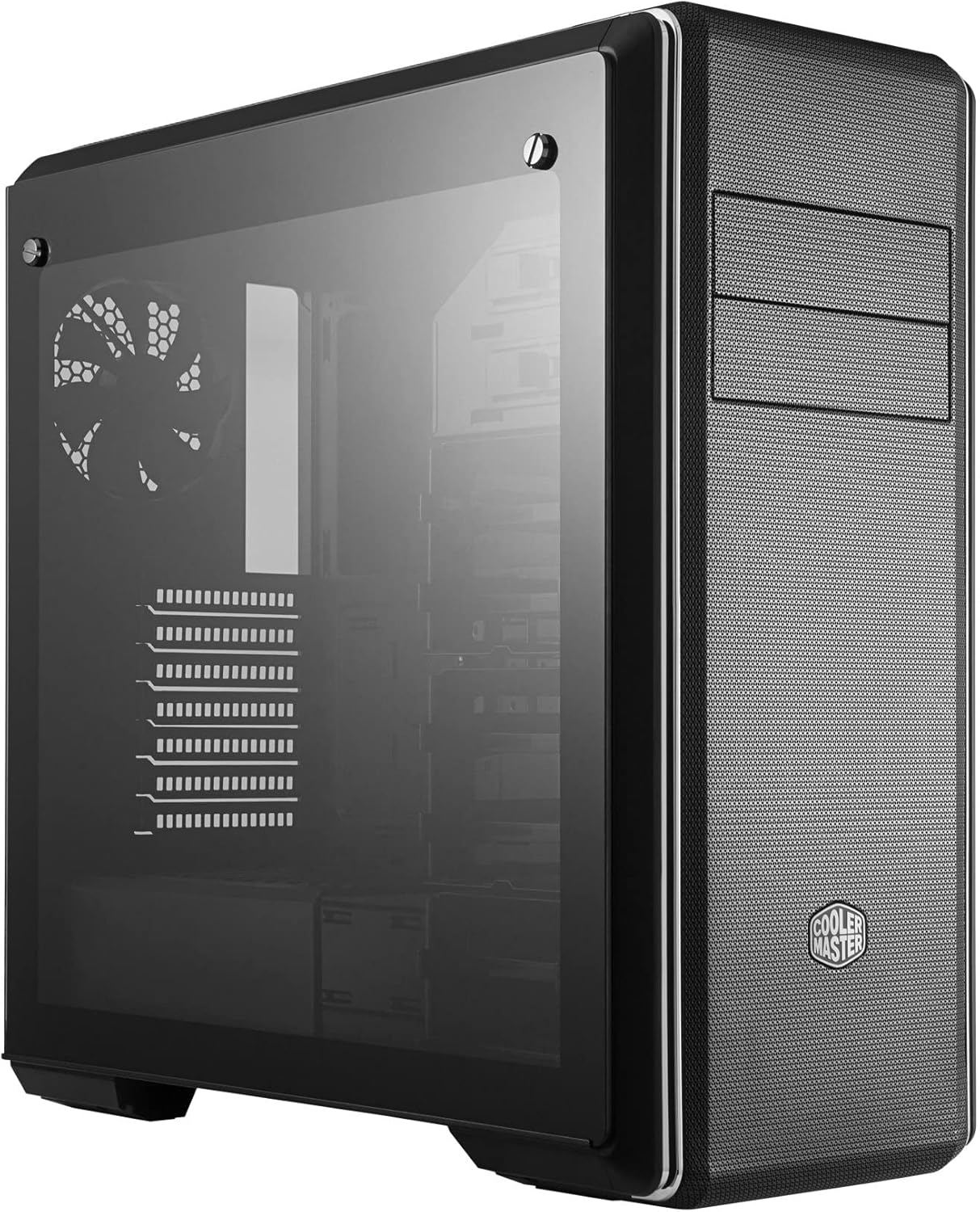
Слика 2: Страна view of the PC case featuring the tempered glass panel.
3. Инсталација матичне плоче
Install the appropriate standoffs for your motherboard form factor (E-ATX, ATX, microATX, Mini-ITX). Carefully place your motherboard onto the standoffs and secure it with screws.

Слика 3: Унутрашњост view of the PC case, showing the motherboard tray and drive bays.
4. Инсталација напајања
Mount your ATX power supply in the designated compartment at the bottom rear of the case. Secure it with screws from the exterior.
5. Инсталација диск јединице
Utilize the modular drive cages for 2.5" SSDs and 3.5" HDDs. The case also features two 5.25" bays for optical drives or other accessories. Refer to the specific drive cage mechanism for tool-less or screw-based installation.

Слика 4: Детаљан ентеријер view highlighting the modular drive cages.
6. Инсталација графичке картице и картице за проширење
Install your graphics card and other expansion cards into the PCIe slots on the motherboard. Use the included graphics card stabilizer for larger cards to prevent sagging.
7. Подешавање система за хлађење
The MasterBox CM694 TG supports various cooling configurations. Install additional fans or liquid cooling radiators as needed. The case supports up to 360mm radiators.

Figure 5: Diagram illustrating fan and radiator mounting locations and sizes.
8. Менаџмент каблова
Utilize the cable routing cutouts and tie-down points behind the motherboard tray to manage cables for improved airflow and a clean aesthetic.
Оперативни
Once all components are installed and secured, connect your peripherals and power cable. Press the power button on the front I/O panel to start your system.
Предња И/О плоча
- Дугме за напајање: Initiates system startup.
- Дугме за ресетовање: Поново покреће систем.
- УСБ 3.0 портови (к2): За брзи пренос података са компатибилним уређајима.
- USB 3.1 (Gen 2) Type-C Port (x1): For fast data transfer and device connectivity.
- 4-Pole Headset Jack: Supports simultaneous audio input and output for headsets.

Слика 6: Врх view of the PC case, showing the front I/O panel with various ports and buttons.
Одржавање
Чишћење филтера за прашину
The MasterBox CM694 TG features mesh panels that act as dust filters. Regularly clean these panels to maintain optimal airflow and prevent dust buildup inside the case. Gently remove the panels and use compressed air or a soft brush to clear dust.
Генерал Цлеанинг
Користите меку, дamp cloth to wipe down the exterior of the case. Avoid abrasive cleaners or solvents that could damage the finish. For the tempered glass panel, use a glass cleaner and a microfiber cloth.
Решавање проблема
- Систем се не укључује:
- Ensure the power supply is switched on and properly connected to the wall outlet and motherboard.
- Check all front panel connectors (power switch, reset switch) are correctly attached to the motherboard.
- Нема излаза на екран:
- Verify that your monitor is connected to the graphics card (not the motherboard integrated graphics, unless intended).
- Поново инсталирајте графичку картицу и РАМ модуле.
- прегревање:
- Ensure all case fans are spinning and properly oriented for optimal airflow.
- Clean dust filters and internal components regularly.
- Verify CPU cooler and thermal paste application.
Спецификације
| Феатуре | Детаљ |
|---|---|
| Бранд | Цоолер Мастер |
| Број модела | MCB-CM694-KG5N-S00 |
| Тип случаја | Средња кула |
| Компатибилност матичне плоче | Е-АТКС, АТКС, Мицро-АТКС, Мини-ИТКС |
| Материјал | Челик, каљено стакло |
| Димензије (Д к Ш к В) | 19.41 к 8.66 к 19.92 инча |
| Тежина артикла | 4.4 фунте (2 килограма) |
| И/О портови | 2x USB 3.0, 1x USB 3.1 (Gen 2) Type-C, 1x 4-Pole Headset Jack |
| Лежишта за дискове од 5.25 инча | 2 |
| Graphics Card Clearance | До 410 мм |
| Подршка за хлађење течности | Up to 360mm radiators |
Гаранција и подршка
За информације о гаранцији и техничку подршку, посетите званичну веб страницу Cooler Master-а. webсајт или контактирајте локалног продавца. Сачувајте доказ о куповини за евентуалне рекламације.
Онлине ресурси: ввв.цоолермастер.цом