
1. Увод
This manual provides essential instructions for the safe and efficient operation of your Areyourshop 12/24V 50A MPPT Solar Charge Controller. Please read this manual thoroughly before installation and use to ensure proper functionality and longevity of the device. This controller is designed to manage power flow from solar panels to batteries and loads, optimizing charging efficiency.
2. Производ је готовview
The Areyourshop MPPT Solar Charge Controller is a robust device designed for solar power systems. It features an LCD display for monitoring, dual USB outputs for charging external devices, and comprehensive protection mechanisms.
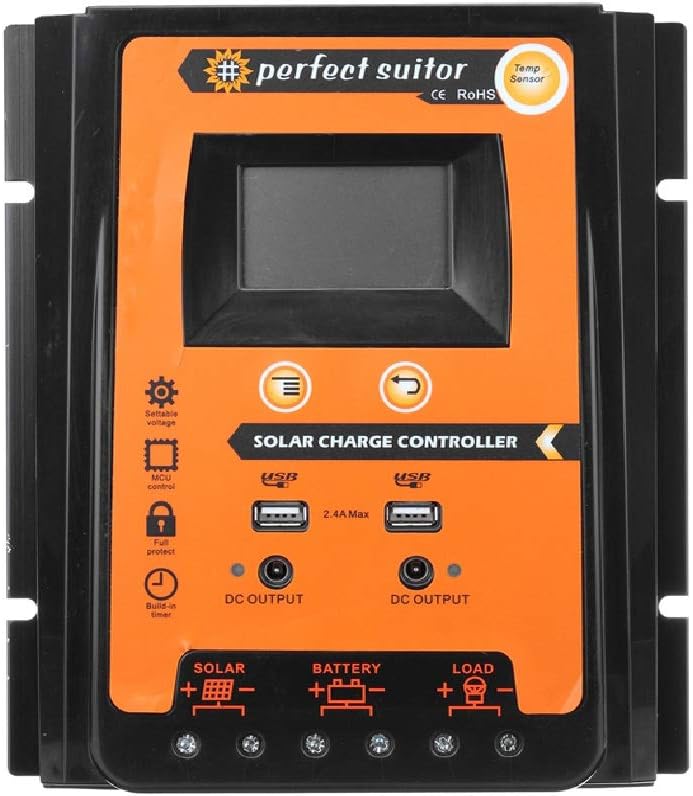
Слика: Фронт view of the Areyourshop 50A MPPT Solar Charge Controller, showing the LCD screen, control buttons, USB ports, and connection terminals.
Кључне карактеристике:
- MPPT Charging: Utilizes Maximum Power Point Tracking technology for efficient solar energy conversion.
- Аутоматиц Волtagе Адаптација: Automatically detects 12V or 24V system voltage.
- ЛЦД екран: Provides real-time monitoring of system status and parameters.
- Двоструки УСБ излази: Two 2.4A USB ports for charging mobile devices.
- Свеобухватна заштита: Includes overcharge, over-discharge, overcurrent, and short-circuit protection.
- Подесиви параметри: Control parameters can be adjusted to suit various battery types.
- Компензација температуре: Automatic temperature compensation for accurate charging and discharging voltage.

Image: Diagram highlighting features such as high conversion efficiency MPPT, intelligent LCD display, battery charge voltage/current/power, PV voltage/current power generation, perfect protection, and load power consumption work mode.
3. Спецификације
| Параметар | Валуе |
|---|---|
| Модел | E401-A002 (PVSC50A) |
| Цхаргинг Типе | МППТ |
| Систем Волtage | 12В/24В (аутоматска идентификација) |
| Називна струја пуњења/пражњења | 50А |
| Макс. ПВ Волtage | 50В |
| УСБ излаз | Dual USB, 2.4A each (5V total) |
| Овер Цхарге Волtage | 13.7V (for 12V system) / 27.4V (for 24V system) |
| Овер Дисцхарге Волtage | 10.5-11V (for 12V system) / 21-22V (for 24V system) |
| Recovery Discharge Voltage | 12.6V (for 12V system) / 25.2V (for 24V system) |
| Температурна компензација | -3mv/℃/cell |
| Empty Load Wastage | <45мА |
| Лооп Волtagе Дроп | <200мв |
| Дисплаи | ЛЦД екран |
| Dimensions (50A) | 21 x 19.2 x 4 цм (приближно 8.27 x 7.56 x 1.57 инча) |
| Тежина артикла | Приближно 1.98 фунте |
| Материјал | Пластика |
| Посебне карактеристике | Водоотпоран |

Image: The 50A solar charge controller with its physical dimensions (21cm, 19.2cm, 4cm) indicated.
4. Подешавање и инсталација
Proper installation is crucial for the safe and efficient operation of your solar charge controller. Please follow these steps carefully.
Важне безбедносне напомене:
- This controller is designed exclusively for LEAD-ACID batteries. Do not use with other battery types (e.g., Lithium-ion, NiMH) as this may cause damage to the controller or battery.
- Ensure all connections are secure and correct polarity is observed to prevent damage.
- Инсталирајте контролер у добро проветреном простору, даље од директне сунчеве светлости и влаге.
Начин повезивања:
Повежите компоненте следећим редоследом:
- Повежите батерију: First, connect the battery to the controller's battery terminals (marked with a battery symbol). Ensure correct polarity (+ to + and - to -). The controller will automatically detect 12V or 24V system voltage.
- Повежите соларну плочу: Next, connect the solar panel to the controller's solar terminals (marked with a solar panel symbol). Ensure correct polarity.
- Connect the Load: Finally, connect your DC load to the controller's load terminals (marked with a light bulb symbol). Ensure correct polarity.

Image: A clear diagram illustrating the correct connection sequence: Solar Panel to Controller, Battery to Controller, and Load to Controller.
5. Упутство за употребу
The controller features an intuitive LCD display and control buttons for monitoring and adjusting settings.
LCD Display and Buttons:

Слика: Детаљна view of the controller's LCD display and control buttons. Labels indicate: 1. Solar panel, 2. Battery, 3. Load, 4. Warming, 5. Digital display, 6. Voltage, 7. Timer setting, 8. Unit symbol value. The 'Menu' button switches display or function, and 'Return' button is also shown.
- Digital Display (5): Shows various parameters like voltage, current, and charge status.
- Дугме менија: Press to cycle through different display screens or functions. Long press to enter setting mode for adjustable parameters.
- Дугме за повратак: Used to exit setting mode or confirm selections.
Подешавање параметара:
The controller allows adjustment of certain parameters to optimize performance for your specific lead-acid battery. Refer to the LCD display and use the Menu/Return buttons to navigate and modify settings such as overcharge voltage, over-discharge voltage, and load control mode. Consult your battery's specifications for recommended voltagе подешавања.
УСБ излаз:
The dual 2.4A USB ports provide 5V output for charging small electronic devices. These outputs are active when the controller is powered.
6. Одржавање
Редовно одржавање осигурава дуготрајност и оптималне перформансе вашег соларног регулатора пуњења.
- чистоћа: Одржавајте контролер чистим и без прашине и прљавштине. Користите суву крпу за чишћење.
- Везе: Periodically check all wiring connections to ensure they are tight and free from corrosion. Loose connections can lead to power loss or overheating.
- вентилација: Обезбедите добро проветравање простора за инсталацију како бисте спречили прегревање контролера.
- Здравље батерије: Monitor your battery's health and electrolyte levels (for flooded lead-acid batteries) as per the battery manufacturer's recommendations.
КСНУМКС. Решавање проблема
Овај одељак се бави уобичајеним проблемима са којима се можете сусрести са вашим соларним контролером пуњења.
- Нема дисплеја/Нема напајања: Check battery connections and ensure the battery has sufficient charge. Verify solar panel connections.
- Controller Stops Output to Load: The controller is designed to protect the battery from over-discharge. If the battery voltage drops below the set over-discharge voltage (e.g., 10.5-11V for 12V systems), the load output will be disconnected. The output will automatically recover once the solar panel charges the battery back to the recovery discharge voltage (e.g., 12.6V for 12V systems).
- Батерија се не пуни: Verify solar panel connections and ensure the panel is receiving adequate sunlight. Check for any shading or damage to the solar panel. Ensure the battery is properly connected and not severely discharged.
- Заштита од преоптерећења: The controller will stop charging the battery once it reaches the overcharge voltage (e.g., 13.7V for 12V systems) to prevent damage.
- Netačno Voltagе Читања: Ensure all connections are secure. Temperature compensation is automatic, but extreme temperatures can affect readings.
8. Важне напомене и упозорења
- Lead-Acid Batteries Only: This controller is specifically designed for use with LEAD-ACID batteries. Using it with other battery chemistries may result in damage to the battery or the controller, and poses a safety risk.
- Simple MPPT Controller: This product is a simple MPPT controller. While it offers efficient charging, it does not include advanced features such as communication interfaces found in higher-end multifunctional MPPT controllers.
- Сценарији примене: This controller is suitable for various applications including farm solar power systems, solar street lights, solar patio lights, solar billboards, outdoor camping solar systems, and ship solar systems.

Слика: Визуелни ексamples of suitable application scenarios for the solar charge controller, including residential solar, water pumping, street lighting, and recreational use.
9. Гаранција и подршка
For any technical assistance or warranty inquiries, please contact Areyourshop customer support. Keep your purchase receipt as proof of purchase.
Manufacturer: Areyourshop