
1. Увод
Хвала вам на куповиниasing the VIVIBRIGHT GP100UP LED Projector. This manual provides essential information for the safe and efficient operation of your device. Please read it thoroughly before use and retain it for future reference.
The VIVIBRIGHT GP100UP is an Android 6.0-based LED projector featuring built-in Wi-Fi and Bluetooth, designed for home theater and office presentations. It supports Full HD content and offers a bright projection experience.
2. Безбедносне информације
- Напајање: Користите само наведени адаптер за напајање. Уверите се да је јачина звукаtagе одговара вашем локалном извору напајања.
- вентилација: Не блокирајте вентилационе отворе. Обезбедите адекватан проток ваздуха око пројектора како бисте спречили прегревање.
- Изложеност течности: Keep the projector away from water or other liquids. Do not operate in damp окружења.
- Чишћење: Disconnect power before cleaning. Use a soft, dry cloth. Avoid liquid or aerosol cleaners.
- Уметање објекта: Never insert objects of any kind into the projector openings as they may touch dangerous voltagе тачке или кратки делови.
- Сервисирање: Не покушавајте сами да сервисирате овај производ. Све сервисирање препустите квалификованом сервисном особљу.
- Заштита очију: Не гледајте директно у сочиво пројектора када је укљученоamp је укључено. Јако светло може изазвати оштећење ока.
3. Садржај пакета
Проверите да ли су све ставке наведене у наставку укључене у ваш пакет:
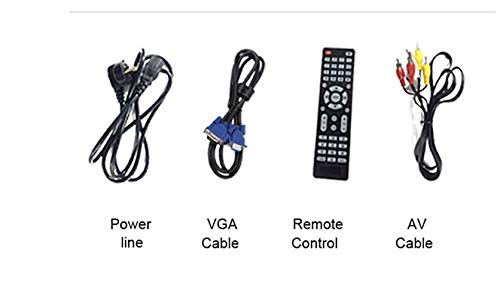
- VIVIBRIGHT GP100UP Projector
- Повер Цабле
- ВГА кабел
- АВ кабл
- Ремоте Цонтрол
- Кориснички приручник (овај документ)
Слика 3.1: Included accessories with the VIVIBRIGHT GP100UP projector, including power cable, VGA cable, remote control, and AV cable.
4. Производ је готовview
4.1. Projector Dimensions
Слика 4.1: Предњи и горњи view of the VIVIBRIGHT GP100UP projector with approximate dimensions: 11 inches (length), 8.85 inches (width), and 4 inches (height).
4.2. Улазно/излазни портови
The projector features various ports for connecting external devices:
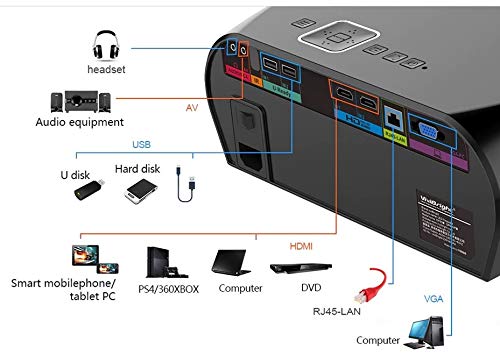
Слика 4.2: Detailed diagram of the projector's rear panel, illustrating connectivity options including headset, audio equipment (AV), USB ports for U disk and hard disk, HDMI ports, RJ45-LAN, and VGA port.
- ДВИ: Connect to Blu-ray players, gaming consoles, laptops, or other HDMI-enabled devices.
- УСБ: For connecting USB drives (U disk) or external hard drives.
- АВ: За повезивање старијих уређаја који користе композитни видео и стерео аудио.
- ВГА: For connecting to computers or laptops with a VGA output.
- RJ45-LAN: За жичану мрежну везу.
- Слушалице: За повезивање екстерних слушалица или звучника.
4.3. Даљински управљач
The included remote control allows for convenient operation of the projector.
Слика 4.3: Remote control layout with key functions: ON/OFF, Volume Up/Down, OK, Menu, Home, Speed, Mute, Back, Mouse Mode, and the USB receiver.
- УКЉУЧЕНО/ИСКЉУЧЕНО: Power on or off the projector.
- Волуме +/-: Подесите јачину звука.
- ОК: Потврдите избор.
- Мени: Access projector settings.
- Почетна: Return to the main Android interface.
- назад: Вратите се на претходни екран.
- Режим миша: Activate/deactivate air mouse function (if applicable).
- Искључи звук: Искључите или укључите звук.
5. Подешавање
КСНУМКС. Постављање
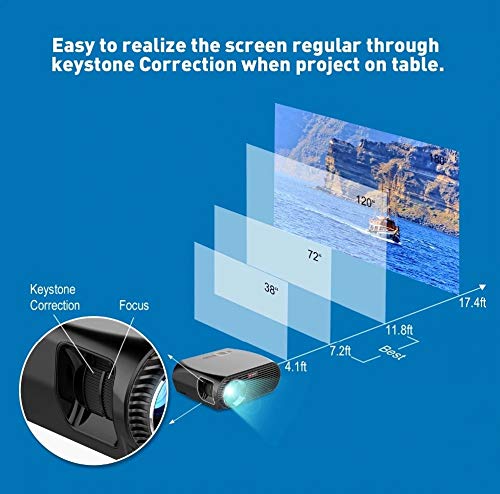
Place the projector on a stable, flat surface or mount it to the ceiling. Ensure there are no obstructions to the lens or ventilation ports. The optimal projection distance for a clear image is between 1 to 5 meters.
Слика 5.1: Illustration of projection distances and corresponding screen sizes, along with the location of the keystone correction and focus rings on the projector.
- For a 72-inch screen, the recommended distance is approximately 7.2 feet (2.2 meters).
- For a 120-inch screen, the recommended distance is approximately 11.8 feet (3.6 meters).
5.2. Прикључак за напајање
- Повежите кабл за напајање са улазом за напајање пројектора.
- Укључите други крај кабла за напајање у одговарајућу електричну утичницу.
- The power indicator light on the projector should illuminate.
5.3. Фокус и корекција Кеистоне
After powering on, adjust the image for clarity and proper geometry.
- Фокус: Rotate the focus ring near the lens until the projected image is sharp and clear.
- Кеистоне Цоррецтион: If the projected image appears trapezoidal (wider at the top or bottom), use the keystone correction ring or lever (usually located near the focus ring) to adjust the image until it is rectangular. The GP100UP supports +/- 15 degrees vertical keystone correction.
6. Упутство за употребу
6.1. Initial Power On and Android Interface
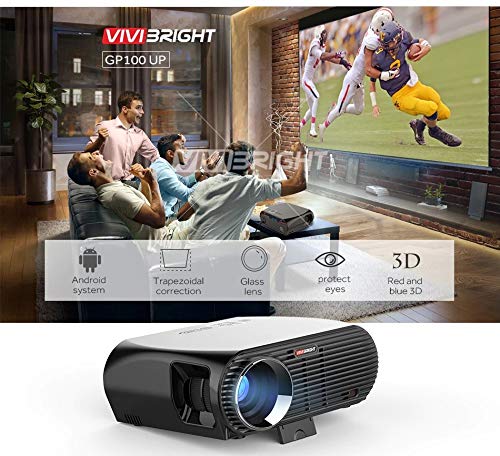
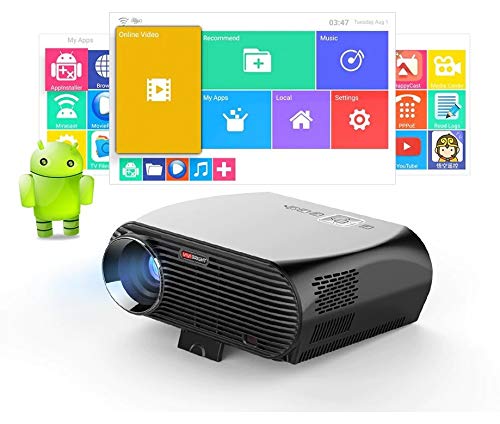
Press the power button on the projector or remote control to turn on the device. The projector will boot into its Android 6.0 operating system interface.
Слика 6.1: The VIVIBRIGHT GP100UP projector in operation, highlighting its Android system capabilities and other features.
Navigate the Android interface using the remote control. You can access pre-installed applications, settings, and media files.
6.2. Повезивање спољних уређаја
To project content from external sources:
- Connect your device (e.g., laptop, gaming console, USB drive) to the appropriate port on the projector (HDMI, USB, AV, VGA).
- On the projector's Android interface, navigate to the "Input Source" or "Source" option.
- Select the corresponding input source (e.g., HDMI1, USB, AV, VGA) to display content from your connected device.
6.3. Wireless Connectivity (Wi-Fi, Bluetooth, Screen Mirroring)
The GP100UP supports various wireless functions:
- Ви-Фи:
- Go to "Settings" on the Android interface.
- Изаберите „Wi-Fi“ и укључите га.
- Choose your desired network and enter the password to connect.
- Блуетоотх:
- Go to "Settings" on the Android interface.
- Select "Bluetooth" and turn it on.
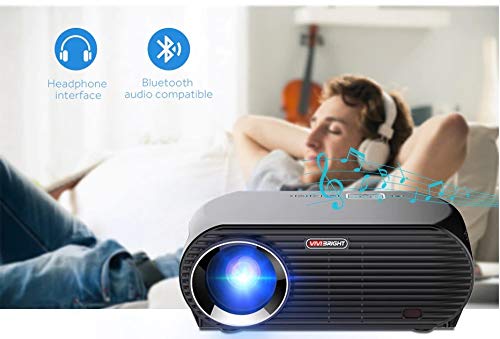
- Pair with Bluetooth audio devices like headphones or speakers.
Слика 6.2: The projector's Bluetooth audio compatibility, allowing connection to wireless headphones or speakers.
- Screen Mirroring (Miracast/Airplay/DLNA):
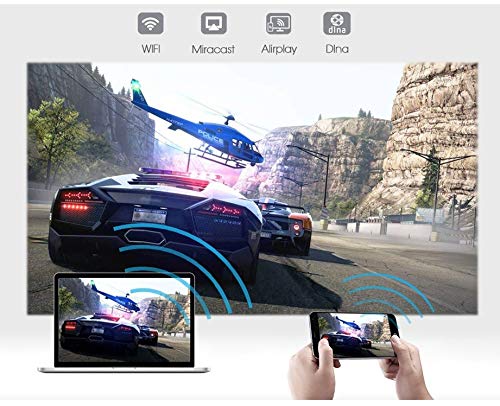
The projector supports mirroring content from compatible smartphones, tablets, and laptops via Wi-Fi, Miracast, Airplay, and DLNA.
- Ensure both your device and the projector are connected to the same Wi-Fi network.
- On the projector's Android interface, open the relevant screen mirroring application (e.g., Miracast, Airplay, DLNA).
- On your smartphone/tablet/laptop, activate its screen mirroring function (e.g., "Screen Mirroring," "Smart View," "Cast," "AirPlay").
- Select the projector from the list of available devices to begin mirroring.

Слика 6.3: Wireless screen mirroring capabilities, enabling content from mobile devices and laptops to be displayed on the projector.
7. Одржавање
7.1. Чишћење сочива
Користите меку крпу без влакана, посебно дизајнирану за оптичка сочива. Нежно обришите сочиво да бисте уклонили прашину или мрље. Избегавајте употребу абразивних материјала или јаких хемикалија.
7.2. Cleaning the Projector Casing
Обришите спољашњост пројектора меком, сувом крпом. За тврдокорне мрље, благоamp cloth can be used, followed by a dry cloth. Ensure no liquid enters the ventilation openings.
7.3. Air Filter (if applicable)
While LED projectors typically have sealed optical engines, regularly check ventilation openings for dust accumulation. Use a soft brush or compressed air to clear any blockages.
КСНУМКС. Решавање проблема
| Проблем | Могући узрок | Решење |
|---|---|---|
| Нема приказане слике |
|
|
| Слика је мутна |
|
|
| Слика је трапезоидног облика |
|
|
| Нема звука |
|
|
| Проблеми са Wi-Fi/Bluetooth везом |
|
|
9. Спецификације
| Феатуре | Детаљ |
|---|---|
| Број модела | GP100UP |
| Дисплаи Тецхнологи | ЛЦД |
| Нативе Ресолутион | 1280x800dpi (WXGA) |
| Осветљеност | 3500 лумена |
| Однос контраста | 1000:1-2000:1 |
| Извор светлости | ЛЕД |
| Живот извора светлости | Not specified (typically 20,000+ hours for LED) |
| Удаљеност пројекције | 1-5м |
| Пројектована димензија | 40-300 inches (Best image size: 72-120 inches) |
| Скала екрана | 4:3/16:9 |
| Кеистоне Цоррецтион | Manual Correction, +/- 15 degrees (vertical) |
| Систем | Android 6.0.1, CPU: Quad core ARM Cortex-A53 |
| Меморија (РАМ/РОМ) | RAM: 1G / ROM: 8G |
| Бежично повезивање | Wi-Fi, Bluetooth, DLNA, Miracast, Airplay |
| Улазни портови | HDMI, USB, AV, VGA, RJ45-LAN |
| Повер Суппли | АЦ 90-240В, 50/60Хз |
| Потрошња енергије | 140В |
| Димензије (приближно) | 37 к 30.5 к 15.9 цм |
| Тежина (приближно) | 2.6 кг |
| 3Д функција | Red-blue 3D |
10. Гаранција и подршка
The VIVIBRIGHT GP100UP Projector comes with a 1-годишња гаранција од датума куповине. Ова гаранција покрива производне недостатке при нормалној употреби.
For technical support, warranty claims, or service inquiries, please contact your retailer or the official VIVIBRIGHT customer service channel. Please have your product model number (GP100UP) and proof of purchase ready when contacting support.