
1. Производ је готовview
The LEKATO M00775 Guitar Looper Pedal is a compact and intuitive effect pedal designed for guitarists and bassists. It allows for up to 5 minutes of clear loop recording with unlimited overdubbing, providing a versatile tool for practice, composition, and live performance. The pedal features high-quality 24-bit uncompressed audio and a robust aluminum alloy construction.

Image: The LEKATO M00775 Guitar Looper Pedal, a compact and durable device.
2. Садржај пакета
Молимо вас да проверите пакет за следеће ставке:
- 1 x LEKATO Looper Pedal
- 1 к УСБ кабл
- 1 x Упутство за употребу (овај документ)
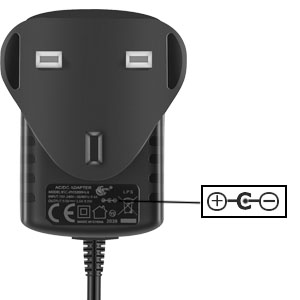
Image: The looper pedal, USB cable, and user manual included in the package. Note: Power adapter is not included.
3. Безбедносне информације
- Do not expose the unit to rain or moisture to avoid fire or shock hazards.
- Не отварајте цasinг. Унутра нема делова које корисник може сам да поправи.
- Use only a DC 9V power adapter with a center-negative polarity and a minimum of 300mA current output. Incorrect power supply can damage the unit.
- Чувати ван домашаја деце.
4. Подешавање
4.1 Повезивање напајања
The LEKATO M00775 requires a DC 9V power adapter with a center-negative polarity. The current draw is 300mA. Ensure your power adapter meets these specifications to prevent damage to the pedal. The power adapter is not included in the package.

Image: Diagram illustrating the required DC 9V center-negative power polarity for the pedal.
4.2 Аудио везе
Connect your instrument (guitar, bass, etc.) to the INPUT jack on the pedal. Connect the OUTPUT jack of the pedal to your amplifier or audio interface. Use standard 1/4" instrument cables.
4.3 УСБ веза
The USB port is used for connecting the pedal to a computer (Windows/Mac OS) to upload or download WAV loop files. The USB cable provided is for data transfer only and does not supply power to the pedal.

Image: The looper pedal connected to a laptop via its USB port for file пренос.
5. Упутство за употребу
The LEKATO M00775 Looper Pedal features a single footswitch for all primary looping functions and a Level knob to adjust playback volume.
5.1 Basic Looping Functions
- Запис: Press the footswitch once to start recording. The LED indicator will turn red.
- Play/Overdub: Press the footswitch once again to stop recording and start playback. The LED will turn green. To overdub, press the footswitch once during playback. The LED will flash red.
- Поништи/Понови: During playback, hold the footswitch for 2 seconds to undo the last overdub. Hold again for 2 seconds to redo.
- Зауставити: Double-press the footswitch quickly to stop playback. The LED will turn off.
- Избриши: While stopped, hold the footswitch for 2 seconds to delete the current loop. The LED will flash red rapidly, then turn off.

Image: A visual guide demonstrating the single-button operation for recording, playing, overdubbing, undoing, and stopping on the LEKATO Looper Pedal.
5.2 Level Knob
The 'LEVEL' knob controls the playback volume of your recorded loops. Adjust it to balance the loop volume with your live instrument signal.
5.3 УСБ File Менаџмент
Connect the pedal to your computer using the provided USB cable. The pedal will appear as a removable drive. You can then drag and drop WAV files (48kHz, 24-bit) to and from the pedal. This allows for backing up your loops or importing pre-recorded tracks.

Image: The looper pedal connected to a guitar and a laptop, illustrating its use in a musical setup.
6. Одржавање
- Clean the pedal with a soft, dry cloth. Do not use liquid cleaners.
- Чувајте педалу на сувом месту, даље од екстремних температура и директне сунчеве светлости.
- Искључите напајање када се не користи дуже време.
КСНУМКС. Решавање проблема
- Нема звука: Check all cable connections (instrument to input, output to amp). Ensure the power adapter is correctly connected and meets specifications. Adjust the 'LEVEL' knob.
- Проблеми са снимањем: Ensure the input signal is strong enough. Check if the loop memory is full (though it has unlimited overdubbing, initial recording time is 5 minutes).
- USB веза није препозната: Try a different USB port or cable. Ensure the pedal is powered on when connecting to the computer.
- Нежељена бука: Ensure all cables are properly shielded. Try a different power supply if hum or buzz persists.
8. Спецификације
| Феатуре | Спецификација |
|---|---|
| Број модела | М00775 |
| Време снимања | КСНУМКС минута |
| Овердубббинг | Неограничено |
| Квалитет звука | 24-bit, 48kHz uncompressed |
| Повер Рекуиремент | DC 9V, 300mA, Center Negative |
| Димензије (Д к Ш к В) | КСНУМКС к КСНУМКС к КСНУМКС цм (КСНУМКС к КСНУМКС к КСНУМКС инча) |
| Тежина | 310 грама (0.68 лбс) |
| Повезивање | 1/4" Jack Input, 1/4" Jack Output, USB |
| Материјал | Алуминијумска легура |

Image: The LEKATO Looper Pedal, highlighting its low noise and clean sound capabilities.
9. Гаранција и подршка
For warranty information and technical support, please refer to the documentation provided at the time of purchase or contact your retailer. You can also visit the official LEKATO webсајт за додатну помоћ и регистрацију производа.
LEKATO is committed to providing quality musical accessories. For any inquiries, please reach out to our customer service team.