
1. Увод
The CEM DT-9516 is a professional True RMS Digital Multimeter designed for safe, reliable, and accurate electrical measurements. This compact and easy-to-use instrument is ideal for identifying and resolving issues in various electrical and electronic systems. It features auto-ranging capabilities and a 6000-count display, making it suitable for both professional and hobbyist applications.
2. Безбедносне информације
Read all safety information and operating instructions before using this meter.
Овај уређај је у складу са следећим безбедносним стандардима:
- ЕН61010-1 ЦАТ ИВ 600В, ЦАТ ИИИ 1000В
- 1000V input protection on all ranges
- 10A/1000V and 0.8A/1000V fuses protection on current ranges
Опште мере предострожности:
- Увек се уверите да су мерни каблови у добром стању и правилно повезани.
- Не покушавајте да мерите волtagили струје које прелазе наведене максималне границе.
- Будите опрезни када радите са струјним колима под напоном.
- Replace batteries and fuses only with the specified types and ratings.
- Не користите мерач ако изгледа оштећено или ако је кућиште отворено.
3. Подешавање и почетни рад
3.1 Инсталација батерије
The CEM DT-9516 requires three (3) AAA batteries for operation. These are typically included with the device.
- Пронађите поклопац одељка за батерију на задњој страни мултиметра.
- Користите шрафцигер да отворите одељак за батерије.
- Insert three AAA batteries, observing the correct polarity (+ and -) as indicated inside the compartment.
- Вратите поклопац одељка за батерије и причврстите га завртњем.

Figure 1: CEM DT-9516 Multimeter with test leads, AAA batteries, and a protective carrying case.
3.2 Повезивање мерних каблова
Before taking any measurements, ensure the test leads are correctly connected to the multimeter.
- Повежите црвена тестни водич до VΩHz%CAP input jack (positive input).
- Повежите црна тестни водич до ЦОМ input jack (common/negative input).
- For current measurements (mA, µA), connect the red lead to the мАµА улазни прикључак.
- For high current measurements (up to 10A), connect the red lead to the 10А улазни прикључак.

Слика 2: Детаљно view of the multimeter's input jacks and function switch, indicating where to connect test leads for various measurements.
4. Упутство за употребу
The DT-9516 features an intuitive interface with a large LCD display and a rotary function switch for selecting measurement modes.

Слика 3: Завршеноview of the CEM DT-9516 Multimeter's controls and display elements.
4.1 Function Switch and Auto Ranging
Turn the rotary switch to the desired measurement function. The DT-9516 is an auto-ranging multimeter, meaning it automatically selects the appropriate measurement range for the input signal, simplifying operation.

Figure 4: The multimeter's auto-ranging feature allows for intuitive operation without manual range selection.
4.2 Функције мерења
The DT-9516 offers a wide range of measurement capabilities:
- Волtagе (АЦ/ДЦ): Select the 'V' position on the rotary switch. The meter will automatically detect AC or DC voltage.
- Струја (AC/DC): Select the 'mAµA' or '10A' position. Ensure test leads are connected to the correct current input jacks.
- Отпор (Ω): Изаберите положај „Ω“.
- Капацитет (CAP): Select the 'CAP' position.
- Фреквенција (Hz%): Select the 'Hz%' position.
- Тест диода: Select the diode symbol position.
- континуитет: Select the continuity symbol position. An audible tone indicates continuity.
- температура: Select the temperature symbol position. This function typically requires a K-type thermocouple (sold separately).
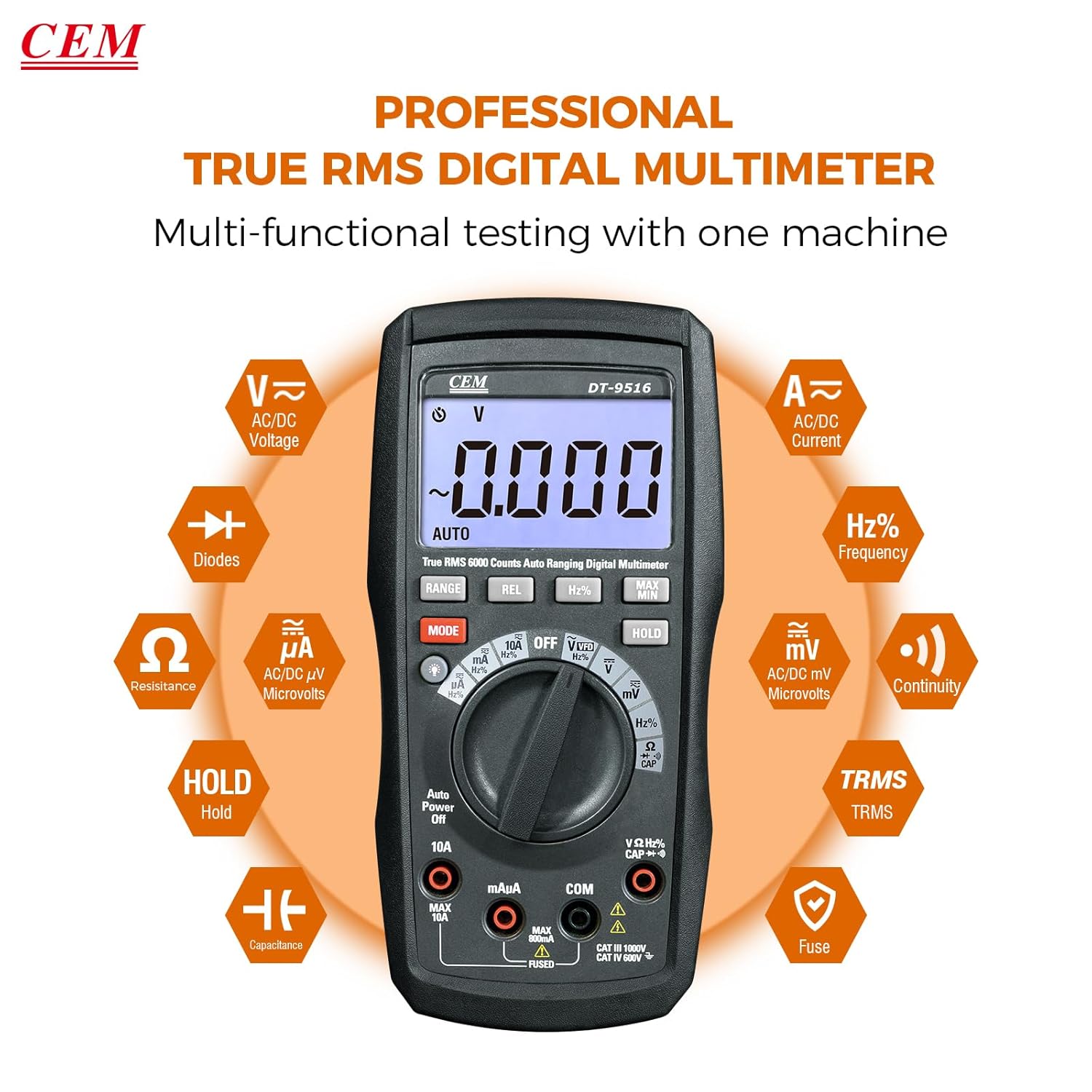
Figure 5: The multimeter's multi-functional testing capabilities are clearly illustrated.

Figure 6: The 6000-count display provides higher resolution and more accurate readings.
4.3 Посебне функције
- ВФД функција: The Variable Frequency Drive (VFD) function utilizes a low-pass filter for accurate measurement of VFD signals. Select the 'VFD' position on the rotary switch.
- Задржавање података (HOLD): Притисните тастер ХОЛД button to freeze the current measurement on the display. Press again to release. This is useful for recording readings in difficult-to-view локацијама.
- МАКС/МИН: Притисните тастер МАКС/МИН button to record the maximum and minimum values during a measurement session.
- REL (Релативно мерење): Притисните тастер РЕЛ button to store the current reading as a reference value. Subsequent measurements will be displayed as a deviation from this reference.
- Позадинско осветљење: Press the backlight button (often integrated with another function or a dedicated button) to illuminate the display for better visibility in low-light conditions.

Figure 7: The VFD function enables precise measurement of variable frequency drive signals.

Figure 8: The Data Hold function allows users to lock and record measurement values with a single button press.

Figure 9: The high-definition LCD display ensures clear digital readings at a glance, even with multiple indicators.
5. Одржавање
5.1 Чишћење
Обришите кућиште огласомamp крпом и благим детерџентом. Не користите абразивна средства или раствараче. Држите улазне терминале чистим од прљавштине и влаге.
5.2 Замена батерије
When the battery indicator appears on the display, replace the batteries as described in Section 3.1. Always use three new AAA batteries.
5.3 Замена осигурача
If the current measurement functions cease to operate, the internal fuses may need replacement. Refer to the safety section for fuse specifications (10A/1000V and 0.8A/1000V). Fuse replacement should only be performed by qualified personnel.
Warning: Disconnect all test leads from the meter and any circuit before opening the case for battery or fuse replacement.
КСНУМКС. Решавање проблема
- Без приказа: Проверите постављање батерија и пуњење. Замените батерије ако је потребно.
- Нетачна очитавања:
- Уверите се да су мерни каблови правилно повезани са одговарајућим улазним прикључцима за изабрану функцију.
- Verify the function switch is set to the appropriate measurement type.
- Проверите да ли су тест каблови оштећени.
- For current measurements, check the internal fuses.
- "OL" or "OVERLOAD" on Display: The measured value exceeds the selected range. The auto-ranging feature should typically prevent this, but if it occurs, ensure the meter is capable of measuring the expected value.
7. Спецификације
| Феатуре | Детаљ |
|---|---|
| Број модела | ДТ-КСНУМКС |
| Дисплаи | ЛЦД екран са 6000 тачака |
| Безбедносна категорија | ЦАТ ИВ 600В, ЦАТ ИИИ 1000В |
| Волtagе Мерење | АЦ/ДЦ до 1000В |
| Цуррент Меасуремент | AC/DC up to 10A |
| Ресистанце Меасуремент | До 60 МΩ |
| Капацитет Мерење | До 6000µF |
| Мерење фреквенције | До 10МХз |
| Диодни тест | Да |
| Тест континуитета | Yes (with audible indicator) |
| Посебне карактеристике | True RMS, Auto Ranging, VFD Function, Data Hold, MAX/MIN, Relative Measurement, Backlight |
| Батерије | 3 к ААА (укључено) |
| Димензије пакета | 20.6 к 13 к 7.9 цм |
| Тежина | 654 г |
| Произвођач | Shenzhen Everbest Machinery Industry Co.,Ltd. |
| УПЦ | 887327951600 |
8. Гаранција и подршка
CEM products are manufactured to high-quality standards. For specific warranty terms and conditions, please refer to the warranty card included with your product or contact CEM customer support.
For technical assistance, troubleshooting, or service inquiries, please contact your local CEM distributor or visit the official CEM webсајт за ресурсе подршке.