
1. Увод
Thank you for choosing the Kungfuking Surge Protector Power Strip with USB Ports. This device is designed to provide convenient power access and surge protection for your electronic devices. It features two AC outlets and two USB ports, along with a 6.56 ft extension cord and a flat plug for versatile placement. This manual provides essential information for safe installation, operation, and maintenance of your power strip.

Figure 1: Kungfuking Surge Protector Power Strip (Model: Kungfuking 2AC+2USB)
2. Важна безбедносна упутства
Молимо вас да прочитате и разумете сва безбедносна упутства пре употребе овог производа. Непоштовање ових упутстава може довести до струјног удара, пожара или озбиљних повреда.
- НЕМОЈТЕ exceed the electrical ratings of 120V, 12A, 60Hz, and 2.1A for USB ports.
- НЕМОЈТЕ use in wet environments or near water.
- НЕМОЈТЕ disassemble or modify the device.
- НЕМОЈТЕ use with aquariums or other water-related products.
- НЕМОЈТЕ прикључите у другу славину за напајање која се може преместити.
- НЕМОЈТЕ use if the cord or plug is damaged.
- Чувати ван домашаја деце.
- Уверите се да је утикач до краја утакнут у зидну утичницу.
- Овај производ је само за унутрашњу употребу.
3. Карактеристике производа
The Kungfuking Surge Protector Power Strip is designed for convenience and safety, offering multiple power options in a compact form factor.
- 2 АЦ утичнице: Provides standard power for electronic devices.
- 2 USB-A Ports: Delivers 5V/2.1A for charging smartphones, tablets, and other USB-powered devices.
- 6.56 FT Extension Cord: Offers flexibility in placement, reaching distant outlets.
- Дизајн равног утикача: Minimizes obstruction and allows furniture to be placed closer to the wall.
- Заштита од пренапона: Штити повезане уређаје од струјних удара и скокова.
- Издржљива конструкција: Built with fireproof ABS+PC materials for enhanced safety.
- Монтажни дизајн: Can be easily mounted on or under desks, walls, or other surfaces.

Слика 2: Кључне карактеристике и спецификације

Figure 3: All-in-One Charging Station in use
4. Подешавање и инсталација
The power strip can be installed in various locations to suit your needs. Mounting screws are included for secure installation.
4.1 Опције монтаже
The power strip offers flexible mounting options:
- Under Desk/Table: Mount horizontally or vertically under a desk or table to keep surfaces clear.
- Zidni nosač: Secure to a wall for convenient access, such as near a TV or bedside.
- Side of Cabinets/Headboards: Install vertically on the side of furniture for discreet power access.

Figure 4: Installation Options and Dimensions
4.2 Кораци инсталације
- Изаберите локацију: Select a flat, stable surface for mounting, ensuring it is within reach of a wall outlet and your devices.
- Означите рупе за завртње: Place the power strip in the desired position and mark the locations for the mounting screws using a pencil.
- Бушите пробне рупе (опционо): For wood surfaces, you may pre-drill small pilot holes to prevent wood splitting.
- Secure the Power Strip: Use the provided screws to firmly attach the power strip to the surface. Ensure it is securely fastened before use.
- Повежите се са напајањем: Plug the power strip's flat plug into a standard 120V wall outlet. The flat plug design allows for placement behind furniture.
4.3 Докampле Инсталлатионс
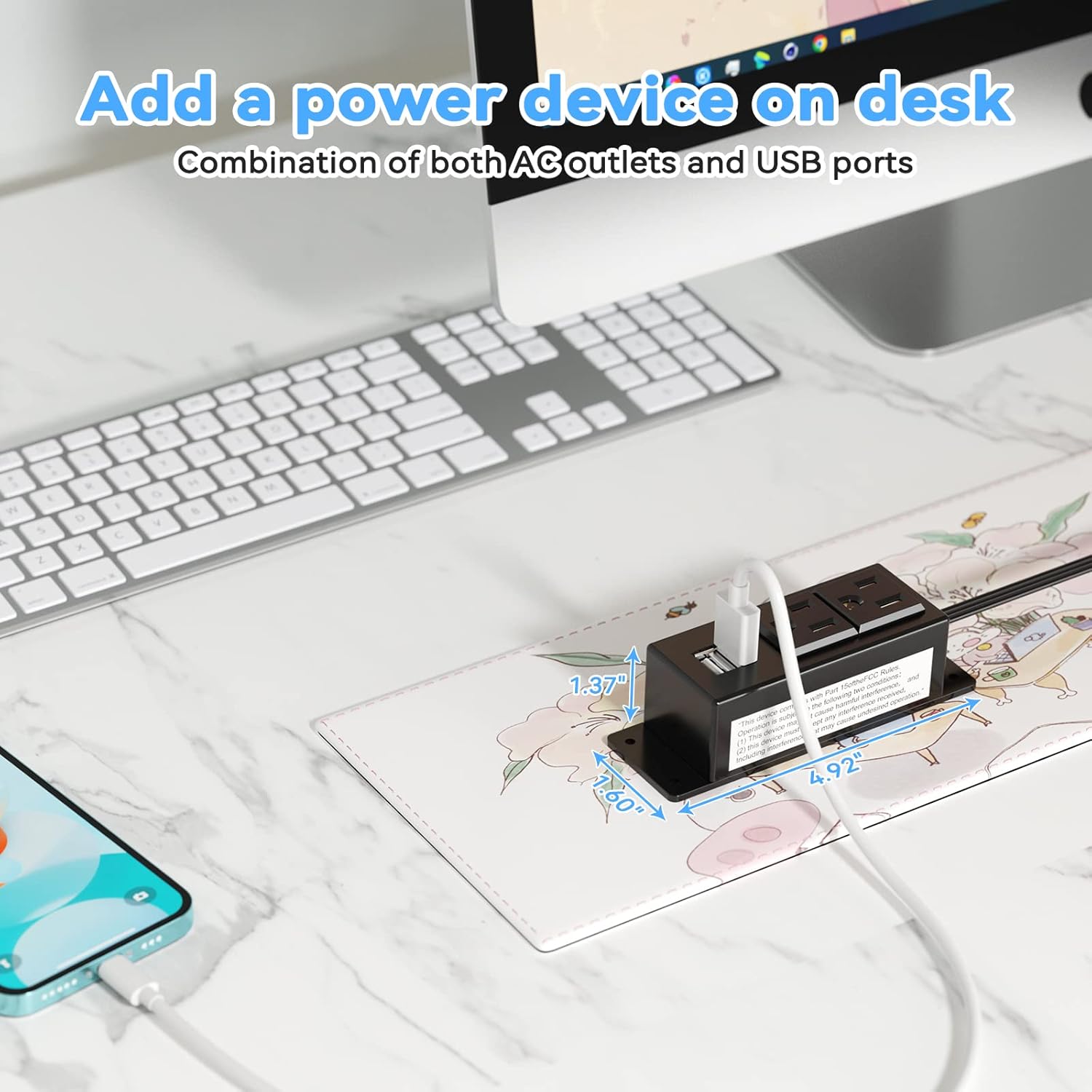
Figure 5: Desk Surface Installation

Figure 6: Under-Desk Installation

Figure 7: Wall-Mounted for TV

Figure 8: Nightstand Installation

Figure 9: Kitchen Cabinet Installation

Figure 10: Flat Plug for Space-Saving Placement
5. Упутство за употребу
Using your Kungfuking Surge Protector Power Strip is straightforward:
- Укључите у зидну утичницу: Ensure the power strip's flat plug is securely connected to a grounded 120V AC wall outlet.
- Повежите АЦ уређаје: Insert the power cords of your electronic devices into the two AC outlets.
- Повежите УСБ уређаје: Plug your USB charging cables into the two USB-A ports to charge compatible devices.
- Укључено: The power strip is designed for continuous operation once plugged in. There is no on/off switch.
- Коришћење монитора: Avoid overloading the power strip by ensuring the total power consumption of connected devices does not exceed the rated capacity (12A, 120V).
КСНУМКС. Решавање проблема
If you encounter issues with your power strip, refer to the following common problems and solutions:
| Проблем | Могући узрок | Решење |
|---|---|---|
| Нема напајања из утичница или УСБ портова. |
|
|
| USB devices not charging. |
|
|
| Power strip feels hot. |
|
|
7. Спецификације
| Феатуре | Детаљ |
|---|---|
| Модел | Kungfuking 2AC+2USB |
| АЦ утичнице | 2 |
| УСБ портови | 2 (УСБ-А) |
| Улазни волtage | 120В АЦ |
| АЦ Цуррент Ратинг | 12А |
| Фреквенција | 60Хз |
| УСБ излаз | 5V / 2.1A (Total) |
| Дужина кабла | 6.56 FT (2 метара) |
| Плуг Типе | Флат Плуг |
| Материјал | Ватроотпорни АБС+ПЦ |
| Димензије (приближно) | 4.92 к 3.74 к 1.37 инча (Д к Ш к В) |
| Тежина (приближно) | 10.5 унци |
| Посебне карактеристике | Surge Protection, Mountable Design |
8. Одржавање
Proper maintenance ensures the longevity and safe operation of your power strip:
- Чишћење: Disconnect the power strip from the wall outlet before cleaning. Use a dry, soft cloth to wipe the exterior. Do not use liquid cleaners or sprays.
- инспекција: Periodically inspect the power cord, plug, and housing for any signs of damage, such as cuts, fraying, or cracks. If damage is found, discontinue use immediately.
- Складиштење: When not in use for extended periods, store the power strip in a cool, dry place away from direct sunlight and moisture.
9. Гаранција и подршка
Kungfuking products are designed for reliability and performance. For warranty information, technical support, or any questions regarding your product, please refer to the contact information provided at the point of purchase or visit the official Kungfuking webсајту.
Сачувајте доказ о куповини за гаранцијске захтеве.