
1. Производ је готовview
The Schneider SC600SND is a versatile 2.0 channel soundbar designed to enhance your audio experience. It offers a total output power of 30W (15W x 2) and supports multiple connectivity options including Bluetooth, HDMI (ARC), Optical, and Aux. A unique feature of this soundbar is its convertible design, allowing it to be used as a single horizontal unit or split into two vertical speaker columns.

Image 1.1: The Schneider SC600SND Soundbar in its standard monoblock configuration.
2. Подешавање
2.1 Распакивање и постављање
Carefully remove all components from the packaging. Ensure you have the soundbar unit, remote control, and 3.5mm Jack cable.
The SC600SND soundbar offers two primary placement options:
- Monoblock Configuration: Use the soundbar as a single horizontal unit, ideal for placing below your television.
- Split Column Configuration: The soundbar can be separated into two vertical speaker columns. This allows for flexible placement on either side of your television or entertainment unit. To split, gently twist and pull the two halves apart at the central connection point. Attach the provided bases to each column for stability.

Image 2.1: Detail of the central connection point, allowing the soundbar to be split into two columns.
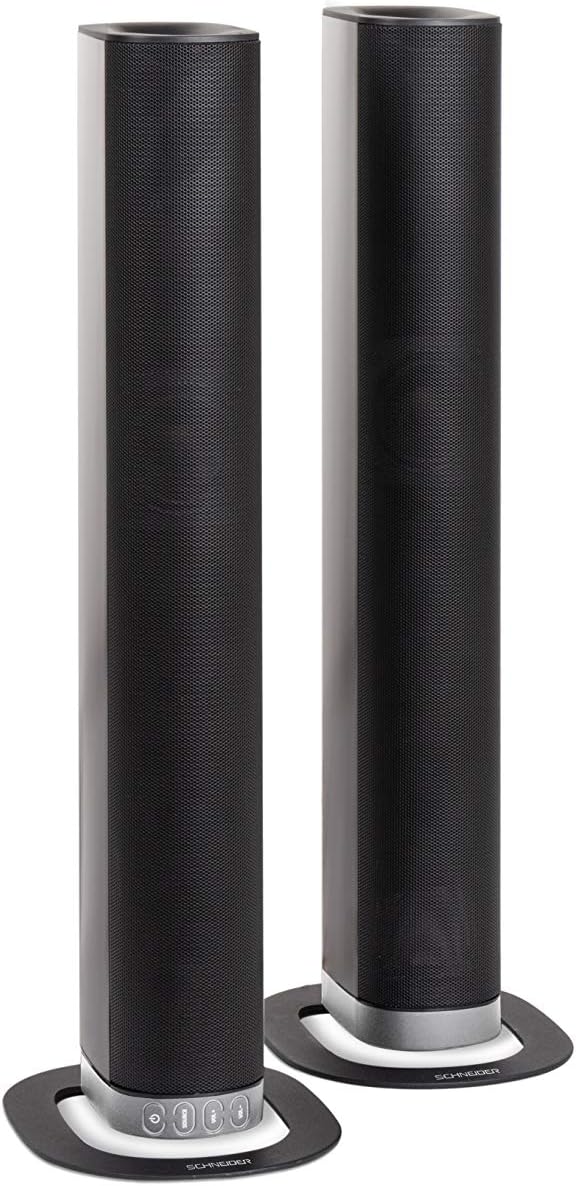
Image 2.2: The soundbar configured as two independent vertical speaker columns.
2.2 Повезивање на напајање
Connect the power cable to the soundbar's power input and then to a suitable wall outlet. The soundbar will enter standby mode.
2.3 Аудио везе
Изаберите један од следећих начина повезивања вашег аудио извора:
- ХДМИ (АРЦ): For optimal audio quality and control, connect an HDMI cable from the soundbar's HDMI ARC port to your TV's HDMI ARC port. This allows your TV remote to control the soundbar's volume.
- Оптички: Connect an optical cable from the soundbar's OPTICAL input to your TV's optical output.
- АУКС: Use the included 3.5mm Jack cable to connect the soundbar's AUX input to the headphone jack or audio output of your device (e.g., TV, smartphone, MP3 player).
- Блуетоотх: For wireless connection, refer to the Bluetooth pairing instructions in the Operating section.
3. Упутство за употребу
3.1 Укључивање/искључивање
Притисните тастер Повер дугме на саундбару или даљинском управљачу да бисте укључили или искључили уређај.
3.2 Избор извора
Притисните тастер ИЗВОР button on the soundbar or the remote control to cycle through the available input sources: Bluetooth (BT), HDMI (ARC), Optical, and AUX.

Image 3.1: On-unit control buttons for power, source selection, and volume adjustment.
3.3 Контрола јачине звука
Користите ВОЛ+ и ВОЛ- buttons on the soundbar or remote control to adjust the volume. Press the МУТЕ button on the remote to temporarily silence the audio.
3.4 Блуетоотх упаривање
- Select Bluetooth as the source input. The soundbar will enter pairing mode, indicated by a flashing LED.
- На свом мобилном уређају (паметном телефону, таблету итд.) омогућите Блутут и потражите доступне уређаје.
- Select "SC600SND" from the list of devices.
- Once paired, the LED indicator on the soundbar will stop flashing and remain solid. You can now play audio wirelessly from your device.
3.5 Режими звука
The remote control includes dedicated buttons for different sound modes to optimize your listening experience:
- ВЕСТИ: Enhances vocal clarity for news broadcasts and dialogue.
- ФИЛМ: Provides a more immersive soundstagе за филмове.
- МУЗИКА: Оптимизује звук за репродукцију музике.

Image 3.2: The included remote control with dedicated buttons for power, source, volume, mute, and sound modes.
4. Одржавање
Да бисте осигурали дуготрајност и оптималне перформансе вашег саундбара, пратите ова упутства за одржавање:
- Чишћење: Use a soft, dry cloth to clean the exterior surfaces of the soundbar. Do not use liquid cleaners, aerosols, or abrasive materials, as these can damage the finish or internal components.
- вентилација: Ensure that the soundbar's ventilation openings are not blocked. Proper airflow prevents overheating.
- Складиштење: If storing the soundbar for an extended period, disconnect it from power and store it in a cool, dry place, away from direct sunlight and extreme temperatures.
- Руковање: Избегавајте испуштање или излагање саундбара јаким ударцима.
КСНУМКС. Решавање проблема
If you encounter issues with your SC600SND soundbar, refer to the following common problems and solutions:
- Нема напајања:
- Уверите се да је кабл за напајање безбедно повезан и са звучном траком и са исправном утичницом.
- Проверите да ли је утичница функционална тако што ћете укључити други уређај.
- Нема звука:
- Verify that the correct input source (HDMI, Optical, AUX, Bluetooth) is selected on the soundbar.
- Increase the volume on both the soundbar and your connected audio source (e.g., TV, smartphone).
- Уверите се да звучна трака није искључена.
- Check all audio cables for secure connections and damage. Try a different cable if possible.
- If using HDMI ARC, ensure your TV's HDMI ARC function is enabled in its settings.
- Poor Sound Quality / Distorted Audio:
- Adjust the volume levels to avoid distortion.
- Try switching between the different sound modes (NEWS, MOVIE, MUSIC) to see if one improves the audio for your content.
- Ensure the soundbar is placed on a stable surface and not vibrating excessively.
- Ако користите Bluetooth, уверите се да је ваш уређај у домету и да нема препрека које могу изазвати сметње.
- Проблеми са Блуетоотх упаривањем:
- Ensure the soundbar is in Bluetooth pairing mode (flashing LED).
- Make sure your device's Bluetooth is enabled and it is searching for new devices.
- Приближите уређај саундбару.
- Ако је уређај претходно упарен, покушајте да га распарите и поново упарите.
- Даљински управљач не ради:
- Проверите и замените батерије у даљинском управљачу.
- Уверите се да нема препрека између даљинског управљача и сензора саундбара.
- Усмерите даљински директно на звучну траку.
6. Спецификације
| Феатуре | Спецификација |
|---|---|
| Број модела | SC600SND |
| Канали | 2.0 |
| Излазна снага | 30В (15В к 2) |
| Технологија повезивања | Bluetooth, HDMI (ARC), Optical, Aux |
| Бежична комуникација | Блуетоотх |
| Контролни метод | Ремоте Цонтрол |
| Спеакер Типе | Соундбар |
| Величина звучника | 2 инча |
| Извор напајања | Кабл Електрик |
| Product Dimensions (Monoblock) | 80.5 к 6.2 к 9 цм |
| Тежина производа | 2.5 килограма |
| Укључене компоненте | Remote Control, 3.5mm Jack Cable |
| Боја | Црно |
7. Гаранција и подршка
7.1 Ограничена гаранција
This Schneider SC600SND Soundbar is covered by a Limited Warranty. Please refer to the warranty card included with your product or contact your retailer for specific terms and conditions regarding warranty coverage and duration.
7.2 Корисничка подршка
For technical assistance, troubleshooting beyond this manual, or warranty claims, please contact the retailer where you purchased the product or visit the official Schneider webсајт за информације о подршци.