
Увод
This manual provides comprehensive instructions for the PONYBRO Mini Wireless Backlit Keyboard (Model T2). This versatile 3-in-1 device combines a full QWERTY keyboard, a multi-finger touchpad, and a remote control, making it ideal for various smart devices. Please read this manual carefully before use to ensure proper operation and to maximize your product experience.

Image: The PONYBRO Mini Wireless Backlit Keyboard, showcasing its compact design and the included USB receiver.
Садржај пакета
Молимо вас да проверите да ли су све ставке присутне у вашем пакету:
- 1 x PONYBRO Mini Keyboard
- 1 x USB Receiver (located under the battery cover)
- 1 к Мицро УСБ кабл за пуњење
- 1 x Упутство за употребу
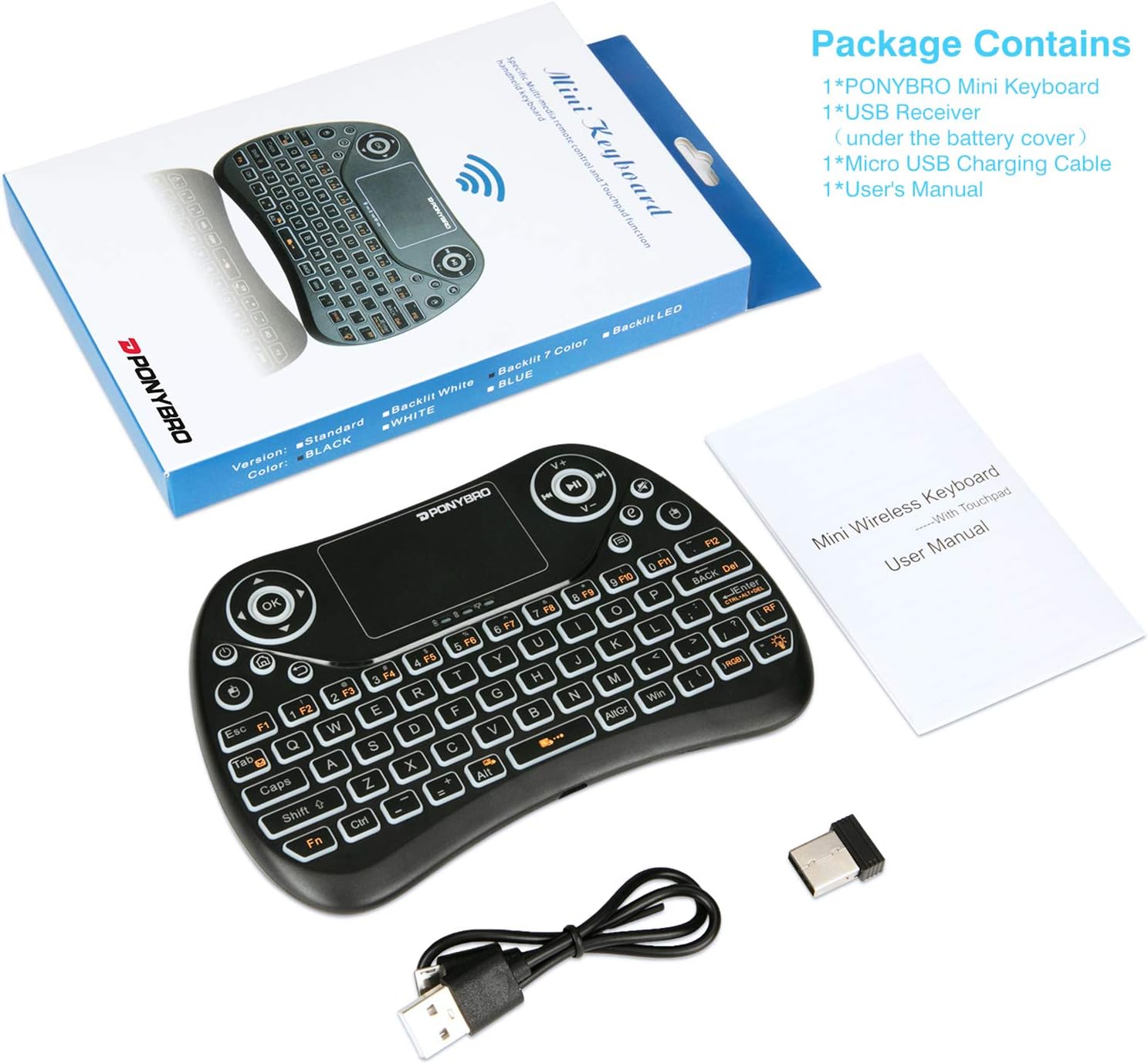
Image: Contents of the PONYBRO Mini Keyboard package, showing the keyboard, USB receiver, charging cable, and user manual.
Сетуп
- Пуњење тастатуре: Before first use, fully charge the keyboard using the provided Micro USB charging cable. Connect the cable to the keyboard's charging port and the other end to a USB power source (e.g., computer USB port, USB wall adapter). The LED indicator will show charging status.
- Пронађите УСБ пријемник: The 2.4 GHz USB dongle is stored conveniently inside the battery compartment of the keyboard. Open the battery cover to retrieve it.

Image: Step-by-step guide for initial setup, illustrating how to remove the USB receiver, plug it into a device, and turn on the keyboard.
- Повежите УСБ рисивер: Plug the USB receiver into an available USB port on your target device (e.g., Smart TV, Android TV Box, PC, Raspberry Pi, Xbox 360, PS3). The device should automatically recognize the keyboard (Plug and Play, no drivers required).
- Укључивање тастатуре: Locate the power switch on the keyboard and slide it to the "ON" position. The keyboard is now ready for use.
Упутство за употребу
Функције додирне табле
The integrated multi-finger touchpad supports various gestures for intuitive navigation:
- Single Finger Click: Функционише као клик левим мишем.
- Two Finger Click: Функционише као десни клик миша.
- Two Finger Drag (Up/Down): Scrolls the page up or down.
- Two Finger Drag (Pinch In/Out): Zooms in or out (application dependent).
The touchpad also allows for cursor speed adjustment with three grades.

Image: Visual guide to touchpad gestures, including single-finger click for left mouse, two-finger click for right mouse, and two-finger drag for scrolling/zooming.
Keyboard and Multimedia Keys
The keyboard features a full QWERTY layout with additional multimedia and function keys:
- Function (Fn) Key: Press and hold the Fn key to access the secondary functions of certain keys (e.g., F1-F12, multimedia controls).
- Мултимедијалне контроле: Dedicated keys for volume up/down, mute, play/pause, rewind, and fast forward are located on the top right.
- Тастери за навигацију: Arrow keys and an "OK" button are provided for easy navigation, especially useful for Smart TVs and media boxes.
- Browser/Home/Return: Dedicated buttons for quick access to browser, home screen, and return functions.
Контрола позадинског осветљења
The keyboard features a 7-color rainbow LED backlight for improved visibility in low-light conditions:
- FN + 💡 (Lightbulb icon): Turns the backlight on/off or cycles through 7 colors/white.
- CTRL + 💡 (Lightbulb icon): Turns on/off the backlight fade mode.
- FN + RGB: Slide finger on the touchpad to change backlight color.
- CTRL + RGB: Press CTRL + RGB to change color one by one.

Image: The PONYBRO Mini Keyboard held in hand, demonstrating its vibrant colorful backlight feature.
Компатибилност
The PONYBRO Mini Wireless Keyboard offers wide compatibility with various operating systems and devices:
- Оперативни системи: ROKU, Raspberry Pi, Linux, All Windows Server Versions 2000, KODI, iOS, Android.
- Компатибилни уређаји: Laptop/PC/PAD/Notebooks/Tablet, Raspberry Pi/HTPC/Projector/PS3, Android TV Box/Google TV Box/Smart TV, Xbox 360, smartphones (with USB adapter if no USB port).

Image: Illustration of the keyboard's wide compatibility with devices such as laptops, HTPCs, projectors, Smart TVs, notebooks, and TV boxes.

Слика: прamples of the keyboard's wide application, including use with a Smart TV, for business presentations, and for general typing on a laptop.
Одржавање
- Чишћење: Користите меку, суву крпу за чишћење површине тастатуре. За тврдокорну прљавштину, благо дamp cloth can be used, but ensure no liquid enters the device. Do not use harsh chemicals or abrasive cleaners.
- Одржавање батерије: To prolong battery life, avoid fully discharging the battery frequently. Charge the keyboard regularly, especially if it will not be used for an extended period. Store in a cool, dry place.
- Складиштење: When not in use, store the USB receiver inside the keyboard's battery compartment to prevent loss.
Решавање проблема
| Проблем | Могући узрок | Решење |
|---|---|---|
| Тастатура не реагује. | Low battery; USB receiver not connected; Keyboard not powered on; Out of range. | Charge the keyboard. Ensure the USB receiver is securely plugged into the device. Turn on the keyboard. Move closer to the device (operating range is 10 meters). |
| Touchpad erratic or unresponsive. | Interference; Low battery; Dirty touchpad surface. | Recharge the keyboard. Clean the touchpad surface. Try restarting the keyboard (turn off, then on). |
| Позадинско осветљење не ради. | Позадинско осветљење искључено; Батерија је празна. | Press FN + Lightbulb icon to toggle backlight. Charge the keyboard. |
| Keys not typing correctly. | Incorrect layout setting on host device; Interference. | Check keyboard language/layout settings on your connected device. Try moving the receiver to a different USB port. |
Спецификације
| Феатуре | Детаљ |
|---|---|
| Бранд | ПОНИБРО |
| Број модела | T2 |
| Технологија повезивања | 2.4 GHz Wireless (USB Dongle) |
| Опис тастатуре | Multi-functional QWERTY with Touchpad |
| Посебне карактеристике | Rechargeable, Backlit (7-color RGB) |
| Тип батерије | Lithium-polymer (included) |
| Подржани оперативни системи | ROKU, Raspberry Pi, Linux, Windows (2000+), KODI, iOS, Android |
| Компатибилни уређаји | Laptop/PC/PAD/Notebooks/Tablet, Raspberry Pi/HTPC/Projector/PS3, Android TV Box/Google TV Box/Smart TV |
| Димензије производа | 16 Д x 10.9 Ш x 1.5 В центиметара (приближно 6.3 Д x 4.3 Ш x 0.6 В инча) |
| Број кључева | 77 |
| Боја | Црно |

Image: Dimensions of the PONYBRO Mini Keyboard, showing its compact size for portability.
Гаранција и подршка
PONYBRO is committed to providing excellent customer satisfaction. This product comes with:
- Lifetime PONYBRO Customer Service: For any inquiries or assistance, please contact PONYBRO customer service.
- Two-Year Manufacturer's Warranty: This product is covered by a two-year manufacturer's warranty from the date of purchase.
If any problems arise during future use, please do not hesitate to contact PONYBRO customer service for support.