
1. Увод
The Protmex PT625A is a handheld digital anemometer designed for measuring air velocity and airflow. This device is suitable for various applications, including environmental monitoring, HVAC system analysis, outdoor sports, and industrial use. It provides accurate and fast readings with multiple measurement units and data handling capabilities.
2. Производ је готовview
2.1 Компоненте
- Air Velocity Flow Sensor: The fan blade assembly at the top of the device.
- Приказ: LCD screen for showing measurement readings and indicators.
- Контролна дугмад: Power, Function, Unit, Max/Min/Avg, Data Hold, Record.
- Одељак за батерије: Located on the back for battery installation.
- Микро УСБ порт: For data connection (on some models, not explicitly stated for PT625A but mentioned in video).
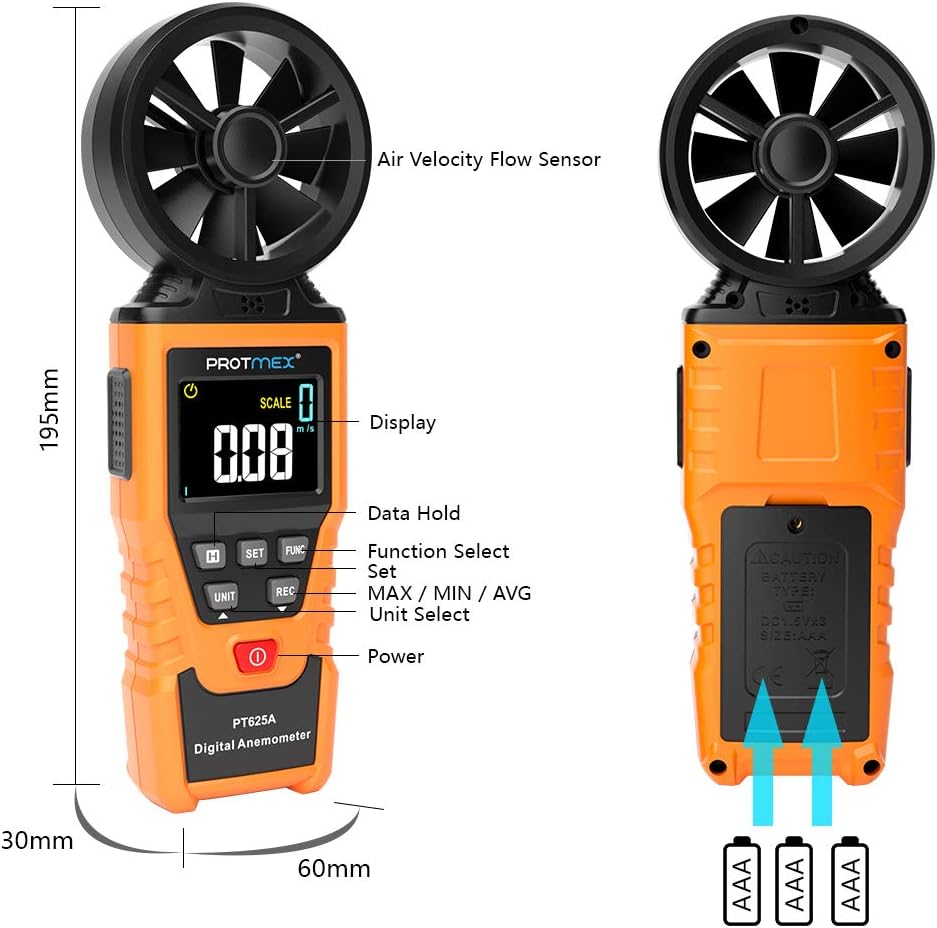
Слика 1: Предња страна view of the Protmex PT625A Anemometer with key components labeled, including the air velocity flow sensor, display, and control buttons.
2.2 Карактеристике
- High accuracy for wind speed measurement (0.4~40 m/s).
- Multiple units for wind speed: m/s, km/h, ft/s, knots, mil/h, fp/m.
- Air volume measurement in CFM, CMM, CMS.
- 8-blade aviation wing fan for sensitive and accurate readings.
- MAX/MIN/AVG data display.
- Data Hold function.
- Аутоматско искључивање.
- Индикатор ниске батерије.
- Air duct area setting for airflow calculation.
3. Подешавање
3.1 Инсталација батерије
- Пронађите одељак за батерију на задњој страни уређаја.
- Користите одвијач да бисте отворили поклопац одељка за батерију.
- Insert the provided 9V battery, ensuring correct polarity (+/-).
- Вратите поклопац одељка за батерије и причврстите га завртњем.

Слика 2: Позади view of the anemometer, indicating the battery compartment where a 9V battery is inserted. A screwdriver is required to open the compartment.
4. Упутство за употребу
4.1 Укључивање/искључивање
Притисните тастер Повер дугме ( ) to turn the device on or off. The device features an auto power-off function to conserve battery life.
4.2 Measuring Air Velocity
- Turn on the anemometer.
- Point the air velocity flow sensor (fan) directly into the airflow you wish to measure. Ensure the airflow passes through the fan blades.
- The current air velocity reading will be displayed on the LCD screen.
- Притисните тастер УНИТ button to cycle through different measurement units (m/s, km/h, ft/s, knots, mil/h, fp/m).

Figure 3: The anemometer being used to measure wind speed in an outdoor environment, demonstrating how to position the sensor into the airflow.
4.3 Airflow Measurement (CFM/CMM/CMS)
- Turn on the anemometer.
- Притисните тастер ФУНЦ button to enter airflow measurement mode.
- Користите СЕТ button to input the cross-sectional area of the air duct or channel. This is crucial for accurate airflow calculation.
- Once the area is set, point the sensor into the airflow. The device will display the airflow volume in CFM, CMM, or CMS.
- Притисните тастер УНИТ button to select the desired airflow unit.

Figure 4: Illustration of the anemometer displaying airflow measurement after setting the air duct area. The screen shows both area input and calculated flow.
4.4 Data Hold, Max/Min/Avg, and Record Functions
- Задржавање података: Притисните тастер ХОЛД дугме да замрзнете тренутно очитавање на екрану. Притисните поново да бисте отпустили.
- MAX/MIN/AVG: Притисните тастер МАКС/МИН/АВГ button to cycle through maximum, minimum, and average readings during a measurement session.
- Запис: Притисните тастер РЕЦ button to initiate data recording. (Note: Specific details on data storage and retrieval may be in the full manual or software).
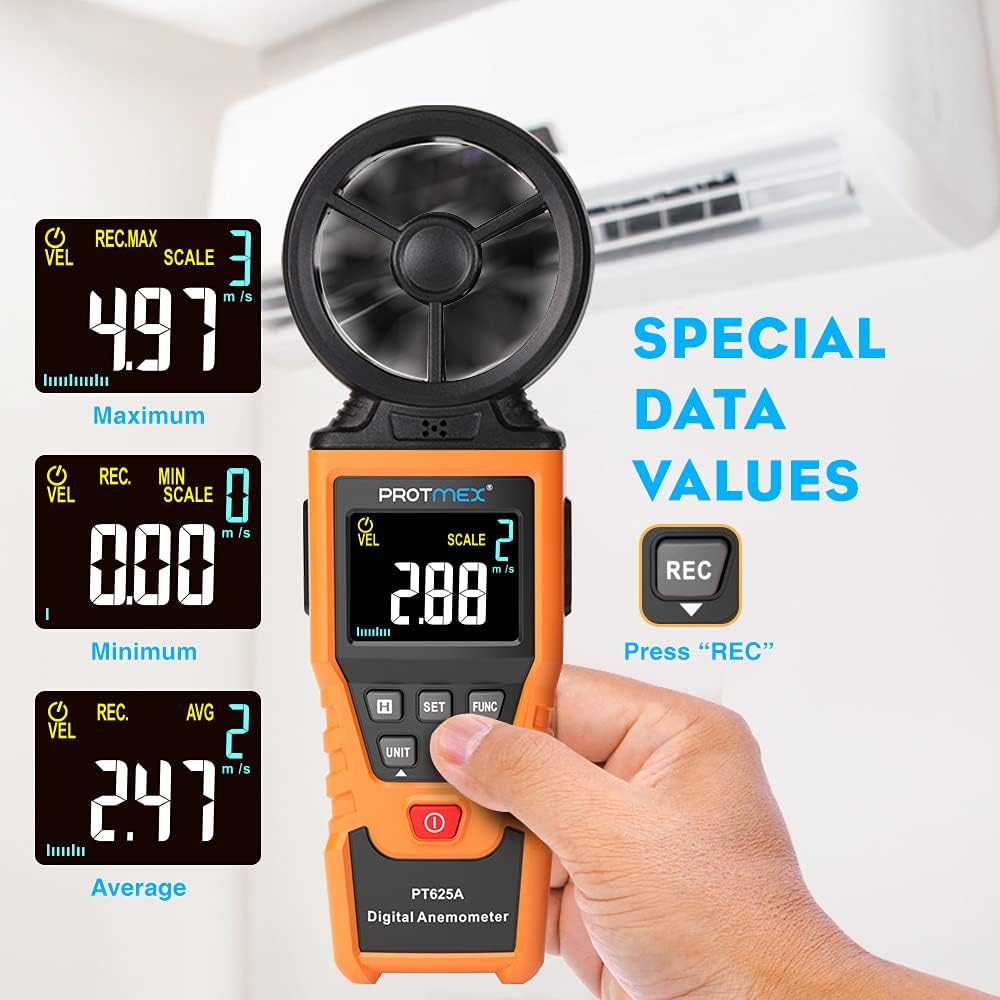
Figure 5: The anemometer's display showing maximum, minimum, and average wind velocity readings, accessible via the dedicated buttons.
5. Одржавање
- Уређај одржавајте чистим и сувим. Обришите меком,amp тканина. Немојте користити абразивна средства за чишћење или раствараче.
- Ensure the fan blades are free from dust and debris to maintain measurement accuracy.
- When not in use for extended periods, remove the battery to prevent leakage.
- Store the anemometer in its protective case in a cool, dry place.
КСНУМКС. Решавање проблема
- Нема екрана/уређаја који се не укључује:
- Check if the battery is installed correctly with the right polarity.
- Replace the battery if it is low or depleted.
- Нетачна очитавања:
- Ensure the fan blades are clean and spinning freely.
- Verify that the sensor is pointed directly into the airflow.
- Check if the correct measurement unit is selected.
- For airflow measurements, confirm the air duct area setting is accurate.
- Дугмад не реагују:
- Искључите уређај, а затим га поново укључите.
- Замените батерију.
7. Спецификације
| Параметар | Валуе |
|---|---|
| Опсег брзине ветра | 0.4~40 м/с |
| Јединице брзине ветра | m/s, km/h, ft/s, knots, mil/h, fp/m |
| Air Volume Units | CFM, CMM, CMS |
| Sampлинг Тиме | Approx. 0.5s/time |
| Максимална приказана вредност | 9999 |
| Повер Суппли | 9В Батерија |
| Димензије (Д к Ш к В) | 8.85 к 4.52 к 1.77 инча |
| Тежина артикла | 10 унци |
| Материјал | Гума |

Figure 6: A detailed screen introduction showing various symbols and their descriptions, including MAX, MIN, AVG, VEL, FLOW, AREA, and different units of measurement.
8. Гаранција и подршка
Protmex products are designed for quality and reliability. For any issues or support, please refer to the contact information provided with your purchase or visit the official Protmex website. The product is CE (LVE, EMC), RoHS approved.
Protmex offers 24/7 online friendly support. Your satisfaction is our priority.