
Cooler Master MS-110-KKMF1-US
Cooler Master MS110 Combo Bundle
Упутство за употребу
Увод
This manual provides comprehensive instructions for the setup, operation, maintenance, and troubleshooting of your Cooler Master MS110 Combo Bundle. This bundle includes a Mem-chanical Gaming Keyboard and a Gaming Mouse with an Optical Sensor, designed for enhanced gaming and computing experiences.
Key features of this combo include Mem-chanical Switches for tactile feedback, customizable gaming keys for personalized control, and an Optical Sensor in the mouse for precise tracking.
Сетуп
The Cooler Master MS110 Combo is designed for easy plug-and-play setup with your personal computer or gaming console. Both the keyboard and mouse connect via a standard USB-A interface.
Повезивање тастатуре и миша
- Locate an available USB-A port on your computer or gaming console.
- Carefully insert the USB connector of the Cooler Master MS110 Keyboard into the USB-A port.
- Insert the USB connector of the Cooler Master MS110 Mouse into another available USB-A port.
- Your operating system (e.g., Windows) should automatically detect and install the necessary drivers. This process may take a few moments.
- Once installation is complete, the keyboard and mouse will be ready for use. The keyboard's RGB lighting will illuminate, indicating it is powered on.
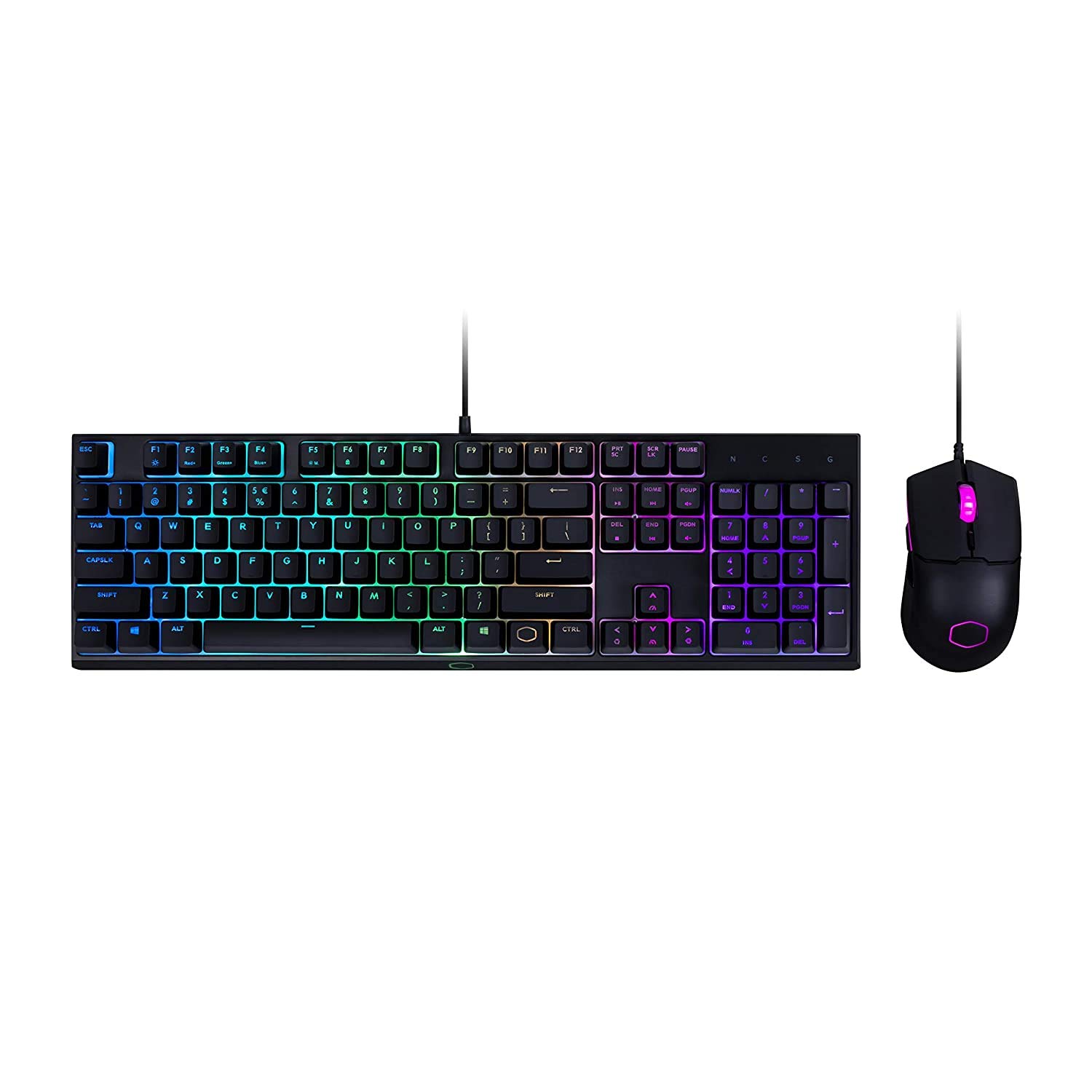
Figure 1: The Cooler Master MS110 Keyboard and Mouse Combo, ready for connection. The keyboard features a full layout with a numeric keypad and RGB backlighting, while the mouse has an ergonomic design with illuminated accents.
Упутство за употребу
Рад са тастатуром
The MS110 keyboard features Cooler Master's exclusive Mem-chanical switches, providing a tactile and responsive typing experience similar to mechanical keyboards. It includes a full-size layout with a numeric keypad and dedicated media keys.
- Стандардно куцање: Користите алфанумеричке тастере за унос текста.
- Функцијски тастери (F1-F12): These keys perform their standard functions. Some may have secondary functions accessible via the 'Fn' key (refer to on-keyboard legends).
- Контроле медија: Dedicated media keys (e.g., Play/Pause, Volume Up/Down) are typically located above the numeric keypad or integrated with function keys.
- РГБ контрола осветљења: The keyboard features vibrant RGB backlighting. Lighting modes and brightness can often be adjusted directly on the keyboard using specific key combinations (e.g., Fn + F-keys or dedicated lighting keys). Refer to the keyboard's printed legends for specific combinations.

Слика 2: Под углом view of the MS110 keyboard and mouse, showcasing the customizable RGB lighting effects on the keyboard's keys and underglow, and the mouse's illuminated scroll wheel and logo.

Слика 3: Бочни професионалацfile of the MS110 keyboard, illustrating its ergonomic design and the slight incline provided by its adjustable feet for comfortable typing and gaming.
Операција мишем
The MS110 mouse is equipped with an optical sensor for precise tracking and is designed for right-hand orientation. It offers responsive control for both general computing and gaming.
- Леви и десни клик: Standard mouse button functions.
- Точак за померање: Used for vertical scrolling and can also function as a middle click button.
- ДПИ подешавање: The mouse typically includes a dedicated button (often located behind the scroll wheel) to cycle through different DPI (Dots Per Inch) sensitivity levels, allowing you to adjust cursor speed on the fly.
- Бочна дугмад: If present, these buttons are often programmable for in-game actions or navigation (e.g., forward/back in web прегледачи).
Одржавање
Proper maintenance ensures the longevity and optimal performance of your Cooler Master MS110 Combo.
- Чишћење тастатуре:
- Искључите тастатуру из рачунара.
- Користите бочицу компримованог ваздуха да бисте уклонили прашину и остатке између тастера.
- Обришите тастере и површину тастатуре меком, благо длакомamp, крпа која не оставља влакна. Избегавајте прекомерну влагу.
- Не користите јаке хемикалије, абразивна средства за чишћење или раствараче.
- Чишћење миша:
- Искључите миш из рачунара.
- Обришите површину миша меком, благо длакомamp, крпа без длачица.
- Gently clean the optical sensor lens on the bottom of the mouse with a dry cotton swab to ensure accurate tracking.
- Складиштење: Када се не користи дуже време, чувајте комбинацију на чистом и сувом месту, даље од директне сунчеве светлости и екстремних температура.
Решавање проблема
If you encounter issues with your Cooler Master MS110 Combo, refer to the following common troubleshooting steps.
- Тастатура или миш не реагују:
- Ensure both USB connectors are securely plugged into the computer's USB ports.
- Покушајте да прикључите уређаје на различите УСБ портове на рачунару.
- Поново покрените рачунар.
- Check your computer's Device Manager (Windows) to see if the devices are recognized and if there are any driver issues.
- Keys Not Registering or Mouse Tracking Poorly:
- Perform the cleaning steps outlined in the Maintenance section. Debris under keys or on the mouse sensor can cause issues.
- Уверите се да се миш користи на чистој, нерефлектујућој површини.
- РГБ осветљење не ради:
- Verify the keyboard is properly connected and powered.
- Cycle through lighting modes using the keyboard's built-in controls (refer to the Operating section).
- If applicable, check for any software-based lighting controls from Cooler Master (though no specific software is mentioned in product details).
Спецификације
| Феатуре | Детаљ |
|---|---|
| Бранд | Цоолер Мастер |
| Број модела | MS-110-KKMF1-US |
| Димензије производа | 55.8 к 18.7 к 4.6 цм |
| Тежина артикла | 1.08 kg (Keyboard and Mouse combined) |
| Хардверски интерфејс | УСБ |
| Технологија повезивања | USB (електрични са каблом) |
| Компатибилни уређаји | Лични рачунар, играћа конзола |
| Оперативни систем | Виндовс |
| Посебне карактеристике | Mem-chanical Switches, Customizable Gaming Keys, Optical Sensor, Attached Light (RGB) |
| Опис тастатуре | Гаминг |
| Movement Detection Technology (Mouse) | Оптицал |
| Hand Orientation (Mouse) | Тачно |
Информације о гаранцији
Cooler Master products are typically covered by a limited warranty. For specific warranty terms, conditions, and duration applicable to your MS110 Combo Bundle, please refer to the warranty card included with your product packaging or visit the official Cooler Master webсајт. За рекламације у оквиру гаранције може бити потребан доказ о куповини.
Подршка
For further assistance, technical support, or to download the latest drivers and software (if available), please visit the official Cooler Master support webсајт. Тамо можете пронаћи и често постављана питања и форуме заједнице.
Official Cooler Master Store: Cooler Master Store on Amazon.in
Ask a question about this manual
Ask about setup, troubleshooting, compatibility, parts, safety, or missing instructions. Manuals+ will review the question and use this page’s manual context to help answer it.