
1. Увод
This manual provides essential information for the safe and efficient operation of your Eurom DryBest 30 WiFi dehumidifier. Please read these instructions carefully before use and retain them for future reference. This appliance is designed to reduce humidity levels in indoor environments, improving air quality and preventing issues related to excessive moisture.
2. Безбедносна упутства
Увек се придржавајте следећих мера предострожности како бисте смањили ризик од пожара, струјног удара или повреде.
- Уверите се да је напајање волtage одговара налепници са ознакама на уређају.
- Не користите одвлаживач ваздуха са оштећеним каблом или утикачем.
- Држите уређај даље од извора топлоте, директне сунчеве светлости и запаљивих материјала.
- Не блокирајте улаз или излаз ваздуха. Одржавајте најмање 20 цм простора око уређаја.
- Никада не стављајте предмете у вентилационе отворе.
- Unplug the unit before cleaning, maintenance, or when not in use.
- Do not use the appliance in bathrooms or other excessively wet environments where it could come into contact with water.
- Овај уређај није намењен за употребу од стране особа (укључујући децу) са смањеним физичким, чулним или менталним способностима, или недостатком искуства и знања, осим ако им је дат надзор или упутства о употреби уређаја од стране особе одговорне за њихову безбедност.
- Децу треба надзирати како би се осигурало да се не играју са уређајем.
- Ако је кабл за напајање оштећен, мора га заменити произвођач, његов сервисер или слично квалификоване особе како би се избегла опасност.
3. Производ је готовview
The Eurom DryBest 30 WiFi is a powerful and efficient dehumidifier designed for domestic use. It features a quiet operation and can be controlled via WiFi for convenience.
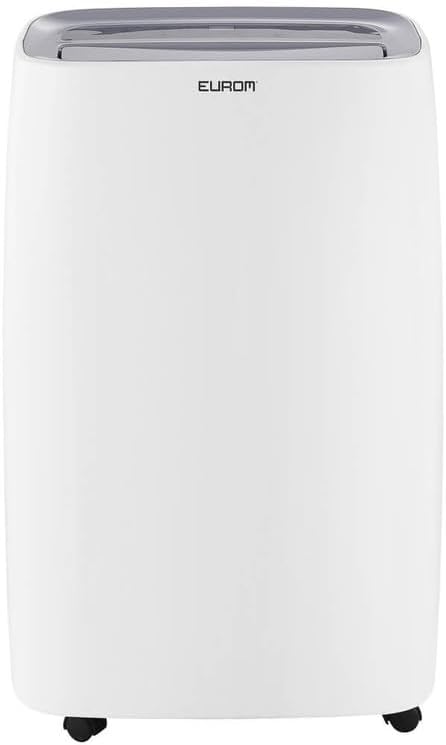
Слика 3.1: Фронт view of the Eurom DryBest 30 WiFi dehumidifier. This image displays the unit's overall appearance, highlighting its modern white casing and integrated handles for portability.
3.1 Главне компоненте
- Контролна табла: Located on the top of the unit for easy access to settings and indicators.
- Излаз ваздуха: Top-mounted grille for expelling dry air.
- Улаз/филтер за ваздух: Rear-mounted for drawing in humid air, equipped with a removable air filter.
- Резервоар за воду: Removable tank for collecting condensed water.
- Континуирани излаз за одвод: Port for connecting a hose for continuous drainage.
- Котачићи: Точкови у основи за лако кретање.
4. Подешавање
4.1 Распакивање
- Пажљиво извадите одвлаживач ваздуха из његовог паковања.
- Уклоните сав материјал за паковање, укључујући траку или заштитне фолије.
- Inspect the unit for any signs of damage. If damaged, do not operate and contact your retailer.
4.2 Постављање
- Place the dehumidifier on a firm, level surface to prevent vibration and water leakage.
- Ensure there is at least 20 cm (8 inches) of space around the unit for proper airflow. Do not place it against a wall or furniture that could obstruct the air inlets or outlets.
- For optimal performance, place the unit in the center of the room or area requiring dehumidification.
- Избегавајте постављање уређаја у близини уређаја који производе топлоту или на директној сунчевој светлости.
4.3 Прикључак за напајање
- Укључите кабл за напајање у уземљену електричну утичницу.
- Ensure the outlet meets the electrical requirements of the unit (230V, 50Hz).
4.4 Опције одводњавања
The dehumidifier offers two drainage methods: manual tank emptying or continuous drainage.
4.4.1 Ручно пражњење (резервоар за воду)
- When the water tank is full, the "FULL" indicator light will illuminate, and the unit will automatically stop operating.
- Пажљиво извуците резервоар за воду са предње стране уређаја.
- Испразните сакупљену воду.
- Вратите празан резервоар за воду на место док не кликне чврсто. Уређај ће наставити са радом.
4.4.2 Континуирано одводњавање
- For continuous operation without emptying the tank, connect a suitable drain hose (not included) to the continuous drain outlet at the back of the unit.
- Ensure the hose is sloped downwards to allow gravity to drain the water into a floor drain or larger container.
- Проверите да ли је спој црева безбедан како бисте спречили цурење.
4.5 WiFi Setup
The DryBest 30 WiFi can be controlled remotely via a smartphone app.
- Download the "Eurom Smart" app (or similar specified app) from your device's app store.
- Follow the in-app instructions to register an account and add your dehumidifier.
- Ensure your dehumidifier is powered on and the WiFi indicator light is blinking, indicating pairing mode.
- Once connected, the WiFi indicator light will become solid.
5. Упутство за употребу

Слика 5.1: Control Panel of the Eurom DryBest 30 WiFi. This image details the various buttons and indicators for operating the dehumidifier.
5.1 Контролна табла прекоview
- Дугме за укључивање: Укључује или искључује јединицу.
- Дугме МОДЕ: Cycles through operating modes (e.g., Auto, Continuous, Laundry).
- Тастери ГОРЕ/ДОЛЕ: Подесите жељени ниво влажности или подешавања тајмера.
- Дугме СПЕЕД: Бира брзину вентилатора (Висока, Ниска).
- Дугме ТАЈМЕР: Подешава тајмер за аутоматско укључивање или искључивање.
- Дугме СВИНГ: Activates or deactivates the oscillating air outlet.
- PUMP Button: Activates the internal pump for continuous drainage (if applicable and hose connected).
- Дугме ЛОЦК: Функција закључавања за децу спречава случајне промене.
- ВИФИ индикатор: Приказује статус WiFi везе.
- FULL Indicator: Светли када је резервоар за воду пун.
- LAUNDRY Indicator: Illuminates when Laundry mode is active.
- FAN Indicator: Illuminates when fan is operating.
5.2 Основни рад
- Укључено: Притисните тастер ПОВЕР button. The unit will start in its default or last-used mode.
- Подесите жељену влажност: Користите UP и ДОВН buttons to set the target humidity level (e.g., 40% - 60% relative humidity is generally recommended). The unit will operate until this level is reached, then cycle on and off to maintain it.
- Изаберите режим: Притисните тастер МОДЕ button to choose between different operating modes.
- Аутоматски режим: The unit automatically adjusts operation based on the ambient humidity.
- Континуирани режим: The unit runs continuously regardless of humidity level. Ideal for very damp conditions or for use with continuous drainage.
- Режим прања веша: Designed to quickly dry clothes indoors. The unit operates at high fan speed and continuous dehumidification.
- Подесите брзину вентилатора: Притисните тастер СПЕЕД button to toggle between High and Low fan speeds.
- Подеси тајмер: Притисните тастер ТИМЕР дугме, а затим употребите UP и ДОВН to set the desired operating duration (e.g., 2 hours, 4 hours).
- Функција замаха: Притисните тастер СВИНГ button to activate the oscillating louvers, distributing dry air more evenly.
- Брава за децу: Притисните и држите ЛОЦК button for a few seconds to activate/deactivate the child lock.
- Искључивање: Притисните тастер ПОВЕР поново дугме да искључите јединицу.

Слика 5.2: Dehumidifier in use, illustrating its application for drying laundry. The image shows the unit positioned near a clothes rack, indicating its effectiveness in reducing drying times indoors.
6. Одржавање
Редовно одржавање обезбеђује оптималне перформансе и продужава век трајања вашег одвлаживача ваздуха.
6.1 Чишћење ваздушног филтера
Ваздушни филтер треба чистити сваке две недеље или чешће, у зависности од употребе и квалитета ваздуха.
- Искључите одвлаживач ваздуха из утичнице.
- Уклоните ваздушни филтер са задње стране уређаја.
- Gently vacuum any dust or debris from the filter. For heavy dirt, wash the filter with lukewarm water and a mild detergent.
- Rinse thoroughly and allow the filter to air dry completely before reinstalling. Do not expose to direct sunlight or high heat.
- Вратите суви филтер у уређај.
6.2 Чишћење резервоара за воду
Редовно чистите резервоар за воду како бисте спречили раст буђи и плесни.
- Искључите јединицу.
- Уклоните и испразните резервоар за воду.
- Wash the tank with warm water and a mild detergent. Rinse thoroughly.
- Dry the tank completely before placing it back into the unit.
6.3 Складиштење
Ако се одвлаживач неће користити дуже време:
- Искључите уређај из струје и испразните резервоар за воду.
- Clean the air filter and the exterior of the unit.
- Allow the unit to dry for at least 24 hours in a well-ventilated area to prevent mold growth inside.
- Одвлаживач ваздуха чувајте усправно на хладном и сувом месту, даље од директне сунчеве светлости и екстремних температура.
КСНУМКС. Решавање проблема
Пре него што контактирате корисничку подршку, погледајте следећи водич за решавање уобичајених проблема.
| Проблем | Могући узрок | Решење |
|---|---|---|
| Јединица се не укључује. | No power, power cord loose, water tank full. | Check power connection, ensure tank is empty and correctly inserted. |
| No water collected / Low dehumidification. | Humidity level too low, air filter clogged, room temperature too low, unit size too small for area. | Increase desired humidity setting, clean air filter, ensure room temperature is above 5°C (41°F), close doors/windows. |
| Јединица је бучна. | Unit not on a level surface, air filter clogged. | Place on a flat, stable surface. Clean air filter. |
| Вода цури из јединице. | Water tank not inserted correctly, continuous drain hose loose or blocked. | Reinsert water tank properly. Check continuous drain hose for secure connection and obstructions. |
| Проблеми са WiFi везом. | Incorrect app, poor WiFi signal, incorrect pairing procedure. | Ensure correct app is used, check router and signal strength, repeat WiFi setup steps. |
8. Спецификације
| Феатуре | Спецификација |
|---|---|
| Назив модела | DryBest 30 WiFi |
| Референтни број | 1052 |
| Бранд | Еуром |
| Капацитет одвлаживања | 30 Liters/24 hours |
| Потрошња енергије | 580 В |
| Капацитет протока ваздуха | 350 м³/сат |
| Ниво буке | <47 дБА |
| Димензије (Д к Ш к В) | 64.2 к 43.1 к 30.1 цм |
| Тежина | 15.5 кг |
| Запремина резервоара за воду | 6 Liters / 10 Liters (depending on mode/configuration) |
| Посебне карактеристике | Silent operation, Adjustable humidity control, WiFi connectivity |
| Препоручена употреба | Домаћи |
| Боја | Бела |
9. Гаранција и подршка
For warranty information, please refer to the terms and conditions provided at the time of purchase or contact your retailer. If you encounter any issues not covered in the troubleshooting section, or require further assistance, please contact Eurom customer support or your authorized dealer.
Сачувајте рачун као доказ о куповини за евентуалне рекламације у вези са гаранцијом.