
1. Производ је готовview
The TOTU 13-in-1 USB C Hub (Model TT-HB013A) is a versatile docking station designed to expand the connectivity of your USB-C enabled laptop or device. It provides multiple ports for display output, high-speed data transfer, and power delivery, enhancing productivity and convenience.
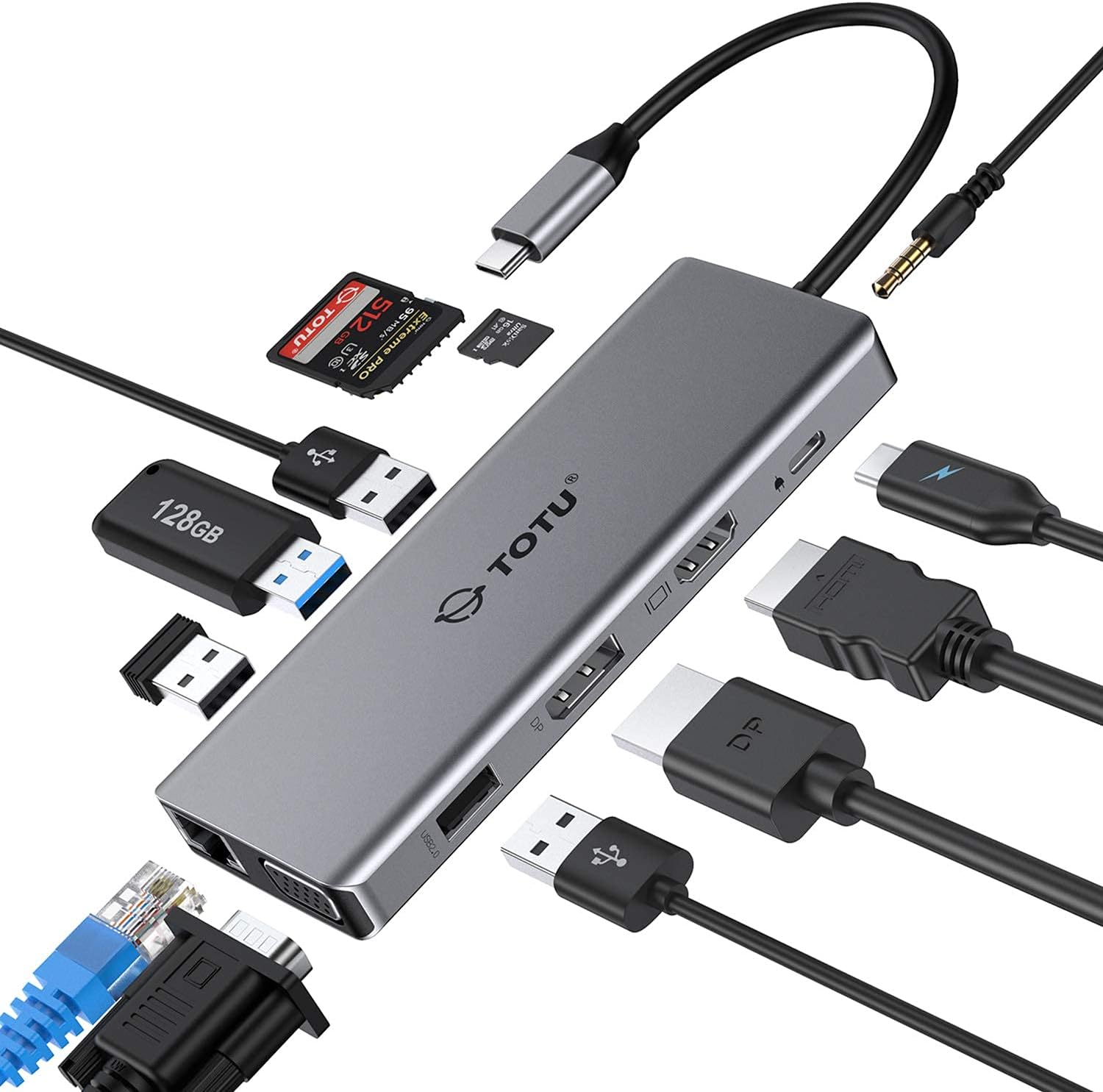
Figure 1: The TOTU 13-in-1 USB C Hub, showcasing its compact design and multiple connectivity options including USB, HDMI, DisplayPort, and audio jacks.
This hub is ideal for users seeking to connect multiple peripherals, external displays, and network connections through a single USB-C port.
2. Key Features and Port Layout
The TOTU 13-in-1 USB C Hub offers a comprehensive set of ports to meet diverse connectivity needs. Below is a detailed layout and description of each port:

- HDMI Port (1): Supports up to 4K UHD (3840x2160) at 30Hz for high-resolution video output.
- DisplayPort (2): Supports up to 4K UHD (3840x2160) at 30Hz for high-resolution video output.
- VGA Port (3): Supports up to 1080P (1920x1080) at 60Hz for standard video output.
- USB 3.0 Type-A Ports (2): Data transfer speed up to 5Gbps, ideal for connecting external hard drives, flash drives, and other high-speed peripherals.
- USB 2.0 Type-A Ports (2): Data transfer speed up to 480Mbps, recommended for connecting mouse, keyboard, and other low-bandwidth devices to avoid potential USB 3.0 radio frequency interference.
- SD Card Slot (6): Supports memory cards up to 512GB with read/write speeds up to 104 MB/s.
- TF Card Slot (7): Supports memory cards up to 512GB with read/write speeds up to 104 MB/s. SD/TF memory cards can be used simultaneously.
- USB Type-C Female PD3.0 Charging Port (8): For Type-C laptop or Type-C smartphone charging. Input power 20V/3A max (Please use a 45W or above adapter for laptop charging).
- RJ45 гигабитни етернет порт: Provides stable and fast wired network connection (10/100/1000 Mbps).
- 3.5mm Audio/Mic 2-in-1 Jack: За повезивање слушалица или звучника.
3. Водич за подешавање
Follow these steps to set up your TOTU 13-in-1 USB C Hub:
- Провера компатибилности: Ensure your laptop's USB-C port supports DisplayPort Alt Mode and Power Delivery for full functionality. The hub is incompatible with USB-A to USB-C adapters.
- Повежите се са хост уређајем: Plug the integrated USB-C cable of the hub into the USB-C port of your laptop or compatible device.
- Напајање (опционо, али препоручено): For stable operation and charging your laptop, connect a 45W or above USB-C power adapter to the PD3.0 charging port on the hub.
- Повежите периферне уређаје: Plug your desired peripherals (e.g., external monitors, USB drives, keyboard, mouse, Ethernet cable, audio devices) into the corresponding ports on the hub.
- Инсталација драјвера: The hub is generally plug-and-play for most operating systems (Windows 7/8/8.1/10, Mac OS X 10.6 or later, Linux 2.6.14 or later). No additional drivers are typically required.

Figure 2: Connecting the USB C Hub to a laptop and power source for charging.
4. Упутство за употребу
4.1. Режими приказа
The TOTU 13-in-1 USB C Hub supports various display configurations depending on your operating system:
За macOS системе:
macOS only supports mirror display across multiple external monitors. The laptop's own screen will also mirror the external displays.

Figure 3: Mirror Mode on macOS, where all connected displays show identical content.
За Windows системе:
Windows systems support triple display in extended mode, including the laptop's own display. The resolution for extended mode will be limited to 1080P.

Figure 4: Extended Mode on Windows, allowing different content on each display.

Figure 5: Multi-display mode comparison between Windows (supports MST) and macOS (mirror only).
4.2. Пренос података
The hub features both USB 3.0 and USB 2.0 ports for efficient data transfer:
- УСБ 3.0 портови: Offer ultra-high-speed data sync up to 5 Gbps, suitable for large file transfers and connecting high-bandwidth devices.
- УСБ 2.0 портови: Provide transfer speeds of 480 Mbps. It is advisable to connect your mouse or keyboard to these ports to avoid potential radio frequency interference from USB 3.0 devices.

Figure 6: USB 3.0 and USB 2.0 ports for super fast and stable data transfer.
4.3. Аудио повезивање
The integrated 3.5mm audio/mic 2-in-1 jack allows you to connect headphones or speakers for an enhanced audio experience.

Figure 7: The 3.5mm audio jack enables connection to various audio devices.
5. Спецификације производа
| Феатуре | Спецификација |
|---|---|
| Бранд | ТОТУ |
| Број модела | ТТ-ХБ013А |
| Материјал | Алуминијумска легура, АБС |
| Цоннецтор | УСБ 3.1 Типе-Ц конектор |
| ХДМИ порт | Up to 4K UHD (3840x2160@30Hz) |
| ДисплаиПорт | Up to 4K UHD (3840x2160@30Hz) |
| ВГА порт | 1080P (1920x1080@60Hz) |
| УСБ 3.0 портови типа А | Data transfer speed up to 5Gbps |
| УСБ 2.0 портови типа А | Брзина преноса података до 480Мбпс |
| Слот за СД картицу | Supported memory card capacity up to 512GB, Read/Write speed up to 104 MB/s |
| ТФ Цард слот | Supported memory card capacity up to 512GB, Read/Write speed up to 104 MB/s |
| USB Type-C PD3.0 Charging Port | Input power 20V/3A max (Only for Type-C laptop or Type-C smartphone charging) |
| Компатибилност оперативног система | Windows 7/8/8.1/10, Mac OS X 10.6 or later, Linux 2.6.14 or later |
| Тежина артикла | 3.68 унци |
| Димензије производа | 10.94 к 1.96 к 0.59 инча |
6. Одржавање
To ensure the longevity and optimal performance of your TOTU USB C Hub, please follow these maintenance guidelines:
- Чишћење: Use a soft, dry cloth to wipe the surface of the hub. Avoid using liquid cleaners or aerosols, as they may damage the device.
- Складиштење: When not in use, store the hub in a cool, dry place, away from direct sunlight and extreme temperatures. The included soft pouch can be used for protection.
- Руковање: Избегавајте испуштање чворишта или његово излагање јаким ударцима. Немојте прекомерно савијати или увијати интегрисани USB-C кабл.
- вентилација: Ensure the hub has adequate ventilation during use to prevent overheating. Do not cover the hub with cloths or place it in enclosed spaces.

Figure 8: The included soft pouch provides convenient storage and protection for the hub.
КСНУМКС. Решавање проблема
If you encounter issues with your TOTU USB C Hub, please refer to the following common troubleshooting tips:
- Нема излаза на екран:
- Уверите се да USB-C порт вашег лаптопа подржава DisplayPort Alt режим.
- Check all cable connections (USB-C from hub to laptop, HDMI/DP/VGA from hub to monitor).
- Try restarting your laptop and reconnecting the hub.
- Verify monitor input settings are correctly selected (e.g., HDMI 1, DisplayPort).
- For Windows, ensure display settings are configured for 'Extend' or 'Duplicate'. For macOS, remember it only supports mirror display.
- Треперење или нестабилан приказ:
- Reduce the display resolution if using multiple monitors, especially if exceeding 1080P/60Hz.
- Ensure you are using high-quality HDMI/DP/VGA cables.
- Connect a power adapter to the hub's PD port to provide stable power.
- USB уређаји нису препознати:
- Поново повежите УСБ уређај и чвориште.
- Try connecting the device to a different USB port on the hub.
- Ensure the hub is receiving sufficient power, especially for power-hungry devices.
- Спори пренос података:
- Уверите се да користите уређаје и каблове компатибилне са USB 3.0 за оптималне брзине.
- Avoid connecting high-bandwidth devices to USB 2.0 ports.
- Нема напајања лаптопа:
- Ensure your power adapter is 45W or above.
- Verify the power adapter and USB-C cable are functioning correctly.
8. Гаранција и подршка
TOTU offers a robust warranty and support system for its products:
- 100% гаранција поврата новца: For quality problems within 30 days of purchase.
- КСНУМКС-месец Гаранција: A standard 12-month warranty is provided for the product.
- 18-месечна продужена гаранција: You can upgrade to an 18-month warranty by subscribing to the TOTU webсајту.
- Љубазна корисничка служба: TOTU is committed to providing hassle-free customer service.
- Подршка путем е-поште: For any assistance or inquiries, please contact support@loopec.com.