
1. Увод
This manual provides detailed instructions for the proper use and maintenance of your ELECTROPRIME SK-892 Mini Digital Voice Recorder. Please read this manual thoroughly before operating the device to ensure optimal performance and longevity. Keep this manual for future reference.
2. Производ је готовview
The ELECTROPRIME SK-892 is a compact and portable digital voice recorder designed for discreet audio capture and playback. It features 8GB of internal storage and a simple one-switch operation.
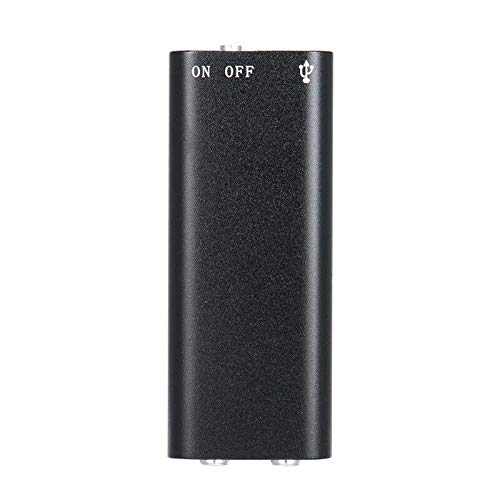
Слика 2.1: Врх view of the ELECTROPRIME SK-892 Mini Digital Voice Recorder, highlighting the ON/OFF switch and the USB port for connectivity.
Компоненте уређаја:
- ОН/ОФФ прекидач: Контролише напајање и функције снимања.
- УСБ порт: Used for charging the device and connecting to a computer for data transfer.
- Утичница за слушалице (3.5 мм): For audio playback using earphones.
- Светло индикатора: Provides status feedback (e.g., recording, charging).
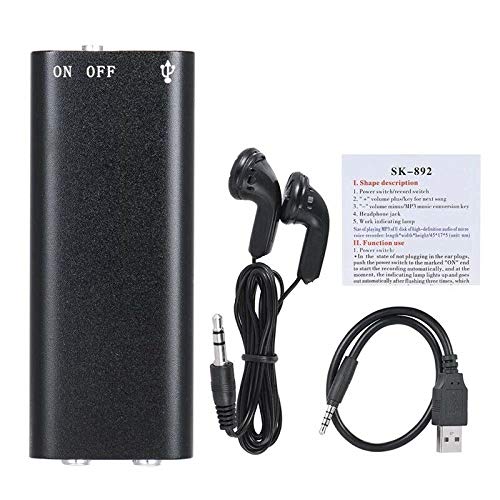
Слика 2.2: The SK-892 recorder shown with its accessories, including wired headphones and a USB charging/data cable. The small instruction card is also visible.
3. Подешавање
3.1 Пуњење уређаја
- Connect the small end of the provided USB cable to the USB port on the recorder.
- Connect the other end of the USB cable to a powered USB port on a computer or a USB wall adapter (not included).
- The indicator light will illuminate during charging. Once fully charged, the light may change color or turn off.
- Потпуно пуњење обично траје отприлике 2-3 сата.
3.2 Почетно укључивање
To power on the device, slide the ON/OFF switch to the "ON" position. The indicator light will briefly flash, indicating the device is ready for operation.
4. Упутство за употребу
4.1 Снимање звука
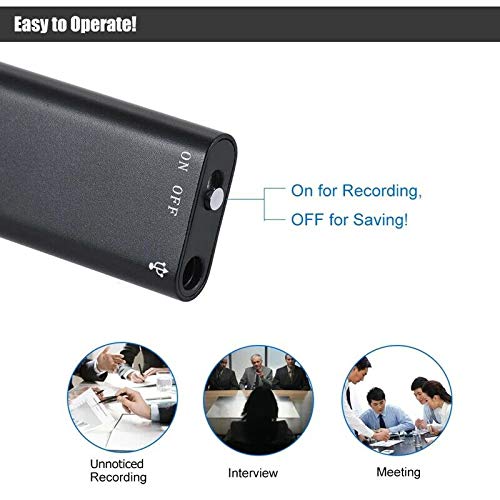
Слика 4.1: Detail of the SK-892's ON/OFF switch, illustrating its dual function for initiating recording and saving files.
- Уверите се да је уређај довољно напуњен.
- To begin recording, slide the ON/OFF switch to the "ON" position. The device will automatically start recording. The indicator light will typically flash or remain steadily lit during recording, then turn off to indicate discreet operation.
- To stop recording and save the audio file, slide the ON/OFF switch to the "OFF" position. The indicator light will flash a few times and then turn off, confirming the recording has been saved and the device is powered down.
Напомена: Ensure the switch is fully in the "OFF" position to properly save your recordings and prevent data loss.
4.2 Репродукција снимака
- Connect the provided headphones (or your own 3.5mm headphones) to the headphone jack on the recorder.
- Slide the ON/OFF switch to the "ON" position. The device will typically begin playing the most recent recording or cycle through recordings.
- Further controls for playback (e.g., next track, volume) may be available through the connected headphones if they feature inline controls, or by briefly toggling the ON/OFF switch (refer to the small instruction card for specific playback controls if available).
- To stop playback, slide the ON/OFF switch to the "OFF" position.
4.3 Повезивање са рачунаром
To transfer recordings to your computer or manage files:
- Ensure the recorder is powered "OFF".
- Повежите снимач са рачунаром помоћу приложеног USB кабла.
- Your computer should recognize the device as a removable disk (similar to a USB flash drive).
- Navigate to the device's storage to access your recorded audio files (usually in a folder named "RECORD" or similar).
- Можете копирати, преместити или избрисати fileс по потреби.
- Safely eject the device from your computer before disconnecting the USB cable to prevent data corruption.
5. Одржавање
- Држите уређај сувим. Избегавајте излагање влази или течностима.
- Очистите уређај меком, сувом крпом. Не користите јаке хемикалије или абразивна средства за чишћење.
- Избегавајте испуштање уређаја или излагање јаким ударима.
- Чувајте уређај на хладном и сувом месту када се не користи.
- Редовно пуните уређај, чак и ако се не користи често, како бисте одржали здравље батерије.
КСНУМКС. Решавање проблема
| Проблем | Могуће решење |
|---|---|
| Уређај се не укључује. | Ensure the device is fully charged. Connect to a USB power source and check the indicator light. |
| Cannot record audio. | Check if the device has sufficient battery. Ensure the ON/OFF switch is moved fully to the "ON" position. Verify there is enough free storage space. |
| Recordings are not saving. | Ensure the ON/OFF switch is moved fully to the "OFF" position to properly save the file. Do not disconnect power during recording or saving. |
| Cannot hear playback. | Ensure headphones are securely connected. Check headphone functionality with another device. Verify the device is powered "ON" for playback. |
| Рачунар не препознаје уређај. | Ensure the recorder is powered "OFF" before connecting to the computer. Try a different USB port or cable. Restart your computer. |
7. Спецификације
- Модел: СК-892
- Капацитет меморије: 8 ГБ
- Аудио формат: МП3
- Хардверски интерфејс: УСБ
- Компатибилни уређаји: MP3 Player (for playback)
- Произвођач: ЕЛЕЦТРОПРИМ
- Број дела ставке: ASHA20BEBUBEB19894
8. Гаранција и подршка
For warranty information or technical support, please refer to the documentation included with your purchase or contact ELECTROPRIME customer service through their official channels. Please have your model number (SK-892) and purchase details ready when contacting support.
За додатну помоћ, можете посетити ELECTROPRIME brand page on Amazon.