
ThreeH H-AC11Brown_Blue
ThreeH стони дрвени алармни сат дигитални упутство за употребу
Model: H-AC11Brown_Blue
Увод
Хвала вам на куповиниasing the ThreeH Desk Wooden Alarm Clock Digital. This manual provides detailed instructions for setting up, operating, and maintaining your new alarm clock. Please read this manual thoroughly before use to ensure proper function and longevity of the product.
This digital alarm clock features a wooden design, digital time and temperature display, multiple alarm settings, and voice control functionality. It is suitable for use in homes, kitchens, and offices.
Производ је завршенview
The ThreeH Desk Wooden Alarm Clock is designed with a minimalist aesthetic and practical features. It displays time and temperature clearly with adjustable brightness. The clock supports both USB power and battery backup.

Слика: Фронт view of the ThreeH Wooden Digital Alarm Clock, displaying time (12:02) and temperature (23°C) in blue LED digits on a brown wooden surface.
Кључне карактеристике:
- Digital Time and Temperature Display
- 3 Подешавања аларма
- Функционалност гласовне контроле
- Adjustable Brightness (3 levels)
- Power Off Memory (CR2032 battery backup)
- Dual Power Supply Options (USB or AAA batteries)
- Modern Wooden Design
Сетуп
Напајање сата:
The clock can be powered by either a USB power cord or AAA batteries. For continuous display and optimal performance, USB power is recommended.
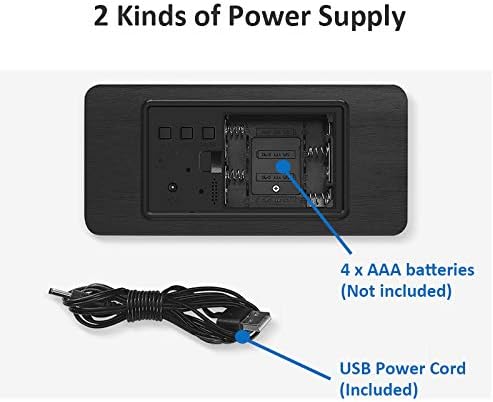
Слика: Позади view of the alarm clock, illustrating the battery compartment for 4x AAA batteries (not included) and the USB power cord input (included).
- УСБ Снага: Connect the provided USB power cord to the DC5V port on the back of the clock and plug the other end into a USB power adapter (not included) or a powered USB port.
- Напајање батеријом (резервна копија): Open the battery compartment on the back of the clock. Insert 4 x AAA batteries (not included), ensuring correct polarity (+/-). Note: Batteries are primarily for backup and may not provide continuous display.
- Меморијска батерија: The clock also uses a CR2032 button cell battery (usually pre-installed) for "power off memory," which retains time settings even when the main power is disconnected.

Слика: Детаљна view of the clock's rear panel, highlighting the 'SET', 'UP', 'DOWN', and 'RESET' buttons, the USB port, and the CR2032 battery compartment for memory retention.
Упутство за употребу
Подешавање времена и датума:
- Притисните тастер СЕТ дугме за улазак у режим подешавања времена. Цифре за сате ће трептати.
- Користите UP и ДОВН дугмад за подешавање сата.
- Притисните СЕТ again to move to minute setting. Adjust minutes with UP и ДОВН.
- Наставите да притискате СЕТ да бисте се кретали кроз подешавања године, месеца и дана, подешавајући свако помоћу UP и ДОВН.
- Притисните СЕТ још једном да бисте изашли из режима подешавања.
Подешавање аларма:
The clock supports up to 3 alarm settings (AL1, AL2, AL3).
- Притисните тастер СЕТ button repeatedly until "AL1" appears on the display.
- Притисните СЕТ to enter AL1 setting. The hour digits will flash.
- Користите UP и ДОВН да подесите сат аларма.
- Притисните СЕТ to move to minute setting. Adjust minutes with UP и ДОВН.
- Притисните СЕТ again to enable/disable the alarm (ON/--).
- Repeat for AL2 and AL3 if desired.
Функција гласовне контроле:
In power-saving mode, the display will turn off. To activate the display, make a sound (e.g., clap hands, tap the clock) or touch the clock. The display will light up for approximately 15 seconds before turning off again.
To toggle voice control mode (ON/OFF), refer to the specific instructions in your clock's packaging, as this feature can sometimes be enabled or disabled via a long press of a specific button (e.g., DOWN button) or a combination of buttons.
Подешавање осветљености:
The clock features 3 levels of brightness. While in normal time display mode, press the UP button to cycle through the brightness levels.

Image: A ThreeH Wooden Digital Alarm Clock with a dark wood finish, showing the time and temperature in bright blue LED digits. This image demonstrates the clear display.
Одржавање
- Чишћење: Wipe the clock surface with a soft, dry cloth. Do not use abrasive cleaners or solvents, as they may damage the wooden finish or electronic components.
- Замена батерије: If using AAA batteries for backup, replace them when the display becomes dim or inconsistent, or if the clock fails to retain time during power outages. Ensure correct polarity.
- ЦР2032 батерија: The CR2032 battery for memory retention typically lasts for several years. If the clock loses time settings after a power disconnection, the CR2032 battery may need replacement.
- Окружење: Keep the clock away from direct sunlight, extreme temperatures, high humidity, and strong magnetic fields to prevent damage.
Решавање проблема
| Проблем | Могући узрок | Решење |
|---|---|---|
| Екран је искључен или затамњен. |
|
|
| Clock loses time settings after power disconnection. | CR2032 memory battery is dead or missing. | Replace the CR2032 button cell battery on the back of the clock. |
| Аларм се не оглашава. |
|
|
| Гласовна контрола не ради. | Voice control feature is disabled. | Refer to your clock's specific instructions to enable voice control mode. |
Спецификације
| Феатуре | Детаљ |
|---|---|
| Бранд | ТхрееХ |
| Број модела | H-AC11Brown_Blue |
| Димензије производа | 4 к 3.81 к 7 цм |
| Тежина артикла | 245 г |
| Материјал | Дрво |
| Дисплаи Типе | Дигитал |
| Посебне карактеристике | Alarm, Voice Control, Temperature Display, Adjustable Brightness |
| Извор напајања | Corded Electric (USB), 4x AAA Batteries (backup), 1x CR2032 (memory) |
Гаранција и подршка
For warranty information and customer support, please refer to the documentation included with your purchase or contact ThreeH customer service directly through their official webсајт или продавницу где је производ купљен.
Молимо вас да сачувате доказ о куповини за евентуалне рекламације у вези са гаранцијом.
Ask a question about this manual
Ask about setup, troubleshooting, compatibility, parts, safety, or missing instructions. Manuals+ will review the question and use this page’s manual context to help answer it.