
1. Увод
The Maxell Bass 13 Wireless Headphones (Model B13-WHPS) are designed to provide a versatile audio experience. These headphones feature 40mm drivers for clear sound, an integrated microphone for communication, and comfortable ear pads for extended listening. They offer both wireless Bluetooth connectivity and a traditional 3.5mm wired option.
2. Шта је у кутији
- Maxell Bass 13 Wireless Headphones
- УСБ кабл за пуњење
- 3.5mm Audio Cable (if applicable, not explicitly listed but common for hybrid headphones)
- Упутство за употребу
3. Производ је готовview
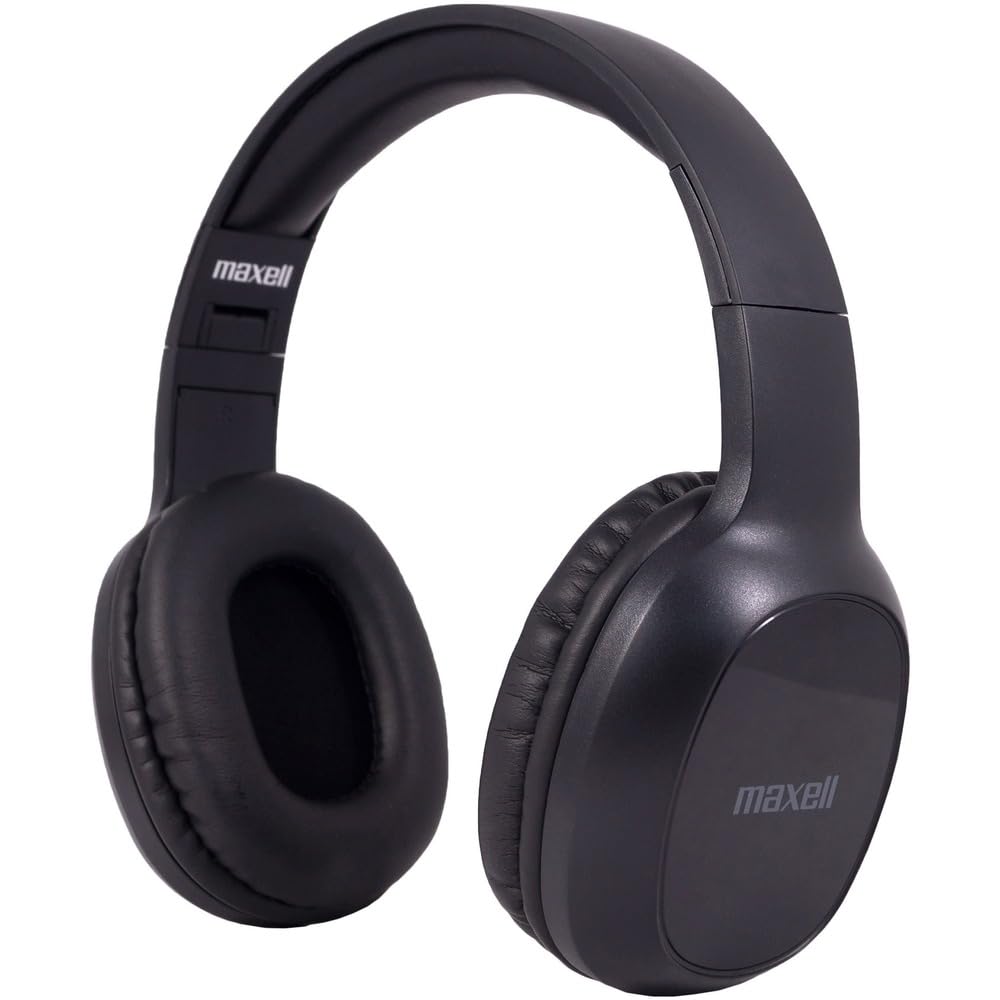
Figure 1: Maxell Bass 13 Wireless Headphones

Figure 2: Earcup Controls (Power, Volume, Play/Pause)
Кључне карактеристике:
- 40мм динамички драјвери: Deliver clear and powerful audio performance.
- Интегрисани микрофон: Омогућава позивање без употребе руку.
- Noise-Isolating Earpads: Provide comfort and help reduce external distractions.
- Блуетоотх 5.0 повезивање: For stable wireless connection.
- 3.5 мм аудио прикључак: Allows for wired connection to compatible devices.
- Подесива трака за главу: Обезбеђује удобно приањање за различите величине главе.
- Трајање батерије до 8 сати: For extended listening and talk time.
4. Подешавање
4.1 Пуњење слушалица

Figure 3: Connecting the USB Charging Cable
- Пронађите прикључак за пуњење на слушалицама.
- Connect the small end of the provided USB charging cable to the headphone's charging port.
- Connect the larger end of the USB cable to a USB power source (e.g., computer USB port, USB wall adapter).
- The LED indicator on the headphones will illuminate to show charging status. It will typically turn off or change color when fully charged.
- A full charge provides up to 8 hours of continuous talk/play time.
4.2 Блуетоотх упаривање
- Уверите се да су слушалице потпуно напуњене.
- Press and hold the Power button on the headphone earcup until the LED indicator flashes blue and red, indicating pairing mode.
- На свом уређају (паметном телефону, таблету, рачунару) идите на подешавања Блутут-а.
- Тражи available devices. Select "Maxell Bass 13" from the list.
- Once paired, the LED indicator will typically show a solid blue light or flash blue slowly.
- Ако се затражи лозинка, унесите „0000“.
4.3 Wired Connection (3.5mm Audio Jack)

Figure 4: Connecting the 3.5mm Audio Cable
For devices without Bluetooth or when battery is low, you can use the 3.5mm audio cable:
- Plug one end of the 3.5mm audio cable into the audio input jack on the headphone earcup.
- Укључите други крај у 3.5 мм аудио излазни прикључак на вашем уређају.
- The headphones will operate in passive mode, and Bluetooth functionality will be disabled.
5. Упутство за употребу
5.1 Укључивање/искључивање
- Укључено: Притисните и држите дугме за напајање око 3 секунде док се ЛЕД индикатор не упали.
- Искључивање: Press and hold the Power button for approximately 3-5 seconds until the LED indicator turns off.
5.2 Контрола јачине звука
- Повећајте јачину звука: Притисните дугме за појачавање јачине звука (+).
- Смањи јачину звука: Притисните дугме за смањивање јачине звука (-).
5.3 Репродукција музике
- Пусти/паузирај: Press the Multi-function button (often the Power button or a dedicated Play/Pause button) once.
- Следећа нумера: Press and hold the Volume Up (+) button (or double-press, refer to specific product button layout).
- Претходни запис: Press and hold the Volume Down (-) button (or double-press, refer to specific product button layout).
5.4 Управљање позивима
- Одговори/заврши позив: Притисните вишенаменско дугме једном.
- Одбиј позив: Притисните и држите вишефункционално дугме око 2 секунде.
- Поновно бирање последњег броја: Двапут притисните вишенаменско дугме.
6. Одржавање
6.1 Чишћење
- Обришите слушалице меком, сувом крпом која не оставља влакна.
- Не користите абразивна средства за чишћење, раствараче или аеросолне спрејеве.
- Избегавајте улазак влаге у било какве отворе.
6.2 Складиштење

Figure 5: Headphones Folded for Storage
- Чувајте слушалице на хладном и сувом месту, даље од екстремних температура.
- When not in use for extended periods, ensure the headphones are fully charged before storage to preserve battery health.
- The headphones feature a foldable design for compact storage and portability.
6.3 Одржавање батерије
- Избегавајте често потпуно пражњење батерије.
- Charge the headphones regularly, even if not used often.
- Do not expose the battery to excessive heat or direct sunlight.
КСНУМКС. Решавање проблема
| Проблем | Могући узрок | Решење |
|---|---|---|
| Слушалице се не укључују | Ниска батерија | У потпуности напуните слушалице. |
| Не могу да упарим преко Bluetooth-а | Слушалице нису у режиму упаривања; Блутут уређаја је искључен; Предалеко од уређаја | Ensure headphones are in pairing mode (flashing blue/red). Turn on device Bluetooth. Move headphones closer to device. |
| Нема звука | Volume too low; Incorrect audio source; Headphones not connected | Increase headphone and device volume. Check if headphones are properly paired/connected. Verify audio output settings on your device. |
| Лош квалитет позива | Weak Bluetooth signal; Microphone obstructed | Move closer to your device. Ensure microphone is not covered. |
8. Спецификације
| Феатуре | Детаљ |
|---|---|
| Број модела | B13-WHPS |
| Бранд | Макелл |
| Технологија повезивања | Блуетоотх 5.0 |
| Величина аудио драјвера | 40 мм |
| Трајање батерије | Up to 8 Hours (continuous talk/play time) |
| Јацк за слушалице | 3.5 мм прикључак |
| Функције контроле буке | Sound Isolation, Noise Cancelling |
| Импеданса | 32 Охмс |
| Осетљивост | 100 дБ |
| Фреквенцијски одзив | 20 Хз |
| Постављање уха | Он Еар |
| Форм Фацтор | Преко уха |
| Димензије производа | 7.25 к 3 к 9 инча |
| Тежина артикла | 8.4 унци |
| Материјал | Electronic Components, Foam, Plastic, Wire |
| Компатибилни уређаји | Tablets, Laptops, Desktops, Portable Devices with 3.5mm Audio Jack |
9. Званични видео производа
Video 1: Maxell Bass 13 Bluetooth Headphones Overview. This video provides a visual demonstration of the headphones' features and design.
10. Гаранција и подршка
Maxell products are designed for reliability and performance. For specific warranty information, please refer to the warranty card included with your purchase or visit the official Maxell website. For technical support or customer service inquiries, please contact Maxell customer support through their official channels.