
Увод
Thank you for choosing the Zelotes F-35 2.4GHz Vertical Wireless Rechargeable Gaming Mouse. This ergonomic mouse is designed to provide a comfortable and efficient user experience, reducing wrist strain during extended use. Featuring multiple connectivity options and customizable buttons, it is ideal for both productivity and gaming on various devices.
Карактеристике производа
- Ергономски вертикални дизајн: Positions the hand in a natural handshake posture to minimize wrist and forearm strain.
- Вишемодална повезаност: Supports 2.4GHz wireless via USB dongle, Bluetooth 1, and Bluetooth 2 for versatile device pairing.
- Пуњива батерија: Built-in rechargeable battery for convenience.
- Подесиви ДПИ: Up to 2400 DPI for precise cursor control, suitable for various tasks and gaming.
- 6 програмабилних дугмади: Includes left/right click, scroll wheel, DPI button, and forward/backward buttons for enhanced functionality.
- Оптички сензор: Reliable and accurate tracking on most surfaces.
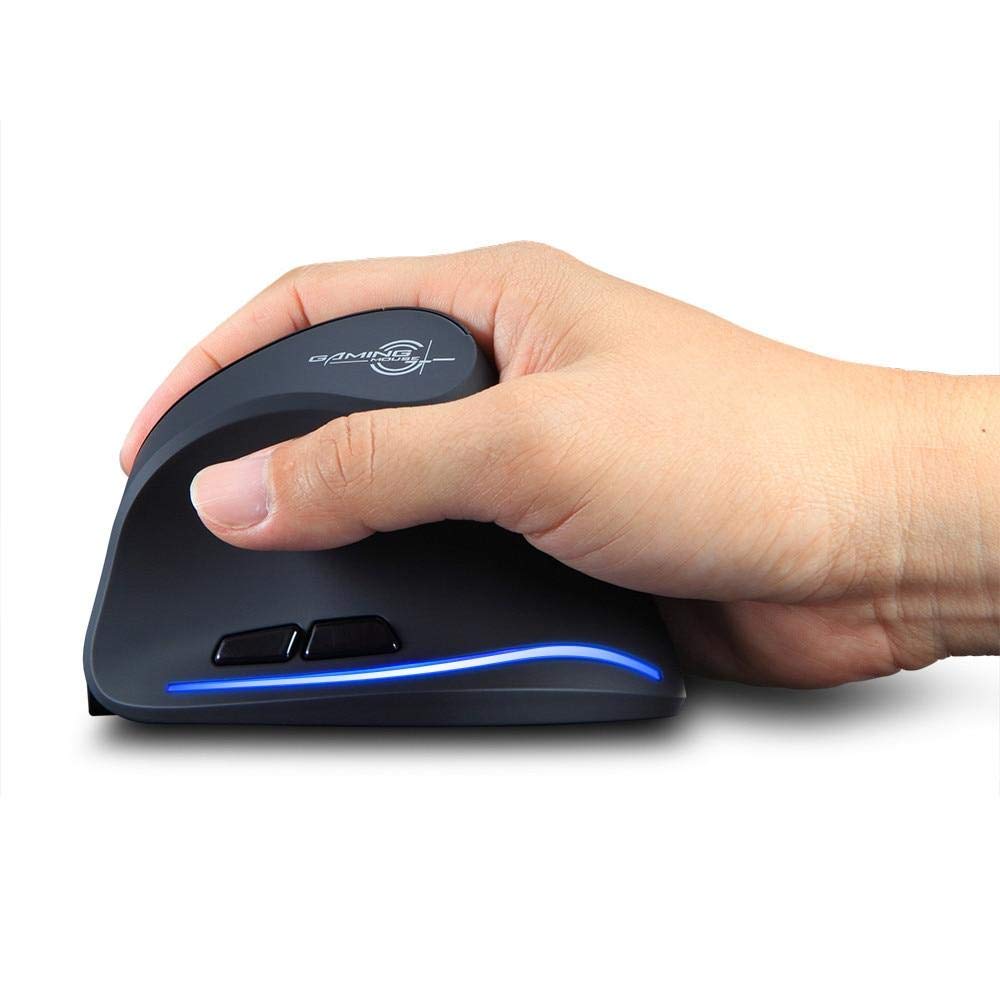
Image: The Zelotes F-35 Vertical Wireless Gaming Mouse, showcasing its unique ergonomic shape and illuminated accents.

Image: A visual comparison illustrating the natural hand position with a vertical mouse versus the twisted wrist position with a traditional horizontal mouse, highlighting the ergonomic benefits.
Упутства за подешавање
- Укључено: Пронађите прекидач УКЉУЧЕНО/ИСКЉУЧЕНО на дну миша и померите га у положај „УКЉУЧЕНО“.
- Select Connection Mode: The mouse supports three connection modes: 2.4GHz wireless (via USB dongle), Bluetooth 1, and Bluetooth 2. Use the 'Mode Switch' button on the bottom of the mouse to cycle through these options. The corresponding indicator light will illuminate.
- 2.4ГХз бежична веза:
- Remove the USB receiver dongle from its storage slot on the bottom of the mouse.
- Укључите УСБ пријемник у слободан УСБ порт на рачунару или лаптопу.
- Миш би требало да се аутоматски повеже.
- Блутут веза (BT1/BT2):
- Switch the mouse to either Bluetooth 1 or Bluetooth 2 mode using the 'Mode Switch'.
- On your computer or laptop, go to Bluetooth settings and search for new devices.
- Select 'Zelotes F-35' from the list of available devices to pair.

Image: The underside of the Zelotes F-35 mouse, highlighting the ON/OFF switch, mode switch, and the integrated storage slot for the 2.4GHz USB receiver dongle.
Упутство за употребу
The Zelotes F-35 mouse features 6 buttons designed for intuitive control and enhanced productivity:
- Леви клик: Стандардна функција примарног клика.
- Десни клик: Стандардна функција секундарног клика.
- Точак за померање: Scroll up or down for navigation. Can also be pressed for a middle-click function.
- Дугме за подешавање DPI-ја: Located near the scroll wheel, press to cycle through different DPI settings (e.g., 800/1200/1600/2400) to adjust cursor sensitivity.
- Дугме за напред: Located on the thumb rest, typically navigates forward in web претраживачи или file истраживачи.
- Дугме за назад: Located on the thumb rest, typically navigates backward in web претраживачи или file истраживачи.
Пуњење и батерија
The Zelotes F-35 mouse is equipped with a rechargeable battery for continuous use.
- Порт за пуњење: The mouse features a USB-C charging port, typically located at the front base of the mouse.
- Пуњење: Connect the provided USB-C cable to the mouse and the other end to a USB power source (e.g., computer USB port, wall adapter).
- Индикатор батерије: The mouse may have an indicator light to show charging status or low battery. Refer to the product packaging for specific indicator behavior.
- Трајање батерије: The average battery life is approximately 12 months, depending on usage.
Одржавање
- Чишћење: Користите меку, суву крпу за чишћење површине миша. За тврдокорну прљавштину, благо дamp може се користити крпа, водећи рачуна да влага не уђе у унутрашње компоненте.
- Брига о сензорима: Одржавајте оптички сензор на дну миша чистим и без прашине или прљавштине како бисте осигурали прецизно праћење.
- Складиштење: When not in use for extended periods, turn off the mouse to conserve battery life. Store the USB receiver in its designated slot to prevent loss.
Решавање проблема
- Миш не реагује:
- Уверите се да је миш укључен.
- Проверите ниво батерије и по потреби је напуните.
- For 2.4GHz connection, ensure the USB receiver is securely plugged into the computer.
- For Bluetooth connection, ensure Bluetooth is enabled on your device and the mouse is correctly paired. Try re-pairing if issues persist.
- Нетачно праћење:
- Очистите оптички сензор на дну миша.
- Уверите се да користите миш на одговарајућој површини (нерефлектујућој, не стакленој).
- Adjust the DPI setting to a comfortable level.
- Connectivity Drops:
- Ensure the mouse is within the effective range of your device (typically up to 10 meters for wireless).
- Минимизирајте сметње од других бежичних уређаја.
Спецификације
| Феатуре | Детаљ |
|---|---|
| Бранд | Zelotes |
| Модел | Ф-35 |
| Тип | 2.4 ГХз бежични, Блуетоотх |
| Оперативни режим | Опто-електронски |
| Број дугмади | 6 |
| Број ваљака | 1 |
| Оријентација руке | Тачно |
| Тип интерфејса | УСБ |
| ДПИ | 2400 |
| Посебна карактеристика | Rechargeable, Wireless |
| Откривање покрета | Оптицал |
| Компатибилни уређаји | Лаптоп, лични рачунар |
| Оперативни систем | Линукс, Виндоус 7 (и новији) |
| Просечан век трајања батерије | 12 месеци |
| Извор напајања | Баттери Поверед |
| Боја | Црно |
| Земља порекла | Кина |
Гаранција и подршка
For warranty information and technical support, please refer to the documentation included with your product or visit the official Zelotes website. You may also contact the retailer where you purchased the product for assistance.