
1. Производ је готовview
The GalaxyElec STC-100A is a microcomputer temperature controller designed for precise temperature management. It supports both heating and refrigerating modes, allowing for accurate control based on user-defined temperature settings and differential values. The device includes delay protection for compressor startup and heating elements, a feature to limit the temperature setting range, and an alarm function for sensor errors.
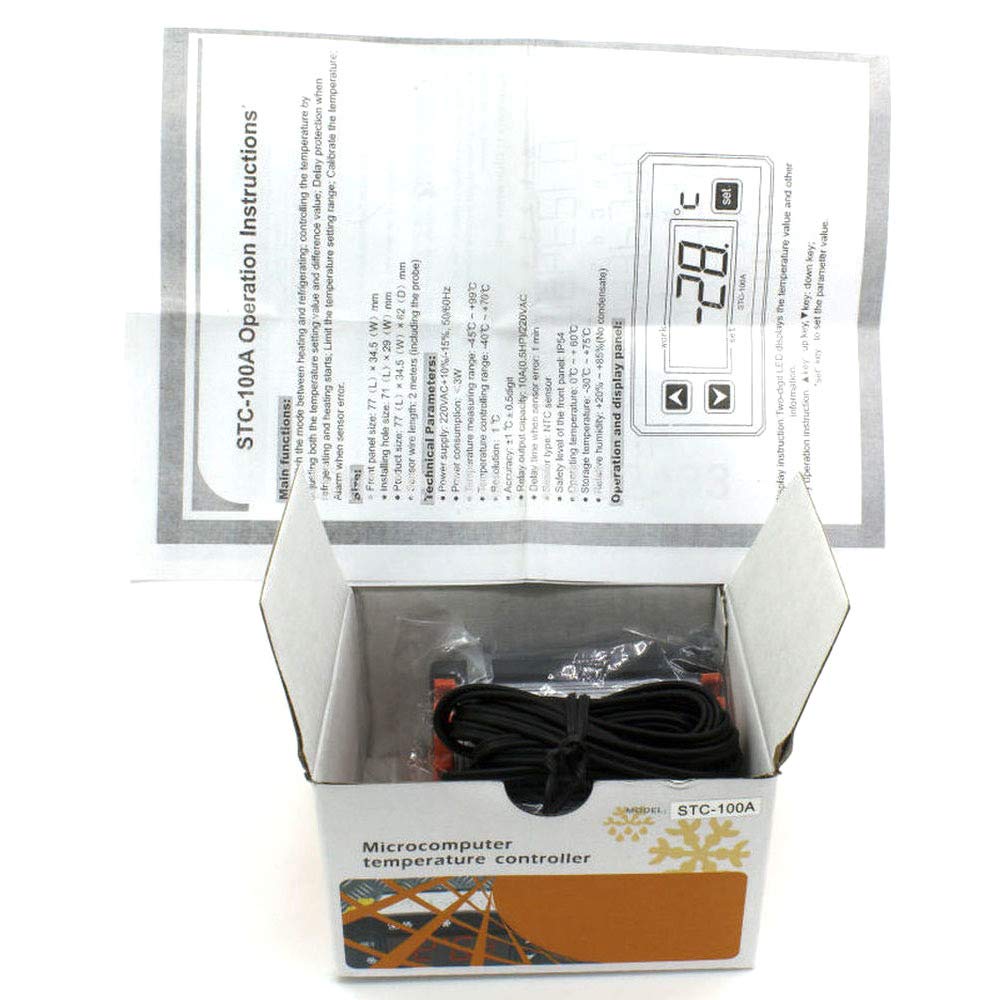
Слика 1.1: The STC-100A Temperature Controller shown in its retail packaging, with the instruction manual partially visible. The device itself is a compact unit with a digital display and control buttons.
2. Техничке спецификације
| Параметар | Валуе |
|---|---|
| Величина предњег панела | 77 (Д) к 34.5 (Ш) мм |
| Installing Hole Size | 71 (Д) к 29 (Ш) мм |
| Величина производа | 77 (Д) к 34.5 (Ш) к 62 (Д) мм |
| Дужина жице сензора | 2 meters (including the probe) |
| Повер Суппли | 220VAC +10% -15%, 50/60Hz |
| Потрошња енергије | <3В |
| Опсег мерења температуре | -45°Ц до +99°Ц |
| Temperature Controlling Range | -40°Ц до +70°Ц |
| Резолуција | Ночьу 1°Ц |
| Прецизност | ±1°Ц ±0.5 цифра |
| Relay Output Capacity | 10A (0.5HP) / 220VAC |
| Delay Time When Sensor Error | 1 минут |
| Тип сензора | НТЦ сензор |
| Safety Level of Front Panel | ИП54 |
| Радна температура | 0°Ц до +60°Ц |
| Температура складиштења | -30°Ц до +75°Ц |
| Релативна влажност | +20% to +85% (No condensate) |
3. Упутства за инсталацију
Proper installation is crucial for the safe and effective operation of the STC-100A temperature controller. Ensure all electrical connections are made by a qualified professional if you are unsure.
3.1 Физичка инсталација
- Prepare an opening in your control panel or enclosure with dimensions matching the 'Installing Hole Size' (71mm L x 29mm W).
- Insert the STC-100A controller into the prepared opening.
- Secure the controller using the provided mounting clips or screws to ensure it is firmly in place.
- Connect the NTC temperature sensor probe to the designated terminals on the controller. Ensure the sensor is placed in the area where temperature measurement is required. The sensor wire length is 2 meters.
3.2 Električno ožičenje
Упозорење: Disconnect power before performing any wiring to prevent electric shock. All wiring should comply with local electrical codes.
- Connect the power supply (220VAC, 50/60Hz) to the designated power input terminals on the controller.
- Connect your heating or refrigerating load (e.g., compressor, heater) to the relay output terminals. The relay output capacity is 10A (0.5HP) at 220VAC.
- Double-check all connections for tightness and correct polarity before applying power.
4. Панел за рад и приказ
The STC-100A features a two-digit LED display that shows the current temperature value and other operational information. Control is managed via three buttons located below the display.
Слика 4.1: The operational display panel of the STC-100A. It features a digital LED display for temperature readings and three tactile buttons for navigation and setting parameters: an 'up' arrow, a 'down' arrow, and a 'set' button.
4.1 Функције дугмета
- Up Key (▲): Користи се за повећање вредности или навигацију нагоре у менијима.
- Down Key (▼): Used to decrease values or navigate downwards in menus.
- Подешавање тастера (SET): Used to enter parameter setting mode, confirm selections, or save changes.
5. Упутство за употребу
5.1 Укључивање/искључивање
The controller powers on automatically when connected to a suitable power supply. There is no dedicated power button.
5.2 Setting the Temperature Value
- Притисните тастер СЕТ key once. The display will flash, indicating that the temperature setting value can be adjusted.
- Користите Горе (▲) or Доле (▼) keys to adjust the desired temperature set point.
- Притисните тастер СЕТ key again to confirm and save the new setting. The display will stop flashing and return to showing the current temperature.
5.3 Adjusting Advanced Parameters
To access and modify advanced parameters (e.g., difference value, delay protection, temperature calibration), refer to the detailed parameter list in the full manual. Typically, this involves pressing and holding the СЕТ key for several seconds to enter the parameter menu, then using the Горе (▲) и Доле (▼) keys to navigate and adjust values, and СЕТ потврдити.
6. Одржавање
Regular maintenance ensures the longevity and accuracy of your temperature controller.
- Чишћење: Периодично обришите екран и цasing with a soft, dry cloth. Do not use abrasive cleaners or solvents. Ensure no liquids enter the device.
- Брига о сензорима: Ensure the temperature sensor probe is clean and free from debris. Avoid bending or damaging the sensor wire. If the sensor appears damaged or provides inconsistent readings, it may need replacement.
- Услови животне средине: Operate the controller within the specified operating temperature (0°C to +60°C) and relative humidity (+20% to +85%, non-condensing) to prevent damage.
КСНУМКС. Решавање проблема
This section addresses common issues you might encounter with the STC-100A controller.
7.1 Sensor Error Alarm
- Симптом: The display shows an error code (e.g., 'E1' or similar, as indicated by 'Alarm when sensor error' in main functions).
- Могући узрок: The NTC sensor is disconnected, damaged, or faulty.
- решење: Check the sensor's connection to the controller. Ensure the wire is not cut or shorted. If the connection is secure and the error persists, replace the sensor. The delay time when sensor error is 1 minute before an alarm is triggered.
7.2 Incorrect Temperature Readings
- Могући узрок: Sensor misplacement, environmental interference, or calibration offset.
- решење: Ensure the sensor is correctly positioned to measure the desired temperature. Check for drafts or heat sources directly affecting the sensor. If necessary, use the temperature calibration function (refer to advanced parameters) to adjust the reading.
7.3 Controller Not Powering On
- Могући узрок: Нема напајања, нетачна јачина звукаtage, or faulty wiring.
- решење: Verify that the 220VAC power supply is connected and active. Check all wiring connections for security and correctness. Ensure the voltage is within the specified range (220VAC +10% -15%).
8. Безбедносне информације
- Always disconnect power before installing, wiring, or performing maintenance on the controller.
- Ensure all wiring is done by a qualified person and complies with local electrical codes and regulations.
- Do not operate the device in environments exceeding its specified operating temperature or humidity ranges.
- The front panel has a safety level of IP54, providing protection against dust and splashing water, but it is not waterproof. Avoid direct exposure to water.
- Не покушавајте сами да поправите уређај. Обратите се квалификованом сервисеру.
9. Гаранција и подршка
For warranty information, please refer to the documentation provided at the time of purchase or contact your retailer. For technical support or further assistance with your GalaxyElec STC-100A Temperature Controller, please contact the manufacturer, GalaxyElec, or your authorized distributor.