
1. Увод
Thank you for choosing the AG Neovo SC-55E CCTV Monitor. This monitor is specifically designed for continuous operation in surveillance environments, offering industry-leading reliability and enhanced image clarity. It incorporates advanced technologies to prevent image ghosting and deliver premium visual performance, even in challenging lighting conditions.
This manual provides essential information for the proper setup, operation, maintenance, and troubleshooting of your SC-55E monitor. Please read it thoroughly before using the product to ensure safe and optimal performance.
2. Безбедносне информације
Увек се придржавајте следећих мера предострожности како бисте спречили оштећење монитора и осигурали безбедност корисника:
- Не излажите монитор киши или влази како бисте спречили опасност од пожара или струјног удара.
- Обезбедите одговарајућу вентилацију. Не блокирајте вентилационе отворе.
- Use only the power supply specified for this monitor.
- Не отварајте монитор цasinг. Сва сервисирања препустите квалификованом сервисном особљу.
- Clean the monitor with a soft, dry cloth. Avoid using liquid or aerosol cleaners.
- Place the monitor on a stable surface or mount it securely according to installation instructions.
3. Садржај пакета
Молимо вас да проверите да ли су сви предмети присутни и у добром стању приликом распакивања:
- AG Neovo SC-55E CCTV Monitor
- Повер Цабле
- ВГА кабел
- Кориснички приручник (овај документ)
- Гарантни лист (ако је примењиво)
4. Производ је готовview
Familiarize yourself with the components and connections of your AG Neovo SC-55E monitor.
4.1 Фронт View
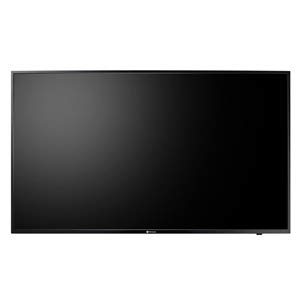
Слика 4.1: Предња страна view of the AG Neovo SC-55E monitor, showing the full display area and the AG Neovo logo at the bottom center.
4.2 Реар View и Везе
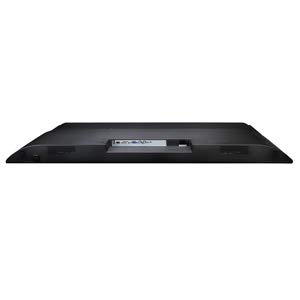
Слика 4.2: Задња страна view of the AG Neovo SC-55E monitor, highlighting the various input and output ports located on the back panel, including the VGA input.
The rear panel includes the power input, VGA input, and potentially other video inputs and control ports depending on the specific model configuration. Refer to the labels next to each port for identification.
5. Подешавање
5.1 Монтирање монитора
The AG Neovo SC-55E monitor supports both freestanding and wall-mount installations. Ensure the mounting solution (stand or wall mount bracket) is appropriate for the monitor's size and weight and is securely installed according to its own instructions.
- Самостојећи: Attach the provided stand (if included) to the monitor following the assembly instructions. Place the monitor on a stable, level surface.
- Монтажа на зид: This monitor is compatible with VESA standard mounting solutions. Attach a VESA-compatible wall mount bracket to the monitor's rear mounting holes, then secure the monitor to the wall according to the wall mount manufacturer's instructions.
5.2 Каблови за повезивање
- Прикључак за напајање: Connect the power cable to the monitor's DC power input port, then plug the other end into a grounded electrical outlet.
- Видео веза: Connect a VGA cable from your video source (e.g., DVR, NVR, PC) to the VGA input port on the monitor's rear panel. Ensure the connection is secure.
- Other Connections (Optional): If your setup requires, connect any other relevant cables (e.g., audio, control cables) to their respective ports.
6. Упутство за употребу
6.1 Укључивање/искључивање
- To power on the monitor, press the Power button located on the monitor's frame. The Power LED will illuminate.
- To power off, press the Power button again. The Power LED will turn off.
6.2 Навигација кроз мени на екрану (OSD)
The OSD menu allows you to adjust various display settings. Use the control buttons (usually located on the side or bottom of the monitor) to navigate the menu:
- МЕНИ: Press to open the OSD menu or enter a sub-menu.
- UP/DOWN (or +/-): Use to navigate through menu options or adjust values.
- ENTER (or OK): Press to confirm a selection or save changes.
- EXIT (or BACK): Press to exit the current menu or go back to the previous level.
6.3 Display Settings and Features
The SC-55E offers several advanced settings for optimized image quality, especially for surveillance applications:
- Gamma Curve Selection: Adjusts the luminance response to input signals, enhancing detail in dark or bright areas.
- Black Level Adjustment: Fine-tunes the black levels to reveal more detail in shadows, crucial for surveillance footage.
- High Dynamic Contrast Ratio (20,000:1): Automatically adjusts contrast for clearer images with deeper blacks and brighter whites.
- ЦЦТВ режим: A pre-configured mode specifically designed for surveillance control rooms. This mode optimizes settings like sharpness, color temperature, and brightness to maximize image clarity, particularly in low-light conditions.
- Aspect Ratio Selection: Choose from various aspect ratios including 16:9, 4:3, 1:1, or a custom zoom mode to fit the display to your control room conditions, regardless of the input signal.
- Blue Screen On/Off: Option to enable or disable the blue screen display when no signal is detected.
- Power LED On/Off: Option to turn the power indicator LED on or off.
7. Одржавање
7.1 Чишћење монитора
- Увек искључите монитор из утичнице пре чишћења.
- Користите меку крпу која не оставља длачицеampводом или благим, неабразивним средством за чишћење екрана.
- Не прскајте течност директно на екран или цasing.
- Avoid using benzene, thinner, or any volatile solvents, as they may damage the surface.
7.2 Anti-Burn-in Technology
The AG Neovo SC-55E features Anti-Burn-in technology to prevent image ghosting, which is common in monitors displaying static images for extended periods. This technology helps maintain image integrity during continuous, mission-critical operations.
КСНУМКС. Решавање проблема
Ако наиђете на проблеме са монитором, погледајте следеће уобичајене проблеме и решења:
| Проблем | Могући узрок | Решење |
|---|---|---|
| Нема напајања / ЛЕД диода за напајање је искључена | Power cable not connected; Power outlet not working; Monitor off. | Ensure power cable is securely connected. Test power outlet with another device. Press the monitor's Power button. |
| Нема сигнала / порука „Нема сигнала“ | Video cable not connected; Incorrect input selected; Video source off. | Check video cable connection. Ensure video source is on. Select the correct input source via the OSD menu. |
| Лош квалитет слике (замућена, изобличена) | Incorrect resolution; Cable issue; OSD settings. | Set the video source resolution to 1920x1080. Try a different VGA cable. Adjust OSD settings like sharpness, contrast, and brightness. |
| Image ghosting or retention | Static image displayed for too long. | The monitor has Anti-Burn-in technology to mitigate this. If persistent, turn off the monitor for a period. Avoid displaying static images for excessively long durations. |
If the problem persists after trying these solutions, please contact AG Neovo customer support or your local dealer for assistance.
9. Спецификације
| Феатуре | Спецификација |
|---|---|
| Врста производа | ЦЦТВ Монитор |
| Модел | СЦ-55Е |
| Дијагонала екрана | 139.7 цм (55 инча) |
| Резолуција | 1920 x 1080 пиксела (FHD 1080p) |
| Дисплаи Типе | ЛЦД са ЛЕД позадинским осветљењем |
| Аспецт Ратио | 16:9 (selectable options: 4:3, 1:1, custom zoom) |
| Повезивање | ВГА |
| Тип монтаже | Freestanding / Wall Mount (VESA compatible) |
| Боја производа | Црно |
| Повер Суппли | DC |
| Димензије (В к Д) | 717 mm x 83 mm (approximate, without stand) |
Напомена: Спецификације се могу променити без најаве.
10. Гаранција и подршка
The AG Neovo SC-55E monitor comes with a standard manufacturer's warranty. Please refer to the warranty card included in your package for specific terms and conditions, including the warranty period and coverage details.
For technical support, service, or warranty claims, please contact your authorized AG Neovo dealer or visit the official AG Neovo webсајт за контакт информације и ресурсе за подршку.
When contacting support, please have your monitor's model number (SC-55E) and serial number (usually found on a label on the back of the monitor) ready.