
Увод
The NEDIS Universal Programmable Remote Control (model TVRC1140BK) is designed to manage up to 4 different devices. This remote can be programmed via a personal computer (PC) to replace original remote controls for various electronic devices, including televisions (TV), video cassette recorders (VCR), digital versatile disc players (DVD), and digital video broadcasting terrestrial receivers (DVB-T). It is engineered to replicate most functions of your original remotes, providing a consolidated control solution.
Безбедносне информације
- Do not expose the remote control to direct sunlight, heat, or moisture.
- Избегавајте испуштање или излагање даљинског управљача јаким ударцима.
- Не покушавајте да растављате или модификујете даљински управљач. То ће поништити гаранцију.
- Држите батерије ван домашаја деце. Ако се прогута, одмах потражите медицинску помоћ.
- Одложите искоришћене батерије у складу са локалним прописима. Не бацајте батерије у ватру.
- Use only the specified battery type (2x AAA Alkaline).
Садржај пакета
Молимо вас да проверите пакет за следеће ставке:
- NEDIS Universal Programmable Remote Control (TVRC1140BK)
- УСБ кабл за програмирање
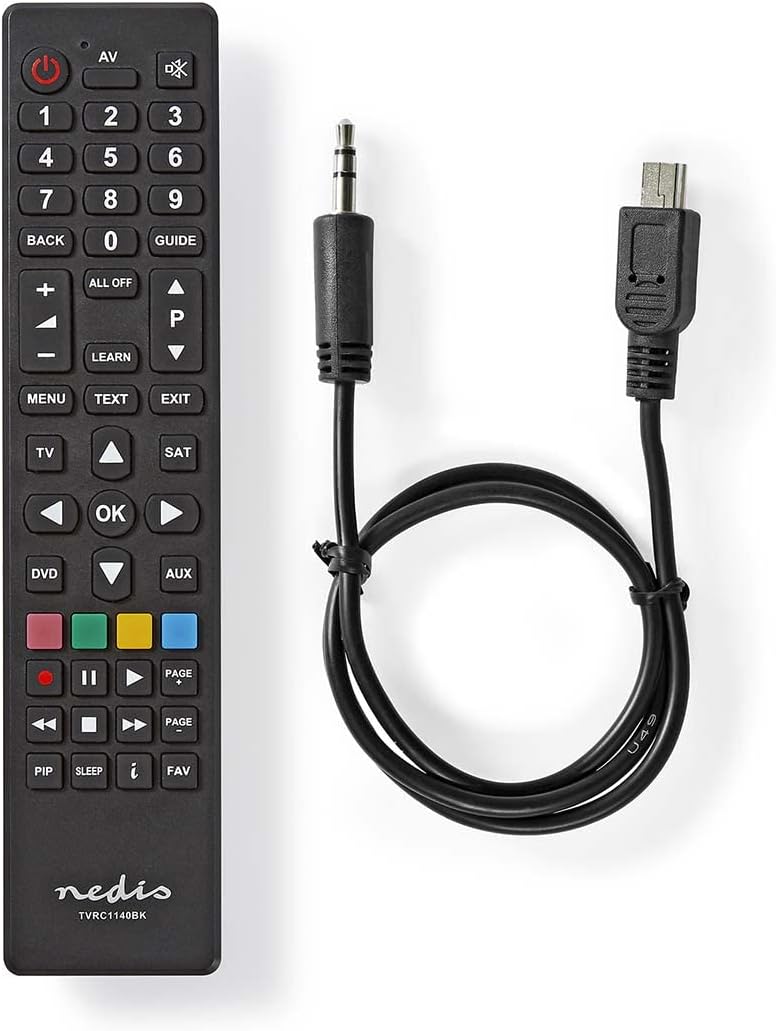
Image: The NEDIS Universal Remote Control TVRC1140BK shown alongside its USB programming cable.
Производ је завршенview
The remote control features a clear button layout for intuitive operation. Familiarize yourself with the various buttons and their functions before use.

Слика: Фронт view of the NEDIS Universal Remote Control TVRC1140BK, displaying all control buttons.
Кључна дугмад и функције:
- Дугме за укључивање (): Turns devices on or off.
- Device Selection Buttons (TV, DVD, SAT, AUX): Selects the device you wish to control.
- Нумеричка тастатура (0-9): For channel selection and data input.
- Појачавање/утишавање (+/-): Подешава јачину звука.
- Канал горе/доле (P/P): Мења канале.
- Навигациона дугмад (горе, доле, лево, десно, ОК): За навигацију и избор у менију.
- Мени/Излаз: Accesses or exits device menus.
- Дугме за учење: Used for programming functions from an original remote.
- Дугмад у боји (црвена, зелена, жута, плава): Often used for specific functions in menus or teletext.
Сетуп
1. Инсталација батерије
- Отворите поклопац одељка за батерије на задњој страни даљинског управљача.
- Insert two (2) AAA Alkaline batteries, ensuring the correct polarity (+ and -) as indicated inside the compartment.
- Добро затворите поклопац одељка за батерије.
2. Програмирање на рачунару
The NEDIS TVRC1140BK remote control is programmed using dedicated software on a PC. This method allows for comprehensive device code loading and customization.
- Преузимање софтвера: Visit the official NEDIS support website to download the latest programming software for the TVRC1140BK model.
- Инсталација софтвера:
- If you have previously installed an older version of the software, uninstall it completely before proceeding.
- For new users, install the downloaded software directly by following the on-screen instructions.
- Повежите даљински: Use the provided USB programming cable to connect the remote control to an available USB port on your PC.
- Programming Process: Follow the instructions within the software to select your device types (TV, DVD, VCR, DVB-T, etc.) and load the appropriate control codes onto the remote. The software typically guides you through the process of assigning functions to buttons.
Напомена: For optimal performance and access to the latest device codes, always use the most current version of the programming software available from the manufacturer.
Управљање даљинским управљачем
Once programmed, the remote control functions similarly to your original device remotes.
- Изаберите уређај: Press the corresponding device button (e.g., TV, ДВД, САТ, АУКС) to select the device you wish to control. The indicator light on the remote may illuminate to confirm selection.
- Point and Operate: Point the remote control directly at the device's infrared receiver.
- Use Functions: Press the desired function buttons (e.g., Power, Volume, Channel, Menu, Play, Pause) to control your selected device.
Одржавање
- Чишћење: Обришите даљински управљач меком, сувом крпом. Не користите абразивна средства за чишћење или раствараче.
- Замена батерије: Replace batteries when the remote's performance degrades or if the indicator light does not illuminate. Always replace both batteries at the same time with new AAA Alkaline batteries.
- Складиштење: Ако даљински управљач неће бити коришћен дуже време, извадите батерије да бисте спречили цурење.
Решавање проблема
- Даљински не реагује:
- Проверите да ли су батерије правилно уметнуте и да ли су довољно напуњене. Замените их ако је потребно.
- Ensure there is a clear line of sight between the remote control and the device's infrared receiver.
- Verify that the correct device mode (TV, DVD, etc.) is selected on the remote.
- Device functions not working correctly after programming:
- The device code may be incorrect or incomplete. Re-program the remote using the PC software, ensuring you select the correct manufacturer and model for your device.
- Some specific functions might not be available if the original remote had unique features not supported by the universal remote's code database.
- Consult the NEDIS support website for updated software or additional programming tips.
- PC programming software issues:
- Ensure you have uninstalled any previous versions of the software before installing the latest one.
- Check your PC's operating system compatibility with the software.
- Покушајте да користите други УСБ порт или поново покренете рачунар.
Спецификације
| Бранд | НЕДИС |
| Број модела | ТВРЦ1140БК |
| Технологија повезивања | Инфрацрвени |
| Максималан број подржаних уређаја | 4 |
| Компатибилни уређаји | TV, DVD/Blu-ray Player, Set-top Box, VCR |
| Тип контролера | Контрола дугмета |
| Максимални домет | 10 метара |
| Батерије су потребне | 2к ААА алкална (није укључена) |
| Боја | Црно |
Гаранција и подршка
For warranty information, please refer to the terms and conditions provided by your retailer at the time of purchase or contact NEDIS customer support directly. For technical assistance, software updates, and additional resources, please visit the official NEDIS webсајту.