
1. Увод
Welcome to the user manual for your Google Pixel 4 XL smartphone. This guide provides essential information to help you get started, understand its features, and maintain your device. The Google Pixel 4 XL is designed to offer a seamless Android experience with advanced camera capabilities, intuitive gesture controls, and the integrated Google Assistant.

Figure 1.1: Google Pixel 4 XL (Oh So Orange)
2. Подешавање
2.1 Шта је у кутији
- Google Pixel 4 XL Smartphone
- АЦ адаптер
- USB кабл (USB-C на USB-C)
- OTG Dongle (USB-A to USB-C adapter)
- Алат за избацивање лежишта СИМ картице
- Водич за брзи почетак
2.2 Уметање СИМ картице
- Locate the SIM card tray on the side of your Pixel 4 XL.
- Уметните алат за избацивање лежишта СИМ картице у мали отвор поред лежишта и чврсто притисните док лежиште не искочи.
- Place your Nano SIM card into the tray with the gold contacts facing down. Ensure it fits securely.
- Пажљиво вратите лежиште СИМ картице у телефон док не кликне на своје место.

Слика 2.1: Локација лежишта SIM картице
2.3 Прво укључивање и подешавање
- Press and hold the Power button (located on the right side) until the Google logo appears.
- Follow the on-screen instructions to select your language, connect to Wi-Fi, and transfer data from an old device if desired.
- Пријавите се помоћу свог Google налога или креирајте нови.
- Set up security features such as Face Unlock.
2.4 Пуњење уређаја
Connect the USB cable to the AC adapter and plug it into a power outlet. Connect the other end of the USB cable to the USB-C port at the bottom of your Pixel 4 XL. The device supports fast charging. For optimal battery health, avoid fully discharging the battery frequently.
3. Упутство за употребу
3.1 Основна навигација
The Pixel 4 XL uses a touchscreen interface for navigation. Swipe up from the bottom to go to the home screen, swipe from the left or right edge to go back, and swipe up and hold to view недавне апликације.

Figure 3.1: Pixel 4 XL Front Display
3.2 Гоогле помоћник
The new Google Assistant is integrated into the Pixel 4 XL. You can activate it by squeezing the sides of your phone or by saying "Hey Google." Use your voice to send texts, share photos, get directions, and more.
3.3 Карактеристике камере
The Pixel 4 XL camera offers advanced photography capabilities:
- Point and Shoot: Capture brilliant color and control exposure balance.
- Night Sight: Take clear photos in low-light conditions, including astrophotography for capturing the Milky Way.
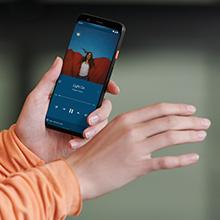
Figure 3.2: Using the Pixel 4 XL Camera
3.4 Motion Sense (Quick Gestures)
Utilize Quick Gestures to control your phone without touching it. Wave your hand above the screen to skip songs, silence calls, and more. Motion Sense functionality is available in specific regions including the US, Canada, Singapore, Australia, Taiwan, and most European countries.
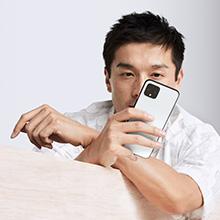
Figure 3.3: Motion Sense in Action
3.5 Call Screen
The Google Assistant's Call Screen feature helps filter out spam calls. It can proactively screen unknown callers and provide a transcript of the conversation, allowing you to decide whether to answer.
3.6 Званични видео производа
Video 3.1: An official video from Google Inc showcasing the features of the Google Pixel 4, including Google Assistant and Motion Sense. This video provides a visual overview of key functionalities.
4. Одржавање
4.1 Чишћење уређаја
To clean your Pixel 4 XL, use a soft, lint-free cloth. Avoid abrasive materials, solvents, or aerosol sprays. For stubborn marks, slightly dampen the cloth with water. Do not submerge the device in water.
4.2 Ажурирања софтвера
Google regularly releases software updates to improve performance, add features, and enhance security. Ensure your device is connected to Wi-Fi and has sufficient battery life before installing updates. You can check for updates in Settings > System > System update.
4.3 Одржавање батерије
Да бисте продужили век трајања батерије:
- Избегавајте екстремне температуре.
- Use the provided charger or a compatible Qi-certified wireless charger.
- Enable Adaptive Battery in settings to optimize app usage.
- Disable features like Motion Sense and Always-on Display if not actively needed to conserve power.
4.4 Резервна копија података
Regularly back up your data to your Google Account. This includes photos, videos, contacts, and app data. Go to Settings > System > Backup to manage your backup settings.
КСНУМКС. Решавање проблема
5.1 Уобичајена питања и решења
- Уређај не реагује: Притисните и држите дугме за напајање око 30 секунди да бисте присилно поново покренули рачунар.
- Рушење апликација: Clear the cache and data for the problematic app in Settings > Apps & notifications > See all apps > [App Name] > Storage & cache.
- Проблеми са повезивањем (Wi-Fi/Bluetooth): Try toggling Wi-Fi or Bluetooth off and on. If the issue persists, reset network settings in Settings > System > Reset options > Reset Wi-Fi, mobile & Bluetooth.
- Лош век трајања батерије: Review battery usage in Settings > Battery to identify apps consuming excessive power. Adjust screen brightness and disable unnecessary features.
5.2 Ресетовање на фабричка подешавања
Фабричко враћање ће обрисати све податке са вашег телефона и вратити га на оригинална фабричка подешавања. Ово може решити сталне проблеме са софтвером. Warning: Back up all important data before proceeding.
- Идите на Подешавања > Систем > Опције ресетовања.
- Додирните „Обриши све податке (ресетовање на фабричка подешавања)“.
- Потврдите своју одлуку и пратите упутства на екрану.
6. Спецификације
Key technical specifications for the Google Pixel 4 XL:
| Феатуре | Спецификација |
|---|---|
| Бранд | Гоогле |
| Назив модела | Пикел 4 КСЛ |
| Оперативни систем | Андроид |
| Капацитет меморије | 64 ГБ |
| Величина инсталиране РАМ меморије | 6 ГБ |
| Величина екрана | 6.3 инча |
| Резолуција | 1440 к 2960 |
| Рефресх Рате | 120 Хз |
| ЦПУ модел | Snapdragon S3 |
| Брзина процесора | 2.84 ГХз |
| Боја | Oh So Orange |
| Број слотова за SIM картице | Сингле СИМ |
| Тип конектора | УСБ тип Ц |
| Биометријска безбедносна функција | Препознавање лица |
| Ниво отпорности на воду | Отпоран на воду |
| Јацк за слушалице | Нема прикључка за слушалице |
| Front Photo Sensor Resolution | 8 МП |
| Резолуција снимања видео записа | 4k (30fps) |
| Дисплаи Типе | ОЛЕД |
| Бежични провајдер | Откључано |
| Просечан век трајања батерије | 12 сата |
7. Информације о гаранцији
Your Google Pixel 4 XL comes with a Двогодишња гаранција произвођача. This warranty covers defects in materials and workmanship under normal use. It does not cover damage caused by accidents, misuse, unauthorized repairs, or normal wear and tear.
For detailed terms and conditions, please refer to the warranty card included with your product or visit the official Google support webсајту.
8. Подршка
If you require further assistance or encounter issues not covered in this manual, please utilize the following resources:
- Помоћ на мрежи: Visit the official Google Pixel Help Center for comprehensive articles, FAQs, and troubleshooting guides.
- Форуми заједнице: Engage with other Pixel users and experts in Google's official product forums.
- Контактирајте подршку: Access direct support options (chat, phone, email) through the Google Pixel Help Center.
Always ensure you are referring to official Google support channels for accurate and up-to-date information.