
Увод
Thank you for choosing the Ksix Fitness Band GPS. This manual provides essential information for setting up, operating, and maintaining your device. Please read it carefully to ensure optimal performance and longevity of your fitness band.
The Ksix Fitness Band GPS is designed to monitor your physical activity comprehensively, featuring integrated GPS for route tracking, a dynamic 24-hour heart rate monitor, and a multi-sport mode to enhance your training sessions.
Производ је завршенview
The Ksix Fitness Band GPS is a versatile smartband equipped with advanced features to support your fitness journey. Its lightweight design and 1.3-inch TFT color screen offer a comfortable and clear user experience.
- Интегрисани ГПС: Records your route during outdoor activities.
- 24-Hour Dynamic Heart Rate Monitor: Непрекидно прати ваш откуцај срца.
- Мулти-Спорт Моде: Monitors various types of workouts.
- Отпорност на воду: IP68 rated, waterproof up to 3 meters for 1 hour.
- Повезивање: Bluetooth 4.0 for seamless connection with your smartphone.
- Компатибилност: Works with Android 4.4 and later, and iOS 8.0 and later.
- Трајање батерије: Up to 7-8 hours with GPS and real-time heart rate monitoring, and up to 30 days in standby mode.

Image 1: Ksix Fitness Band GPS displaying time and date.
Водич за подешавање
1. Пуњење уређаја
Before first use, fully charge your Ksix Fitness Band GPS. Connect the charging cable to the designated port on the device and a USB power source. The screen will indicate charging status.
2. Installing the Hi Move App
- Тражи "Hi Move" in your smartphone's app store (Google Play Store for Android or Apple App Store for iOS).
- Преузмите и инсталирајте апликацију.
- Отворите апликацију и пратите упутства на екрану да бисте креирали налог и подесили свој професионалац.file.
3. Упаривање са вашим паметним телефоном
- Уверите се да је Блуетоотх омогућен на вашем паметном телефону.
- Open the Hi Move app.
- Идите до одељка за упаривање уређаја у апликацији.
- The app will search for available devices. Select "Ksix Fitness Band GPS" from the list.
- Confirm the pairing request on both your smartphone and the fitness band, if prompted.
- Once paired, the time and date on your fitness band will synchronize with your phone.
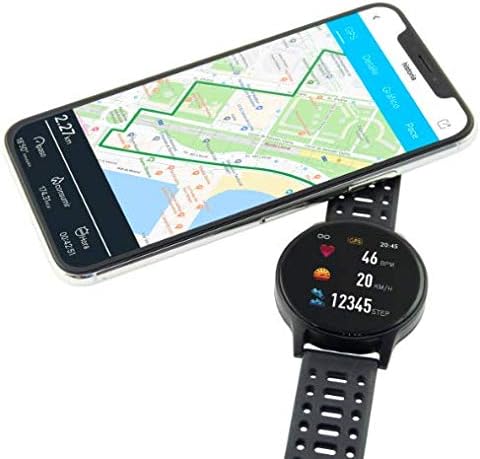
Image 2: Ksix Fitness Band GPS connected to a smartphone displaying a GPS-tracked route.
Упутство за употребу
Кретање кроз интерфејс
The fitness band features a touch-sensitive screen. Swipe left/right or up/down to navigate through different functions and menus. Tap to select an option or confirm an action.
ГПС праћење
For accurate GPS tracking, ensure you are in an open outdoor area with a clear view of the sky. Start your activity from the multi-sport mode, and the device will automatically attempt to acquire a GPS signal. Your route will be recorded and can be viewed in the Hi Move app after synchronization.
Праћење откуцаја срца
The fitness band continuously monitors your heart rate. Wear the band snugly on your wrist, about one finger's width above your wrist bone, for accurate readings. You can view your current heart rate on the device and detailed historical data in the Hi Move app.
Мулти-Спорт Моде
Access the multi-sport mode from the main menu to select specific activities such as running, walking, cycling, etc. Selecting an activity will initiate tracking of relevant metrics like duration, distance, calories burned, and heart rate. End the activity when finished to save the data.

Image 3: Ksix Fitness Band GPS showing a person running, highlighting features like pedometer, multi-sport mode, heart rate monitoring, and distance tracking.
Одржавање
Чишћење
Regularly clean your fitness band and strap to prevent skin irritation and maintain device hygiene. Use a soft, damp крпу за брисање уређаја. Избегавајте употребу јаких хемикалија или абразивних материјала.
Отпорност на воду
The device is IP68 waterproof, meaning it can withstand immersion in water up to 3 meters deep for a maximum of 1 hour. It is suitable for swimming in shallow water but not recommended for diving, high-pressure water activities, or prolonged immersion. Ensure the charging port is dry before charging.
Складиштење
When not in use for extended periods, store the fitness band in a cool, dry place. Avoid extreme temperatures and direct sunlight.
Решавање проблема
- Уређај се не укључује: Ensure the device is fully charged. Connect it to the charger and wait a few minutes.
- Не може се упарити са паметним телефоном:
- Уверите се да је Блуетоотх омогућен на вашем телефону.
- Make sure the fitness band is within Bluetooth range of your phone.
- Restart both your phone and the fitness band.
- Try unpairing and re-pairing the device through the Hi Move app.
- Нетачна очитавања откуцаја срца:
- Уверите се да је наруквица чврсто причвршћена за зглоб, не превише лабава или превише затегнута.
- Clean the sensor on the back of the device.
- Избегавајте прекомерно кретање током мерења.
- GPS не прима сигнал:
- Уверите се да сте на отвореном простору са чистим view неба.
- Wait a few minutes for the device to acquire a signal.
- Ensure the device's firmware is up to date via the Hi Move app.
- Подаци се не синхронизују са апликацијом:
- Ensure the fitness band is connected to your phone via Bluetooth.
- Open the Hi Move app and manually initiate a sync if available.
- Проверите интернет везу вашег телефона.
Спецификације
| Број модела | BXBZGPS01 |
| Бранд | Ксик |
| Величина екрана | 1.3 инча |
| Тип екрана | TFT Color |
| Капацитет батерије | 230 mAh (литијум-јонска) |
| Battery Life (GPS + HR) | 7-8 сати |
| Трајање батерије (приправност) | До 30 дана |
| Отпорност на воду | IP68 (up to 3 meters for 1 hour) |
| Повезивање | Блуетоотх 4.0 |
| Компатибилност | Андроид 4.4+ / иОС 8.0+ |
| Тежина | 38 грама |
| Материјал | Пластика, ПВЦ |
| Боја | Црно |
Гаранција и подршка
For warranty information and technical support, please refer to the documentation provided with your purchase or visit the official Ksix webсајт. Сачувајте доказ о куповини за потребе гаранције.
Произвођач: КСИКС
Контакт: Please refer to the Ksix official webсајт за контакт податке корисничке службе.