
Увод
Welcome to your new MageGee GK710 Pink Gaming Keyboard and Mouse Combo. This manual provides detailed instructions for setup, operation, and maintenance to ensure optimal performance and a satisfying user experience. Please read this manual thoroughly before using the product.
Садржај пакета
- MageGee GK710 Pink Gaming Keyboard
- MageGee Pink Gaming Mouse
- Integrated USB Cables
Упутства за подешавање
Повезивање тастатуре и миша
The MageGee GK710 keyboard and mouse combo utilizes standard USB connections for both devices. No additional drivers are required for basic functionality, making it a plug-and-play solution.
- Пронађите слободан USB 2.0 порт на рачунару.
- Укључите УСБ конектор са тастатуре у УСБ порт.
- Plug the USB connector from the mouse into another available USB port.
- Your operating system will automatically detect and install the necessary drivers.
- The devices are now ready for use.

Image: Close-up of the pink gaming mouse, highlighting its USB connection and plug-and-play capability. The mouse features a geometric pattern and illuminated scroll wheel.
Упутство за употребу
Функције тастатуре
The GK710 keyboard features a standard 104-key layout with several enhanced functions designed for gaming and productivity.
Кључеви против духова
The keyboard supports 19 anti-ghosting keys, allowing simultaneous key presses without conflict. These keys include Q, A, Z, W, S, X, E, D, C, B, Space, Up, Down, Left, Right, Tab, Alt, Ctrl, and Shift.
Мултимедијални функцијски тастери
Приступите мултимедијалним контролама притиском на Fn key in combination with the designated function keys (F1-F10).

Image: The MageGee GK710 keyboard displaying the 10 dedicated multimedia function keys located above the F-keys, labeled for quick access to common applications and media controls.
- Фн + Ф1: Web Бровсер
- Фн + Ф2: Мој рачунар
- Фн + Ф3: Е-маил
- Фн + Ф4: Music Player
- Фн + Ф5: Калкулатор
- Фн + Ф6: Utišavanje zvuka
- Фн + Ф7: Појачавање звука
- Фн + Ф8: Претходна нумера
- Фн + Ф9: Пусти/пауза
- Фн + Ф10: Нект Трацк
Подешавање позадинског осветљења
The keyboard features 7 single-color lighting modes. To adjust the backlight:
- Притисните Фн + ЕСЦ repeatedly to cycle through brightness levels (Dim, Bright, Breathing, Off).
- The backlight will automatically turn off after 10 minutes of inactivity to conserve energy.
Gaming Mode Features
- Disable WIN Key: Притисните Фн + ВИН to disable the Windows key during gameplay, preventing accidental interruptions. Press again to re-enable.
- WASD Key Swap: Притисните Фн + В to swap the functionality of the WASD keys with the arrow keys. Press again to revert to standard layout.
Функције миша
The gaming mouse offers adjustable DPI settings and an aesthetic breathing backlight.
ДПИ Адјустмент
The mouse supports four adjustable DPI levels. Press the DPI button located on top of the mouse to cycle through the settings. An indicator light will change color to show the current DPI:
- Црвени: 800 DPI (suitable for web browsing and general tasks)
- Зелена: 1600 DPI (ideal for daily use)
- Плава: 2400 DPI (recommended for gaming)
- Љубичаста: 3200 DPI (for professional gaming requiring high precision)
Бреатхинг Бацклигхт
The mouse features an automatic 7-color breathing backlight that cycles through various colors when connected.
Кључне карактеристике
- Дурабле Десигн: Features suspension keycaps and a waterproof, dust-resistant membrane switch for enhanced longevity and easy cleaning.
- Тактилна повратна информација: The crater structure of the keycaps provides a comfortable and responsive typing experience, crucial for both gaming and extended typing sessions.
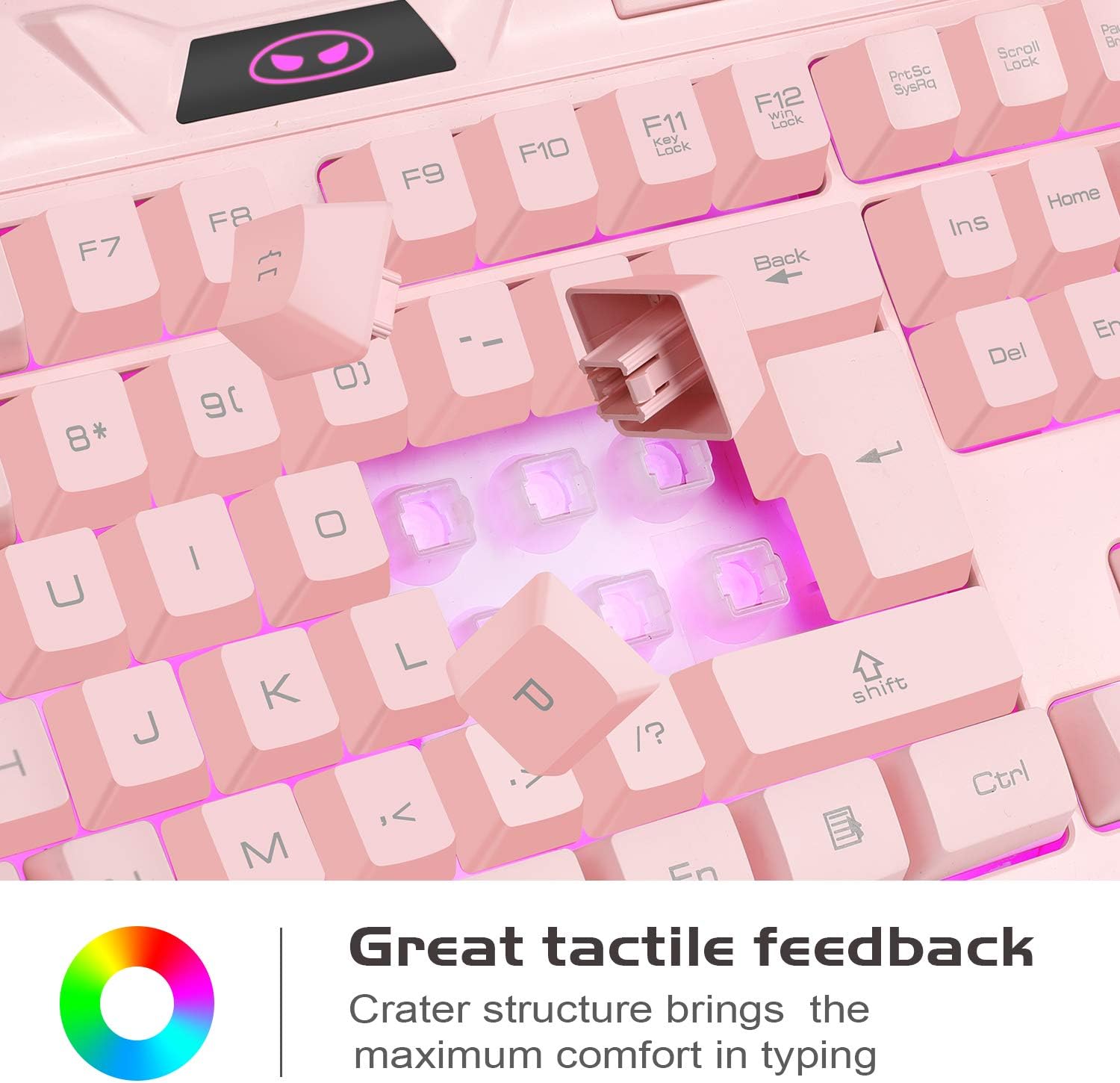
Слика: Крупни план view of the keyboard's keycaps, illustrating the crater structure designed to provide enhanced tactile feedback during typing.
- Ergonomic Mouse Design: The mouse is contoured for a comfortable grip, reducing fatigue during prolonged use.
- Широка компатибилност: Compatible with a broad range of operating systems including Windows 98/2000/ME/XP/Vista/Win7/Win8 and Linux.
Одржавање
Чишћење тастатуре
Due to its waterproof and dust-resistant design, the keyboard is easy to clean and maintain.
- Искључите тастатуру из рачунара пре чишћења.
- Користите меку, благо дamp крпу за брисање капица тастера и површине.
- For stubborn dirt, a small amount of mild soap can be used, ensuring no liquid enters the USB connector.
- Allow the keyboard to dry completely before reconnecting it to your computer.
Чишћење миша
- Искључите миш из рачунара.
- Користите меку, благо дamp cloth to gently wipe the surface of the mouse.
- Avoid using harsh chemicals or abrasive materials, as these can damage the finish.
- Ensure the mouse is completely dry before reconnecting.
Решавање проблема
Тастатура или миш не реагују
- Уверите се да су USB каблови безбедно прикључени у USB портове рачунара.
- Покушајте да прикључите уређаје на различите УСБ портове на рачунару.
- Restart your computer to refresh the USB connections.
- Test the keyboard and mouse on another computer to determine if the issue is with the devices or your system.
Позадинско осветљење не ради
- For the keyboard, ensure the backlight is not set to 'Off' mode by pressing Фн + ЕСЦ да бисте се кретали кроз режиме.
- For the mouse, the backlight is automatic and should be on when connected. If not, try reconnecting the mouse.
Keys Not Registering Correctly
- Ensure the WASD keys are not swapped with arrow keys (press Фн + В to toggle this function).
- Clean around the affected keys to remove any debris that might be obstructing key presses.
Спецификације
| Феатуре | Детаљ |
|---|---|
| Модел | ГК710 |
| Тип тастатуре | Мембране |
| Број кључева | 104 |
| Анти-Гхостинг | 19 keys (Q, A, Z, W, S, X, E, D, C, B, Space, Up, Down, Left, Right, Tab, Alt, Ctrl, Shift) |
| Мултимедијални тастери | 10 (Fn combinations) |
| Позадинско осветљење тастатуре | 7 single-color modes, adjustable brightness (Fn+ESC) |
| ДПИ подешавања миша | 800 / 1200 / 2400 / 3200 ДПИ |
| Позадинско осветљење миша | 7-color breathing light |
| Повезивање | Жичани УСБ 2.0 |
| Цабле Ленгтх | 180 cm (approx. 5.9 ft) |
| Оператинг Волtage | 5V |
| Оператинг Цуррент | 10 мАх |
| Компатибилност | Linux, Win XP, Win 2000, Win Vista, Win7, Win8 |
| Димензије тастатуре | Прибл. 460 мм к 188.5 мм к 28.5 мм |
| Димензије миша | Прибл. 120 мм к 70 мм к 41 мм |
| Тежина | 1.02 kg (combined package weight) |

Image: Technical diagram illustrating the precise dimensions of both the MageGee GK710 pink gaming keyboard and its accompanying mouse.
Гаранција и подршка
For any issues or questions regarding your MageGee GK710 Pink Gaming Keyboard and Mouse Combo, please contact our customer service team. We value your feedback and are committed to providing assistance.
Молимо погледајте документацију о куповини или упутства продавца webсајт за конкретне услове гаранције и контакт информације.