
1. Увод
This manual provides essential information for the installation, operation, maintenance, and troubleshooting of your Chieftec Polaris 650W 80Plus Certified Power Supply Unit (PSU). Please read this manual thoroughly before installing and using the product to ensure proper function and safety. The Chieftec Polaris 650W PSU is designed to provide stable and efficient power to your personal computer system.
2. Безбедносне информације
Увек се придржавајте следећих мера предострожности како бисте спречили повреде или оштећење опреме:
- немој open the PSU casinг. Висока запреминаtages inside can cause electric shock. There are no user-serviceable parts inside.
- немој insert any objects into the PSU's ventilation openings.
- немој expose the PSU to water, moisture, or high humidity.
- Ensure the PSU is installed in a well-ventilated area, free from obstructions to airflow.
- Always disconnect the AC power cord from the wall outlet before installing, removing, or cleaning the PSU.
- Use only the modular cables provided with your Chieftec Polaris 650W PSU. Using incompatible cables may damage the PSU or connected components.
- Ensure all cable connections are secure before powering on the system.
3. Садржај пакета
Проверите да ли су све ставке присутне у вашем пакету:
- Chieftec Polaris 650W Power Supply Unit
- Modular Cable Set (e.g., 24-pin ATX, 8-pin EPS/CPU, PCIe, SATA, Molex)
- Кабл за напајање наизменичном струјом
- Монтажни завртњи
- Кориснички приручник (овај документ)
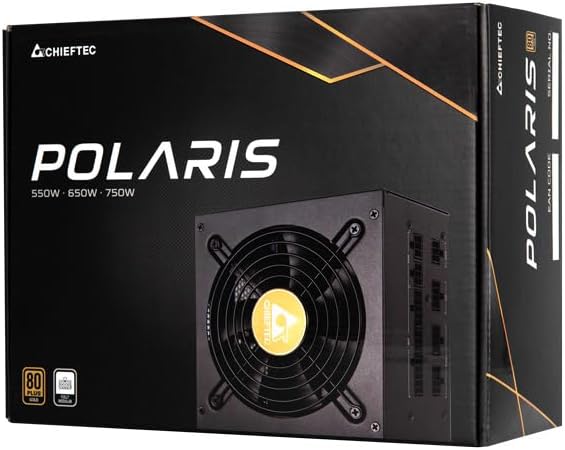
Image: The Chieftec Polaris 650W Power Supply Unit and its retail packaging.
4. Подешавање и инсталација
Follow these steps to install your Chieftec Polaris 650W PSU into your personal computer system:
- Припремите свој систем: Ensure your computer is completely powered off and unplugged from the wall outlet. Open your computer case to access the PSU mounting area.
- Уклоните стари напајач (ако је применљиво): If replacing an existing PSU, disconnect all cables from the components and motherboard, then unscrew and remove the old PSU.
- Монтирајте нови PSU: Carefully slide the Chieftec Polaris 650W PSU into the designated PSU bay in your computer case. Ensure the fan faces the correct direction (typically downwards for bottom-mounted PSUs, or as per case design for optimal airflow). Secure the PSU with the provided mounting screws.
- Повежите модуларне каблове: Identify the necessary modular cables for your system components (motherboard, CPU, graphics card, storage drives). Connect these cables to the corresponding ports on the back of the PSU. Refer to the image below for connector identification.
- Повежите се са компонентама: Connect the other end of the modular cables to your motherboard (24-pin ATX and 8-pin EPS/CPU), graphics card(s) (PCIe), and storage devices (SATA/Molex). Ensure all connections are firm and fully seated.
- Управљање кабловима: Уредно усмерите каблове како бисте побољшали проток ваздуха и естетику унутар кућишта.
- Завршне провере: Double-check all connections. Ensure no loose cables are obstructing fans. Close your computer case.
- Повежите наизменичну струју: Укључите кабл за напајање наизменичном струјом у прикључак за напајање на уређају за напајање, а затим у зидну утичницу.

Слика: Позади view of the Chieftec Polaris 650W PSU showing modular cable connection ports for M/B, SATA, PCIe, and CPU.

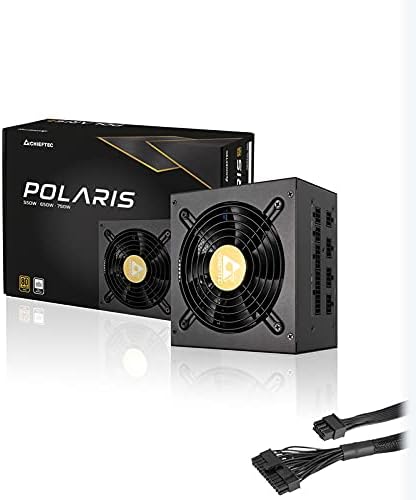
Image: The Chieftec Polaris 650W Power Supply Unit with its modular cables connected, ready for installation.
5. Упутство за употребу
Once the Chieftec Polaris 650W PSU is correctly installed and all connections are secure:
- Укључено: Locate the power switch on the back of the PSU (next to the AC power inlet). Ensure it is in the 'I' (On) position.
- Покретање система: Press the power button on your computer case. The system should power on, and the PSU fan will begin to spin, indicating normal operation.
- Рад вентилатора: The PSU features an air cooling method. The fan will operate to dissipate heat generated by the power supply components. Its speed may vary depending on the load and temperature to maintain optimal cooling and noise levels.
- Искључивање: To shut down your system, use the operating system's shutdown procedure. For a complete power cut, switch the PSU's power switch to the 'O' (Off) position and unplug the AC power cord.
Слика: Одозго надоле view of the Chieftec Polaris 650W Power Supply, highlighting the cooling fan and protective grille.
6. Одржавање
Proper maintenance ensures the longevity and optimal performance of your PSU:
- Чишћење прашине: Periodically (e.g., every 3-6 months), power off your computer, unplug the AC cord, and open the case. Use compressed air to gently blow dust out of the PSU's fan and ventilation grilles. немој use a vacuum cleaner directly on the PSU as it can generate static electricity.
- Услови животне средине: Ensure the computer operates in a clean, dry, and well-ventilated environment. Avoid extreme temperatures and direct sunlight.
- Интегритет кабла: Occasionally check that all modular cables are securely connected and not frayed or damaged.
КСНУМКС. Решавање проблема
If you encounter issues with your Chieftec Polaris 650W PSU, consider the following troubleshooting steps:
- Нема напајања:
- Уверите се да је кабл за напајање наизменичном струјом безбедно прикључен и у уређај за напајање и у зидну утичницу.
- Check that the PSU's power switch on the back is in the 'I' (On) position.
- Проверите да ли зидна утичница функционише тако што ћете укључити други уређај.
- Confirm all internal power cables (24-pin ATX, 8-pin EPS/CPU) are firmly connected to the motherboard.
- Нестабилност система/Случајна гашења:
- Ensure the PSU is adequately ventilated and not overheating.
- Check all power connections to components (graphics card, storage) for looseness.
- If possible, test the PSU with a different set of components or in another system to rule out other hardware issues.
- Необични звуци:
- A rattling or grinding noise may indicate a fan issue. Power off the system and inspect the PSU fan for obstructions (e.g., loose cables).
- If the noise persists and is not due to an obstruction, contact support.
If these steps do not resolve the issue, please refer to the Warranty and Support section.
8. Спецификације
| Феатуре | Спецификација |
|---|---|
| Бранд | Цхиефтец |
| Назив модела | Поларис |
| Број модела ставке | IN-ACT-ZDLCHFOBU0087 |
| Оутпут Ватtage | 650 Ваттс |
| Форм Фацтор | АТКС |
| Метод хлађења | Ваздух |
| Тип конектора | АТКС |
| Компатибилни уређаји | Персонал Цомпутер |
| Димензије производа (Д к Ш к В) | 8.66 к 3.15 к 1.18 инча (22 к 8 к 3 цм) |
| Тежина артикла | 4.4 фунте (2 килограма) |
| Цертифицатион | 80Плус Цертифиед |
9. Гаранција и подршка
Chieftec products are manufactured to high-quality standards. For specific warranty terms and conditions, please refer to the warranty card included with your product or visit the official Chieftec website. Warranty periods and coverage may vary by region and product.
For technical support, product inquiries, or warranty claims, please contact Chieftec customer service through their official website or the contact information provided in your product documentation. When contacting support, please have your product model number (IN-ACT-ZDLCHFOBU0087) and proof of purchase readily available.