
1. Увод
Welcome to the Argon Audio FORTE A5 powered speaker system. This manual provides essential information for setting up, operating, and maintaining your speakers to ensure optimal performance and longevity. Please read this manual thoroughly before using your speakers.
2. Безбедносна упутства
To prevent fire or electric shock, do not expose this appliance to rain or moisture. Do not open the cabinet. Refer servicing to qualified personnel only.
- вентилација: Обезбедите одговарајућу вентилацију око звучника. Не блокирајте вентилационе отворе.
- Извор напајања: Connect the speakers only to the specified power supply.
- Вода и влага: Do not expose the speakers to dripping or splashing water. Do not place objects filled with liquids, such as vases, on the speakers.
- Чишћење: Чистите само сувом крпом. Немојте користити течна средства за чишћење или средства за чишћење у облику аеросола.
- топлота: Не постављајте у близини извора топлоте као што су радијатори, грејни регистри, пећи или други уређаји (укључујући ampлифиерс) који производе топлоту.
- Пласман: Place the speakers on a stable, level surface to prevent them from falling.
3. Садржај пакета
Молимо вас да проверите да ли су све ставке присутне у пакету:
- Argon Audio FORTE A5 Powered Speakers (1 pair)
- Special Speaker Cable (3 meters)
- Ремоте Цонтрол
- Повер Цабле
- Кориснички приручник (овај документ)
4. Производ је готовview
4.1 Предња плоча
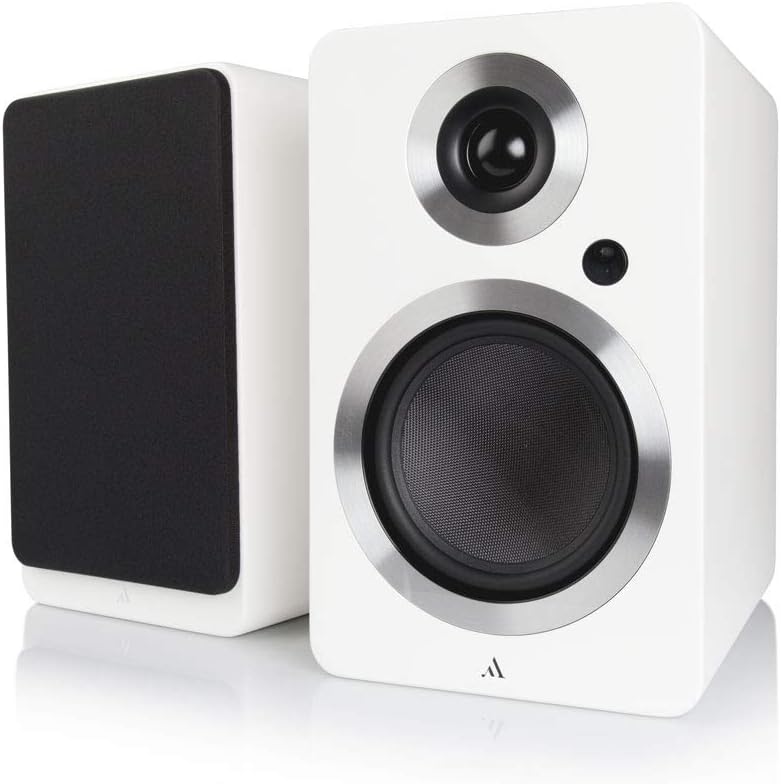
Слика: Фронт view of the Argon Audio FORTE A5 speakers. The image displays two white bookshelf speakers with black speaker cones and metallic rings around the drivers. The left speaker is shown from the side, while the right speaker is shown from the front, highlighting its clean design.
- Твеетер: High-frequency driver.
- Mid/Bass Driver: Handles mid-range and bass frequencies.
- Статус ЛЕД: Indicates power status and selected input.
4.2 Задња плоча

Слика: Позади view of the Argon Audio FORTE A5 speakers. The image shows the back panel of the active speaker with various connection ports including RCA, optical, USB, and speaker terminals. The passive speaker's rear panel is also visible, showing only the speaker terminals.
- RCA улази (L/R): For connecting analog audio sources like CD players or turntables.
- Optical Inputs (OPT1, OPT2): For connecting digital audio sources like TVs or game consoles.
- Суб Оут: For connecting an external subwoofer.
- USB Charge (5V/1A): За пуњење мобилних уређаја.
- Speaker Cable Output: Connects to the passive speaker.
- Улазна снага: Повезује се на АЦ напајање.
5. Подешавање
5.1 Постављање
Place the speakers on a stable surface, such as a bookshelf or speaker stands. For optimal stereo imaging, position the speakers equidistant from your listening position and angle them slightly towards you (toe-in). Ensure there is sufficient space behind the speakers for proper ventilation and cable connections.
5.2 Везе
- Повежите звучнике: Use the provided speaker cable to connect the active speaker (with all the inputs) to the passive speaker. Ensure correct polarity (+ to + and - to -).
- Повежите изворе звука:
- РЦА: Connect your analog audio device (e.g., CD player, turntable with pre-amp) to the RCA inputs.
- Оптички: Connect your digital audio device (e.g., TV, game console) to either OPT1 or OPT2.
- Блуетоотх: For wireless connection, see section 6.3.
- Прикључите напајање: Plug the power cable into the active speaker's power input, then plug the other end into a wall outlet.
6. Операција
6.1 Укључивање/искључивање
The speakers will automatically enter standby mode when no audio signal is detected for a period. They will wake up automatically when an audio signal is received on the selected input. To manually power off, use the remote control or the power button on the active speaker (if available).
6.2 Избор улаза
Use the input selection buttons on the remote control or the active speaker to cycle through the available audio inputs (RCA, Optical 1, Optical 2, Bluetooth). The Status LED will change color to indicate the currently selected input.
6.3 Блуетоотх упаривање
- Select the Bluetooth input on your speakers. The Status LED will blink, indicating pairing mode.
- On your Bluetooth device (smartphone, tablet, laptop), enable Bluetooth and search for new devices.
- Select "Argon Audio FORTE A5" from the list of available devices.
- Once connected, the Status LED on the speaker will turn solid, and you can now play audio wirelessly.
6.4 Функције даљинског управљача
The included remote control allows you to:
- Adjust Volume (Up/Down)
- Муте/Унмуте
- Изаберите Улазни извор
- Укључивање/искључивање (приправност)
7. Одржавање
To keep your Argon Audio FORTE A5 speakers in optimal condition:
- Чишћење: Use a soft, dry, lint-free cloth to clean the cabinet surfaces. Do not use abrasive cleaners, waxes, or solvents.
- Решетке: The speaker grilles can be carefully removed for cleaning, but ensure they are reattached securely to protect the drivers.
- прашина: Regularly dust the speakers to prevent accumulation, especially around the drivers and ventilation ports.
КСНУМКС. Решавање проблема
If you experience issues with your speakers, please refer to the following table:
| Проблем | Могући узрок | Решење |
|---|---|---|
| Нема звука | Напајање није повезано; изабран је погрешан улаз; јачина звука је прениска; каблови су лабави. | Check power connection; Select correct input; Increase volume; Reconnect all cables securely. |
| Изобличен звук | Volume too high; Source audio quality poor; Cables damaged. | Reduce volume; Try a different audio source; Check and replace cables if necessary. |
| Блуетоотх се не повезује | Speakers not in pairing mode; Device too far; Previously paired device connected. | Ensure speakers are in Bluetooth pairing mode; Move device closer; Disconnect from other Bluetooth devices. |
| Даљински управљач не ради | Batteries dead; Obstruction between remote and speaker. | Замените батерије; Уклоните све препреке. |
If the problem persists, please contact Argon Audio customer support.
9. Спецификације
| Феатуре | Спецификација |
|---|---|
| Модел | ФОРТЕ А5 |
| Тежина артикла | 6.7 килограма |
| Димензије производа (Ш к Д к В) | 16.5 к 23 к 27 цм |
| Максимална излазна снага звучника | 80 Ваттс |
| Технологија повезивања | Блуетоотх |
| Режим аудио излаза | Стерео |
| Тип монтаже | Носач полица |
| Спеакер Типе | Subwoofer (Note: This refers to the capability to connect a subwoofer, as these are bookshelf speakers) |
| Компатибилни уређаји | Smartphone, Tablet, Laptop, TV, Desktop, Turntable, MP3 Player |
| Конфигурација сурроунд звука | 2.0 |
10. Гаранција и подршка
Argon Audio products are designed and manufactured to the highest quality standards. For information regarding warranty terms and conditions, please refer to the warranty card included with your product or visit the official Argon Audio website. For technical support or service inquiries, please contact your local dealer or Argon Audio customer service.
Webсајт: ввв.аргонаудио.цом