
1. Увод
This manual provides detailed instructions for the installation, operation, and maintenance of your Cooler Master RR-A71C-18PA-R1 CPU Cooler. This air cooler is designed to efficiently dissipate heat from your desktop CPU, featuring a PWM controlled fan for optimized performance and addressable RGB lighting for customizable aesthetics. Please read this manual thoroughly before proceeding with installation to ensure proper setup and safe operation.
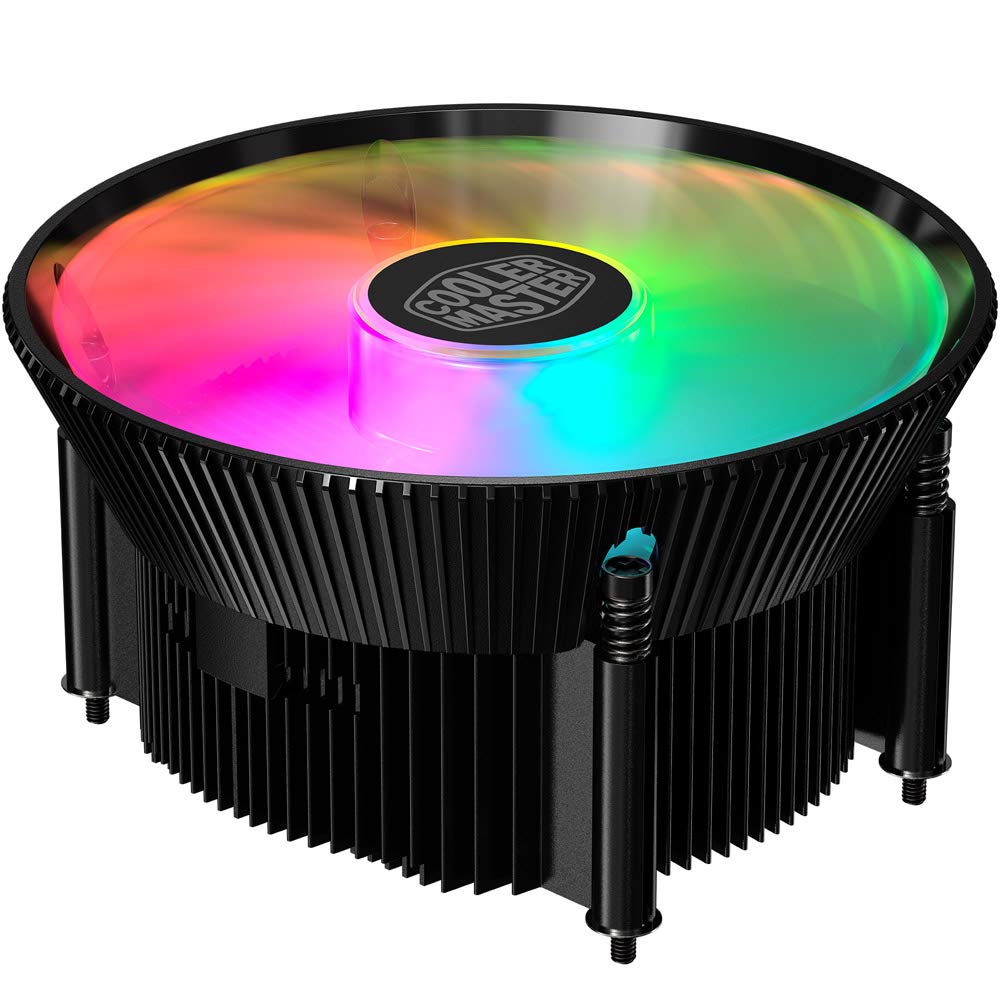
Слика 1.1: Врх view of the Cooler Master RR-A71C-18PA-R1 CPU Cooler showcasing its addressable RGB fan.
2. Безбедносне информације
Придржавајте се следећих мера предострожности како бисте спречили оштећење производа или повреде себе:
- Уверите се да је ваш рачунар искључен из напајања и да је кабл искључен из зидне утичнице пре инсталације или одржавања.
- Avoid touching the fan blades while the system is operating.
- Handle the cooler and its components with care to prevent damage.
- Чувати ван домашаја деце.
- Do not attempt to modify the cooler or its components. Unauthorized modifications may void your warranty and pose safety risks.
3. Садржај пакета
Проверите да ли су све ставке присутне у вашем пакету:
- Cooler Master RR-A71C-18PA-R1 CPU Cooler Assembly
- Mounting Hardware (for compatible CPU sockets)
- Термална паста (претходно нанета или у туби)
- Кориснички приручник (овај документ)
4. Подешавање и инсталација
Follow these steps for proper installation of the CPU cooler:
- Припремите матичну плочу:
Ensure your motherboard is removed from the PC case or has sufficient access for cooler installation. Refer to your motherboard's manual for specific CPU socket preparation.
- Нанесите термалну пасту:
If thermal paste is not pre-applied to the cooler's base, apply a small, pea-sized amount to the center of your CPU's integrated heat spreader (IHS). Do not spread it manually; the pressure from the cooler will distribute it evenly.

Слика 4.1: Доња страна view of the CPU cooler, illustrating the fan and copper contact base. Ensure this surface is clean before applying thermal paste.
- Монтирајте хладњак:
Carefully align the cooler with the mounting holes on your motherboard. Gently place the cooler onto the CPU, ensuring even contact. Secure the cooler using the provided mounting hardware. Tighten screws in a diagonal pattern (e.g., top-left, bottom-right, top-right, bottom-left) until snug, but do not overtighten.
- Повежите кабл вентилатора:
Locate the 4-pin PWM fan connector on the cooler. Connect this cable to the "CPU_FAN" header on your motherboard. Refer to your motherboard manual for the exact location of this header.
- Connect RGB Cable:
Locate the addressable RGB (ARGB) connector on the cooler. Connect this cable to a compatible 3-pin 5V ARGB header on your motherboard. Упозорење: Do not connect to a 4-pin 12V RGB header, as this will damage the LEDs.
- Завршне провере:
Double-check all connections. Ensure no cables are obstructing the fan blades or other components. Reinstall your motherboard into the PC case if it was removed.
5. Упутство за употребу
Once installed, the Cooler Master RR-A71C-18PA-R1 CPU Cooler operates automatically, but its performance and aesthetics can be managed:
- Контрола брзине вентилатора (PWM):
The fan's speed is controlled by your motherboard's BIOS/UEFI settings or through motherboard software. PWM (Pulse Width Modulation) allows for dynamic fan speed adjustments based on CPU temperature, providing optimal cooling and noise levels. Consult your motherboard manual for instructions on configuring fan curves.
- Addressable RGB Lighting Control:
The addressable RGB lighting can be controlled via your motherboard's RGB software (e.g., ASUS Aura Sync, MSI Mystic Light Sync, Gigabyte RGB Fusion, ASRock Polychrome Sync) or a dedicated ARGB controller (not included). Ensure the ARGB cable is correctly connected to a 3-pin 5V ARGB header. Refer to your motherboard's software documentation for lighting customization options.
6. Одржавање
Редовно одржавање осигурава оптималне перформансе и дуготрајност вашег процесорског хладњака:
- Уклањање прашине:
Periodically (every 3-6 months, depending on environment) power off your computer and unplug it. Use compressed air to gently blow dust out of the heatsink fins and fan blades. Hold the fan blades to prevent them from spinning rapidly during cleaning, which can damage the bearings.
- Проверите везе:
Occasionally verify that the fan and RGB cables are securely connected to their respective headers on the motherboard.
- Поновно наношење термалне пасте:
If you remove the cooler for any reason, it is recommended to clean off the old thermal paste from both the CPU and the cooler base and apply fresh thermal paste before reinstallation.
КСНУМКС. Решавање проблема
Ако наиђете на проблеме са хладњаком процесора, погледајте следеће уобичајене проблеме и решења:
| Проблем | Могући узрок | Решење |
|---|---|---|
| Вентилатор се не окреће |
|
|
| No RGB lighting |
|
|
| Високе температуре процесора |
|
|
8. Спецификације
Detailed technical specifications for the Cooler Master RR-A71C-18PA-R1 CPU Cooler:
| Феатуре | Валуе |
|---|---|
| Димензије производа | 4.72 cm D x 0.98 cm Š x 4.72 cm V |
| Бранд | Цоолер Мастер |
| Тип конектора за напајање | КСНУМКС-Пин (ПВМ) |
| Волtage | 12 Волтс |
| Ватtage | 1.44 вати |
| Метод хлађења | Ваздух |
| Компатибилни уређаји | Десктоп |
| Ниво буке | 24.9 децибела |
| Материјал | Алуминијум, Бакар |
| Максимална брзина ротације | 2500 РПМ |
| Тежина артикла | 0.42 килограма |
| Унит Цоунт | 1.0 Цоунт |
| УПЦ | 884102066931 |
9. Гаранција и подршка
Cooler Master products come with a limited warranty. For detailed warranty information, please refer to the official Cooler Master website or the warranty card included with your product. If you encounter any issues not covered in this manual or require further assistance, please contact Cooler Master customer support:
- Webсајт: www.coolermaster.com/support/
- Контакт: Погледајте одељак за подршку на webсајт за регионалне контакт информације.