
Увод
Welcome to your new EZICLEAN Map Robot Vacuum. This manual provides essential information for the setup, operation, and maintenance of your device to ensure optimal performance and longevity. Please read this manual thoroughly before using the robot vacuum.
Важне информације о безбедности
To reduce the risk of injury or damage, always observe basic safety precautions when installing, using, and maintaining your robot vacuum.
- Пре употребе уређаја прочитајте сва упутства.
- Не дозволите деци да се играју са роботским усисивачем.
- Користите само онако како је описано у овом приручнику.
- Не користите роботски усисивач у влажним срединама или на влажним површинама.
- Држите косу, широку одећу, прсте и све делове тела даље од отвора и покретних делова.
- Не узимајте ништа што гори или дими, као што су цигарете, шибице или врући пепео.
- Не користите без канте за прашину и/или филтера на месту.
- Ensure the charging base is placed on a level surface against a wall, with clear space around it.
Садржај пакета
Проверите да ли су све ставке присутне у пакету:
- EZICLEAN Map Robot Vacuum
- База за пуњење
- Повер Адаптер
- Бочне четке (2 пара)
- Високоефикасни филтер (унапред инсталиран)
- Алат за чишћење
- Упутство за употребу
Производ је завршенview
Familiarize yourself with the main components of your EZICLEAN Map Robot Vacuum.
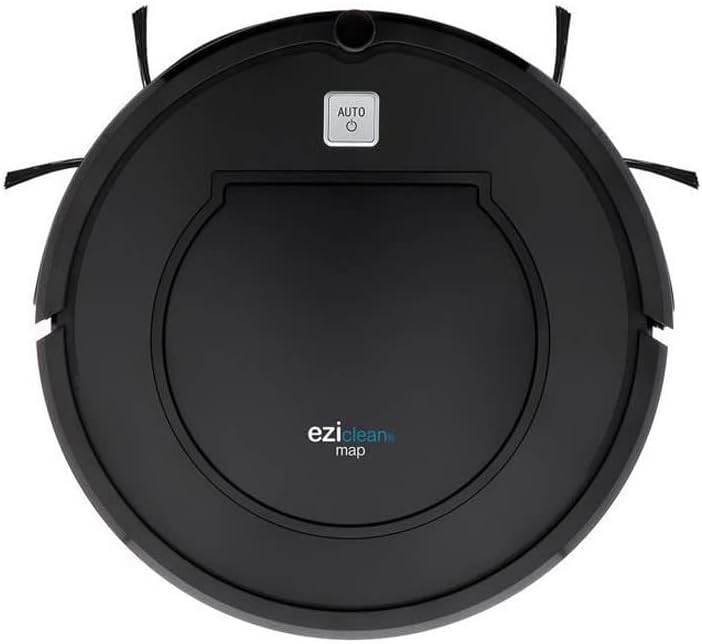
Слика 1: Врх view of the EZICLEAN Map Robot Vacuum. This image displays the circular robot vacuum from above, highlighting the central dustbin access panel and the 'AUTO' power button. The two side brushes are visible extending from the front sides of the unit.
The robot features a compact, circular design with integrated sensors for navigation and obstacle avoidance. The main power button is located on the top surface, providing easy access for starting and stopping cleaning cycles.
Сетуп
1. Постављање базе за пуњење
Place the charging base against a wall in an open, uncluttered area. Ensure there is at least 1 meter (3 feet) of clear space to the front and 0.5 meters (1.5 feet) to each side of the charging base. Plug the power adapter into the charging base and then into a wall outlet.
2. Почетно пуњење
Place the robot vacuum on the charging base, ensuring the charging contacts align. The indicator light on the robot will illuminate to show it is charging. For first-time use, charge the robot for at least 5-6 hours until fully charged.
Operating Your Robot Vacuum
Покретање и заустављање
- Почети: Press the 'AUTO' button on the top of the robot. The robot will begin cleaning in automatic mode.
- За паузирање: Press the 'AUTO' button again during cleaning.
- Да се заустави: Press and hold the 'AUTO' button for a few seconds, or place the robot back on its charging base.
Режими чишћења
The EZICLEAN Map Robot Vacuum is designed to clean various floor types efficiently.
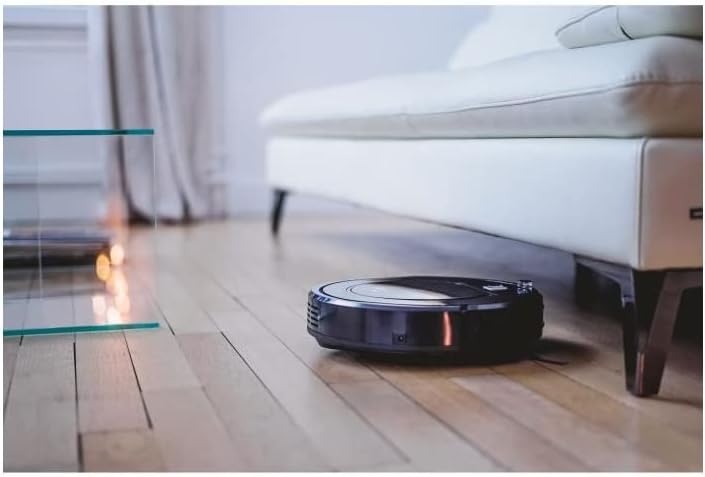
Слика 2: The robot vacuum cleaning under a sofa. This image shows the low-profile design of the robot, allowing it to easily access and clean dust and debris in hard-to-reach areas beneath furniture.

Слика 3: The robot vacuum operating in a bedroom. The robot is shown on a light-colored wooden floor, demonstrating its ability to navigate and clean open spaces effectively.
Навигација
The robot uses intelligent navigation to cover up to 120m² efficiently. It is equipped with sensors to detect obstacles and prevent falls.

Слика 4: The robot vacuum performing edge cleaning. This image illustrates the robot's capability to clean close to walls and baseboards, ensuring thorough coverage of the room.

Слика 5: The robot vacuum cleaning near a sleeping cat. This image highlights the quiet operation of the robot, allowing it to clean without disturbing pets or household activities.
Одржавање
Regular maintenance is crucial for the optimal performance and longevity of your robot vacuum.
1. Пражњење канте за прашину
Empty the dustbin after each cleaning cycle or when the 'Dustbin Full' indicator (if available) illuminates. Open the top cover, remove the dustbin, and dispose of the collected debris.
2. Четке за чишћење
Periodically check and clean the main brush and side brushes. Remove any tangled hair or debris using the provided cleaning tool. Replace worn-out side brushes as needed.
3. Чишћење филтера
Tap the high-efficiency filter to remove dust. Do not wash the high-efficiency filter with water. The foam filter can be rinsed with water; ensure it is completely dry before reinserting.
4. Сензори за чишћење
Wipe the cliff sensors, wall sensors, and charging contacts with a clean, dry cloth to ensure proper functionality.
Решавање проблема
If your robot vacuum encounters an issue, refer to the table below for common problems and their solutions.
| Проблем | Могући узрок | Решење |
|---|---|---|
| Робот се не покреће | Low battery; Power button not pressed; Obstruction | Charge the robot; Press the 'AUTO' button; Clear any obstructions. |
| Robot cannot find charging base | База за пуњење је блокирана; робот је превише удаљен од базе | Ensure clear space around base; Manually place robot closer to base. |
| Лоше перформансе чишћења | Пуна канта за прашину; Зачепљен филтер; Замршене четке | Empty dustbin; Clean/replace filter; Clean brushes. |
| Робот се често заглављује | Loose cables/rugs; Narrow spaces | Clear obstacles; Block off problematic areas. |
Техничке спецификације
| Спецификација | Валуе |
|---|---|
| Бранд | EZICLEAN |
| Број модела | EZI3760190144980 |
| Боја | Црно |
| Димензије производа (Д к Ш к В) | 32 к 32 к 8.5 цм |
| Тежина артикла | 2.8 килограма |
| Материјал | Пластика |
| Ниво буке | 60 дБ |
| Трајање батерије | КСНУМКС минута |
| Посебна карактеристика | Бежични |
| Тип филтера | Цартридге |
| Извор напајања | Баттери Поверед |
| Укључене компоненте | Filter, Battery |
Гаранција и корисничка подршка
Your EZICLEAN Map Robot Vacuum comes with a standard manufacturer's warranty. For detailed warranty information, please refer to the warranty card included in your product packaging or visit the official EZICLEAN website. If you encounter any issues not covered in the troubleshooting section or require further assistance, please contact EZICLEAN customer support through their official channels. Keep your purchase receipt as proof of purchase for warranty claims.