
Увод
The Power Dynamics PDM25 is a compact and versatile 100V amplifier designed for small installations such as shops, restaurants, and offices. It offers easy operation, reliable performance, and a range of features including Bluetooth connectivity, an integrated MP3 player, USB input, AUX input, and a wireless remote control. This manual provides essential information for the safe and efficient use of your PDM25 ampлифиер.
Безбедносна упутства
- Пажљиво прочитајте ово упутство пре употребе производа.
- Сачувајте ово упутство за будућу употребу.
- Поштујте сва упозорења и следите сва упутства.
- Не користите овај апарат у близини воде.
- Чистите само сувом крпом.
- Не блокирајте отворе за вентилацију. Инсталирајте у складу са упутствима произвођача.
- Не постављајте у близини извора топлоте као што су радијатори, грејни регистри, пећи или други уређаји (укључујући ampлифиерс) који производе топлоту.
- Немојте умањити безбедносну сврху поларизованог или уземљеног утикача. Поларизовани утикач има две оштрице од којих је једна шира од друге. Утикач са уземљењем има два ножа и трећи уземљени утикач. Широко сечиво или трећи зуб су обезбеђени за вашу безбедност. Ако испоручени утикач не стане у вашу утичницу, обратите се електричару за замену застареле утичнице.
- Заштитите кабл за напајање од гажења или прикљештења, посебно на утикачима, утичницама и на месту где излазе из уређаја.
- Користите само додатке/прибор које је навео произвођач.
- Искључите овај апарат из струје током олуја са грмљавином или када га не користите дуже време.
- Све сервисирање препустите квалификованом сервисном особљу. Сервисирање је потребно када је уређај оштећен на било који начин, као што је оштећен кабл за напајање или утикач, ако је течност проливена или су предмети упали у апарат, ако је апарат био изложен киши или влази, не ради нормално , или је одбачено.
- УПОЗОРЕЊЕ: Да бисте смањили ризик од пожара или електричног удара, не излажите овај апарат киши или влази.
- ОПРЕЗ: Do not open the cover. No user-serviceable parts inside. Refer servicing to qualified personnel only.
Производ је завршенview
The PDM25 amplifier features a user-friendly front panel with controls for various audio sources and volume adjustments, along with a clear digital display. The rear panel provides all necessary connections for speakers, external audio sources, and power.

Слика 1: Предњи панел изнадview of the PDM25 Ampлифиер.

Figure 2: Rear Panel Connections of the PDM25 Ampлифиер.
Сетуп
1. Распакивање
Пажљиво уклоните amplifier from its packaging. Inspect the unit for any signs of damage during transit. Retain the original packaging for future transport or storage.
КСНУМКС. Постављање
Поставите amplifier on a stable, flat surface. Ensure adequate ventilation around the unit to prevent overheating. Avoid placing it near heat sources or in direct sunlight.
3. Повезивање звучника
The PDM25 supports both 100V line speakers and low impedance (4-16 Ohm) speakers.
- For 100V Line Speakers: Connect the positive (+) terminal of your 100V speaker system to the "100V" terminal on the amplifier's rear panel. Connect the negative (-) terminal to the "COM" terminal.
- For Low Impedance Speakers (4-16 Ohm): Connect the positive (+) terminal of your speaker to the "4-16 Ohm" terminal on the amplifier's rear panel. Connect the negative (-) terminal to the "COM" terminal.
Ensure correct polarity (+ to + and - to -) for optimal sound quality. Do not connect both 100V and low impedance speakers simultaneously to the same output.
4. Повезивање извора звука
- АУКС улаз: Connect external audio devices (e.g., CD player, mixer) to the RCA "AUX" input jacks on the rear panel using an RCA cable.
- Улаз за микрофон: Connect a microphone to the 6.3mm jack on the front panel.
- УСБ улаз: Убаците УСБ флеш диск који садржи МП3 files into the USB port on the front panel.
5. Прикључак за напајање
Connect the supplied power cable to the AC inlet on the rear panel of the amplifier and then to a suitable mains power outlet (230 Vac/50 Hz).
Упутство за употребу
1. Укључивање/искључивање
Press the "ON/OFF" switch on the front panel to power on or off the ampлифиер.
2. Избор извора
Use the "MODE" button on the front panel or the remote control to cycle through available input sources: Bluetooth, USB/MP3, AUX, and Radio. The selected mode will be displayed on the digital screen.

Figure 3: Front Panel Controls and USB Input.
3. Контрола јачине звука
- Мастер јачина звука: Adjust the main output volume using the large "VOLUME" knob on the front panel.
- Individual Source Volume: Adjust the volume for MP3, AUX, and MIC inputs using their respective smaller "VOLUME" knobs.
4. Контрола тона
Use the "TREBLE" and "BASS" knobs on the front panel to adjust the high and low frequencies of the audio output.
5. Блуетоотх рад
- Select "Bluetooth" mode using the "MODE" button. The display will show "BLUE".
- On your Bluetooth-enabled device (smartphone, tablet, etc.), search for available devices and select "PDM25".
- Једном упарени, можете бежично стримовати звук на ampлифиер.
6. USB/MP3 Player Operation
- Insert a USB flash drive into the USB port. The amplifier will automatically switch to USB mode and begin playing MP3 files.
- Use the play/pause, next, and previous track buttons on the front panel or remote control to manage playback.
7. Рад радио-станице
In Radio mode, use the control buttons to scan for and select radio stations.
8. Даљински управљач
The included remote control provides convenient access to power, mode selection, volume, track control, and equalizer presets.
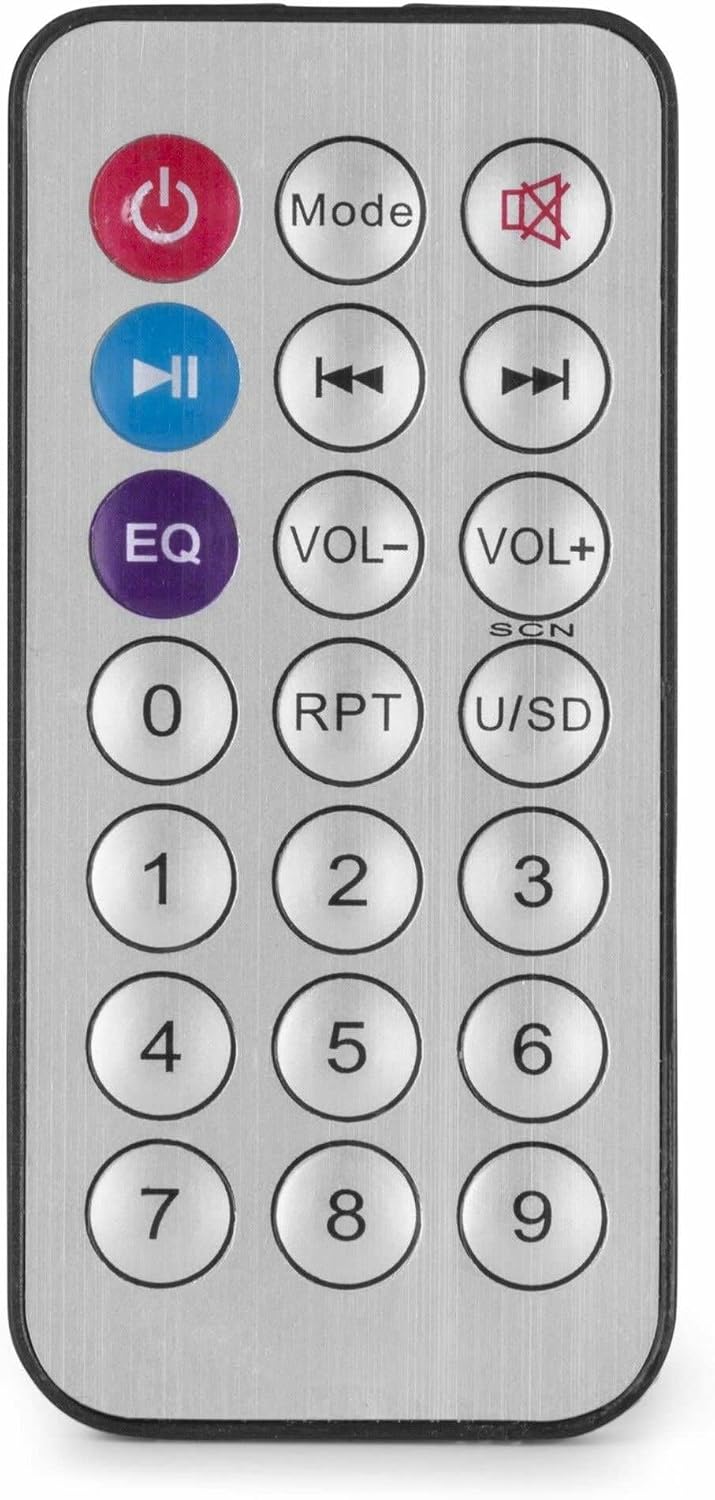
Figure 4: Wireless Remote Control.
Одржавање
- Чишћење: Disconnect the power before cleaning. Use a soft, dry cloth to wipe the exterior of the ampзаустављач. Не користите течна средства за чишћење или аеросоле.
- вентилација: Ensure that the ventilation openings are clear of dust and debris to maintain proper airflow.
- Складиштење: If storing the unit for an extended period, disconnect it from power and store it in a cool, dry place, preferably in its original packaging.
Решавање проблема
| Проблем | Могући узрок | Решење |
|---|---|---|
| Нема струје | Кабл за напајање није повезан; утичница је неисправна; Ampискључити лифиер. | Check power cable connection; Test power outlet; Ensure amplifier switch is ON. |
| Нема излаза звука | Incorrect source selected; Volume too low; Speaker connections faulty; Mute activated. | Select correct input source; Increase master and source volume; Check speaker wiring; Deactivate mute function on remote. |
| Блуетоотх се не повезује | Amplifier not in Bluetooth mode; Device too far; Device already paired with another unit. | Осигурати amplifier is in Bluetooth mode ("BLUE" displayed); Move device closer; Disconnect from other devices and try again. |
| Проблеми са репродукцијом са USB-а | УСБ диск није правилно форматиран; Некомпатибилан file format; USB drive faulty. | Ensure USB drive is FAT32 formatted; Use MP3 fileс; Пробајте други УСБ диск. |
| Изобличен звук | Volume too high; Incorrect impedance matching for speakers; Faulty audio source. | Reduce volume; Verify speaker impedance matches amplifier output; Test with a different audio source. |
Спецификације
- Излазна снага: 25 В
- Излаз звучника: 100V and 4-16 Ohm
- Фреквенцијски опсег: 50 Hz - 18 kHz
- Однос сигнала и шума: >75 дБ
- Цоннецтион Волtage: 230 Vac/50 Hz
- Димензије (Д к Ш к В): 205 к 285 к 65 мм
- Тежина: 1.5 кг
- Карактеристике: Bluetooth, USB MP3 Player, Radio, AUX Input, Microphone Input, Bass/Treble Control, Integrated Equalizer, Remote Control
- Број модела: ПДМ25
- Произвођач: Трониос БВ
Гаранција и подршка
For warranty information and technical support, please refer to the documentation provided with your purchase or visit the official Power Dynamics webсајт. Сачувајте доказ о куповини за евентуалне рекламације по гаранцији.
Произвођач: Трониос БВ
Webсајт: www.power-dynamics.eu