
1. Увод
The Waytronic WT-14 Infrared Motion Sensor Activated Sound Speaker is a versatile device designed to play custom recorded messages or sounds upon detecting motion. It is suitable for various applications, including greeting visitors, providing security alerts, reminding individuals, or even deterring animals. This manual will guide you through the setup, operation, and maintenance of your device.
2. Производ је готовview
The WT-14 features a built-in microphone for direct recording, an infrared motion sensor for activation, and a speaker for audio output. It offers adjustable volume and flexible mounting options.
Кључне карактеристике:
- Функција снимања: Built-in microphone allows instant recording of up to 130 seconds of audio.
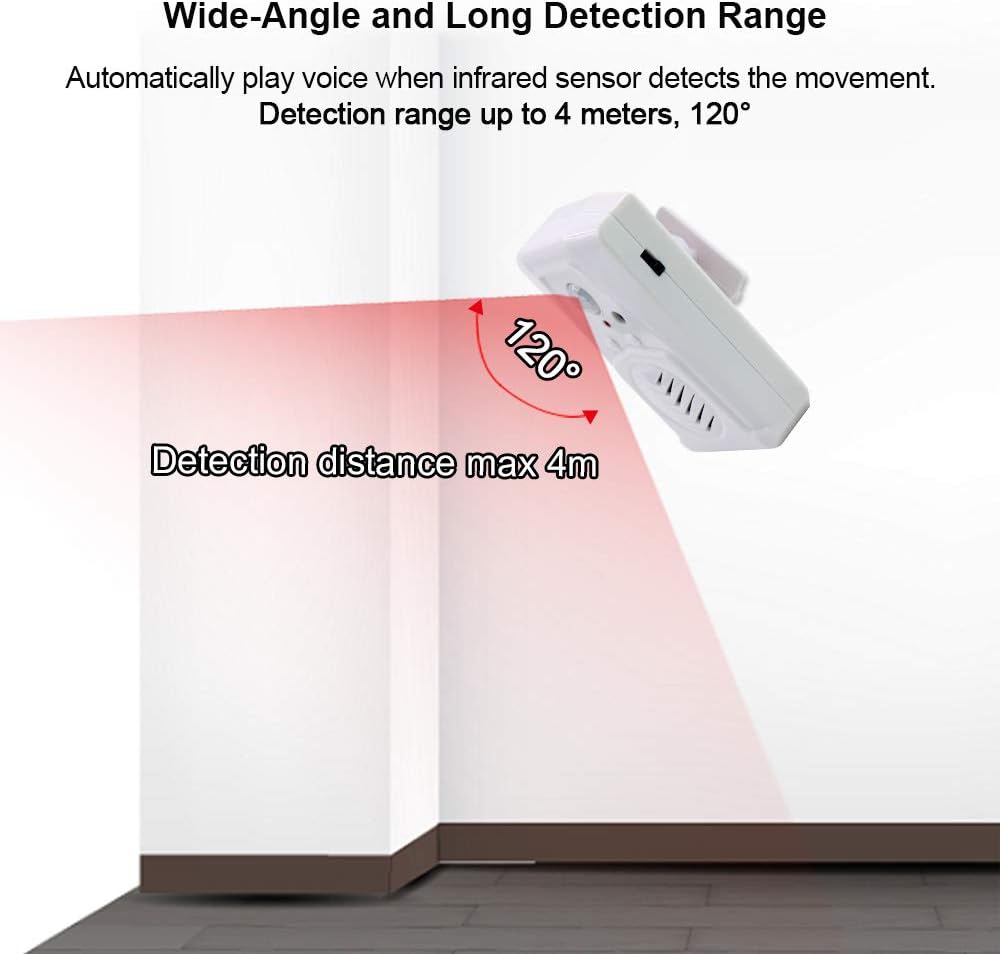
- Широки опсег детекције: Infrared sensor detects motion horizontally at 120 degrees and vertically at 60 degrees, with a maximum detection distance of 4 meters (13 feet).
- Подесива јачина звука: Two-level volume control for clear sound output.
- Свестране апликације: Ideal for door entrance greetings, daily reminders, sale advertising, security alerts, and animal deterrence.
- Једноставна инсталација: Designed for indoor use with included mounting accessories.
- Опције напајања: Operates on 3 AAA batteries (not included) or via a 5V USB cable.
Компоненте уређаја:

Слика 2.1: Предња страна view of the Waytronic WT-14 with labeled components.
- ПИР сензор: Detects motion to trigger audio playback.
- Button A (Record): Press and hold to record audio.
- Button B (Play/Stop): Press to manually play or stop the recorded audio.
- Speaker with Built-in MIC: Outputs sound and captures audio for recording.
- Volume/ON/OFF Switch: Controls power and adjusts sound volume.
- Кућиште батерије: Located on the back for 3 AAA batteries.
- Screw Mounting Hole & Bracket Mounting: За безбедну инсталацију.
3. Садржај пакета
Молимо вас да проверите да ли су све ставке присутне у вашем пакету:
- Waytronic WT-14 Motion Sensor Activated Sound Speaker
- Монтажни завртњи
- Ball Mounting Accessories
- Кориснички приручник (овај документ)
4. Инсталација
4.1 Напајање уређаја
The WT-14 can be powered by batteries or a USB cable.
- Инсталација батерије: Open the battery compartment on the back of the device and insert 3 AAA batteries (not included), ensuring correct polarity.
- УСБ Снага: Connect a 5V USB cable (not included) to the USB port on the side of the device.
Слика 4.1: Позади view with battery compartment and mounting points.

Слика 4.2: Страна view showing USB power port and switch.
4.2 Монтажа уређаја
The device can be mounted using the included screws and ball mounting accessories.
- Изаберите одговарајућу унутрашњу локацију за уградњу.
- Attach the ball mounting bracket to the desired surface using the provided screws.
- Secure the WT-14 device onto the ball mounting accessory. The ball joint allows for 360-degree rotation to optimize the detection angle.

Figure 4.3: Ball mounting accessory for flexible positioning.
4.3 Разматрања пласмана
For optimal performance and to prevent false triggers, observe the following guidelines:
- Инсталирајте само у затвореном простору.
- Избегавајте подручја са директном сунчевом светлошћу.
- Do not place near large temperature variations, such as air conditioners or heaters.
- Position the device to cover the desired detection area, considering the 120-degree horizontal and 60-degree vertical detection angles, and a maximum range of 4 meters (13 feet).

Figure 4.4: Detection range illustration.
5. Операција
5.1 Снимање звука
The WT-14 allows you to record custom audio messages directly using its built-in microphone.
- Ensure the device is powered on using the side switch.
- Притисните и држите Button A (Record). The indicator light may change to confirm recording is active.
- Speak clearly into the built-in microphone. The maximum recording time is 130 seconds.
- Релеасе Дугме А да зауставите снимање.
- Важно: For successful recording, ensure your message is longer than 3 seconds.

Figure 5.1: Audio file change methods (Button Recording only).
5.2 Репродукција звука
Audio can be played automatically via motion detection or manually.
- Motion Activated Playback: Once a message is recorded, the device will automatically play the audio when the infrared sensor detects movement within its range.
- Ручна репродукција: Притисните Button B (Play/Stop) to manually play the last recorded message. Press it again to stop playback.
5.3 Подешавање јачине звука
The device features a two-level volume adjustment.
- Користите Volume/ON/OFF Switch located on the side of the device to select between high and low volume settings.
6. Пријаве
The Waytronic WT-14 can be used in various scenarios:
- Door Entrance Greeting: Welcome visitors to your shop or home with a custom message.
- Security Reminder: Play a warning message or sound when motion is detected in a restricted area.
- Daily Audio Reminder: Set up reminders for tasks or medication.
- Sale Advertising: Announce special offers in a retail environment.
- Animal Deterrent: Record sounds to repel unwanted animals from specific areas.
- Holiday/Festival Sounds: Play festive greetings or spooky sounds for Halloween.

Figure 6.1: Common applications of the sound speaker.

Слика 6.2: Прamples of animal repelling and security reminder uses.
КСНУМКС. Решавање проблема
If you encounter issues with your WT-14 device, please refer to the following common solutions:
| Проблем | Могући узрок | Решење |
|---|---|---|
| Уређај се не укључује. | Батерије су празне или су неправилно уметнуте; USB кабл није повезан или је неисправан. | Проверите поларитет батерије и замените је ако је потребно. Уверите се да је USB кабл безбедно повезан са исправним извором напајања. |
| Recording is unsuccessful or unclear. | Recording duration too short; microphone too far; background noise. | Ensure recording for at least 3 seconds. Speak closer to the microphone. Record in a quiet environment. |
| Нема репродукције звука. | Volume set to minimum; no message recorded; speaker malfunction. | Adjust volume using the side switch. Record a message if none exists. If problem persists, contact support. |
| Motion sensor not triggering or false triggers. | Incorrect placement; sensor obstructed; environmental factors. | Ensure device is placed in an optimal location, away from direct sunlight, heat sources, or air currents. Clear any obstructions from the sensor's view. |
| Detection range is shorter than expected. | Environmental interference; sensor angle. | Adjust the device's angle using the ball mounting accessory. Ensure no objects are partially blocking the sensor's field of view. |
8. Спецификације
| Феатуре | Спецификација |
|---|---|
| Број модела | WT-14 (Part Number: WT-M14) |
| Бранд | Waytronic |
| Боја | Бела |
| Извор напајања | 3 AAA Batteries (not included) or 5V USB |
| Тежина артикла | 85 грама (3 унци) |
| Димензије производа | 3.54 к 2.36 к 1.02 инча |
| Максимални домет детекције | 4 метара (13 стопа) |
| Хоризонтални угао детекције | 120 степени |
| Vertical Detection Angle | 60 степени |
| Време снимања | До 130 секунди |
| Тип монтаже | Door Mount / Wall Mount (with ball mounting accessory) |
| Усаге Енвиронмент | Индоор |
9. Безбедносне информације
- This device is intended for indoor use only. Do not expose to rain or moisture.
- Не покушавајте да растављате или модификујете уређај. То може поништити гаранцију и проузроковати оштећење.
- Чувати ван домашаја деце.
- Dispose of batteries according to local regulations. Do not mix old and new batteries or different types of batteries.
- Avoid placing the device in direct sunlight or near heat sources to prevent overheating and malfunction.
10. Гаранција и подршка
Waytronic provides customer support for any questions or issues you may have regarding your WT-14 device. If you encounter problems not covered in this manual or require further assistance, please contact Waytronic customer service. Refer to your purchase documentation for specific warranty details.
За упите, посетите Waytronic Store on Amazon.