
1. Увод
This manual provides detailed instructions for the operation and maintenance of the POMIACAM IV8W 5-inch 4-in-1 CCTV Tester Monitor. This device is designed for on-site installation and maintenance of various HD coaxial camera systems, including AHD, TVI, CVI, and CVBS. It features a high-resolution display, PTZ control capabilities, and power output for cameras, making it an essential tool for security professionals.
2. Безбедносне информације
- Пажљиво прочитајте сва упутства пре употребе уређаја.
- Не излажите уређај влази, екстремним температурама или директној сунчевој светлости.
- Користите само испоручени адаптер за напајање и каблове.
- Не покушавајте сами да растављате или поправљате уређај. Све сервисирање препустите квалификованом особљу.
- Држите уређај даље од јаких магнетних поља.
- Dispose of batteries according to local regulations. Do not incinerate or expose batteries to high temperatures.
3. Садржај пакета
Verify that all items listed below are included in your package. If any items are missing or damaged, contact your vendor.
- POMIACAM IV8W CCTV Tester Monitor
- DC5V 1A Power Adapter (with USB cable)
- БНЦ Цабле
- Аудио кабл
- РС485 конектор
- Power Output Conversion Cable
- Ланиард
- Торба за алат
- Кориснички приручник (овај документ)

Image 3.1: Contents of the POMIACAM IV8W package, including the tester, cables, adapter, and tool bag.
4. Производ је готовview
The POMIACAM IV8W is a compact and robust CCTV tester designed for field use. It features a 5-inch display and a durable casing with protective rubberized edges.

Слика 4.1: Предња страна view of the POMIACAM IV8W CCTV Tester Monitor.
4.1. Портови и конектори
The device is equipped with various ports for connectivity and testing:
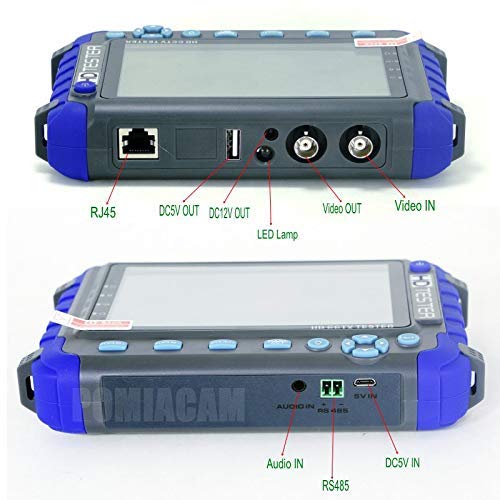
Image 4.2: Labeled ports and connectors on the POMIACAM IV8W.
- Порт РЈ45: For network cable testing.
- DC5V OUT: 5V power output for external devices.
- DC12V OUT: 12V 1A power output for powering cameras.
- ЛЕД Лamp: Integrated light for working in dark environments.
- Видео ОУТ: BNC connector for video signal output (image generator).
- Видео ИН: BNC connector for video signal input from cameras.
- Аудио улаз: For audio signal input from pickup devices.
- РС485: Terminal for PTZ control connections.
- ДЦ5В ИН: Power input for charging the device.
4.2. Controls and Buttons
The front panel includes buttons for navigation, focus, zoom, and menu access. A power button is located on the top right side.
5. Подешавање
5.1. Пуњење батерије
The POMIACAM IV8W features a built-in 2600mAh Lithium-Ion battery. Before first use, fully charge the device.
- Connect the provided USB cable to the DC5V IN port on the tester.
- Connect the other end of the USB cable to the DC5V 1A power adapter.
- Укључите адаптер за напајање у стандардну електричну утичницу.
- The charging indicator will illuminate. A full charge typically takes 3-4 hours, providing approximately 11 hours of working time.
5.2. Укључивање/искључивање
- За укључивање: Press and hold the power button (located on the top right) until the screen illuminates.
- За искључивање: Притисните и држите дугме за напајање док се уређај не искључи.
6. Упутство за употребу
6.1. Video Test (AHD/TVI/CVI/CVBS)
The IV8W supports testing for 8MP AHD, 8MP TVI, 8MP CVI, and CVBS cameras.

Image 6.1: The tester displaying a camera feed, demonstrating 4-in-1 compatibility.
- Connect the video output of your camera to the Видео ИН BNC port on the tester using a BNC cable.
- Ensure the camera is powered on. If needed, use the tester's 12V power output (see Section 6.3).
- The tester will automatically detect the video signal type (AHD, TVI, CVI, or CVBS) and display the camera's image on the 5-inch screen.
- The display supports PAL/NTSC standard video signals.
6.2. ПТЗ контрола
The tester supports Pelco-D/P PTZ control protocols via the RS485 interface.
- Connect the RS485 wires from the PTZ camera to the РС485 terminal on the tester.
- Access the PTZ control menu on the tester.
- Configure the PTZ address, protocol (Pelco-D/P), and baud rate to match your camera's settings.
- Use the directional buttons and zoom/focus controls on the tester to manipulate the PTZ camera's movement, zoom, focus, and aperture.
6.3. 12V Power Output
The tester can provide DC12V 1A power to temporarily power a camera during installation or testing.

Image 6.2: Demonstrating the 12V power output feature.
- Connect the power output conversion cable to the DC12V OUT port on the tester.
- Connect the other end of the conversion cable to the camera's power input.
- Ensure the camera's power requirements do not exceed 12V 1A.
6.4. Image Generator
The multi-format video OUT port can send various standard color graphics sections (e.g., PAL, NTSC) for display testing.
- Connect a display device (e.g., monitor, DVR) to the Видео Оут BNC port on the tester.
- Navigate to the Image Generator function in the tester's menu.
- Select the desired test pattern (e.g., color bars, grid) and video standard (PAL/NTSC).
- The selected pattern will be outputted to the connected display device.
6.5. Audio Testing
Test audio input from pickup devices.
- Connect the audio output of a pickup device to the Аудио ИН port on the tester using the audio cable.
- Access the audio testing function in the tester's menu.
- Monitor the audio signal on the tester's display or through an external speaker if connected.
6.6. Cable Testing
The tester supports UTP cable and telephone cable order and connectivity tests.
- Connect one end of the UTP or telephone cable to the РЈ45 port on the tester.
- Connect the other end of the cable to the appropriate remote unit (if applicable) or loopback connector.
- Navigate to the Cable Test function in the tester's menu.
- The tester will display the wiring order and connectivity status, helping to identify faults.
6.7. Званични видео производа
Watch this video for a visual demonstration of the POMIACAM IV8W CCTV Tester Monitor's features and capabilities.
Видео 6.1: Оверview of the POMIACAM IV8W CCTV Tester Monitor, showcasing its design, various ports, and key functionalities such as 4-in-1 camera testing, 12V power output, and included accessories.
7. Одржавање
- Чишћење: Користите меку, суву крпу за чишћење уређаја. Не користите абразивна средства за чишћење или раствараче.
- Складиштење: Чувајте уређај на хладном и сувом месту, даље од директне сунчеве светлости и екстремних температура када се не користи.
- Одржавање батерије: For prolonged storage, charge the battery to approximately 50% every three months to maintain battery health.
КСНУМКС. Решавање проблема
| Проблем | Могући узрок | Решење |
|---|---|---|
| Уређај се не укључује | Слаба батерија; Дугме за напајање није правилно притиснуто | Charge the device; Press and hold the power button for a few seconds |
| No video signal displayed | Incorrect cable connection; Camera not powered; Incompatible camera type | Check BNC cable connection; Ensure camera is powered; Verify camera is AHD/TVI/CVI/CVBS (not HDMI) |
| PTZ control not working | Incorrect RS485 wiring; Mismatched protocol/baud rate; PTZ camera not powered | Check RS485 connections (A/B); Verify PTZ settings in tester menu; Ensure PTZ camera has power |
| 12V power output not working | Cable not connected; Camera draws too much current | Check power output conversion cable; Ensure camera current draw is within 1A limit |
9. Спецификације
| Феатуре | Спецификација |
|---|---|
| Број модела | IV8W |
| Дисплаи | 5.0-inch LCD, 800(RGB) x 480 resolution |
| Видео улазни формати | CVBS, 8MP AHD, 8MP TVI, 8MP CVI |
| Видео Стандард | PAL/NTSC (auto-detection) |
| ПТЗ контрола | RS485, supports Pelco-D/P protocols |
| Излазна снага | DC12V 1A (for camera power) |
| Батерија | Built-in 2600mAh Lithium-Ion (18650 type) |
| Трајање батерије | Approx. 11 hours (after 3-4 hours charge) |
| Димензије | 6.3 к 1.18 к 4.33 инча (16 к 3 к 11 цм) |
| Тежина | 1.8 фунти (0.82 кг) |
| Радна температура | Not specified (typical range for electronics) |
10. Гаранција и подршка
For warranty information and technical support, please refer to the documentation provided at the time of purchase or contact POMIACAM customer service through their official channels. Keep your purchase receipt as proof of purchase for warranty claims.