
Увод
The Nobsound Douk Audio U4 Mini is a versatile HiFi audio device designed to enhance your listening experience. It functions as a Bluetooth 5.0 receiver, USB DAC, headphone amplifier, and stereo audio preamplifier. Featuring a classic 6N3 vacuum tube, it delivers a warm, clear, and smooth sound, effectively eliminating harsh digital artifacts. This manual provides detailed instructions for setup, operation, and maintenance to ensure optimal performance.
Карактеристике производа
- Мултифункционални дизајн: Combines Bluetooth receiver, USB DAC, headphone amplifier, and preamplifier capabilities in one compact unit.
- Свестрано повезивање: Supports Bluetooth 5.0 and USB audio inputs, with Stereo RCA, 3.5mm AUX, and 3.5mm headphone jack outputs.
- Vacuum Tube Sound: Incorporates a 6N3 vacuum tube for a warm, clear, soft, and sweet audio signature, ideal for vocals, string instruments, and classical music.
- Компоненте високог квалитета: Features QCC3008 Bluetooth chip (supporting APT-X, APTX-LL), TDA1543 decode chip, 2704 USB chip, and MAX9722 headphone ampчип за спасавање.
- Широка компатибилност: USB audio input is compatible with Windows, Mac, Linux systems, and Android smartphones with OTG function, offering plug-and-play convenience without drivers.
- Powerful Headphone Output: The MAX9722 headphone amplifier provides 300mW output, capable of driving most headphones with impedances from 16 to 600 ohms.
Садржај пакета
Молимо вас да проверите пакет за следеће ставке:
- 1 x Douk Audio U4 Mini Headphone Ampлифиер
- 1 x 6N3 Vacuum Tube
- 1 к 12В адаптер за напајање
- 1 к УСБ кабл
- 1 к Блуетоотх антена
Сетуп
- Tube Installation: Carefully insert the 6N3 vacuum tube into its socket on the top of the unit. Ensure it is seated firmly but do not force it.
- Bluetooth Antenna Connection: Причврстите приложену Bluetooth антену на „ANT“ конектор на задњој плочи.
- Прикључак за напајање: Connect the 12V power adapter to the 'DC 12V' input on the rear panel, then plug the adapter into a power outlet.
- Аудио излазна веза:
- For speakers or a power amplifier, connect the 'AUDIO OUT' RCA jacks to your audio system using RCA cables.
- For headphones, plug your 3.5mm headphones into the 'PHONE' jack on the front panel.
- Аудио улазна веза:
- УСБ улаз: Connect your computer (Windows, Mac, Linux) or Android smartphone (with OTG) to the 'PC-USB' port on the rear panel using the supplied USB cable.
- Блуетоотх улаз: Ensure the Bluetooth antenna is connected. The device will be discoverable for pairing.

Image: Rear panel showing 'AUDIO OUT' (RCA/3.5mm), 'PC-USB', 'ANT' (Bluetooth antenna), and 'DC 12V' power input.

Image: Illustrates USB compatibility with various operating systems including Windows, Mac, Linux, and Android devices.
Упутство за употребу
- Укључивање/искључивање: Press the 'POWER' switch on the front panel to turn the unit on or off. The vacuum tube will glow when powered on.
- Избор улаза: Use the 'SELECT' switch on the front panel to cycle between USB and Bluetooth inputs. The corresponding LED indicator (USB or Bluetooth) will light up.
- Блуетоотх упаривање:
- Switch the input to Bluetooth. The Bluetooth LED will blink, indicating it's in pairing mode.
- On your source device (smartphone, tablet, etc.), search for Bluetooth devices and select "Douk Audio U4 Mini" to pair.
- Once paired, the Bluetooth LED will remain solid.
- Контрола јачине звука: Adjust the 'VOLUME' knob on the front panel to control the output level for both headphone and RCA/AUX outputs. Start with a low volume and gradually increase it to a comfortable listening level.
- Употреба слушалица: When headphones are plugged into the 'PHONE' jack, the RCA/AUX outputs may be muted depending on the unit's design. Unplug headphones to resume output to speakers.

Image: Front panel showing Power switch, Select switch, Phone jack, Volume knob, and Power/USB/Bluetooth indicators.

Image: A user wearing headphones connected to the Douk Audio U4 Mini, demonstrating its headphone ampфункција лифиера.
Одржавање
- Чишћење: Use a soft, dry cloth to clean the unit. Do not use liquid cleaners or solvents.
- Vacuum Tube Care: The vacuum tube can become hot during operation. Avoid touching it. If replacement is needed, ensure the unit is powered off and cooled down before handling the tube.
- Пласман: Place the unit on a stable, flat surface away from direct sunlight, heat sources, and excessive moisture. Ensure adequate ventilation around the unit.
- Складиштење: Ако складиштите уређај дуже време, искључите га из струје и чувајте га на хладном и сувом месту.
Решавање проблема
| Проблем | Могући узрок | Решење |
|---|---|---|
| Нема излаза звука | Unit not powered on; incorrect input selected; cables loose; volume too low; headphones plugged in (muting RCA/AUX). | Check power switch; verify input selection; ensure all cables are securely connected; increase volume; unplug headphones if using RCA/AUX. |
| Блуетоотх се не повезује | Bluetooth input not selected; antenna not connected; device too far; already paired with another device. | Select Bluetooth input; ensure antenna is connected; move source device closer; disconnect from other devices and try pairing again. |
| Изобличен звук | Volume too high; faulty cables; source audio quality issues; vacuum tube issue. | Reduce volume; try different cables; check source audio; ensure vacuum tube is properly seated. |
| No USB audio | USB input not selected; USB cable faulty; computer/phone not recognizing device. | Select USB input; try a different USB cable; check device manager on PC or audio settings on Mac/Android. |
Спецификације
| Феатуре | Детаљ |
|---|---|
| Аудио улаз | Блуетоотх 5.0, УСБ |
| Аудио излаз | Stereo RCA, 3.5mm AUX, 3.5mm Headphone Jack |
| Блуетоотх чип | QCC3008 (supports APT-X, APTX-LL) |
| Decode Chip | ТДА1543 |
| УСБ чип | 2704 (supports up to 16bit/96kHz) |
| Слушалице Amp Чип | МАКСКСНУМКС |
| Однос сигнал-шум (СНР) | > 99 дБ |
| Динамиц Ранге | > 99 дБ |
| Излазна снага за слушалице | 300мВ |
| Импеданса слушалица | 16-600Ω |
| Укупна хармонијска дисторзија + шум (ТХД+Н) | 0.004% (RL> 10kΩ) |
| Димензије (Д*Ш*В) | 97 * 77 * 32mm (3.82 * 3.03 * 1.26 inches) |
| Јединична тежина | 250г |
| Тежина пакета | 470г |
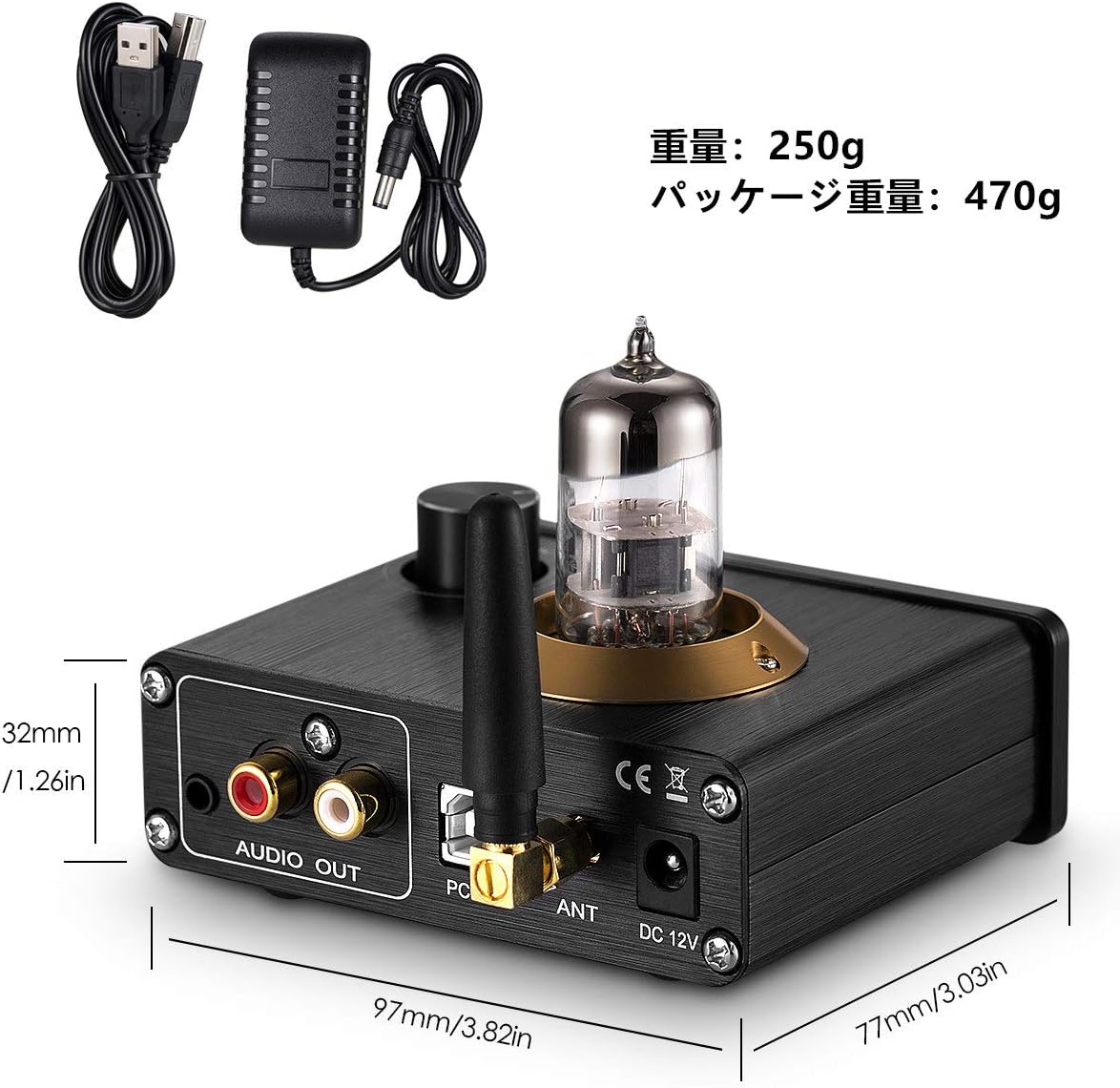
Image: Diagram showing the dimensions of the Douk Audio U4 Mini in millimeters and inches.
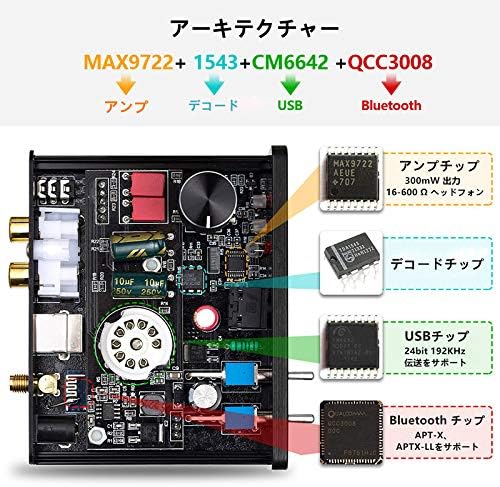
Image: Internal architecture diagram highlighting the MAX9722 (Amp), TDA1543 (Decode), 2704 (USB), and QCC3008 (Bluetooth) chips.
Гаранција и подршка
Nobsound products are designed for reliability and performance. For warranty information, please refer to the documentation included with your purchase or contact your retailer. For technical support, please visit the official Nobsound website or contact their customer service department. Please have your model number (U4 Mini or DZ077) and purchase details ready when seeking support.