
Увод
Хвала вам на куповиниasing the Caliber Alarm Clock with QI Charging Station. This device combines a digital alarm clock with a convenient wireless charging pad and a USB charging port, designed to simplify your bedside setup. It also features an adjustable night light and a large LED display for clear visibility.
This manual provides detailed instructions on how to set up, operate, maintain, and troubleshoot your new alarm clock. Please read it thoroughly before use to ensure optimal performance and longevity of the product.
Сетуп
Распакивање: Carefully remove the alarm clock from its packaging. Ensure all components are present: the alarm clock unit and the power adapter.
Прикључак за напајање: Connect the provided power adapter to the DC input port on the back of the alarm clock. Plug the other end of the adapter into a standard wall outlet. The display will illuminate.
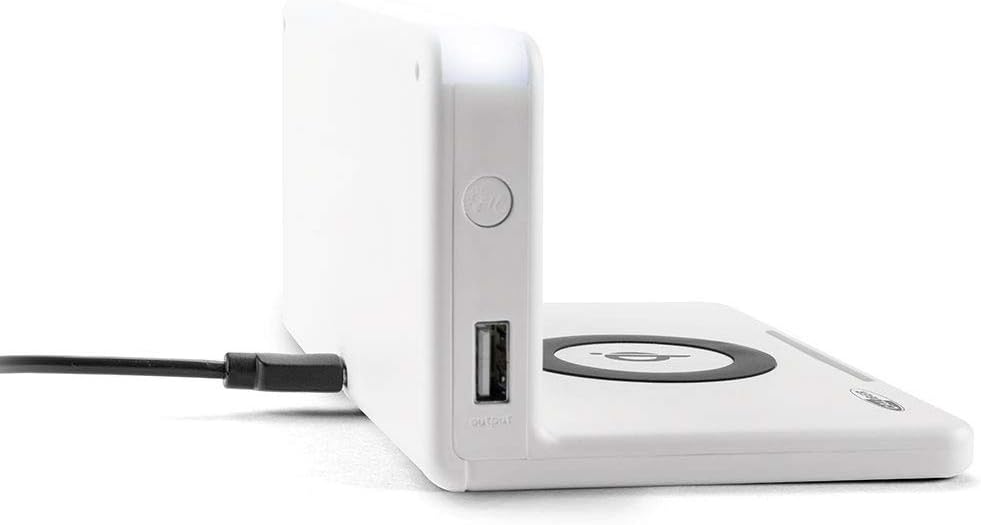
Слика: Са стране view of the alarm clock, illustrating the power input port (left) and the USB output port (right).
Battery Installation (Backup): The unit includes 1 Lithium Ion battery for backup. This battery maintains time settings during power outages. No user installation is typically required for this pre-installed battery.
Почетно подешавање времена: Upon first power-up, the clock may display a default time or require manual setting. Refer to the "Operating" section for detailed instructions on setting the time.
Упутство за употребу
Подешавање времена и датума
- Притисните и држите ВРЕМЕНСКИ СКЛОП button (location may vary, typically on the back or top) until the hour digits flash.
- Користите + or - дугмад за подешавање сата.
- Притисните ВРЕМЕНСКИ СКЛОП поново да бисте прешли на минуте, а затим подесите помоћу + or -.
- Repeat for year, month, and day if applicable.
- Притисните ВРЕМЕНСКИ СКЛОП one last time to confirm and exit.
Подешавање аларма
- Притисните и држите АЛАРМ СЕТ button (or similar) until the alarm hour digits flash.
- Adjust the alarm hour and minutes using the + or - дугмад.
- Притисните АЛАРМ СЕТ потврдити.
- Да бисте активирали/деактивирали аларм, притисните дугме АЛАРМ УКЉУЧЕН / ИСКЉУЧЕН дугме. Икона аларма ће се појавити/нестати на екрану.
- Када се огласи аларм, притисните СНООЗЕ button for a temporary pause, or any other button to turn it off for the day.
Using the QI Wireless Charging Station
The alarm clock features a built-in QI wireless charging pad for compatible devices.
- Ensure the alarm clock is powered on.
- Place your QI-compatible smartphone or device directly onto the charging pad, centering it over the Логотип QI-а.
- A charging indicator (e.g., an LED light or on-screen icon) will illuminate to confirm charging has begun. If charging does not start, reposition your device.

Image: A smartphone placed on the QI charging pad of the alarm clock, showing the charging interface on the phone screen.

Image: The alarm clock with a phone positioned on its wireless charging surface, indicating active charging.
Коришћење УСБ порта за пуњење
A USB output port is available on the side of the unit for charging non-QI compatible devices or for faster wired charging.
- Connect your device's USB charging cable to the USB output port on the alarm clock.
- Повежите други крај кабла са уређајем. Пуњење ће почети аутоматски.
Adjusting Display Brightness and Night Light
- The alarm clock features adjustable display brightness. Look for a ДИММЕР or БРИГХТНЕСС button, typically on the back or top. Press it repeatedly to cycle through brightness levels.
- To activate or adjust the night light, locate the dedicated НОЋНО СВЕТЛО button. Press it to turn the light on/off or cycle through different brightness settings if available.
Одржавање
- Чишћење: Disconnect the power adapter before cleaning. Use a soft, dry cloth to wipe the surface of the alarm clock. Do not use abrasive cleaners, waxes, or solvents as they may damage the finish.
- Складиштење: Ако складиштите уређај дуже време, искључите га из струје и чувајте га на хладном и сувом месту.
- Руковање: Avoid dropping the unit or subjecting it to strong impacts. Keep it away from water and high humidity.
Решавање проблема
| Проблем | Могући узрок | Решење |
|---|---|---|
| Приказ сата је празан. | Нема прикључка за напајање. | Ensure the power adapter is securely plugged into the unit and a working wall outlet. |
| QI charging not working. | Device not QI-compatible; device not properly aligned; foreign objects on pad; phone case too thick. | Verify device compatibility. Reposition device on the center of the pad. Remove any foreign objects. Remove thick phone cases. |
| Аларм се не оглашава. | Alarm not activated; volume too low; incorrect alarm time. | Ensure the alarm icon is displayed. Check alarm volume settings. Verify the alarm time is set correctly. |
| Време је погрешно. | Време није правилно подешено; прекид струје. | Reset the time manually. If power was interrupted, the backup battery should maintain time, but a manual check is recommended. |
Спецификације
| Феатуре | Детаљ |
|---|---|
| Бранд | Калибар |
| Број модела | HCG018QI/W |
| Боја | Бела |
| Дисплаи Типе | Дигитал |
| Посебна карактеристика | Night light, QI charging station, USB charging port |
| Извор напајања | Цордед Елецтриц |
| Димензије производа | 7.09 к 4.25 к 3.86 инча |
| Тежина артикла | 7.9 унци (225 грама) |
| Батерије | 1 Lithium Ion battery (included, for backup) |
| ГТИН | 08714505047157 |
Гаранција и подршка
This Caliber product is designed for reliability and performance. For information regarding warranty coverage, please refer to the warranty card included with your purchase or visit the official Caliber webсајту.
Should you encounter any issues not covered in the troubleshooting section, or require further assistance, please contact Caliber customer support. Contact details can typically be found on the product packaging or the manufacturer's official webсајту.