
1. Увод
This manual provides detailed instructions for the Amazon Basics Aluminum Type-C Docking Station. This device expands the connectivity of your USB-C enabled laptop or tablet, offering a wide range of ports for various peripherals and external displays. Please read this manual thoroughly before use to ensure proper operation and to maximize the product's functionality.
2. Карактеристике производа
- 11-in-1 Multi-Port Design: Integrates Mini DisplayPort, HDMI, VGA, 3 USB-A ports, Ethernet, SD/TF card reader, 3.5mm audio jack, and a Type-C charging port (PD 100W).
- Видео излаз високе резолуције: Supports Ultra HD 4K output via Mini DisplayPort/HDMI and Full HD 1080P via VGA, allowing for mirroring or extending your display to HDTVs, monitors, or projectors. Note: 4K resolution is supported at 30Hz refresh rate.
- Брзи пренос података: Three USB 3.0 A ports provide data transfer speeds up to 5Gbps, backward compatible with USB 2.0/1.0.
- Stable Network Connection: 1000Mbps RJ45 Ethernet port ensures a fast and reliable wired network connection.
- Универзални читач картица: Integrated SD and TF slots allow simultaneous reading of universal SD and Micro SD memory cards.
- Испорука струје: Type-C charging port supports Power Delivery (PD) up to 100 watts for charging your host device.
- Аудио повезивање: 3.5 мм аудио прикључак за слушалице или звучнике.
- Издржљива конструкција: Features an aluminum pedestal-style housing for enhanced durability and heat dissipation.
3. Садржај пакета
- Amazon Basics Aluminum Type-C Docking Station
- Упутство за употребу
4. Производ је готовview and Port Layout
Familiarize yourself with the various ports and their functions on your docking station.

Слика: Крупни план view of the Amazon Basics Type-C Docking Station's ports, including Ethernet, Mini DisplayPort, HDMI, VGA, and USB-C.
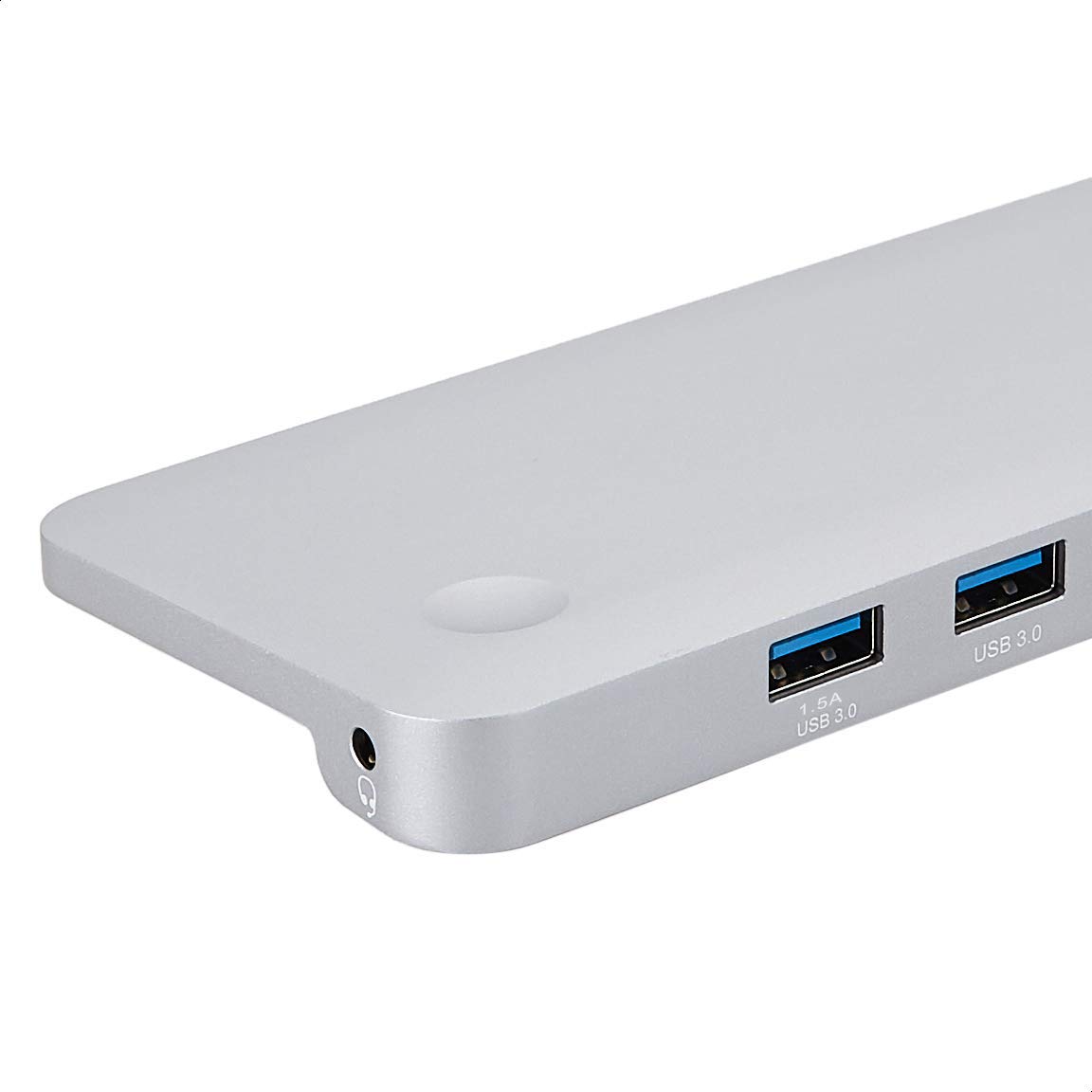
Слика: Детаљна view of the USB 3.0 ports and 3.5mm audio jack on the Amazon Basics Type-C Docking Station.
- USB-C хост конектор: Connects to your laptop or tablet's USB-C port.
- УСБ 3.0 портови (к3): For connecting USB devices such as external hard drives, keyboards, mice, or USB flash drives.
- Слот за СД картицу: За читање стандардних СД меморијских картица.
- Слот за ТФ картицу (Мицро СД): За читање Micro SD меморијских картица.
- РЈ45 Етхернет порт: За жичану мрежну везу.
- Мини ДисплаиПорт: За повезивање са екстерним екраном.
- ХДМИ порт: За повезивање са екстерним екраном.
- ВГА порт: За повезивање са екстерним екраном.
- 3.5 мм аудио прикључак: За повезивање слушалица или звучника.
- УСБ-Ц ПД прикључак за пуњење: For connecting a USB-C power adapter to charge your host device and power the docking station.
5. Упутства за подешавање
Пратите ове кораке да бисте подесили своју докинг станицу:
- Повежите се са хост уређајем: Plug the integrated USB-C host connector cable from the docking station into an available USB-C port on your laptop or tablet. Ensure your host device's USB-C port supports DisplayPort Alt Mode (DP Alt Mode) for video output functionality.
- Повежите напајање (опционо, али се препоручује): If your host device requires charging or if you are connecting power-intensive peripherals, connect your USB-C power adapter (up to 100W) to the USB-C PD Charging Port on the docking station. This will charge your host device and provide stable power to the docking station and connected peripherals.
- Повежите периферне уређаје: Connect your desired peripherals (e.g., external monitors, USB devices, Ethernet cable, SD/TF cards, audio devices) to the corresponding ports on the docking station.

Image: Amazon Basics Type-C Docking Station connected to a laptop, with multiple peripherals like a USB drive and external display cables plugged in.
6. Упутство за употребу
6.1. Видео излаз
- Connect your monitor or projector to the HDMI, Mini DisplayPort, or VGA port.
- Your operating system should automatically detect the external display. You may need to adjust display settings (e.g., extend, duplicate) in your computer's display preferences.
- The docking station supports 4K resolution at 30Hz refresh rate via HDMI and Mini DisplayPort. For optimal performance, ensure your display and cables support the desired resolution and refresh rate.
- Dual video display is supported, allowing you to mirror or expand your screen across multiple monitors.
6.2. USB Data Transfer
- Plug your USB devices into the USB 3.0 ports.
- The ports support data transfer speeds up to 5Gbps.
6.3. Етхернет веза
- Connect an Ethernet cable from your router or modem to the RJ45 Ethernet port on the docking station.
- Your computer should automatically establish a wired network connection.
6.4. Читач SD/TF картица
- Insert your SD or TF (Micro SD) card into the corresponding slot.
- The cards will appear as removable drives on your computer, allowing you to access and transfer files. Both slots can be used simultaneously.
6.5. Аудио излаз
- Connect your headphones or speakers to the 3.5mm audio jack.
- You may need to select the docking station as the default audio output device in your computer's sound settings.
6.6. Испорука напајања (PD)
- Connect your laptop's USB-C power adapter to the USB-C PD Charging Port on the docking station.
- This port supports up to 100W power delivery to charge your host device while using the docking station.
7. Компатибилност
This docking station is compatible with a wide range of USB-C enabled devices, including but not limited to:
- MacBook Pro 2018/2017/2016
- иПад Про 2018
- Mac mini 2018
- МацБоок Аир
- иМац 2017
- Самсунг Ноте9
- HUAWEI MateBook X
- Делл КСПС 13
- ТхинкПад
- Цхромебоок
Важно: This product functions only with computers that support DisplayPort Alt Mode (DP Alt Mode) via their USB-C port. Please verify your computer's specifications for compatibility before use.
КСНУМКС. Решавање проблема
- Нема излаза на екран:
- Ensure your host device's USB-C port supports DisplayPort Alt Mode.
- Check all cable connections (USB-C to host, video cable to monitor).
- Verify the external monitor is powered on and set to the correct input source.
- Покушајте да поново покренете рачунар.
- 4K Resolution Not Working at 60Hz:
- This docking station supports 4K resolution at a maximum refresh rate of 30Hz. If your monitor is set to 4K@60Hz, it will not display correctly. Adjust your display settings to 4K@30Hz or a lower resolution with a higher refresh rate if desired.
- USB Devices Not Recognized or Disconnecting:
- Ensure the docking station is receiving sufficient power. Connect a USB-C power adapter to the PD port if you are using multiple power-intensive USB devices.
- Try connecting the USB device directly to your computer to confirm it is functional.
- Reconnect the docking station to your computer.
- No Network Connection via Ethernet:
- Проверите везу Етернет кабла и са базном станицом и са рутером/модемом.
- Verify your network settings on your computer.
- Уверите се да ваш рутер/модем исправно функционише.
- Нема аудио излаза:
- Ensure your headphones or speakers are properly connected to the 3.5mm audio jack.
- Check your computer's sound settings and select the docking station as the default audio output device.
- Хост уређај се не пуни:
- Ensure a compatible USB-C power adapter is connected to the docking station's USB-C PD Charging Port.
- Verify that your host device supports USB-C Power Delivery.
- Проверите да ли су адаптер за напајање и кабл оштећени.
9. Спецификације
| Феатуре | Спецификација |
|---|---|
| Бранд | Амазон Басицс |
| Број модела | UTC-DOCK01-PRO |
| Боја | Греи |
| Димензије (ДкШкВ) | 28 x 7.5 x 1.4 Centimeters (11.02 x 2.95 x 0.55 Inches) |
| Тежина артикла | 317 г (0.32 килограма) |
| Укупан број портова | 11 |
| УСБ портови | 3 к УСБ 3.0 Типе-А |
| Видео излазни портови | 1 x HDMI, 1 x Mini DisplayPort, 1 x VGA |
| ХДМИ резолуција | До 4К@30Хз |
| Mini DisplayPort Resolution | До 4К@30Хз |
| Етхернет порт | RJ45 Gigabit Ethernet (10/100/1000Mbps) |
| Читач картица | SD and TF (Micro SD) slots, simultaneous read |
| Аудио Порт | КСНУМКСмм Аудио Јацк |
| УСБ-Ц ПД порт за пуњење | До 100 вати |
| Хардверски интерфејс | Ethernet, HDMI, Mini DisplayPort, VGA, USB-A, USB-C, SD/TF, Audio |
10. Одржавање
- Чишћење: Use a soft, dry cloth to clean the docking station. Avoid using liquid cleaners or aerosols.
- Складиштење: Уређај чувајте на хладном и сувом месту, даље од директне сунчеве светлости и екстремних температура.
- Руковање: Avoid dropping or subjecting the device to strong impacts. Do not attempt to disassemble or modify the docking station.
11. Безбедносне информације
- Држите уређај даље од воде, ватре и окружења са високом влажношћу.
- Не излажите уређај екстремним температурама.
- Користите само компатибилне адаптере за напајање и каблове.
- Чувати ван домашаја деце.
- If the device is damaged or malfunctions, discontinue use immediately and contact customer support.
12. Гаранција и подршка
This Amazon Basics product comes with a 1-годишња ограничена гаранција from the date of purchase. This warranty covers manufacturing defects and workmanship under normal use. It does not cover damage caused by misuse, accident, modification, or unauthorized repair.
For warranty claims, technical support, or further assistance, please contact Amazon Basics customer service through your Amazon purchase history or the official Amazon Basics support channels.