
RAPOO H1030
Rapoo H1030 Bluetooth Stereo Headset User Manual
Model: H1030 | Brand: RAPOO
1. Увод
Thank you for choosing the Rapoo H1030 Bluetooth Stereo Headset. This manual provides detailed instructions to help you set up, operate, and maintain your headset for optimal performance. Please read this manual thoroughly before using the product.
2. Производ је готовview
The Rapoo H1030 is a wireless over-ear stereo headset designed for comfortable audio listening and communication. It features Bluetooth connectivity, an integrated microphone, and volume controls.

Слика 2.1: Фронт view of the Rapoo H1030 Bluetooth Stereo Headset. This image shows the overall design of the headset, with both earcups and the headband visible from the front.

Слика 2.2: Сиде view of the Rapoo H1030 Bluetooth Stereo Headset, illustrating the adjustable headband and the design of the over-ear cushions.
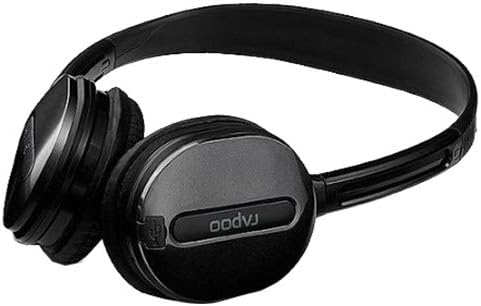
Слика 2.3: Цлосе-уп view of an earcup, highlighting the integrated controls and the "rapoo" branding. This image details the buttons for volume and playback control, and potentially the charging port or microphone location.
2.1 Кључне карактеристике
- Wireless Bluetooth connectivity (2.4 GHz, up to 10 meters / 33 feet range)
- Over-ear design for comfort
- Built-in omni-directional microphone with noise cancelling
- Интегрисана контрола јачине звука
- Пуњива литијумска батерија (360мАх)
- Подесива трака за главу
3. Подешавање
3.1 Пуњење слушалица
Before initial use, fully charge the headset. The Rapoo H1030 features a built-in 360mAh rechargeable lithium battery.
- Locate the charging port on the headset (refer to Figure 2.3 for general control area).
- Connect the charging cable (typically Micro-USB) to the headset and the other end to a USB power source (e.g., computer USB port, USB wall adapter).
- The charging indicator light will illuminate (color may vary, refer to product packaging for specifics).
- A full charge takes approximately 2 hours. The indicator light will change or turn off once charging is complete.
A fully charged headset provides approximately 6 hours of usage time.
3.2 Блуетоотх упаривање
The headset uses smart connection technology for easy pairing.
- Уверите се да су слушалице напуњене и искључене.
- Press and hold the power button (or pairing button, if separate) on the headset until the indicator light begins to flash rapidly, indicating it is in pairing mode.
- На свом уређају (паметном телефону, таблету, рачунару) омогућите Блутут и потражите доступне уређаје.
- Select "RAPOO H1030" (or similar name) from the list of found devices.
- Once connected, the indicator light on the headset will typically stop flashing and remain solid, or turn off.
- The headset is now ready for use. It should automatically reconnect to the last paired device when powered on and within range.
4. Упутство за употребу
4.1 Укључивање/искључивање
- Укључено: Притисните и држите дугме за напајање око 3 секунде док се индикаторска лампица не упали.
- Искључивање: Press and hold the power button for approximately 3-5 seconds until the indicator light turns off.
4.2 Контрола јачине звука
The headset features integrated volume controls.
- Повећајте јачину звука: Притисните дугме за појачавање јачине звука.
- Смањи јачину звука: Притисните дугме за смањивање јачине звука.
4.3 Управљање позивима
When connected to a smartphone, the headset can manage phone calls.
- Одговори/заврши позив: Press the Multi-function button (often the power button or a dedicated call button) once.
- Одбиј позив: Притисните и држите вишефункционално дугме око 2 секунде.
- Поновно бирање последњег броја: Двапут притисните вишенаменско дугме.
4.4 Репродукција музике
When playing music from a connected device, use the headset controls.
- Пусти/паузирај: Притисните вишенаменско дугме једном.
- Следећа нумера: Press and hold the Volume Up button (or a dedicated 'Next' button).
- Претходни запис: Press and hold the Volume Down button (or a dedicated 'Previous' button).
5. Одржавање
- Чишћење: Користите меку, суву крпу за чишћење слушалица. Не користите абразивна средства за чишћење или раствараче.
- Складиштење: Store the headset in a cool, dry place away from direct sunlight and extreme temperatures. When not in use, consider folding the headset (refer to Figure 5.1) to save space and protect it.
- Одржавање батерије: Да бисте продужили век трајања батерије, избегавајте често потпуно пражњење батерије. Редовно пуните слушалице, чак и ако их не користите стално.
- Изложеност води: The headset is not waterproof. Avoid exposure to water or excessive moisture.

Слика 5.1: The Rapoo H1030 headset in a folded position, demonstrating its portability and ease of storage. This compact form helps protect the earcups and headband when not in use.
КСНУМКС. Решавање проблема
| Проблем | Могући узрок | Решење |
|---|---|---|
| Слушалице се не укључују. | Ниска батерија. | Пуните слушалице најмање 2 сата. |
| Упаривање са уређајем није могуће. | Headset not in pairing mode; Bluetooth disabled on device; device too far. | Ensure headset is in pairing mode (flashing light). Enable Bluetooth on your device. Move headset closer to the device (within 10 meters). Try restarting both devices. |
| Нема звука или је јачина звука ниска. | Volume too low on headset or device; headset not properly connected. | Increase volume on both headset and connected device. Re-pair the headset. |
| Лош квалитет звука или прекиди везе. | Interference; device out of range; low battery. | Move closer to the connected device. Avoid obstacles between headset and device. Charge the headset. Avoid environments with strong Wi-Fi or other 2.4 GHz signals. |
7. Спецификације
| Модел | Х1030 |
| Бранд | РАПОО |
| Повезивање | Wireless (Bluetooth, 2.4 GHz) |
| Распон преноса | До 10 метара (33 стопе) |
| Тип слушалица | Преко уха |
| Микрофон | Built-in, Omni-Directional, Noise Cancelling |
| Тип батерије | Пуњива литијумска батерија |
| Капацитет батерије | 360мАх |
| Време пуњења | Отприлике 2 сата |
| Време употребе | Отприлике 6 сата |
| Димензије (Д к Ш к В) | 6.85 к 5.43 к 2.17 инча |
| Тежина | 80 г |
| Боја | Црно |
| Материјал | Метал, гума |
8. Гаранција и подршка
For warranty information and technical support, please refer to the warranty card included with your product or visit the official RAPOO webсајт. Сачувајте рачун као доказ о куповини за потребе гаранције.
Произвођач: Рапоо
Ask a question about this manual
Ask about setup, troubleshooting, compatibility, parts, safety, or missing instructions. Manuals+ will review the question and use this page’s manual context to help answer it.