
Увод
The Aula S6 Multi-Mode Wireless Gaming Headset is designed to provide a versatile audio experience for gaming and multimedia. This headset features three connection options: 2.4GHz wireless, Bluetooth 5.3, and a traditional 3.5mm wired connection. Its ultra-lightweight design, weighing only 180 grams, ensures comfort during extended use. The integrated microphone with smart noise reduction technology delivers clear communication, and the headset offers up to 22 hours of battery life.
Садржај пакета
Молимо вас да означите поље за следеће ставке:
- 1 x Aula S6 Multi-Mode Wireless Gaming Headset
- 1 x 2.4GHz Wireless Connection Dongle
- 1 x Type-C to 3.5mm Audio Connection Cable (1.5 meters)
- КСНУМКС к УСБ кабел за пуњење типа Типе-Ц
- 1 к Упутство за употребу
Производ је завршенview
Familiarize yourself with the headset's components and controls.
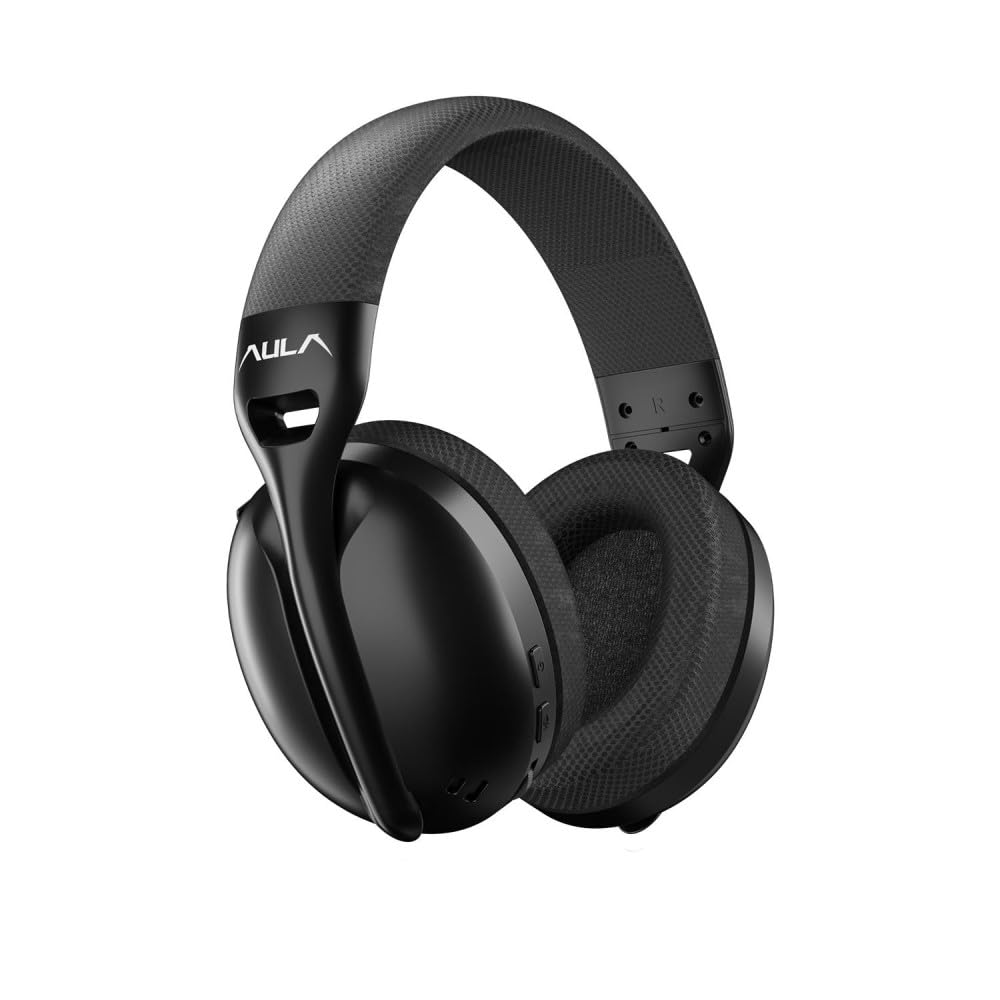
слика: Фронт view of the Aula S6 Multi-Mode Wireless Gaming Headset. This image displays the overall design of the headset, highlighting its earcups and headband.
Контроле и портови

слика: Дно view of the Aula S6 headset. This image illustrates the location of the Type-C charging port, 3.5mm audio jack, volume wheel, and other control buttons on the earcups.
- Дугме за напајање: Used to power the headset on/off and for pairing.
- Дугме за пребацивање режима: Toggles between Game Mode and Music Mode for optimized audio profiles.
- Точак јачине звука: Подешава јачину звука.
- Мултифункционална дугмад: For call management (accept/reject) and switching between Bluetooth and 2.4GHz connections.
- Микрофон који се увлачи: Mute by retracting into the earcup, unmute by extending.
- Порт типа Ц: За пуњење слушалица.
- 3.5 мм аудио прикључак: For wired connection using the provided Type-C to 3.5mm cable.
Сетуп
Пуњење слушалица
Before first use, fully charge the headset. Connect the provided USB Type-C charging cable to the headset's Type-C port and the other end to a USB power source (e.g., computer, wall adapter). The LED indicator will show charging status and turn off when fully charged.
Повезивање слушалица
The Aula S6 offers three connection methods:
1. 2.4GHz Wireless Connection (via Dongle)
- Insert the 2.4GHz wireless dongle into a USB port on your computer or compatible device.
- Укључите слушалице притиском и држањем дугмета за напајање.
- The headset should automatically connect to the dongle. The LED indicator will confirm a successful connection.
2. Bluetooth 5.3 веза
- Укључите слушалице.
- Притисните и држите дугме за напајање док ЛЕД индикатор не почне брзо да трепери, што указује на режим упаривања.
- На свом уређају (паметном телефону, таблету, лаптопу) омогућите Блутут и потражите доступне уређаје.
- Select "Aula S6" from the list of devices to pair. The LED indicator will show a solid light upon successful connection.
3. Wired 3.5mm Connection
- Connect the Type-C end of the provided audio cable to the headset's Type-C port.
- Connect the 3.5mm end of the cable to the audio jack of your device.
- Слушалице ће радити у жичном режиму, заобилазећи бежичне функције.
Упутство за употребу
Укључивање/искључивање
- За укључивање: Притисните и држите дугме за напајање око 3 секунде док се ЛЕД индикатор не упали.
- За искључивање: Притисните и држите дугме за напајање око 5 секунди док се ЛЕД индикатор не искључи.
Mode Switching (Game/Music)
Press the Mode Switch button to toggle between Game Mode and Music Mode. Each mode optimizes audio settings for its intended use.
Употреба микрофона

слика: Англед view of the Aula S6 headset with its retractable microphone extended. This shows the microphone in its active position for communication.
- To Unmute: Extend the microphone from the earcup.
- Искључивање звука: Retract the microphone fully into the earcup.
The smart noise reduction technology helps minimize ambient noise for clearer voice transmission.
Управљање позивима
When connected via Bluetooth or 2.4GHz wireless, use the multi-function buttons on the headset to manage calls:
- Прихвати позив: Притисните вишенаменско дугме једном.
- Одбиј позив: Притисните и држите вишенаменско дугме 2 секунде.
- Заврши позив: Притисните вишефункционално дугме једном током позива.
Контрола јачине звука
Rotate the Volume Wheel up or down to precisely adjust the audio output level.
Повезивање са више уређаја
The headset supports simultaneous wireless connection to two different devices. Use the multi-function buttons to switch between the connected devices as needed.
Одржавање
To ensure the longevity and optimal performance of your Aula S6 headset, follow these maintenance guidelines:
- Чишћење: Користите меку, суву крпу за чишћење слушалица. Избегавајте употребу јаких хемикалија или абразивних материјала.
- Складиштење: Чувајте слушалице на хладном и сувом месту, даље од директне сунчеве светлости и екстремних температура.
- Избегавајте влагу: The headset is not waterproof. Keep it away from water and high humidity.
- Нега каблова: Handle cables gently. Avoid sharp bends or excessive pulling to prevent damage.
Решавање проблема
If you encounter issues with your Aula S6 headset, refer to the following common solutions:
- Нема звука/ниска јачина звука:
- Проверите ниво јачине звука и на слушалицама и на повезаном уређају.
- Ensure the headset is properly connected (wired, Bluetooth, or 2.4GHz dongle).
- Проверите да ли је у подешавањима звука вашег уређаја изабран исправан уређај за излаз звука.
- Микрофон не ради:
- Ensure the microphone is extended and not muted.
- Check microphone input settings on your connected device.
- Тестирајте микрофон помоћу друге апликације или уређаја.
- Проблеми са везом:
- За Блуетоотх: Ensure the headset is in pairing mode and within range. Forget the device on your phone and re-pair.
- За 2.4 GHz: Ensure the dongle is securely plugged in and the headset is powered on. Try a different USB port.
- For Wired: Ensure the 3.5mm cable is fully inserted into both the headset and the device.
- Headset Not Powering On:
- Пуните слушалице најмање 30 минута.
- Try a different charging cable and power source.
Спецификације
| Бранд | АУЛА |
| Модел | S6 |
| Повезивање | Bluetooth 5.3, 2.4GHz Wireless, 3.5mm Wired |
| Дривер Сизе | 40 мм |
| Импеданса | 120 Охм |
| Осетљивост слушалица | 120 дБ |
| Осетљивост микрофона | -38 ± 2дб |
| Фреквенцијски одзив | 20Хз – 20кХз |
| Тежина | 180 грама |
| Трајање батерије | До 22 сати |
| Материјал | Breathable Fabric and ABS Plastic |
| Компатибилни уређаји | Mobile Phone, Laptop, Desktop Computer, Game Console, Tablet, Television |
Гаранција и подршка
The Aula S6 Multi-Mode Wireless Gaming Headset comes with a 2-Year Aula Turkey Warranty.
For warranty claims, technical support, or further assistance, please contact your local Aula authorized dealer or visit the official Aula webсајт за контакт информације за подршку.