
1. Увод
The QGeeM M9VC01 9-in-1 USB-C Docking Station is designed to expand the connectivity of your USB-C enabled devices, such as laptops, tablets, and smartphones. This versatile hub provides multiple ports for video output, data transfer, and power delivery, enhancing your productivity and multimedia experience.

Image 1.1: The QGeeM 9-in-1 USB-C Docking Station connected to various peripherals, illustrating its multi-functionality.
2. Карактеристике производа
The QGeeM M9VC01 docking station integrates nine essential ports into a single compact device:
- Dual 4K HDMI Ports: Connect to two external displays for high-resolution video output (up to 4K@30Hz).
- ВГА порт: Connect to an external display for video output (up to 1080p@60Hz).
- 2x USB 3.0 порта: High-speed data transfer up to 5Gbps for peripherals like keyboards, mice, and external drives.
- Слот за СД картицу: Приступ files from standard SD memory cards.
- Утор за мицроСД картицу: Приступ files from MicroSD memory cards.
- 3.5 мм аудио прикључак: Connect headphones or speakers for audio output.
- USB-C порт за напајање (PD): Supports up to 87W charging for your host device while using the hub.

Image 2.1: Detailed diagram illustrating each of the 9 ports and their specifications on the QGeeM docking station.
3. Спецификације
| Феатуре | Спецификација |
|---|---|
| Модел | M9VC01 |
| Интерфејси | 2x USB 3.0, 2x 4K HDMI, 1x SD Card, 1x MicroSD Card, 1x 3.5mm Audio Jack, 1x VGA, 1x Type C PD Charging |
| Брзина преноса података | Up to 5Gbps (USB 3.0), Up to 104MB/s (Card Readers) |
| ХДМИ резолуција | До 4К@30Хз |
| ВГА резолуција | До 1080п@60Хз |
| ПД пуњење | До 87В |
| Димензије | 115 к 46 к 15 мм |
| Тежина | 88г |
| Материјал | Алуминијум |
| Хардверска платформа | Лаптоп, ПЦ |
| Компатибилни уређаји | Card Readers, Desktops, Keyboards, Laptops, Monitors, Mouse, Projectors, Smartphones, Tablets |
4. Упутства за подешавање
Follow these steps to set up your QGeeM M9VC01 docking station:
- Повежите се са хост уређајем: Plug the USB-C connector of the docking station into a compatible USB-C port on your laptop, tablet, or smartphone. Ensure your device's USB-C port supports DisplayPort (DP) Alt Mode for video output.
- Напајање (опционо): If your host device requires charging, connect your USB-C power adapter to the USB-C PD port on the docking station.
- Повежите екране:
- For HDMI displays, connect HDMI cables from your monitors to the HDMI ports on the docking station.
- За VGA екране, повежите VGA кабл са монитора на VGA порт на базној станици.
Note: HDMI operation may require a driver installation on some systems. Please refer to your operating system's display settings for configuration.
- Повежите периферне уређаје: Plug your USB devices (e.g., keyboard, mouse, external hard drive) into the USB 3.0 ports. Insert SD or MicroSD cards into their respective slots. Connect headphones or speakers to the 3.5mm audio jack.
- Конфигуришите подешавања екрана: Once connected, your operating system should detect the external displays. You may need to adjust display settings (e.g., extend, mirror, resolution) in your system preferences.
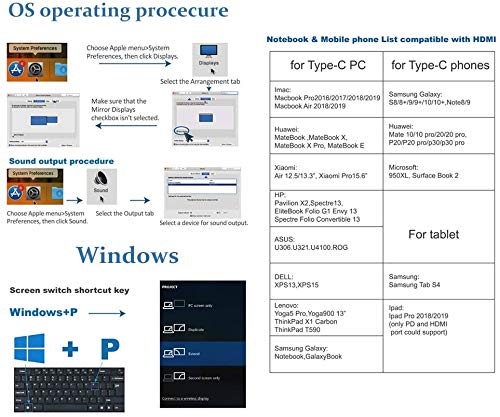
Image 4.1: Visual guide for configuring display settings on Mac OS and Windows, including a compatibility list for devices.
5. Упутство за употребу
5.1. Video Output (Triple Display)
The docking station supports connecting up to three external displays simultaneously (two HDMI, one VGA).
- Виндоус системи: Supports triple display in 'Extend' or 'Mirror' mode. You can extend your desktop across all three external monitors and your laptop screen. The resolution for triple display via VGA is up to 1920x1080.
- Mac OS Systems: Supports dual display. Mac OS typically mirrors one external screen to the other instead of extending to two separate screens. You can extend your desktop to one external monitor, and the other external monitors will mirror that extended display.

Image 5.1: Illustration of triple display capabilities, highlighting the differences in extension modes between Windows and Mac OS.

Image 5.2: Visual representation of how display modes (Mirror and Extend) function on both Windows and Mac operating systems.
5.2. Испорука енергије
The USB-C PD port allows you to charge your host device while using the docking station. Connect your original USB-C power adapter to this port. The hub supports up to 87W power delivery.

Image 5.3: The USB-C PD port in use, demonstrating simultaneous charging of a laptop and a smartphone through the hub.
5.3. Пренос података
Use the USB 3.0 ports for connecting external storage devices, keyboards, mice, or other USB peripherals. The SD and MicroSD card slots allow for convenient access to memory card data.
Note: Data transfer from SD and MicroSD cards cannot occur simultaneously. Only one card can be actively read or written to at a time.

Image 5.4: An SD card and a MicroSD card inserted into their respective slots on the docking station.
5.4. Аудио излаз
Connect your headphones or speakers to the 3.5mm audio jack for audio playback from your host device.
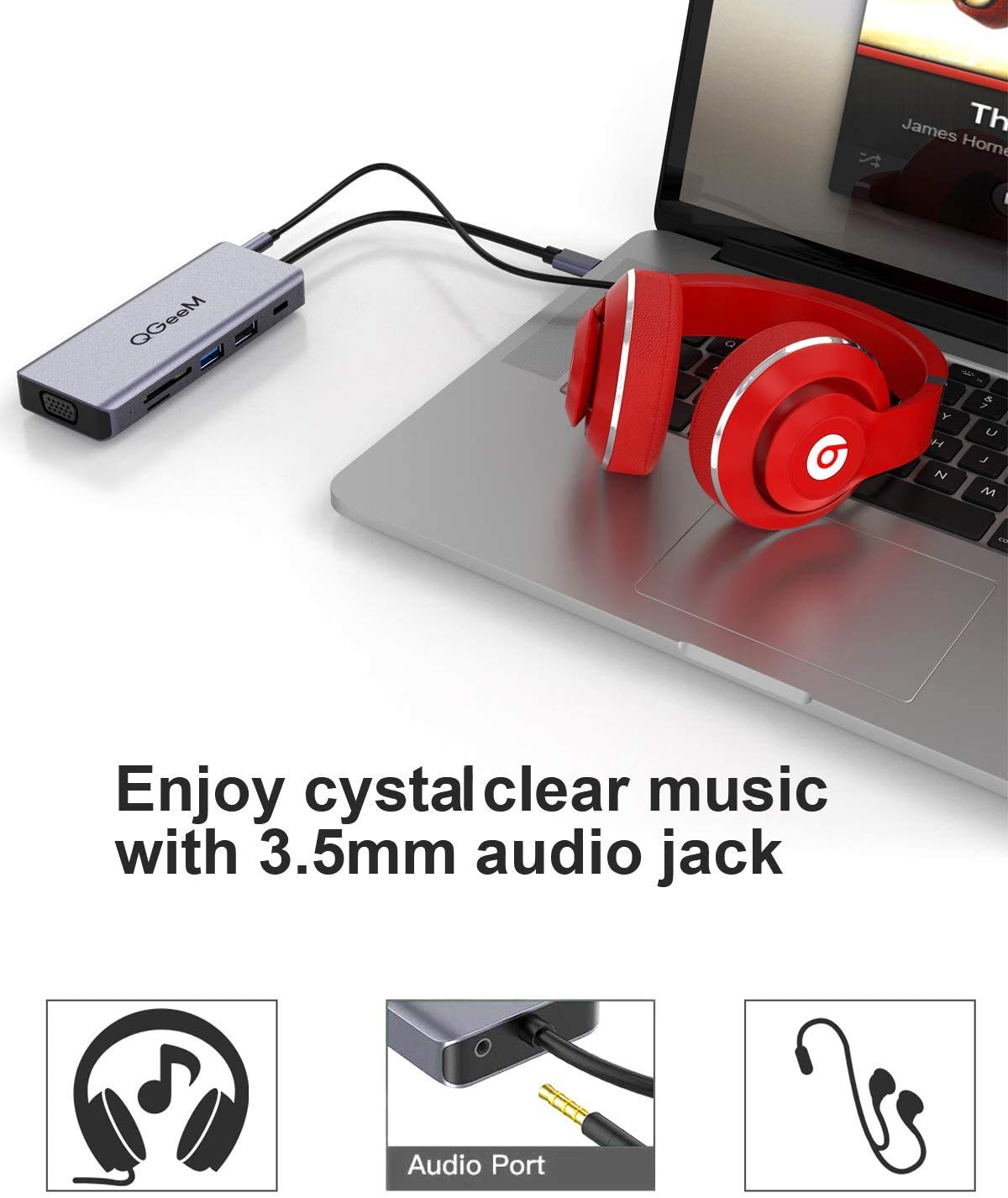
Image 5.5: Headphones connected to the 3.5mm audio jack on the docking station, indicating audio output functionality.
6. Компатибилност
The QGeeM M9VC01 docking station is compatible with a wide range of USB Type-C 3.1 enabled devices. Your laptop must have DisplayPort (DP) Alt Mode functionality for video output to work correctly.
6.1. Compatible USB Type-C PCs/Tablets (Partial List)
- јабука: MacBook Pro 2016/2017/2018/2019, MacBook Air 2018/2019, iPad Pro 2018/2019 (PD and HDMI port support only)
- хуавеи: МатеБоок, МатеБоок Кс, МатеБоок Кс Про, МатеБоок Е
- Ксиаоми: Air 12.5/13.3, Pro 15.6
- ХП: Pavilion X2, Spectre 13, EliteBook Folio G1, Envy 13, Spectre Folio Convertible 13
- АСУС: У306, У321, У4100, РОГ
- ДЕЛЛ: КСПС13, КСПС15
- Леново: Yoga 5 Pro, Yoga 900 13", ThinkPad X1 Carbon, ThinkPad T590
- Самсунг: Galaxy Notebook, GalaxyBook, Tab S4
6.2. Compatible USB Type-C OTG Smartphones (Partial List)
- Самсунг Галаки: S8/8+/9/9+/10/10+, Note8/9
- хуавеи: Mate 10/10pro/20/20 pro, P20/P20pro/P30/P30 pro
- Мицрософт: 950XL, Surface Book 2
7. Одржавање
Да бисте осигурали дуготрајност и оптималне перформансе ваше прикључне станице, пратите ова упутства за одржавање:
- Чишћење: Use a soft, dry cloth to clean the exterior of the docking station. Avoid using liquid cleaners or solvents, as they may damage the finish or internal components.
- Складиштење: Чувајте докинг станицу на хладном и сувом месту, даље од директне сунчеве светлости и екстремних температура када се не користи.
- Расипање топлоте: The aluminum alloy shell is designed for good heat dissipation. It is normal for the hub to warm up during operation, especially when using Power Delivery. Ensure adequate airflow around the device.
- Пажљиво рукујте: Избегавајте испуштање уређаја или излагање јаким ударима.
КСНУМКС. Решавање проблема
If you encounter issues with your QGeeM M9VC01 docking station, please refer to the following common solutions:
- Нема излаза на екран:
- Ensure your host device's USB-C port supports DisplayPort (DP) Alt Mode.
- Проверите све кабловске везе (USB-C до хоста, HDMI/VGA до монитора).
- Verify that the correct input source is selected on your monitor.
- Update your graphics drivers on your host device.
- Поново покрените свој хост уређај.
- For Mac OS, remember that it typically mirrors one external screen to others, rather than extending to multiple separate screens.
- Intermittent Display Connection:
- Ensure the USB-C connection to your host device is secure.
- Try disconnecting and reconnecting the hub.
- Ensure your host device's power adapter is connected to the hub's PD port if power is insufficient.
- USB уређаји нису препознати:
- Ensure the USB device is properly plugged into the hub.
- Покушајте да повежете УСБ уређај директно са вашим главним уређајем да бисте потврдили функционалност.
- Some high-power USB devices may require external power or a direct connection to the host.
- SD/MicroSD Card Not Reading:
- Ensure the card is fully inserted into the correct slot.
- Verify that only one card (SD or MicroSD) is inserted at a time for data transfer.
- Check if the card is damaged or corrupted.
- Hub Feels Warm:
- It is normal for the hub to generate some heat during operation, especially when charging your device via the PD port or when multiple high-power peripherals are connected. This is due to the aluminum casing's heat dissipation design.
- If the hub becomes excessively hot, disconnect it and allow it to cool down. Ensure it is placed in a well-ventilated area.
9. Гаранција и подршка
The QGeeM M9VC01 USB-C Docking Station comes with an 18-month warranty from the date of purchase. Additionally, QGeeM offers an unconditional 30-day return guarantee and life-long product support.
For technical assistance, warranty claims, or any product-related inquiries, please contact QGeeM customer service. Refer to the product packaging or the official QGeeM webсајт за актуелне контакт информације.