
ZZIPP TXZZ580
ZZIPP TXZZ580 UHF 48-Channel Wireless Microphone System User Manual
Model: TXZZ580
Увод
This manual provides detailed instructions for the proper setup, operation, and maintenance of your ZZIPP TXZZ580 UHF 48-Channel Wireless Microphone System. Please read this manual thoroughly before using the product to ensure optimal performance and longevity.
Производ је завршенview
Шта је у кутији
- Two Handheld Microphones (Transmitters)
- Рецеивер Унит
- Power Adapter for Receiver
- Аудио кабл за повезивање
- Упутство за употребу
Кључне карактеристике
- УХФ бежична технологија
- 48 канала који се могу бирати
- Manual and IR Configuration
- Designed for Karaoke and other vocal applications
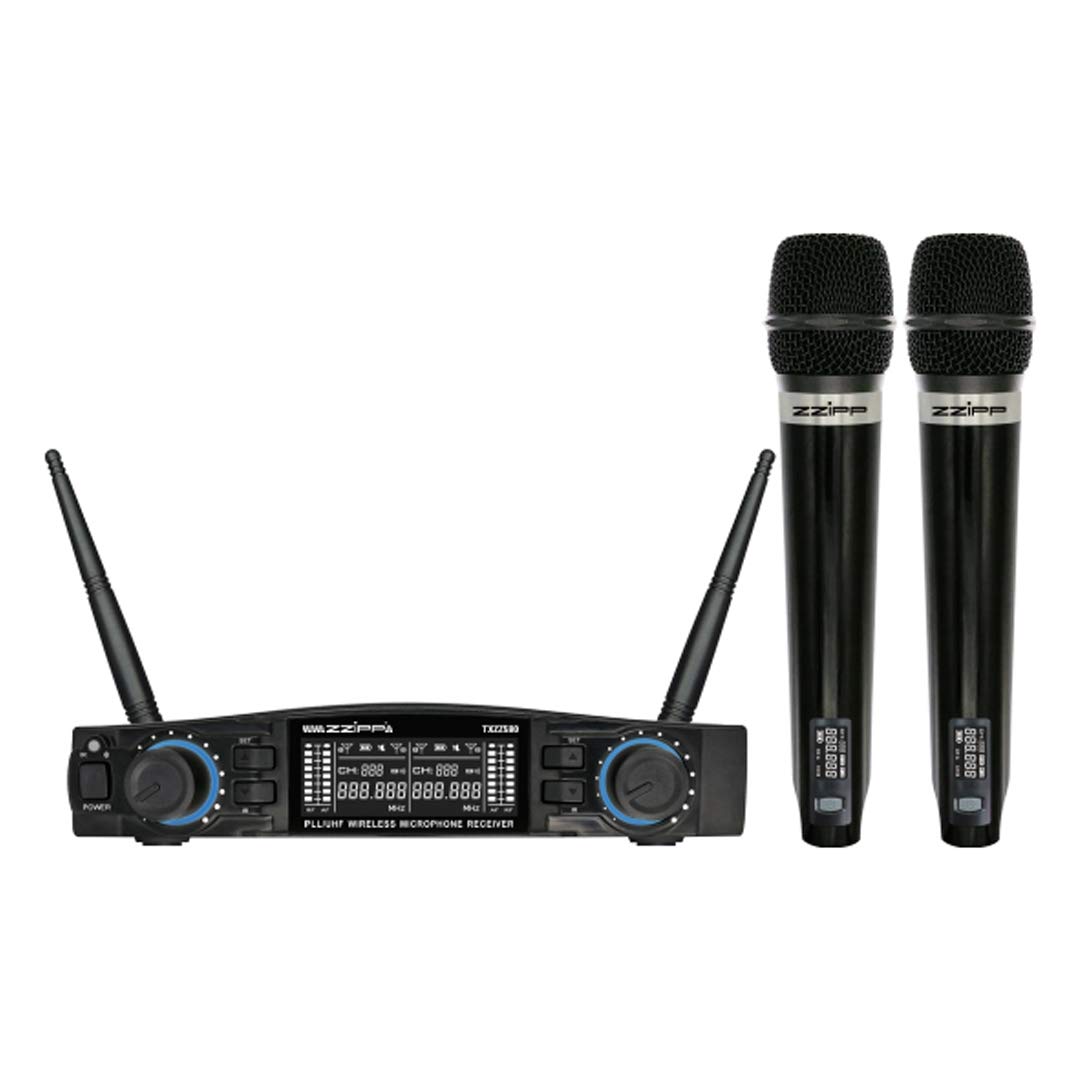
Слика 1: Готовоview of the ZZIPP TXZZ580 Wireless Microphone System, showing the receiver unit and two handheld microphones.
Сетуп
- Распакујте компоненте: Пажљиво извадите све предмете из амбалаже.
- Положај примаоца: Place the receiver unit on a stable surface, away from potential sources of interference such as computers, Wi-Fi routers, or other wireless devices. Ensure good line-of-sight to the area where the microphones will be used.
- Прикључите напајање: Connect the provided power adapter to the receiver's DC input and then plug it into a suitable power outlet.
- Повежите аудио излаз: Connect the receiver's audio output (e.g., 3.5mm Jack) to the input of your mixer, amplifier, or sound system using the supplied audio cable.
- Инсталирајте батерије у предајнике: Open the battery compartment of each handheld microphone and insert the required batteries (typically AA, not always included). Observe correct polarity.
- Укључено: Turn on the receiver unit and then each handheld microphone.
- Channel Synchronization (Manual/IR):
- Ручна конфигурација: Refer to the receiver's display and controls to manually select a desired channel for each microphone. Ensure each microphone is set to a unique channel to avoid interference.
- IR Synchronization: For automatic synchronization, align the IR sensor on the microphone with the IR sensor on the receiver. Activate the IR sync function on the receiver, and the microphone will automatically pair to the selected channel.
- Тест звука: Speak into each microphone to test the audio output through your sound system. Adjust volume levels as needed.
Упутство за употребу
Укључивање/искључивање
- Пријемник: Press the power button on the front panel to turn the unit on or off.
- микрофони: Press and hold the power button on the microphone handle until the display illuminates (on) or turns off (off).
Избор канала
The system offers 48 UHF channels. If you experience interference, change the operating channel. This can be done manually on the receiver and then synchronized with the microphone via IR, or directly on the microphone if it supports manual channel adjustment.
Контрола јачине звука
Adjust the output volume for each microphone using the dedicated volume knobs on the receiver's front panel. Further volume adjustments can be made on your connected mixer or ampлифиер.
Савети за коришћење
- Maintain a clear line of sight between the microphones and the receiver for optimal signal quality.
- Избегавајте постављање пријемника у близини великих металних предмета или других електронских уређаја који могу изазвати сметње.
- Regularly check microphone battery levels to prevent unexpected power loss during use.
- For best sound quality, hold the microphone approximately 2-6 inches from your mouth.
Одржавање
Замена батерије
When the microphone's battery indicator shows low power, replace the batteries immediately. Always use fresh batteries of the correct type (e.g., AA). Remove batteries if the microphones will not be used for an extended period to prevent leakage.
Чишћење
Clean the receiver and microphones with a soft, dry cloth. Do not use liquid cleaners or solvents, as these can damage the finish or internal components. For microphone grilles, a soft brush can be used to remove debris.
Складиштење
Store the system in a cool, dry place, away from direct sunlight and extreme temperatures. If possible, use the original packaging or a protective case for transport and storage.
Решавање проблема
| Проблем | Могући узрок | Решење |
|---|---|---|
| Нема звука из микрофона |
|
|
| Сметње или статички шум |
|
|
| Кратак радни домет |
|
|
Спецификације
- Бренд: ЗЗИПП
- Модел: ТКСЗЗ580
- Боја: Црно
- Бежични тип: УХФ
- Број канала: 48
- Повезивање: 3.5 мм прикључак
- Извор напајања: Corded Electric (for receiver)
- Посебна карактеристика: Manual and IR Configuration
- Препоручена употреба: Караоке
- Укључене компоненте: Two Handheld Microphones, Receiver
Гаранција и подршка
За информације о гаранцији, техничку подршку или упите у вези са сервисирањем, погледајте документацију коју сте добили уз куповину или контактирајте продавца. Сачувајте доказ о куповини за потребе подношења захтева за гаранцију.
Повезани документи - ТКСЗЗ580
 |
Phenyx Pro PTU-6000 UHF Eight-channel Wireless Microphone System Owner's Manual Owner's manual for the Phenyx Pro PTU-6000 selectable frequency UHF eight-channel wireless microphone system. Includes system description, specifications, operating instructions, and warranty information. |
 |
Phenyx Pro PTU-71/7000/6000 Series Wireless Microphone System Owner's Manual Owner's manual for the Phenyx Pro PTU-71/7000/6000 Series of selectable UHF frequency dual, quad, and eight-channel wireless microphone systems. Includes system overview, карактеристике, компоненте, подешавање, рад, решавање проблема, спецификације и информације о гаранцији. |
 |
Phenyx Pro PTU-51/5000/4000 Series Wireless Microphone System User Manual Comprehensive user manual for the Phenyx Pro PTU-51/5000/4000 Series Fixed UHF Frequency Dual/Quad/Eight-Channel Wireless Microphone System. Provides detailed information on system overview, features, components, functions of parts, operation guidance, wireless tips, troubleshooting, specifications, and warranty information. |
 |
Phenyx Pro PTU-51/5000/4000 Series Wireless Microphone System Owner's Manual Owner's manual for Phenyx Pro PTU-51/5000/4000 Series fixed UHF frequency wireless microphone systems. Covers system overview, карактеристике, компоненте, упутства за употребу, решавање проблема, спецификације и информације о гаранцији. |
 |
Упутство за употребу бежичног микрофонског система серије Phenyx Pro PTU-71/7000/6000 Свеобухватно корисничко упутство за Phenyx Pro PTU-71, PTU-7000 и PTU-6000 серију аутоматских UHF двоканалних, четвороканалних и осмоканалних бежичних микрофонских система. Укључује подешавање, рад, функције, решавање проблема и спецификације. |
 |
Phenyx Pro PTU-71/7000/6000 Series UHF Wireless Microphone System Owner's Manual Comprehensive owner's manual for the Phenyx Pro PTU-71, PTU-7000, and PTU-6000 series selectable UHF frequency wireless microphone systems. Includes system overview, features, components, functions of parts, operation guidance, wireless tips, troubleshooting, specifications, frequency list, and warranty information. |
Ask a question about this manual
Ask about setup, troubleshooting, compatibility, parts, safety, or missing instructions. Manuals+ will review the question and use this page’s manual context to help answer it.