
August AUD E1
Упутство за употребу паметног здравственог сата AUDAR E1 за август
Model: AUD E1
1. Увод
The August AUDAR E1 Smart Health Watch is designed to help you monitor your health and fitness activities. It features advanced sensors for heart rate, blood pressure, and ECG measurements, along with comprehensive fitness tracking capabilities. This manual provides detailed instructions to help you get the most out of your device.
2. Шта је у кутији
Upon unboxing your August AUDAR E1 Smart Health Watch, please ensure all the following items are present:
- August AUDAR E1 Smart Health Watch
- УСБ кабл за пуњење
- Кориснички приручник (овај документ)

Figure 2.1: Contents of the AUDAR E1 packaging, showing the smartwatch, charging cable, and documentation.
3. Производ је готовview
The AUDAR E1 features a sleek design with a circular display and a comfortable silicone strap. Key components include the display, side button, and health sensors on the rear.

Слика 3.1: Предња страна view of the AUDAR E1 Smart Health Watch, showing the display with an ECG reading.

Figure 3.2: Dimensions of the AUDAR E1 Smart Health Watch.
4. Подешавање
4.1 Пуњење уређаја
Before first use, fully charge your AUDAR E1. Connect the magnetic USB charging cable to the charging points on the back of the watch and plug the USB end into a power source (e.g., computer USB port, USB wall adapter).

Figure 4.1: Charging the AUDAR E1 Smart Health Watch.
4.2 Downloading the AUDAR App
The AUDAR E1 requires the companion AUDAR app for full functionality. Download the app from your smartphone's app store:
- За Андроид уређаје: Тражи "AUDAR" on the Гоогле Плаи продавница.
- For Apple iOS devices: Тражи "AUDAR" on the Аппле Апп Сторе.
4.3 Упаривање са вашим паметним телефоном
- Уверите се да је Блуетоотх омогућен на вашем паметном телефону.
- Open the AUDAR app.
- Follow the in-app instructions to search for and connect to your AUDAR E1 device. The app will guide you through the pairing process.
- Једном упарен, сат ће синхронизовати време и податке са вашим телефоном.

Figure 4.2: AUDAR E1 compatibility with iOS and Android devices via the Audar app.
5. Упутство за употребу
5.1 Основна навигација
The AUDAR E1 features a touch-sensitive display and a side button for navigation:
- Превуците нагоре/надоле: Листајте кроз меније и обавештења.
- Превуците лево/десно: Access different data screens (e.g., heart rate, steps, calories).
- Додирните: Изаберите ставку или уђите у мени.
- Бочно дугме: Притисните да бисте се вратили на почетни екран или пробудили уређај.
6. Функције праћења здравља
The AUDAR E1 provides comprehensive health data monitoring:
- Монитор пулса: The watch regularly measures your heart rate. Manual measurements can be taken via the enhanced ECG function for a deeper understanding of your heart health. Daily and weekly reports are available in the AUDAR app.
- Монитор крвног притиска: Measure and visualize systolic and diastolic blood pressure throughout the day. Weekly reports provide clear insights into your blood pressure trends.
- Праћење спавања: Monitor your sleep patterns, including sleep duration and quality. This feature helps you understand your rest routine.
- Fatigue Levels: The watch tracks and reports on your fatigue levels, contributing to a holistic view of your current health and fitness routine.

Figure 6.1: The AUDAR E1 monitoring heart rate, blood pressure, and ECG during activity.
7. Fitness Tracking Features
The AUDAR E1 can be used as a fitness tracker for various activities:
- Режим вежбања: Activate exercise mode for activities such as walking, running, and cycling.
- Праћење активности: Track steps taken, calories burned, and GPS route data (utilizes your phone's GPS). The watch adapts to your personal profile за тачне податке.
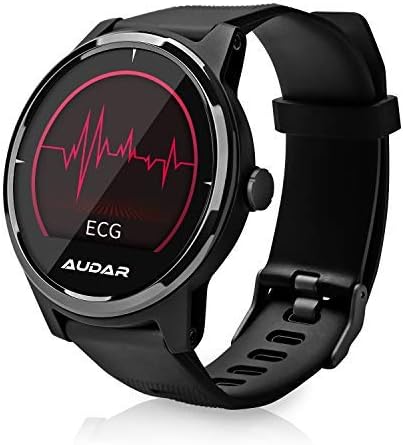
Figure 7.1: Fitness tracking metrics displayed on the AUDAR E1.
8. Обавештења и паметне функције
Stay connected with your AUDAR E1:
- Message and Call Reception: Receive notifications for SMS messages, incoming calls, and alarms directly on your watch.
- Reminders and Alarms: Set reminders and alarms through the app, which will vibrate on your wrist, ensuring you don't miss important events.

Figure 8.1: Message and call notifications on the AUDAR E1.
9. CareMate Function
The AUDAR app provides access to the innovative CareMate network. This feature allows you to designate a trusted responder to receive your health data, enabling remote care for vulnerable or elderly individuals while maintaining their independence.

Figure 9.1: The CareMate function allows monitoring of loved ones' health data.
10. Батерија и пуњење
The AUDAR E1 is designed for extended use, offering significant battery life:
- Трајање батерије: The E1 can last up to 10 days on a single 2-hour charge. In standby mode, it can last up to 20 days.
- Пуњење: Use the provided magnetic USB charging cable. Ensure the charging pins align correctly with the contacts on the back of the watch.
11. Одржавање
To ensure the longevity and optimal performance of your AUDAR E1 Smart Health Watch, follow these maintenance guidelines:
- Чишћење: Regularly wipe the watch and strap with a soft, dry cloth. If necessary, use a slightly damp крпом и благим сапуном, а затим добро осушите. Избегавајте јаке хемикалије или абразивне материјале.
- Отпорност на воду: The AUDAR E1 has an IPX7 water resistance rating, meaning it can withstand splashes, rain, and brief immersion in water (up to 1 meter for 30 minutes). It is suitable for daily use but not recommended for swimming, showering, or diving. Avoid exposing the watch to hot water or steam.
- Складиштење: Када се сат не користи дуже време, чувајте га на хладном и сувом месту, даље од директне сунчеве светлости и екстремних температура.
КСНУМКС. Решавање проблема
If you encounter issues with your AUDAR E1, please refer to the following common solutions:
| Проблем | Могући узрок / решење |
|---|---|
| Сат се не укључује или не реагује. | Battery may be depleted. Charge the watch for at least 30 minutes. Ensure the charging cable is properly connected. |
| Не може се упарити са паметним телефоном. | Ensure Bluetooth is enabled on your phone. Make sure the watch is charged and within range. Restart both the watch and your phone. Try unpairing and re-pairing in the app. |
| Inaccurate health readings (HR, BP, ECG). | Ensure the watch is worn snugly on your wrist, not too tight or too loose. Clean the sensors on the back of the watch. Avoid excessive movement during measurements. Readings are for reference and not medical diagnoses. |
| Обавештења се не појављују. | Check app permissions on your phone to ensure the AUDAR app has access to notifications. Verify notification settings within the AUDAR app. Ensure the watch is connected via Bluetooth. |
| Кратко трајање батерије. | Frequent use of certain features (e.g., continuous heart rate monitoring, bright screen) can drain the battery faster. Reduce screen brightness or turn off unnecessary features. Ensure the watch is fully charged. |
| Watch strap breaks or deteriorates. | Contact August customer support for replacement strap options. |
13. Спецификације
| Феатуре | Детаљ |
|---|---|
| Бранд | августа |
| Број модела | AUD E1 |
| Боја | Црно |
| Оперативни систем | Android (compatible with iOS) |
| Величина екрана | 1 инча |
| Повезивање | Блуетоотх |
| Посебне карактеристике | Heart Rate Monitor, Sleep Monitor, Notification, Blood Pressure Monitor, Calorie Tracker, ECG |
| Компатибилни уређаји | Смартпхоне |
| Тип батерије | Литијум-јонски |
| Капацитет батерије | 220 mAh (приближно) |
| Отпорност на воду | ИПКС7 |
| ГПС | Uses phone's GPS |
| Облик | Роунд |
14. Гаранција и подршка
For warranty information and technical support, please refer to the August brand's official website or contact their customer service directly. Details can typically be found on the August support page or within the product packaging.
You can visit the August brand store on Amazon for more information: August Brand Store
Ask a question about this manual
Ask about setup, troubleshooting, compatibility, parts, safety, or missing instructions. Manuals+ will review the question and use this page’s manual context to help answer it.