
1. Увод
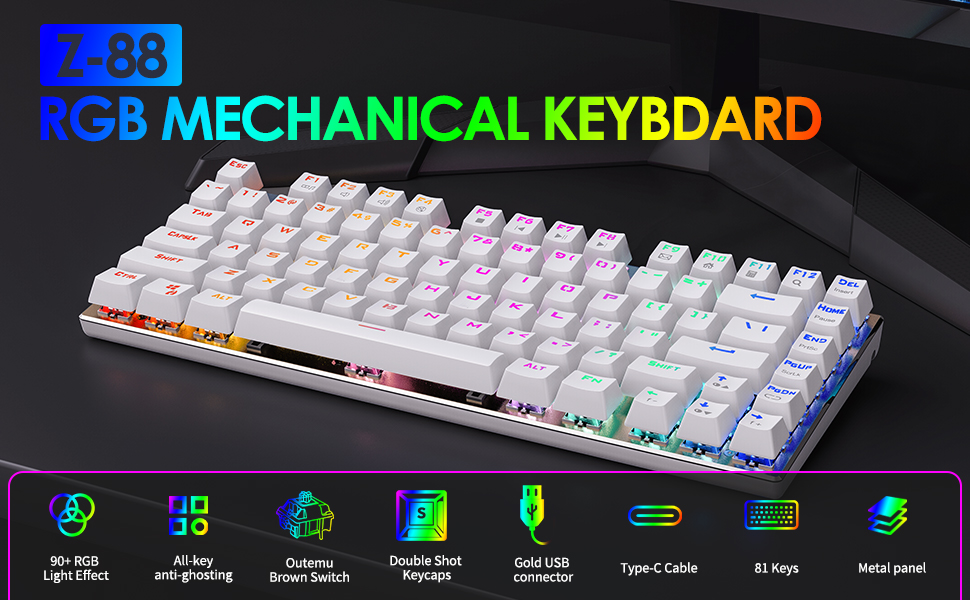
The E-Yooso Z-88 is a compact 81-key mechanical gaming keyboard designed for performance and durability. It features Outemu Red Switches, customizable RGB backlighting, and full anti-ghosting technology. This manual provides detailed instructions for setting up, operating, maintaining, and troubleshooting your keyboard.

Image 1.1: E-Yooso Z-88 Mechanical Gaming Keyboard, showcasinњегов компактни дизајн и RGB осветљење.
2. Садржај пакета
Молимо вас да проверите садржај пакета након распакивања:
- E-Yooso Z-88 Mechanical Gaming Keyboard
- USB Cable (Type-C detachable)
- Кеицап Пуллер
- Кориснички приручник (овај документ)
3. Упутства за подешавање
3.1 Повезивање тастатуре
- Connect the detachable Type-C USB cable to the port on the back of the keyboard.
- Укључите други крај УСБ кабла у слободан УСБ порт на рачунару.
- Ваш оперативни систем ће аутоматски препознати тастатуру. Обично нису потребни додатни драјвери.
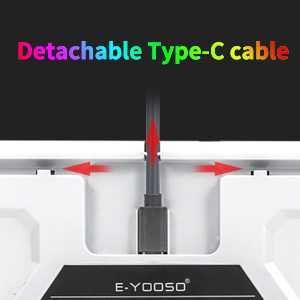
Image 3.1: Illustration of the detachable Type-C USB cable connection to the keyboard.
3.2 Компатибилност система
The E-Yooso Z-88 keyboard is compatible with the following operating systems:
- Windows 10, Windows 8, Windows 7, Windows XP
- Мац ОС Кс
- Виндовс ВИСТА
4. Упутство за употребу
4.1 Механички прекидачи
The keyboard is equipped with Outemu Red Switches, offering a linear feedback with a quiet sound. These switches are designed for responsiveness and durability, with a lifespan of over 50 million keystrokes. The switches are hot-swappable, allowing for easy replacement with other 3-pin Outemu switches (e.g., brown, blue, silver).
Слика 4.1: Детаљно view of the Outemu Red Mechanical Switches and keycaps.
4.2 RGB контрола позадинског осветљења
The Z-88 keyboard features extensive RGB backlighting with multiple modes and customization options:
- Change RGB Backlight Modes: Притисните Фн + ПгДн to cycle through 14 different RGB backlit modes.
- Change Solid Light Modes: Притисните Fn + -/= to cycle through 7 solid color lighting modes.
- Подесите осветљеност позадинског осветљења: Притисните Фн + ↑ (Стрелица нагоре) да бисте повећали осветљеност и Фн + ↓ (Стрелица надоле) за смањење осветљености (5 нивоа).
- Подесите брзину позадинског осветљења: Притисните Фн + ← (Left Arrow) to decrease speed, and Фн + → (Стрелица удесно) да бисте повећали брзину.
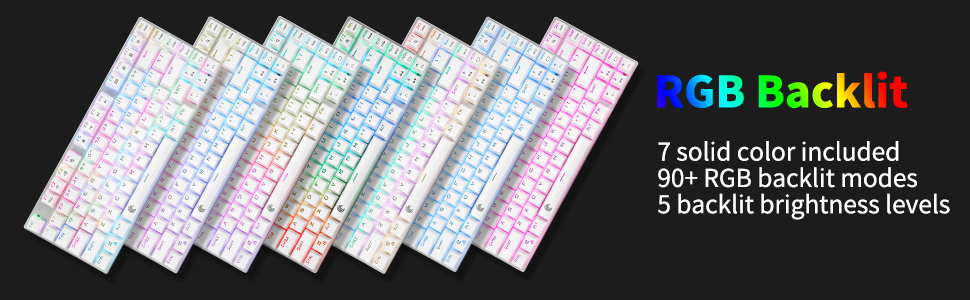
Image 4.2: Various RGB backlighting modes displayed on the keyboard.
4.3 Мултимедијални и функционални тастери
The keyboard includes convenient multimedia function keys accessible via the Fn кључ:
| Function Key Combination | Акција |
|---|---|
| Фн + Ф1 | Отворите Медиа Плаиер |
| Фн + Ф2 | Волуме + |
| Фн + Ф3 | Волуме - |
| Фн + Ф4 | Муте |
| Фн + Ф5 | Превиоус Трацк |
| Фн + Ф6 | Нект Трацк |
| Фн + Ф7 | Пусти/Паузирај |
| Фн + Ф8 | Стоп Плаи |
| Фн + Ф9 | Отвори имејл |
| Фн + Ф10 | Отворите почетну страницу |
| Фн + Ф11 | Отворите Калкулатор |
| Фн + Ф12 | Pretraga |
| Фн + ЕСЦ | Reset Keyboard Settings |
| Фн + ПгДн | Пребаците режим позадинског осветљења |
| Фн + ВИН | Закључајте/откључајте Виндовс кључ |

Image 4.3: Diagram illustrating the multimedia and function key combinations.
4.4 Заштита од духова
The E-Yooso Z-88 features full N-key rollover (NKRO) anti-ghosting technology. This means all 81 mechanical keys are conflict-free, ensuring that every keystroke is registered accurately, even during rapid and simultaneous key presses, which is crucial for gaming performance.

Image 4.4: Visual representation of the anti-ghosting capability, highlighting multiple simultaneous key presses.
5. Одржавање
5.1 Чишћење тастатуре
Да бисте одржали оптималне перформансе и изглед:
- Искључите тастатуру из рачунара пре чишћења.
- Користите меку крпу која не оставља длачицеampened with water or a mild cleaning solution to wipe the keycaps and frame.
- For dust and debris between keys, use compressed air or the included keycap puller to remove keycaps and clean thoroughly.
- Избегавајте употребу јаких хемикалија или абразивних материјала.
5.2 Замена прекидача
The Z-88 features hot-swappable Outemu switches. To replace a switch:
- Use the keycap puller to carefully remove the desired keycap.
- Use a switch puller (not included, but often comes with replacement switches) to gently pull the switch out of its socket.
- Align the pins of the new 3-pin Outemu switch with the holes on the PCB and press firmly until it clicks into place.
- Поново причврстите поклопац тастера.
5.3 Splash Resistance
The keyboard is designed with splash resistance. While it can withstand minor spills, it is not waterproof. Avoid submerging the keyboard in liquids or exposing it to excessive moisture.
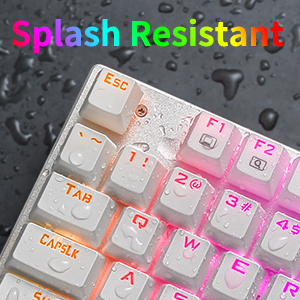
Image 5.1: Illustration of the keyboard's splash-resistant design.
КСНУМКС. Решавање проблема
If you encounter issues with your E-Yooso Z-88 keyboard, please refer to the following common solutions:
- Тастатура не реагује: Ensure the USB cable is securely connected to both the keyboard and the computer. Try a different USB port or a different computer to rule out port or system issues.
- Одређени тастери не раде: If only a few keys are unresponsive, try removing and reseating their switches (if you have a switch puller). Ensure no debris is lodged under the keycap or switch.
- Позадинско осветљење не ради или је неисправно: Притисните Фн + ПгДн or Fn + -/= to cycle through modes. Adjust brightness with Fn + ↑/↓. If issues persist, try resetting the keyboard with Фн + ЕСЦ.
- Windows key locked: Притисните Фн + ВИН да бисте пребацили закључавање тастера Windows.
- Повремена веза: Ensure the detachable Type-C cable is fully inserted and not damaged. Try a different Type-C cable if available.
Ако ови кораци не реше ваш проблем, обратите се корисничкој подршци.
7. Спецификације
| Феатуре | Детаљ |
|---|---|
| Бранд | E-Yooso |
| Број модела | З-88 |
| Технологија повезивања | USB (Type-C detachable cable) |
| Тип прекидача | Outemu Red (Linear, Hot-swappable 3-pin) |
| Број кључева | 81 |
| Позадинско осветљење | RGB (21 режима) |
| Анти-Гхостинг | Full N-key Rollover |
| Компатибилни оперативни системи | Windows 10/8/7/XP, Mac OS X, Windows VISTA |
| Материјал | ABS Plastic, Aluminum Keyboard Plate |
| Димензије (Д к Ш к В) | 32 цм к 15 цм к 3.5 цм |
| Тежина | 0.75 килограма |
| Бок Цонтентс | Keyboard, USB Cable, Keycap Puller |
8. Гаранција и подршка
8.1 Информације о гаранцији
E-Yooso products are covered by a limited warranty against manufacturing defects. Please refer to the warranty card included with your purchase or visit the official E-Yooso webсајт за детаљне услове гаранције. Сачувајте доказ о куповини за потребе подношења захтева за гаранцију.
8.2 Корисничка подршка
For technical assistance, troubleshooting, or warranty inquiries, please contact E-Yooso customer support through their official website or the contact information provided with your product packaging. When contacting support, please have your product model (Z-88) and purchase details ready.