
1. Увод
This manual provides essential information for the safe and effective operation and maintenance of your Airthereal APH230C Floor Air Purifier. Please read all instructions carefully before use and retain this manual for future reference.
The Airthereal APH230C is designed to improve indoor air quality by filtering airborne particles such as allergens, pollen, dust, smoke, and pet dander, utilizing a True HEPA filtration system.
2. Безбедносна упутства
Да бисте смањили ризик од пожара, струјног удара или повреде, увек се придржавајте основних мера безбедности:
- Пре употребе уређаја прочитајте сва упутства.
- Немојте користити вентилатор са оштећеним каблом или утикачем. Одбаците вентилатор или га вратите у овлашћени сервис на преглед и/или поправку.
- Не провлачите кабл испод тепиха. Не покривајте кабл простиркама, клизачима или сличним покривачима. Поставите кабл даље од саобраћајне површине и где се неће спотакнути.
- Use this appliance only for its intended use as described in this manual. Any other use not recommended by the manufacturer may cause fire, electric shock, or injury to persons.
- Always unplug the appliance when not in use, when moving it from place to place, or before cleaning.
- Немојте користити уређај у присуству експлозивних и/или запаљивих испарења.
- Do not place any part of the appliance near an open flame, cooking or other heating appliance.
- Немојте користити уређај са оштећеним каблом или утикачем, или након што је уређај покварен или је испуштен или оштећен на било који начин.
- Избегавајте контакт са покретним деловима.
- Не урањајте уређај у воду или друге течности.
- Овај уређај није намењен за употребу од стране особа (укључујући децу) са смањеним физичким, чулним или менталним способностима, или недостатком искуства и знања, осим ако им је дат надзор или упутства о употреби уређаја од стране особе одговорне за њихову безбедност.
- Децу треба надзирати како би се осигурало да се не играју са уређајем.
3. Садржај пакета
- 1 x Airthereal APH230C Air Purifier Unit
- 1 x True HEPA 3-in-1 Filtration Filter (pre-installed)
- 1 к Упутство за употребу

4. Производ је готовview
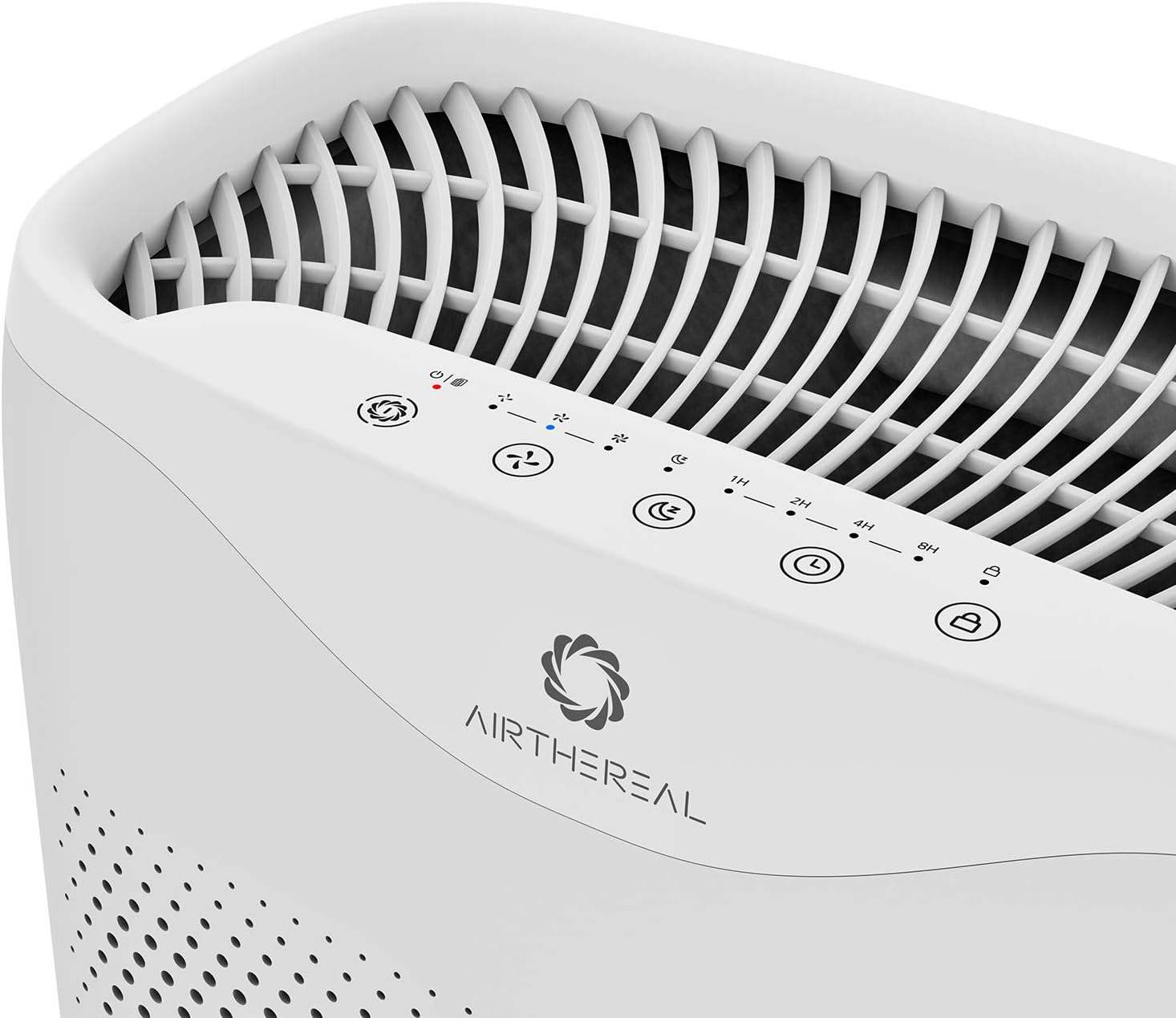
The Airthereal APH230C features a sleek design with intuitive controls and efficient air intake. Key components include the main unit, control panel, air intake vents, and the multi-layer filter.

5. Подешавање
- Распакујте јединицу: Пажљиво извадите пречистач ваздуха из паковања.
- Уклоните амбалажу филтера: Open the front cover of the air purifier. The filter is pre-installed but wrapped in plastic for protection. Remove the plastic packaging from the filter before use.
- Инсталирај филтер: Place the filter back into the unit, ensuring it is seated correctly. Close the front cover securely.
- Пласман: Place the air purifier on a firm, level surface. Ensure there is at least 6 inches (15 cm) of space around all sides of the unit for optimal airflow.
- Прикључак за напајање: Укључите кабл за напајање у стандардну електричну утичницу.
6. Упутство за употребу
Контролна табла се налази на врху јединице.
- Дугме за напајање (⏻): Притисните да укључите или искључите јединицу.
- Fan Speed Button (🌪): Cycle through fan speeds: Low (1), Medium (2), High (3).
- Sleep Mode Button (🌛): Activates sleep mode, which dims display lights and sets the fan to its lowest, quietest setting (24 decibels).
- Дугме тајмера (⏱): Set the operating time for 2, 4, or 8 hours. The unit will automatically turn off after the set time.
- Auto Mode Button (A): The purifier will automatically adjust the fan speed based on the detected air quality.
- UV Light Button (UV): Activates or deactivates the UV-C light for enhanced sterilization.
- Child Lock Button (🔒): Притисните и држите 3 секунде да бисте активирали/деактивирали дечију блокаду, спречавајући случајне промене подешавања.

7. Одржавање
Редовно одржавање обезбеђује оптималне перформансе и продужава век трајања вашег пречистача ваздуха.
Замена филтера
The "On/Off" button will light up and flash when it's time to replace the filter. It is recommended to replace the filter every six months for optimal performance, though this may vary based on usage and air quality.
- Искључите и извуците утикач: Turn off the air purifier and unplug it from the power outlet.
- Уклоните предњи поклопац: Gently pull the front cover to detach it from the unit.
- Уклоните стари филтер: Pull the tab on the old filter to remove it from the unit.
- Инсталирајте нови филтер: Unwrap the new filter and insert it into the unit, ensuring the pull tab faces outwards.
- Replace Front Cover: Align the front cover and push it back into place until it clicks securely.
- Ресетујте индикатор филтера: Plug in the unit and turn it on. Press and hold the "On/Off" button for 5 seconds until the light stops flashing, indicating the filter timer has been reset.
Чишћење јединице
- Обришите спољашњост уређаја меком, сувом крпом.
- Немојте користити абразивна средства за чишћење или раствараче.
- The pre-filter layer of the 3-in-1 filter can be gently vacuumed to remove large dust particles between replacements.
КСНУМКС. Решавање проблема
| Проблем | Могући узрок | Решење |
|---|---|---|
| Јединица се не укључује. | Није укључено; струја је искљученаtage; front cover not closed properly. | Ensure power cord is securely plugged in; check power outlet; ensure front cover is fully closed. |
| Проток ваздуха је слаб. | Filter is dirty or clogged; air intake/outlet blocked. | Replace filter; ensure no obstructions around air intake/outlet. |
| Необична бука. | Filter not installed correctly; foreign object inside unit. | Reinstall filter correctly; check for and remove any foreign objects (unplug first). |
| Индикаторска лампица филтера остаје упаљена након замене. | Filter timer not reset. | Press and hold the "On/Off" button for 5 seconds to reset the filter timer. |
9. Спецификације
- Модел: APH230C
- Бренд: АИРТХЕРЕАЛ
- Димензије производа: 7.5"Д к 13"Ш к 20"В
- Тежина артикла: 10 фунти
- Извор напајања: Цордед Елецтриц
- Боја: Бела
- ЦАДР: 135 ЦФМ (230 м³/х)
- Област покривености: Up to 600 ft² (55 m²) in 30 minutes, 315 ft² (30m²) in 14 minutes.
- Noise Level (Sleep Mode): < 24 дБ
- Тип филтера: Прави ХЕПА 3-Сtagе Филтрација

10. Гаранција и подршка
Airthereal products come with a standard manufacturer's warranty. For detailed warranty information, product support, or to purchase replacement filters, please visit the official Airthereal webсајту или контактирајте корисничку подршку.
Webсајт: ввв.аиртхереал.цом
Служба за кориснике: Погледајте паковање производа или званична упутства webсајт за контакт детаље.