
TOPTECH JET-4-BLUE
TOPTECH Jet-4 Bluetooth Speaker User Manual
Model: JET-4-BLUE
Увод
Thank you for choosing the TOPTECH Jet-4 Portable Bluetooth Speaker. This manual provides essential information for setting up, operating, and maintaining your speaker to ensure optimal performance and longevity. Please read this manual thoroughly before using the product.

Image: The TOPTECH Jet-4 Bluetooth Speaker, showcasing its compact design and vibrant LED lighting.
Безбедносне информације
To prevent fire or shock hazards, always follow basic safety precautions when using this product:
- Do not expose the speaker to rain or moisture.
- Do not disassemble or modify the speaker. Refer all servicing to qualified personnel.
- Keep the speaker away from direct sunlight, heat sources, and extreme temperatures.
- Избегавајте испуштање или излагање звучника јаким ударима.
- Користите само назначени кабл за пуњење и адаптер за напајање.
Садржај пакета
- TOPTECH Jet-4 Bluetooth Speaker
- УСБ кабл за пуњење
- Упутство за употребу
Производ је завршенview
Контроле и портови
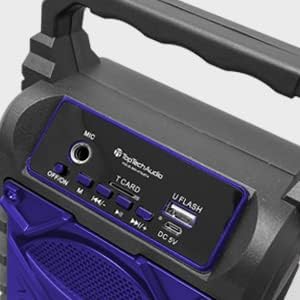
Слика: Детаљна view of the speaker's top control panel, showing various buttons and input ports.
- МИЦ улаз: Connect an external microphone for karaoke.
- ОФФ/ОН прекидач: Power the speaker on or off.
- Дугме М (режим): Switch between Bluetooth, AUX, USB, and TF Card modes.
- Previous / Volume Down Button: Кратак притисак за претходну нумеру, дуг притисак за смањење јачине звука.
- Дугме за репродукцију/паузу: Репродукција или паузирање репродукције звука.
- Next / Volume Up Button: Кратак притисак за следећу нумеру, дуг притисак за повећање јачине звука.
- T CARD Slot: Уметните TF (MicroSD) картицу за директно репродуковање звука.
- U FLASH (USB) Port: Insert a USB flash drive for direct audio playback.
- ДЦ 5В порт: Connect the USB charging cable to power and charge the speaker.
Кључне карактеристике

Image: An infographic showing the TOPTECH Jet-4 speaker with icons representing its key features: easy portability, mic port, mode karaoke, disco light, TF card port, and USB port.
- Снажан звук: Dual-driver stereo output delivers crisp highs and deep bass for a premium audio experience.
- Multi-Mode Playback: Supports Bluetooth, AUX, USB, and TF card input for versatile music streaming.
- Караоке спреман: Built-in karaoke mode with light effects and mic support makes any party more fun.
- TWS Pairing Support: Connect two speakers wirelessly for immersive, room-filling sound.
- Дуг век трајања батерије: Enjoy up to 6 hours of playtime with a rechargeable battery, perfect for all-day events.
Сетуп
Иницијална наплата
Пре прве употребе, потпуно напуните звучник. Повежите приложени USB кабл за пуњење са DC 5V портом на звучнику, а други крај са USB адаптером за напајање (није укључен) или USB портом рачунара.

Image: A visual representation of a fully charged battery, symbolizing the speaker's long battery life.
The charging indicator light will illuminate during charging and turn off or change color when fully charged. A full charge typically takes a few hours.
Упутство за употребу
Блуетоотх упаривање
- Turn on the speaker by sliding the OFF/ON switch to the 'ON' position. The speaker will enter Bluetooth pairing mode automatically, indicated by a flashing LED light and an audible prompt.
- Омогућите Блутут на свом паметном телефону, таблету или другом уређају који подржава Блутут.
- Тражи available Bluetooth devices and select "JET-4" from the list.
- Once connected, the speaker will provide an audible confirmation, and the LED light will stop flashing.
- Сада можете да репродукујете звук са свог уређаја преко звучника.
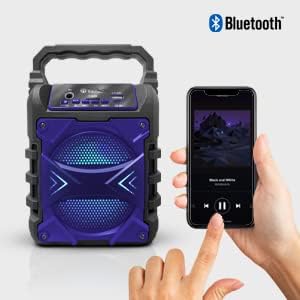
Image: The TOPTECH Jet-4 speaker positioned next to a smartphone, illustrating the seamless Bluetooth connection process.
Playback Modes (AUX, USB, TF Card)
Press the 'M' (Mode) button to cycle through available playback modes:
- АУКС режим: Connect an external audio device using a 3.5mm audio cable (not included) to the AUX input.
- УСБ режим: Insert a USB flash drive into the 'U FLASH' port. The speaker will automatically detect and play compatible audio files.
- Режим ТФ картице: Insert a TF (MicroSD) card into the 'T CARD' slot. The speaker will automatically detect and play compatible audio files.
Караоке режим
To use the karaoke function, connect a microphone (not included) to the 'MIC' input port. Adjust the microphone volume as needed. The speaker's built-in light effects will enhance the karaoke experience.
TWS Pairing (True Wireless Stereo)
For an enhanced stereo sound experience, you can pair two TOPTECH Jet-4 speakers together:
- Ensure both Jet-4 speakers are powered on and not connected to any Bluetooth device.
- On one speaker (this will be the primary speaker), long press the 'M' (Mode) button until you hear a pairing tone.
- Два звучника ће се аутоматски повезати један са другим. Када се повежу, чућете звук потврде.
- Now, connect your Bluetooth device to the primary speaker as described in the 'Bluetooth Pairing' section. Audio will play through both speakers in stereo.

Image: Two TOPTECH Jet-4 speakers wirelessly connected to a smartphone, demonstrating the True Wireless Stereo (TWS) pairing feature for expanded sound.
Одржавање
- Очистите звучник меком, сувом крпом. Не користите абразивна средства за чишћење или раствараче.
- Чувајте звучник на хладном и сувом месту када се не користи.
- Avoid prolonged exposure to extreme temperatures or humidity.
Решавање проблема
| Проблем | Решење |
|---|---|
| Звучник се не укључује. | Уверите се да је батерија напуњена. Повежите звучник са извором напајања помоћу USB кабла. |
| Нема звука из звучника. | Check the volume level on both the speaker and your connected device. Ensure the correct playback mode is selected. |
| Блуетоотх упаривање није успело. | Ensure the speaker is in pairing mode. Turn off Bluetooth on your device and turn it back on. Try restarting both the speaker and your device. Make sure no other devices are connected to the speaker. |
| Лош квалитет звука. | Приближите звучник свом Bluetooth уређају да бисте смањили сметње. Уверите се да је извор звука доброг квалитета. |
Спецификације
| Феатуре | Детаљ |
|---|---|
| Бранд | TOPTECH |
| Број модела | JET-4-BLUE |
| Извор напајања | Баттери Поверед |
| Технологија повезивања | Блуетоотх, УСБ |
| Аудио улаз | Guitar Input, Karaoke Input, USB |
| Број канала | 2 |
| Материјал | Пластика, метал |
| Тежина артикла | 1.54 фунти |
| Димензије пакета | 9.29 к 6.38 к 4.17 инча |
| УПЦ | 689259338593 |
Гаранција и подршка
For warranty information and customer support, please refer to the contact details provided on the product packaging or visit the official TOPTECH webсајт. Сачувајте рачун као доказ о куповини за евентуалне рекламације по гаранцији.